Unique and Text Indexes
A unique index makes MongoDB refuse a second document with the same value, such as a customer's email, with a duplicate key error, and a text index lets a search box find products by the words in their names and descriptions with $text.
Journeyman · MongoDB · Database · Updated
After this lesson you can
- Keep a field's values one per document with a unique index, and read the duplicate key error a write gets when it breaks one
- Search the words in text fields with a text index and $text, and sort the results by textScore
- Choose the index a Riverbend query needs, from single-field, compound, unique and text indexes
Key takeaways
- An index with unique set to true makes MongoDB refuse any write that would give two documents the same value in that field.
- A write that breaks a unique index fails with the E11000 duplicate key error, which names the index and the value.
- A unique index can't be built while duplicates are already there, so find and fix them first.
- A text index splits text fields into words, and $text with $search finds documents by those words, in any case, matching lights to light.
- A collection can have only one text index, and sorting by textScore puts the best matches first.
Two jobs come up in nearly every app with users and products. A sign-up form must never create two accounts with one email, even when someone double-clicks Sign up. A search box must find "helmet" when the product is called "Summit Helmet". The indexes you've built so far make queries fast; these two do something more. One keeps bad data out, and the other searches by words.
The examples use Riverbend's store from Why Queries Get Slow, and What an Index Is. In mongosh, after use riverbend, load it again:
load("riverbend-big-store.js")
products: 12, customers: 2000, orders: 100000
true
Two sign-ups, one email
Jess clicks Sign up twice, quickly, and the app inserts her twice:
db.customers.insertOne({ _id: 2001, name: "Jess", email: "jess@example.com" })
db.customers.insertOne({ _id: 2002, name: "Jess", email: "jess@example.com" })
{ acknowledged: true, insertedId: 2001 }
{ acknowledged: true, insertedId: 2002 }
Both went in. MongoDB refuses a second document with the same _id, but any other field can repeat unless you say otherwise. Now password resets and receipts can't tell which Jess is real.
unique: true
A unique index is an index with a promise: no two documents in the collection hold the same value in its field. createIndex takes the promise as a second document, { unique: true }. While the two Jesses are there, MongoDB can't keep it:
db.customers.createIndex({ email: 1 }, { unique: true })
MongoServerError[DuplicateKey]: Index build failed: 3d4761fe-60b9-4109-a088-d3d209ceb264: Collection riverbend.customers ( 0e436929-faae-4dac-98a3-e0d16c347d91 ) :: caused by :: E11000 duplicate key error collection: riverbend.customers index: email_1 dup key: { email: "jess@example.com" }
The long ids in the middle are different on every computer. The end is what matters: dup key names the value that's there twice. Remove the extra Jess, then build the index:
db.customers.deleteOne({ _id: 2002 })
db.customers.createIndex({ email: 1 }, { unique: true })
{ acknowledged: true, deletedCount: 1 }
email_1
Now the second click fails:
db.customers.insertOne({ _id: 2003, name: "Jess", email: "jess@example.com" })
MongoServerError: E11000 duplicate key error collection: riverbend.customers index: email_1 dup key: { email: "jess@example.com" }
It's the same duplicate key error as a repeated _id in Adding Many Documents with insertMany, because the _id index is a unique index too. An app catches this error and tells the person the email is already taken. One more thing to know: Jess@Example.com is a different value from jess@example.com, so apps store emails in lowercase before they save them.
A search box: text indexes
Riverbend's search box sends "helmet". An exact match needs the whole value, written exactly as stored:
db.products.countDocuments({ name: "helmet" })
0
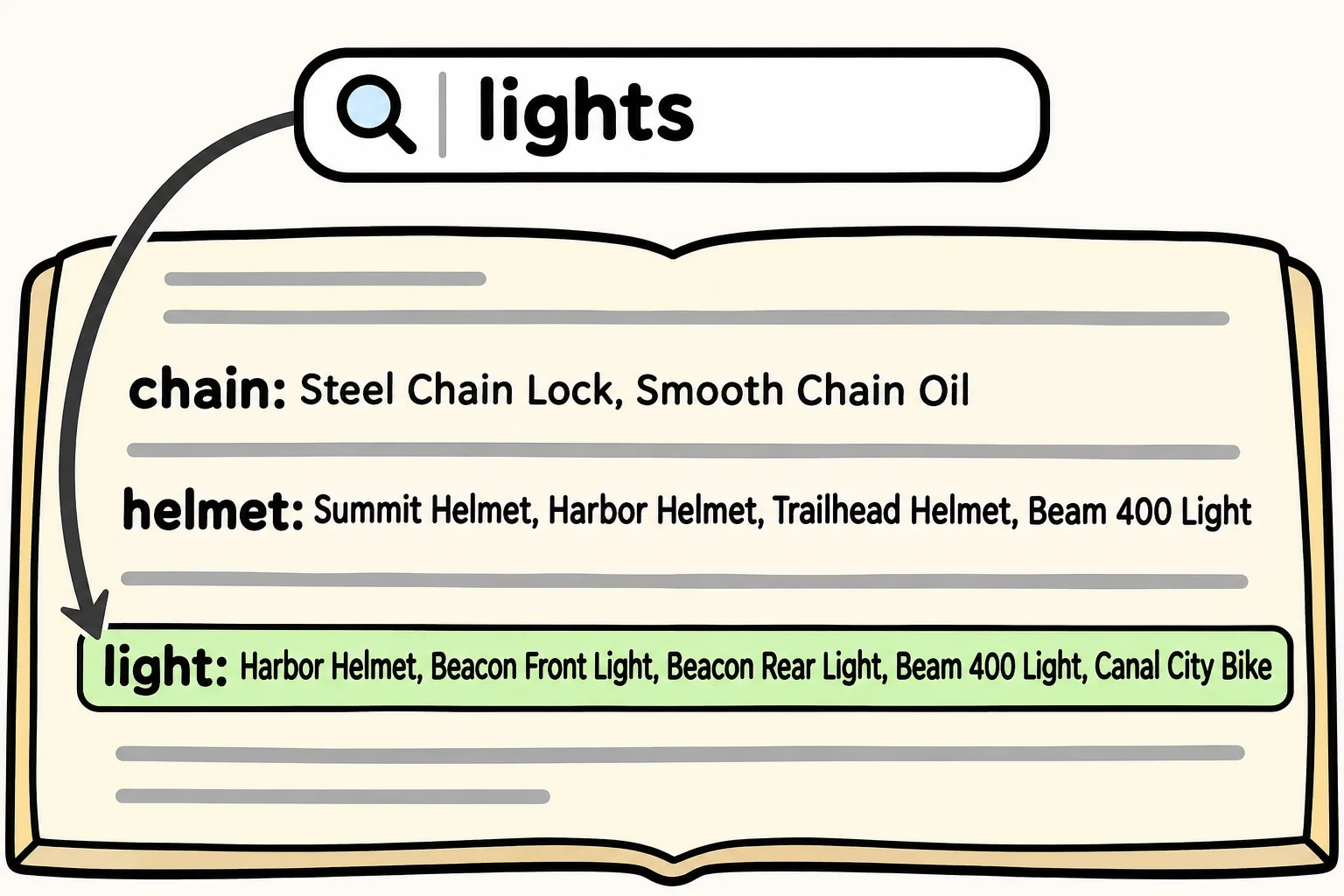
A search box needs the words in a field, in any case. A text index splits the text of the fields you name into words and indexes each word, the way a book's index lists each topic with its pages. List every field to search in one text index:
db.products.createIndex({ name: "text", description: "text" })
name_text_description_text
$text with $search, read "text search", finds documents by those words:
db.products.find({ $text: { $search: "helmet" } }, { _id: 0, name: 1 })
[
  { name: 'Harbor Helmet' },
  { name: 'Summit Helmet' },
  { name: 'Trailhead Helmet' },
  { name: 'Beam 400 Light' }
]
Lowercase "helmet" found "Helmet", and Beam 400 Light came along because its description mentions a helmet mount.
Words, not letters
A text index stores each word's stem, its plain form, so "lights" also finds "light". It matches whole words only: "Lightweight", in the Riverbend Road 2's description, is a different word, and a search for "helm" finds nothing. Several words find documents with any of them, and sorting by { $meta: "textScore" }, read "meta text score", puts the best matches first:
db.products.find({ $text: { $search: "lights" } }, { _id: 0, name: 1, score: { $meta: "textScore" } }).sort({ score: { $meta: "textScore" } })
[
  { name: 'Beacon Front Light', score: 1.25 },
  { name: 'Beacon Rear Light', score: 1.25 },
  { name: 'Beam 400 Light', score: 1.2291666666666665 },
  { name: 'Harbor Helmet', score: 0.6 },
  { name: 'Canal City Bike', score: 0.5714285714285714 }
]
The lights, with "light" in both name and description, score highest; the helmet and the bike that mention lights come last.
Two limits to know. A collection can have only one text index, which is why it lists every field to search. And a text index is an index like any other: every product's words are entries that each write keeps up to date. For search as you type, forgiveness for typos and ranking you can tune, MongoDB Atlas, MongoDB's cloud service, has Atlas Search, a full search engine beside the database. A text index covers a store's search box.
Check yourself
2 questions to try on the lesson page.
So what
A unique index turns "this should never happen" into "this can't happen", and a text index turns a search box into a query. Both are one createIndex away.