HTTP in Plain Words: Requests and Responses
Every app that talks to a server sends an HTTP request (a method, an address, headers and sometimes a body) and gets a response back, and in Node you read a request's path and query values with URL and URLSearchParams.
Apprentice · Node.js · REST API · Updated
After this lesson you can
- Name the parts of an HTTP request and response, such as the method, URL, headers, body and status code
- Choose the HTTP method that fits a request, such as GET, POST, PUT, PATCH or DELETE
- Read a URL's path and query values with URL and URLSearchParams
Key takeaways
- A request is what the client sends: a method, a URL, headers and sometimes a body. A response is what the server sends back: a status code, headers and usually a body.
- The method says what the request wants: GET reads, POST creates, PUT replaces, PATCH changes part of something, and DELETE removes it.
- A URL's path names the thing you want, and its query string, after the question mark, adds details such as free=true.
- new URL() splits an address into its parts, and searchParams.get() reads one query value, always as text, or null when it isn't there.
- VS Code's REST Client extension sends a request written in a .http file and shows the response beside it.
Open a weather app or pull down to refresh a feed, and your phone sends a short message to a computer somewhere, then waits for the answer. Every API you build in this course sits on the other end of that conversation, so it helps to know what the messages look like. They're written in HTTP (read "H-T-T-P", short for HyperText Transfer Protocol), the request-and-response language of the web.
This chapter's example is Greenleaf Community Garden. Neighbors keep phoning to ask which plots are free, and the garden wants a small server that answers for it, any time of day.
An order at a counter
At a deli counter, you say what you want to do ("I'd like to order"), what it's about ("a turkey sandwich"), add notes ("no onions"), and sometimes hand over a form. The clerk answers with how it went ("Here you go", or "Sorry, we're out"), adds notes ("careful, it's hot"), and usually hands you what you asked for.
HTTP works the same way. The client (the app or browser that asks) sends a request, and the server (the program that answers) sends back a response.
- A request has a method (what to do, such as
GET, read), a URL (the address of what it's about, such as/plots), headers (notes, such as which formats the client can read) and sometimes a body (data sent along, such as a new gardener's name). - A response has a status code (how it went, such as
200, it worked), headers (notes, such as what format the body is in) and usually a body (the thing itself, such as the list of plots).
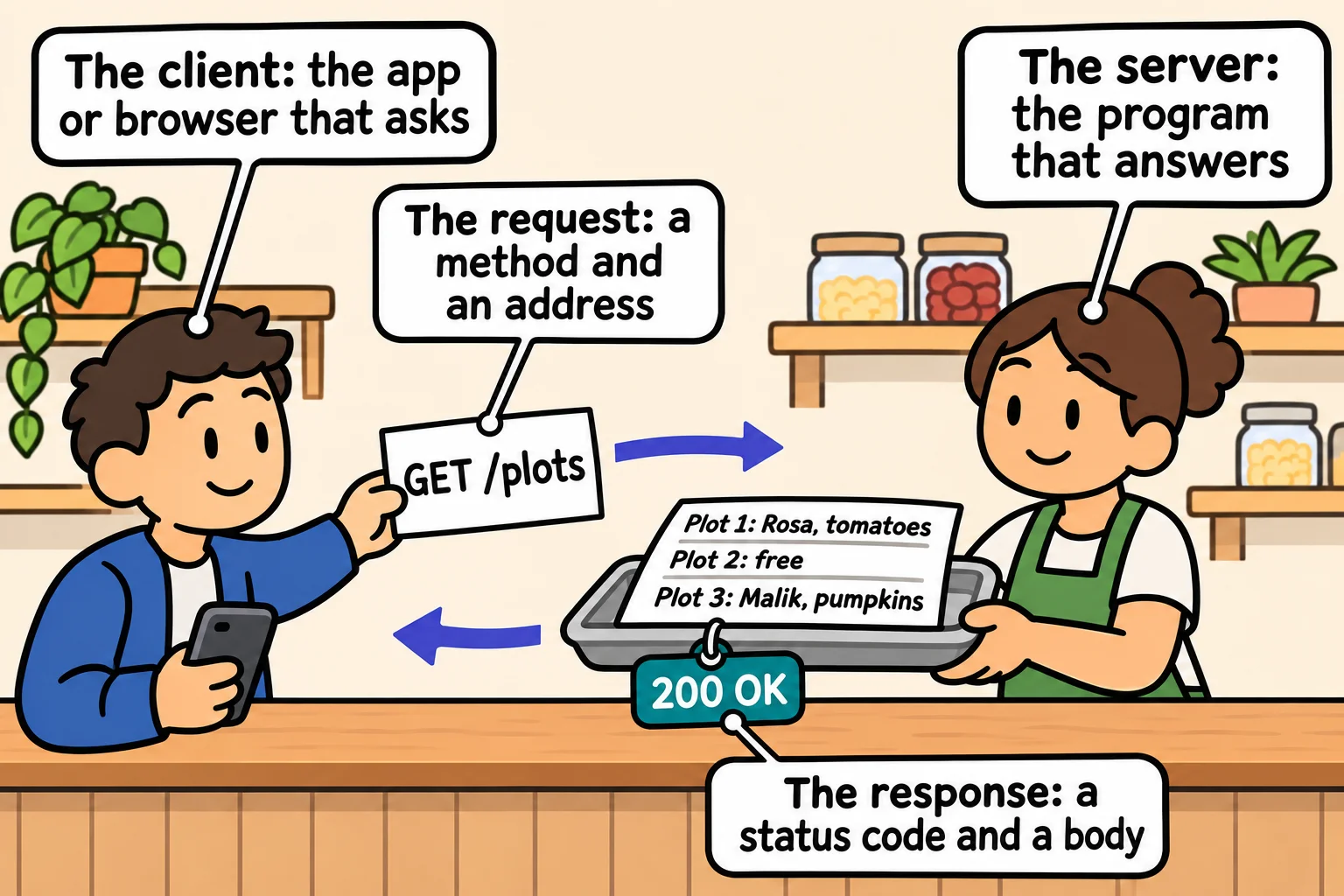
On the wire, a request is plain text. This one asks the garden's server for its free plots:
GET /plots?free=true HTTP/1.1
Host: localhost:3100
Accept: application/json
The first line holds the method, the address and the HTTP version. Each line under it is a header, written name: value. A GET sends no body.
Methods: what the request wants to do
Five methods cover nearly every API you'll build. The method is the verb, and the address is the thing it acts on:
| Method | What it asks for | A garden example |
|---|---|---|
GET |
Read, changing nothing | GET /plots: show me the plots |
POST |
Create something new | POST /plots: add the plot the garden has dug |
PUT |
Replace something whole | PUT /plots/3: here is plot 3's complete new record |
PATCH |
Change part of something | PATCH /plots/3: change only what plot 3 is growing |
DELETE |
Remove something | DELETE /plots/3: plot 3 is now a path |
The same address, /plots/3, is read, replaced, changed or removed depending on the method. A GET changes nothing, so apps feel free to send it again.
The address: a path and a query string
Take http://localhost:3100/plots?free=true&size=small apart. localhost is your own computer, and 3100 is the port, a numbered door one program listens at. Then come the two parts a server reads most:
- The path,
/plots: which thing you want. - The query string,
?free=true&size=small: details about it. The?(read "question mark") starts it, each detail isname=value, and&(read "and") separates them.
JavaScript's built-in URL takes an address apart for you, and its searchParams (a URLSearchParams object) reads the query values:
const address = new URL("http://localhost:3100/plots?free=true&size=small");

console.log(address.pathname);
console.log(address.searchParams.get("free"));
console.log(address.searchParams.get("size"));
console.log(address.searchParams.get("gardener"));
/plots
true
small
null
free is the text "true", not the boolean true: everything in an address is text. A name that isn't there gives null.
A server sees only the part after the port, such as /plots/7?season=spring. Give URL a base address as its second argument to fill in the rest. Object.fromEntries turns every query value into one plain object:
const url = new URL("/plots/7?season=spring", "http://localhost:3100");

console.log(url.pathname);
console.log(url.search);
console.log(Object.fromEntries(url.searchParams));
console.log(typeof url.searchParams.get("season"));
/plots/7
?season=spring
{ season: 'spring' }
string
Sending a request with REST Client
You'll send requests by hand all through this course. VS Code's REST Client extension sends them from a plain text file. In VS Code's Extensions view (Ctrl+Shift+X, or Cmd+Shift+X on a Mac), search for REST Client and install the one by Huachao Mao.
You also need a server to ask. Make a folder named garden, with a package.json that holds { "type": "module" } (so Node reads import) and this garden-server.js, a tiny version of the garden's server that answers every request with the plots. You'll write servers like it yourself, line by line, in A Web Server with Node's http Module.
import http from "node:http";

const plots = [
  { number: 1, size: "small", gardener: "Rosa", growing: "tomatoes" },
  { number: 2, size: "small", gardener: null, growing: null },
  { number: 3, size: "large", gardener: "Malik", growing: "pumpkins" },
];

const server = http.createServer((req, res) => {
  res.writeHead(200, { "Content-Type": "application/json" });
  res.end(JSON.stringify(plots));
});

server.listen(3100, () => {
  console.log("The garden's server is listening on http://localhost:3100");
});
Start it in VS Code's terminal with node garden-server.js. It prints its line and keeps running, waiting for requests. Then make a file named garden.http with one request in it, and click Send Request, which appears above the line:
GET http://localhost:3100/plots
REST Client opens the response in a tab beside your request. It starts with the status line, HTTP/1.1 200 OK, then the headers, which the next lesson reads, then the body:
[{"number":1,"size":"small","gardener":"Rosa","growing":"tomatoes"},{"number":2,"size":"small","gardener":null,"growing":null},{"number":3,"size":"large","gardener":"Malik","growing":"pumpkins"}]
REST Client may spread the JSON over several lines; the data is the same. A line of ### between requests keeps several in one file. Stop the server with Ctrl+C in its terminal.
Do it: read a request to the garden's server
The garden's server is going to keep a log of every request, so the garden can see what neighbors ask for most. Each log entry needs the request pulled apart into its method, its path and its query values.
Your job: write readRequest(method, address).
method: the request's method, such as"GET".address: the whole address it was sent to, such as"http://localhost:3100/plots?free=true&size=small".- Return an object with three properties:
method(the method, as it was given),path(the address's path) andquery(an object holding every query value, by its name). - When the address has no query string,
queryis an empty object,{}. - Query values stay text, as an address gives them:
?number=7gives"7".
Worked through: readRequest("GET", "http://localhost:3100/plots?free=true&size=small") takes the path /plots and the two query values, so it returns { method: "GET", path: "/plots", query: { free: "true", size: "small" } }.
Practiced live on the lesson page: write the JavaScript right there and check it.
Check yourself
2 questions to try on the lesson page.
So what
Every request your servers will ever answer is these same few parts, a method, a path, a query string, headers and a body, so a server's whole job starts with reading them.