Shaping a Document: Embed or Reference
Related data either goes inside a document, embedded, when it is read with it, or lives in its own collection and is pointed to by its _id, referenced, when it is shared, changes on its own or grows without end.
Journeyman · MongoDB · NoSQL · Updated
After this lesson you can
- Embed related data inside a document when it is read together, such as a plant's care tips, and read it with dot notation
- Choose between embedding and referencing by asking whether the data is read together, shared by other documents, or grows without end
Key takeaways
- Embedding puts related data inside the document it belongs to, such as a plant's care details inside the plant, so one read gets it all.
- Referencing keeps the data in its own collection and stores its _id instead, such as an order's customerId, so it lives in one place.
- Embed what is read together with the document. Reference what other documents share or what changes on its own.
- A list that can grow without end, such as every review a plant will ever get, goes in its own collection. A document can't grow past 16 MB.
Before you save a single document, you decide its shape, and that choice decides how much work every page of your app does. Get it right and a page reads one document. Get it wrong and the same page needs ten reads, or a document keeps growing until it can't. You'll make this choice every time you design a new collection.
Fern & Fig's plant page shows each plant with its care details: the light it needs, how often to water it, and a few tips. The shop also takes orders, and each order belongs to a customer. Where should the care details and the customer go?
Embedding: what's read together, kept together
Think of a seed packet. The growing instructions are printed right on the back, so whoever picks up the packet has everything at once. Nobody keeps the instructions in a separate binder.
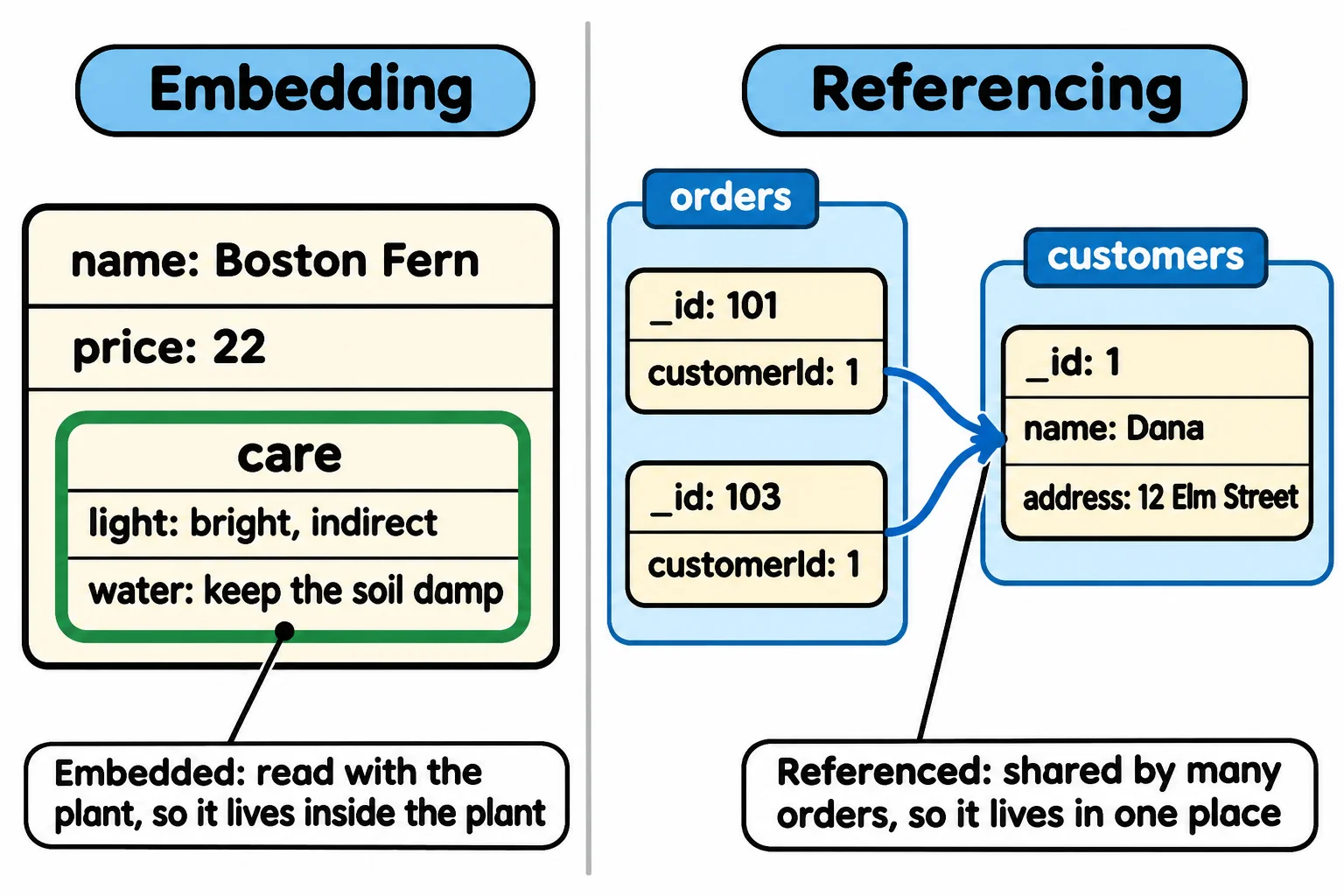
The plant page always shows the care details with the plant, and no other plant shares them. So they go inside the plant's document, as a document of their own. That's embedding, and the inner document is an embedded document. You read its fields with dot notation, a dot for each step inside (plant.care.light is read "plant dot care dot light"):
const plant = {
  name: "Boston Fern",
  price: 22,
  petSafe: true,
  care: {
    light: "bright, indirect",
    water: "keep the soil damp",
    tips: ["Mist the leaves in dry weather.", "Keep it away from heaters."],
  },
};

console.log(plant.care.light);
console.log(plant.care.tips[0]);
console.log(plant.care.tips.length);
bright, indirect
Mist the leaves in dry weather.
2
One read of the plant brings its care details along. That's the whole point.
Referencing: data that lives in one place
Now the orders. Dana has placed 40 orders over two years. If her address were copied into each one, moving house would mean changing 40 documents, and missing one sends a fern to her old door.
So the customer gets a document in a customers collection, and each order stores only the customer's _id, in a field such as customerId. That's referencing: the order points at the customer, the way a library card points at a member. The arrays below stand in for the two collections, with small numbers as ids so they're easy to read:
const customers = [
  { _id: 1, name: "Dana", address: "12 Elm Street" },
  { _id: 2, name: "Marco", address: "48 Lake Road" },
];
const orders = [
  { _id: 101, customerId: 1, items: [{ name: "Boston Fern", price: 22 }] },
  { _id: 102, customerId: 2, items: [{ name: "Snake Plant", price: 24 }, { name: "Spider Plant", price: 14 }] },
  { _id: 103, customerId: 1, items: [{ name: "Calathea", price: 32 }] },
];

const order = orders[1];
const customer = customers.find((c) => c._id === order.customerId);
console.log(`Order ${order._id}: ${order.items.length} plants for ${customer.name}, ${customer.address}`);
Order 102: 2 plants for Marco, 48 Lake Road
Orders 101 and 103 both point at Dana, whose address is written down once. The price of a reference is a second lookup to fetch the customer. Notice that each order still embeds its items: what was bought, at the price paid that day, belongs to that order and is always shown with it.
The questions that decide
Ask these about each piece of related data:
| Question | If yes |
|---|---|
| Is it read together with the document, nearly every time? | Embed it |
| Do other documents share it, such as one customer behind many orders? | Reference it |
| Does it change on its own, apart from the document? | Reference it |
| Can the list grow without end? | Give it its own collection |
The first question is the one that decides most cases: is it read together? A plant's care details always are, so they're embedded. A customer is read with many orders and changes on their own, so the customer is referenced.
Lists that grow without end
Fern & Fig adds reviews. Embedding every review inside its plant looks tidy, until the Snake Plant has 3,000 of them. Every read of the plant now drags all 3,000 along, and the document keeps growing. MongoDB stops a document at 16 MB, so a list with no end will one day fail to save.
A list like that gets its own collection: each review is a document with a plantId that points at its plant. The plant page then asks for the newest few reviews, not all of them. MongoDB in Depth teaches more document shapes like these; the three questions above cover every API in this course.
Do it: shape a plant from the shop's form
Fern & Fig's staff add plants through a form with one box per field and three boxes for care tips. The form's answers come in flat, and the shop wants each plant saved in the shape this lesson chose: the care details embedded.
Your job: write plantDocument(form), which returns one plant document.
form: the form's answers, an object withname,price,petSafe,light,water,tip1,tip2andtip3.- Return an object with
name,priceandpetSafeas the form gives them, and acareobject holdinglight,waterandtips. tipsis a list of the tip boxes that were filled in, in the ordertip1,tip2,tip3. A box left empty is"", and it is left out of the list.- When every tip box is empty,
tipsis an empty list,[].
Worked through: for the Calathea, the form is { name: "Calathea", price: 32, petSafe: true, light: "medium, indirect", water: "once a week", tip1: "Use filtered water.", tip2: "", tip3: "Turn it a quarter turn each week." }. tip2 is empty, so it's left out, and plantDocument returns { name: "Calathea", price: 32, petSafe: true, care: { light: "medium, indirect", water: "once a week", tips: ["Use filtered water.", "Turn it a quarter turn each week."] } }.
Practiced live on the lesson page: write the JavaScript right there and check it.
Check yourself
2 questions to try on the lesson page.
So what
Every collection you design starts with one question, "is it read together?", and answering it well is what keeps your API's pages to one quick read each.