Indexes and Text Search
An index lets MongoDB jump to the documents a query wants instead of reading every one, a unique index refuses a second document with the same value, and a text index lets $text search the words in a collection's text fields.
Journeyman · MongoDB · NoSQL · Node.js · Updated
After this lesson you can
- Explain what an index does for a query, and create one with createIndex
- Keep a field unique with a unique index, and recognize the duplicate key error (E11000) it gives
- Search the words in text fields with a text index and $text
Key takeaways
- Without an index, MongoDB reads every document in the collection to answer a query. An index on the field lets it jump to the matches, like the index at the back of a book.
- createIndex with stall set to 1 makes an index on stall. It's safe to run again, and every insert and update keeps the index up to date, which costs a little time on each write.
- A unique index refuses a second document with the same value, with error code 11000 (E11000 duplicate key error).
- A text index on one or more text fields lets a $text search look for whole words, in any case and in any form, so a search for tomato finds tomatoes.
An app that was quick with a hundred records and crawls with a million is one of the most common problems you'll be asked to fix, and the usual answer is an index. You'll also use one when a sign-up form must refuse a second account with the same email, and when a search box should find tomato in "tomatoes".
The examples use the market folder from Finding Documents with Filters, and each replaces the middle of find.js. Start from the twelve vendors with node --env-file=.env seed-market.js.
Reading every document, or using an index
To find a recipe for pumpkin bread in a cookbook with no index, you'd turn every page. The index at the back lists each word in order, with its page numbers, so you jump to the right page. A MongoDB index does the same for one field: it keeps that field's values in order, each pointing at its document.
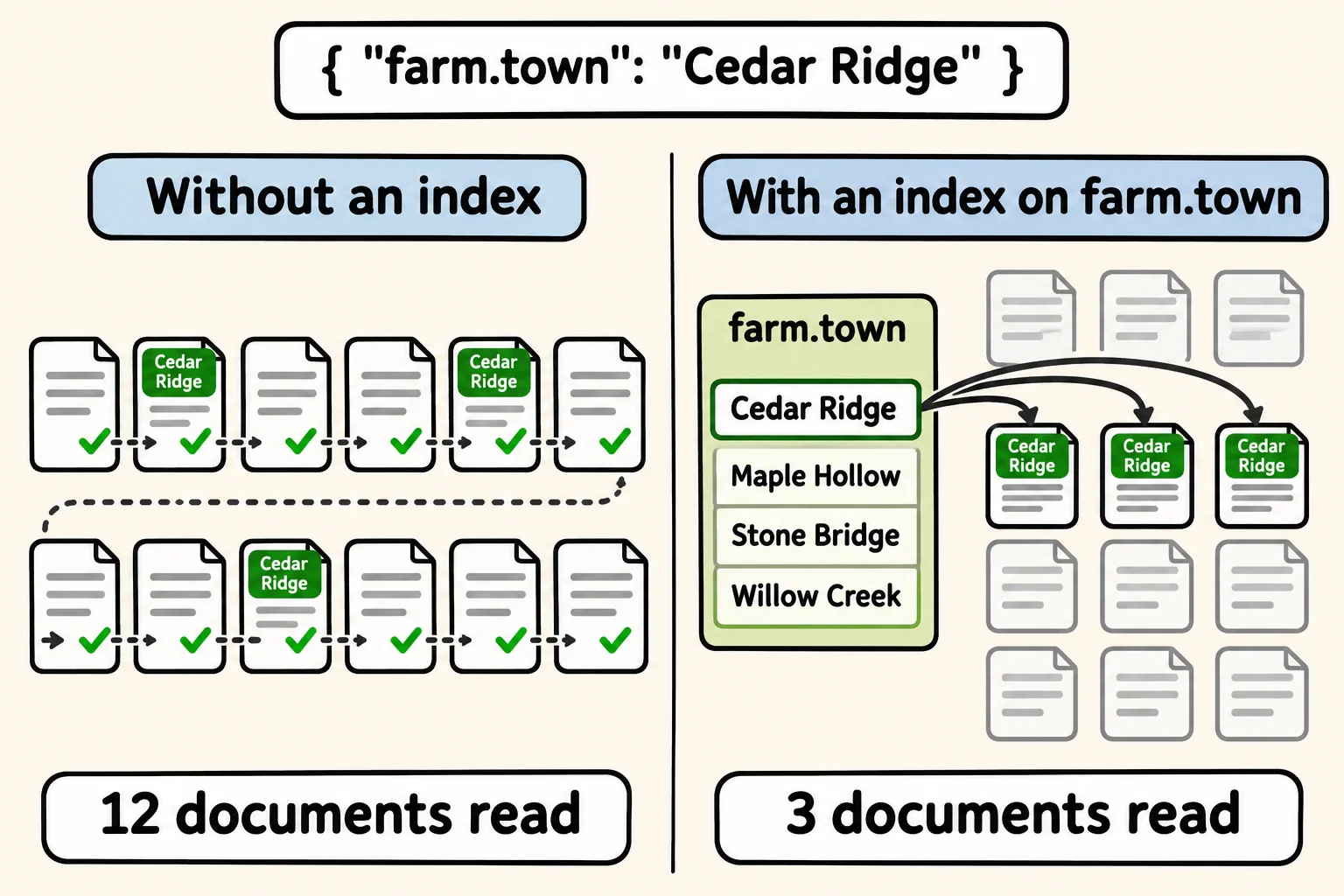
Without one, MongoDB reads every document to answer a query. explain("executionStats") shows how a query was answered instead of its results, and totalDocsExamined is the number of documents it read. createIndex makes an index; { "farm.town": 1 } means "farm dot town, ascending":
const filter = { "farm.town": "Cedar Ridge" };

const before = await vendors.find(filter).explain("executionStats");
console.log("Without an index:", before.executionStats.totalDocsExamined, "documents read");

const indexName = await vendors.createIndex({ "farm.town": 1 });
console.log("Created", indexName);

const after = await vendors.find(filter).explain("executionStats");
console.log("With the index:", after.executionStats.totalDocsExamined, "documents read");
Without an index: 12 documents read
Created farm.town_1
With the index: 3 documents read
Twelve against three is small here. With a million vendors, it's a million documents against three. Running createIndex again changes nothing, so it's safe at the start of a program.
An index isn't free: every insert, update and delete must update the index too, and it takes space. Index the fields your app searches and sorts by often, not every field. _id already has one, which is why finding a document by its id is fast.
One vendor per stall: a unique index
Two vendors at stall 4 would be a real problem on market day. A unique index also refuses any second document with a value it already holds. In Module 4, the same idea makes sure each email address has only one account:
await vendors.createIndex({ stall: 1 }, { unique: true });

try {
  await vendors.insertOne({ name: "Sweet Corn Stand", stall: 4, products: ["sweet corn"] });
} catch (error) {
  console.log(error.code);
  console.log(error.message);
}
11000
E11000 duplicate key error collection: market.vendors index: stall_1 dup key: { stall: 4 }
Error code 11000 (read "eleven thousand") is the duplicate key error: the message names the collection, the index and the value that was already taken. An API catches it and answers 409, a conflict. The same error stops createIndex itself when the collection already holds duplicates, so clean those up first.
Searching words: a text index and $text
A search box is different from a filter. A shopper types honey or tomato and expects every vendor whose name or products mention it, in any case, and "tomato" should find "tomatoes". A text index splits the text fields you name into words and stores each word's root, so tomatoes is kept as tomato. A collection can have only one text index, so list every field it should search:
await vendors.createIndex({ name: "text", products: "text" });

for (const words of ["honey", "tomato", "berry", "candle"]) {
  const found = await vendors
    .find({ $text: { $search: words } })
    .sort({ score: { $meta: "textScore" } })
    .toArray();
  console.log(words, "->", found.map((vendor) => vendor.name));
}
honey -> [ 'Bee Happy Honey', 'Maple Grove Syrup' ]
tomato -> [ 'Sunny Acres' ]
berry -> [ 'Berry Patch' ]
candle -> [ 'Bee Happy Honey' ]
$text(read "text") with$searchlooks for the words in the text index.{ score: { $meta: "textScore" } }sorts by how well each vendor matches, best first. Bee Happy Honey has honey in its name and its products, so it comes before Maple Grove Syrup.- It matches whole words, not parts of words: berry finds Berry Patch, but not strawberries, a different word. candle finds beeswax candles.
- Several words find vendors with any of them:
"honey cheese"finds the two honey vendors and Hilltop Dairy.
Without a text index, $text stops with MongoServerError: text index required for $text query.
Check yourself
2 questions to try on the lesson page.
So what
An index is the difference between a query that reads three documents and one that reads a million, a unique index keeps bad duplicates out of your data for good, and a text index gives your API a search box that understands words.