Keeping Database Code in One Place
A repository module is the one file in an API that talks to MongoDB, with functions such as create and get that give back plain objects whose id is text, so the routes never need to know how the data is stored.
Journeyman · MongoDB · Node.js · Updated
After this lesson you can
- Write a repository module whose functions keep one collection's MongoDB calls in one place and give back plain objects with the id as text
- Explain why an API's routes call a repository instead of the MongoDB driver
Key takeaways
- Database calls written straight into routes repeat the collection name and the ObjectId work in every route, and they send MongoDB's own _id field out to every caller.
- A repository module keeps every MongoDB call for one collection in one file, behind functions named for what the app needs, such as create and get.
- The repository gives back plain objects, with the id as text in an id field, so no other file ever sees an ObjectId.
- insertOne adds an _id to the very object you hand it, so hand it a copy, such as { ...workout }.
- get gives back null when there's no such workout, or when the text isn't an id at all, and the code that called it decides what that means.
Open almost any Node API at work and you'll find its database code in files of its own, with names like usersRepository.js or orderStore.js, and routes that never mention MongoDB. This lesson shows the problem those files solve, and how to write one.
This chapter's example is Rep Counter, a gym's workout log. Members save each workout with its date and its sets: an exercise, the reps and the weight in pounds. The log started as an API that kept its workouts in an array, and every restart lost them. Now they go in MongoDB.
Database calls in every route
The quickest way to get there is to call the driver right inside each route:
app.get("/workouts/:id", async (req, res) => {
  const workout = await db.collection("workouts").findOne({ _id: new ObjectId(req.params.id) });
  res.json(workout);
});
For one route, that works. Rep Counter needs five, and each one repeats the collection's name and turns text into an ObjectId; change how workouts are stored, and you hunt through every route. Then look at what MongoDB hands back. This script, first-try.js, saves one workout and reads it back as JSON, the way a route would send it:
import { MongoClient } from "mongodb";

const client = new MongoClient(process.env.MONGODB_URI);
const workouts = client.db("rep_counter").collection("workouts");

const workout = { member: "Luis", date: "2026-11-17", sets: [] };
await workouts.insertOne(workout);
console.log(workout);

const found = await workouts.findOne({ member: "Luis" });
console.log(JSON.stringify(found));

await client.close();
{
  member: 'Luis',
  date: '2026-11-17',
  sets: [],
  _id: new ObjectId('6afc94fb996b8377f7660669')
}
{"_id":"6afc94fb996b8377f7660669","member":"Luis","date":"2026-11-17","sets":[]}
Two surprises. insertOne added an _id to Luis's object itself, the one the code still holds. And the JSON a phone app would get calls the id _id, MongoDB's own name for it, so the app's code now depends on the database you chose.
One file that knows MongoDB
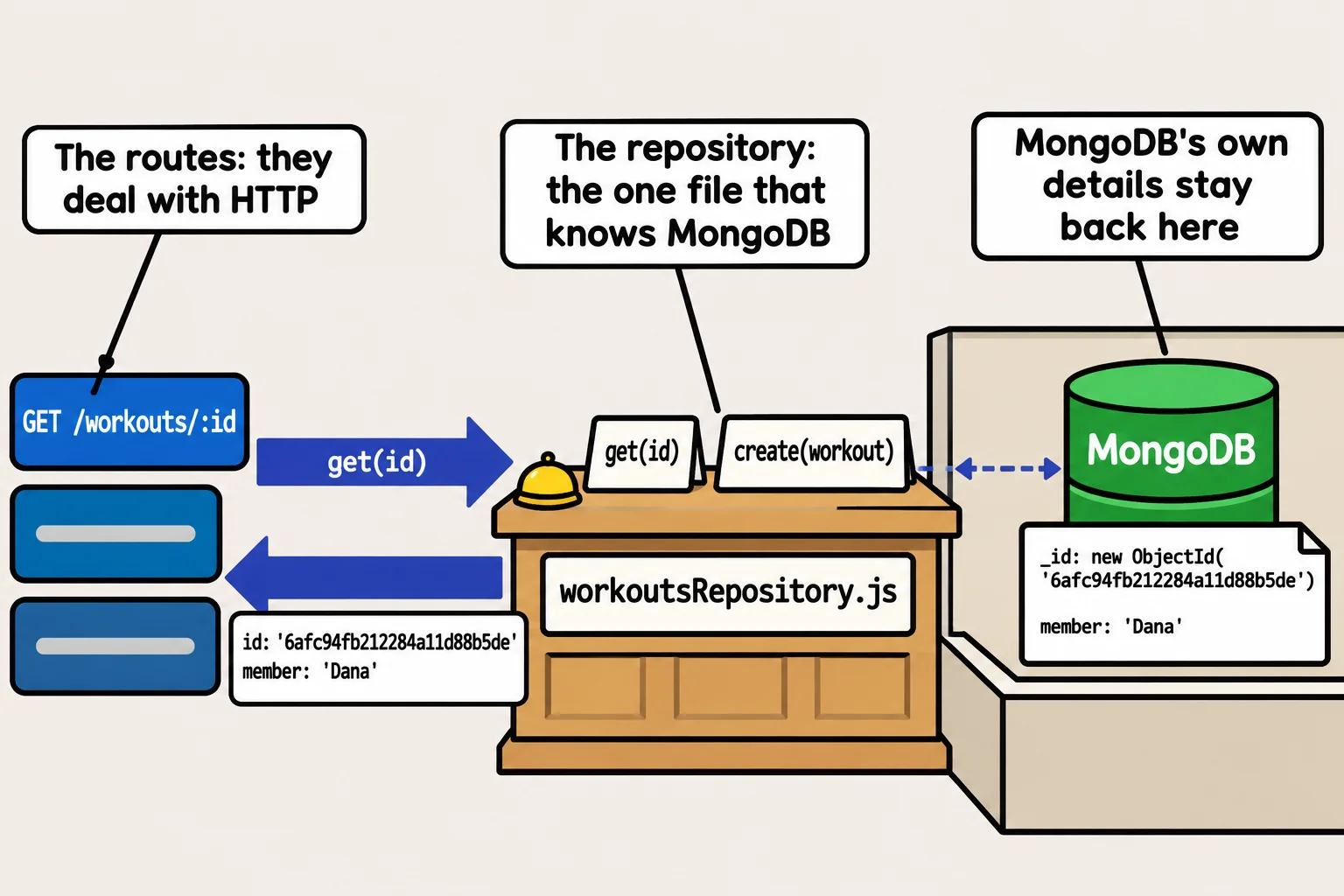
At a library, you ask at the front desk for a book by its title. You never walk into the back room, and when the library moves its shelves around, you ask the same way. A repository is that front desk for your data: one module that holds every database call for one collection, behind functions named for what the app needs. The idea is called the repository pattern; some projects call the same file a data access object, or DAO. Here's the start of Rep Counter's, workoutsRepository.js:
import { ObjectId } from "mongodb";

function toWorkout(document) {
  const { _id, ...fields } = document;
  return { id: _id.toHexString(), ...fields };
}

export function createWorkoutsRepository(db) {
  const workouts = db.collection("workouts");

  return {
    async create(workout) {
      const result = await workouts.insertOne({ ...workout });
      return { id: result.insertedId.toHexString(), ...workout };
    },

    async get(id) {
      if (!ObjectId.isValid(id)) {
        return null;
      }
      const document = await workouts.findOne({ _id: new ObjectId(id) });
      return document === null ? null : toWorkout(document);
    },
  };
}
createWorkoutsRepository(db) takes a database and gives back an object of functions, all working on its one workouts collection. The collection's name appears once, in this file only.
Plain objects out, with the id as text
toWorkout turns a document into what the rest of the app sees. const { _id, ...fields } = document takes the _id out, and ...fields (read "the rest, as fields") collects every other field. In the returned object, ...fields spreads those fields back in after a new id, and toHexString() gives the ObjectId as its 24 characters of text.
create hands insertOne a copy, { ...workout }, so the caller's object never gets an _id. get first asks ObjectId.isValid(id), as Finding Documents with Filters does: text that can't be an id gives back null before MongoDB is asked anything, and so does an id with no workout. The repository doesn't decide what the API says about a missing workout; Wiring MongoDB into Express turns that null into a 404.
Trying it
try-repository.js uses the repository the way the routes will:
import { MongoClient } from "mongodb";
import { createWorkoutsRepository } from "./workoutsRepository.js";

const client = new MongoClient(process.env.MONGODB_URI);
const workouts = createWorkoutsRepository(client.db("rep_counter"));

const saved = await workouts.create({
  member: "Dana",
  date: "2026-11-16",
  sets: [{ exercise: "squat", reps: 8, weight: 135 }],
});
console.log(saved);

console.log(await workouts.get(saved.id));
console.log(await workouts.get("not-an-id"));

await client.close();
node --env-file=.env try-repository.js
{
  id: '6afc94fb212284a11d88b5de',
  member: 'Dana',
  date: '2026-11-16',
  sets: [ { exercise: 'squat', reps: 8, weight: 135 } ]
}
{
  id: '6afc94fb212284a11d88b5de',
  member: 'Dana',
  date: '2026-11-16',
  sets: [ { exercise: 'squat', reps: 8, weight: 135 } ]
}
null
Your id will be different. What create gives back and what get finds look the same: a plain object, with id as text and no _id anywhere.
What the routes see now
With the repository, the route from the top of the lesson asks for a workout and gets one:
app.get("/workouts/:id", async (req, res) => {
  const workout = await workouts.get(req.params.id);
  res.json(workout);
});
No ObjectId, no collection name, and no import from mongodb. Each file has one job, which is called separation of concerns: routes deal with HTTP, and the repository deals with MongoDB. A change to how workouts are stored touches one file, and the repository can be tested on its own.
Check yourself
2 questions to try on the lesson page.
So what
Keep the database behind one front desk, and the rest of your API stays plain JavaScript: easier to read, to change and to test, whichever database sits behind the desk.