CORS: Which Web Pages May Call Your API
A browser lets a web page read answers only from its own origin unless the other server allows it, and the cors package lets an Express API name the pages it allows, which protects people's browsers but never stops scripts and tools.
Journeyman · Node.js · Web Development · Updated
After this lesson you can
- Explain the same-origin rule, CORS and preflight requests, and why CORS doesn't protect an API from scripts and tools
- Allow only an API's own web pages to call it from a browser, with the cors package and an allow-list of origins
Key takeaways
- An origin is a page's scheme, host and port, such as http://localhost:3101. A browser lets a page read answers only from its own origin, unless the other server allows it.
- CORS is how a server allows other origins. Its answer carries an Access-Control-Allow-Origin header that names the origin it allows.
- Before a request that could change data, such as a PATCH with a token, the browser first asks permission with an OPTIONS request, called a preflight.
- The cors package with a list of origins answers the pages on the list, and leaves the header out for every other page.
- CORS is a rule browsers follow. REST Client, scripts and other servers ignore it, so it never replaces signing in.
The first time a web page calls an API you built, there's a good chance it fails with a red message about CORS in the browser's console. Nearly every front end that talks to its own API meets it, usually the same afternoon the two first run together. This lesson shows what the browser is protecting, and how your API tells it which pages are welcome.
This chapter's example is Bean There Coffee Club, a coffee subscription club whose API (members, orders, each member's favorite roast) is about to go online. A volunteer is building the club's web page, and while it's being built it runs on its own small server at http://localhost:3101. Its first line of JavaScript asks the API, at http://localhost:3100, for the roasts: fetch("http://localhost:3100/roasts"). REST Client gets the roasts from that address with no trouble. The page gets this, in the browser's console (F12):
Access to fetch at 'http://localhost:3100/roasts' from origin 'http://localhost:3101' has been blocked by CORS policy: No 'Access-Control-Allow-Origin' header is present on the requested resource.
The browser's guest list
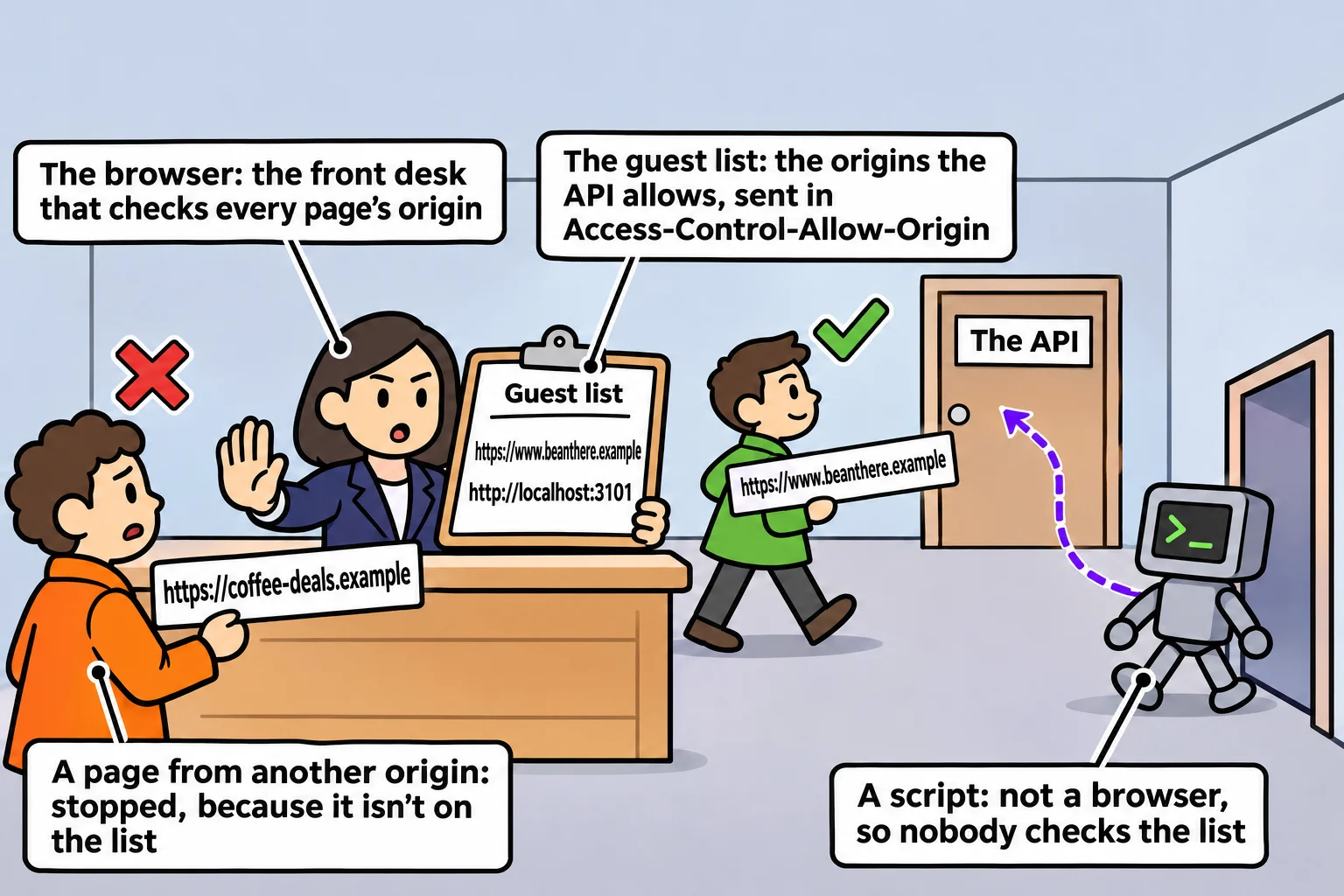
Think of an office building with a front desk. Visitors who work in the building walk straight in. A visitor from outside gets in only if the company they're visiting has put their name on the guest list. The front desk doesn't decide who's welcome: it reads the list each company gives it.
In this picture, the browser is the front desk, the API is the company, and the visitor is a web page. Where a page comes from is its origin: its scheme (http or https), its host and its port, together. JavaScript's URL gives you an address's origin:
const page = new URL("http://localhost:3101/order.html");
const api = new URL("http://localhost:3100/roasts");

console.log(page.origin);
console.log(api.origin);
console.log(page.origin === api.origin);
console.log(new URL("https://www.beanthere.example/menu").origin === new URL("https://beanthere.example/menu").origin);
http://localhost:3101
http://localhost:3100
false
false
A different port is a different origin, and so is a different host: www.beanthere.example and beanthere.example are two origins. The browser's rule, called the same-origin policy, is that a page may read answers only from its own origin. CORS (said "kors", short for Cross-Origin Resource Sharing) is how a server puts other origins on the list: its answer carries an Access-Control-Allow-Origin header naming the origin it allows.
Putting the club's pages on the list
The cors package adds that header for you. Install it in the API's folder with npm install cors, and give it the list of origins that may call the API, an allow-list:
import express from "express";
import cors from "cors";

export const app = express();

app.use(
  cors({
    origin: ["https://www.beanthere.example", "http://localhost:3101"],
  }),
);
The first origin is the club's real site, and the second is the page while it's being built. Add the middleware before your routes, so every answer passes through it. To see what it does, send the Origin header from REST Client, the way a browser sends it:
GET http://localhost:3100/roasts
Origin: http://localhost:3101
The answer's first lines now read:
HTTP/1.1 200 OK
X-Powered-By: Express
Access-Control-Allow-Origin: http://localhost:3101
Vary: Origin
Content-Type: application/json; charset=utf-8
The page shows the roasts. Send the same request with Origin: https://coffee-deals.example, a site that isn't on the list, and the answer is still 200 with the roasts, but with no Access-Control-Allow-Origin line, so a browser keeps them from that page. (Vary: Origin tells anything that saves copies of answers that the answer depends on the origin. X-Powered-By is Express telling everyone what it is, which the next lesson takes away.)
Calling cors() with no list sends Access-Control-Allow-Origin: * (read "star", meaning every origin). That fits a public API anyone may read, such as a bus timetable. For an API with members' data, name the origins.
Preflight: asking before sending
Changing a favorite roast is a PATCH with a JSON body and an Authorization header. A request like that could change data, so the browser phones ahead first: it sends an OPTIONS request, called a preflight, asking whether that method and those headers are allowed from this origin. The cors middleware answers it, and these are the lines that matter:
HTTP/1.1 204 No Content
Access-Control-Allow-Origin: http://localhost:3101
Access-Control-Allow-Methods: GET,HEAD,PUT,PATCH,POST,DELETE
Access-Control-Allow-Headers: authorization,content-type
Only after a yes like this does the browser send the real PATCH. Without cors, Express answers the OPTIONS request with 200 and no Access-Control headers, so the browser never sends the PATCH at all.
What CORS doesn't protect
CORS is a rule browsers follow, and only browsers:
- REST Client, scripts and other servers ignore it. REST Client got the roasts before any list existed.
- Even in a browser, the request reaches your API. When the page was blocked, the API's terminal showed the request arrive, and the API answered it. The browser received the roasts and kept them from the page.
So CORS protects the people who use your API through a browser: a page on another site can't use a member's browser to read the club's data. It doesn't protect the API itself from anyone who sends requests some other way. That job belongs to signing in, as Requiring a Signed-In User builds it, to the rate limits in Security Headers and Rate Limits, and to checking every request, as The Attacks to Expect: Injection and Mass Assignment shows.
Check yourself
2 questions to try on the lesson page.
So what
When your front end and your API live at different origins, CORS is how they're introduced, and knowing it's the browser's rule tells you both how to fix the red console message and why it never replaces a real check on the server.