Keeping Secrets Out of Your Code
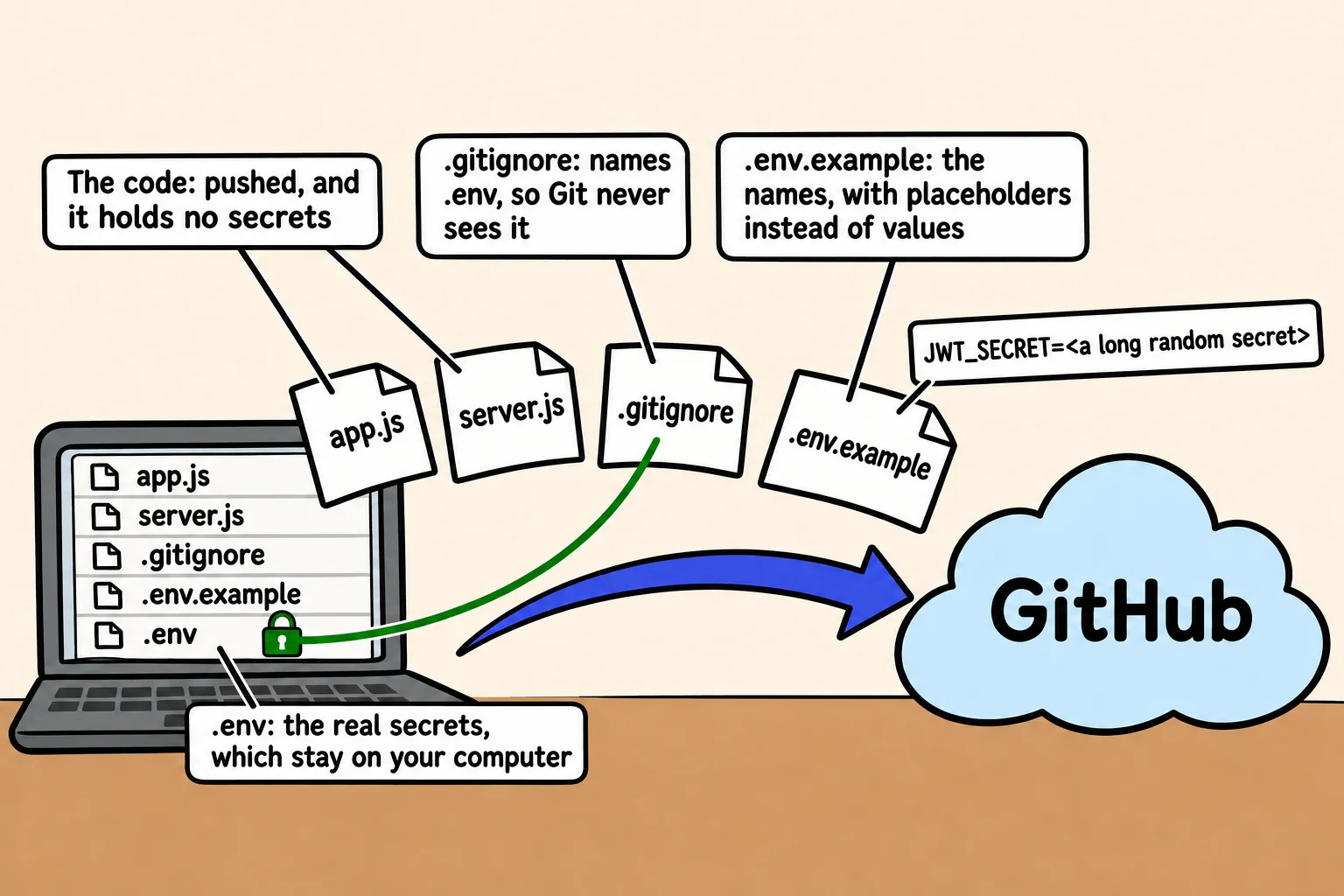
An API's secrets, such as the key that signs its tokens and its database password, live in environment variables loaded from a .env file that Git never sees, with a committed .env.example naming them, a check at startup that each one is set, and a new secret at once if one ever reaches GitHub.
Journeyman · Node.js · Web Development · Updated
After this lesson you can
- Keep an API's secrets in environment variables loaded with node --env-file, out of Git with .gitignore, and named in a .env.example
- Check at startup that every secret is set, and rotate a secret that reached GitHub
Key takeaways
- A secret is anything that lets someone act as your app, such as the JWT secret or the database password. Written in the code, it goes wherever the code goes.
- The code reads each secret from process.env, and node --env-file=.env loads them from a .env file on your own computer.
- The .env file goes in .gitignore, and a committed .env.example lists the names a teammate must set, with placeholders instead of values.
- A server that checks its secrets at startup stops with a message naming what's missing, instead of failing later in a confusing way.
- A secret that reached GitHub isn't secret any more. Deleting it isn't enough, so replace it with a new one, which is called rotating it.
Every API you put online holds secrets: the key that signs its tokens, the password to its database, maybe a key for an email service. Where they live decides whether your public repository gives them away. Programs search public repositories for keys all the time, so a secret that's pushed can be found within minutes. Getting this right once, in every project, is a habit every team expects.
Bean There Coffee Club's sign-in code signs its tokens with a secret written into app.js:
// app.js: the secret is part of the code, so it goes wherever the code goes
const JWT_SECRET = "bean-there-club-secret";
The club pushes the code to a public repository so a volunteer can help. Now anyone who reads app.js can sign a token of their own that says "role": "admin", and the API will believe it: they can make their own festival wristband.
What counts as a secret
A secret is anything that lets someone act as your app: the JWT secret, a database connection string with its password, an API key for another service. The port your server listens on, or the name of a roast, isn't one.
A secret in the code is in every copy of the code: your laptop, the repository, every clone. And Git keeps history, so deleting the line in a later commit leaves it in the commit before. The fix is to keep secrets out of the code from the first commit.
Secrets in environment variables
Settings from Environment Variables showed how a program reads a setting from process.env, and how node --env-file=.env loads settings from a file. Secrets use exactly that. The code names the secret but never holds it:
const token = jwt.sign({ sub: member.id, role: member.role }, process.env.JWT_SECRET, { expiresIn: "1h" });
The values go in a file named .env, beside package.json, one NAME=value per line:
JWT_SECRET=<a long random secret>
MONGODB_URI=mongodb://localhost:27017/coffee_club
For a JWT secret, use something nobody could guess. This command prints 64 random characters; copy them into .env in place of the placeholder:
node -e "console.log(require('node:crypto').randomBytes(32).toString('hex'))"
Then let the scripts in package.json load the file, so npm start and npm run dev always have the secrets:
{
  "scripts": {
    "start": "node --env-file=.env server.js",
    "dev": "node --watch --env-file=.env server.js"
  }
}
.gitignore and .env.example
Two small files keep .env on your computer and still tell a teammate what it needs. .gitignore gets a line for it:
node_modules/
.env
And .env.example, which is committed, holds the same names with placeholders, never real values:
# Copy this file to .env and fill in your own values.
JWT_SECRET=<a long random secret>
MONGODB_URI=mongodb://localhost:27017/coffee_club
Before your first commit, ask Git what it sees. In a new project with both files:
git status --short --untracked-files=all
?? .env.example
?? .gitignore
?? package.json
?? server.js
.env isn't in the list: Git can't see it, so it can't commit it.
Check at startup that every secret is set
A teammate clones the code and runs it without making a .env. The server starts, and nothing seems wrong until the first sign-in, when jwt.sign stops with secretOrPrivateKey must have a value. A few lines at the top of server.js catch it at once, naming every missing setting:
const required = ["JWT_SECRET", "MONGODB_URI"];
const missing = required.filter((name) => !process.env[name]);

if (missing.length > 0) {
  console.error(`Missing settings: ${missing.join(", ")}. Copy .env.example to .env and fill them in.`);
  process.exit(1);
}

console.log("Every secret is set.");
Run with no settings, it stops before the server starts:
Missing settings: JWT_SECRET, MONGODB_URI. Copy .env.example to .env and fill them in.
! (read "not") also counts an empty value, JWT_SECRET=, as missing. With a filled-in .env, node --env-file=.env server.js prints Every secret is set. If the .env file itself is missing, Node stops before your code runs, with a line ending .env: not found. Configuration Checked at Startup, in Module 6, grows this into a check of every setting.
When a secret reaches GitHub: rotate it
It happens to careful people too. When a secret has been pushed, treat it as known to everyone, and rotate it, which means replacing it:
- Make a new secret and put it everywhere the app runs: your
.env, and later your host's settings. - Restart the app, so the old secret stops working. Every token signed with it now fails
jwt.verify, so members sign in again. That's the point: nobody keeps a wristband made with the old secret. For a database password, change it in the database too. - Then fix the code: read the secret from
process.env, add.envto.gitignore, and push.
Deleting the commit, or the whole repository, isn't enough on its own: someone may already have a copy. The new secret is what makes the old one useless.
Check yourself
2 questions to try on the lesson page.
So what
Secrets in .env, names in .env.example and a check at startup is the same setup in every project you'll work on, and it means a public repository never gives away the keys to the club's API.