Streams: Big Files a Piece at a Time
A stream moves a file or a response a piece at a time instead of loading it whole, so pipeline from node:stream/promises can copy a huge file, readline can read a big CSV line by line, and an Express route can send a CSV export without holding it in memory.
Journeyman · Node.js · Web Development · Updated
After this lesson you can
- Choose a stream over readFile for a big file, and join a readable stream to a writable one with pipeline from node:stream/promises
- Read a big CSV file line by line with readline and a for await loop
- Stream a CSV export to an Express response with pipeline and res.attachment
Key takeaways
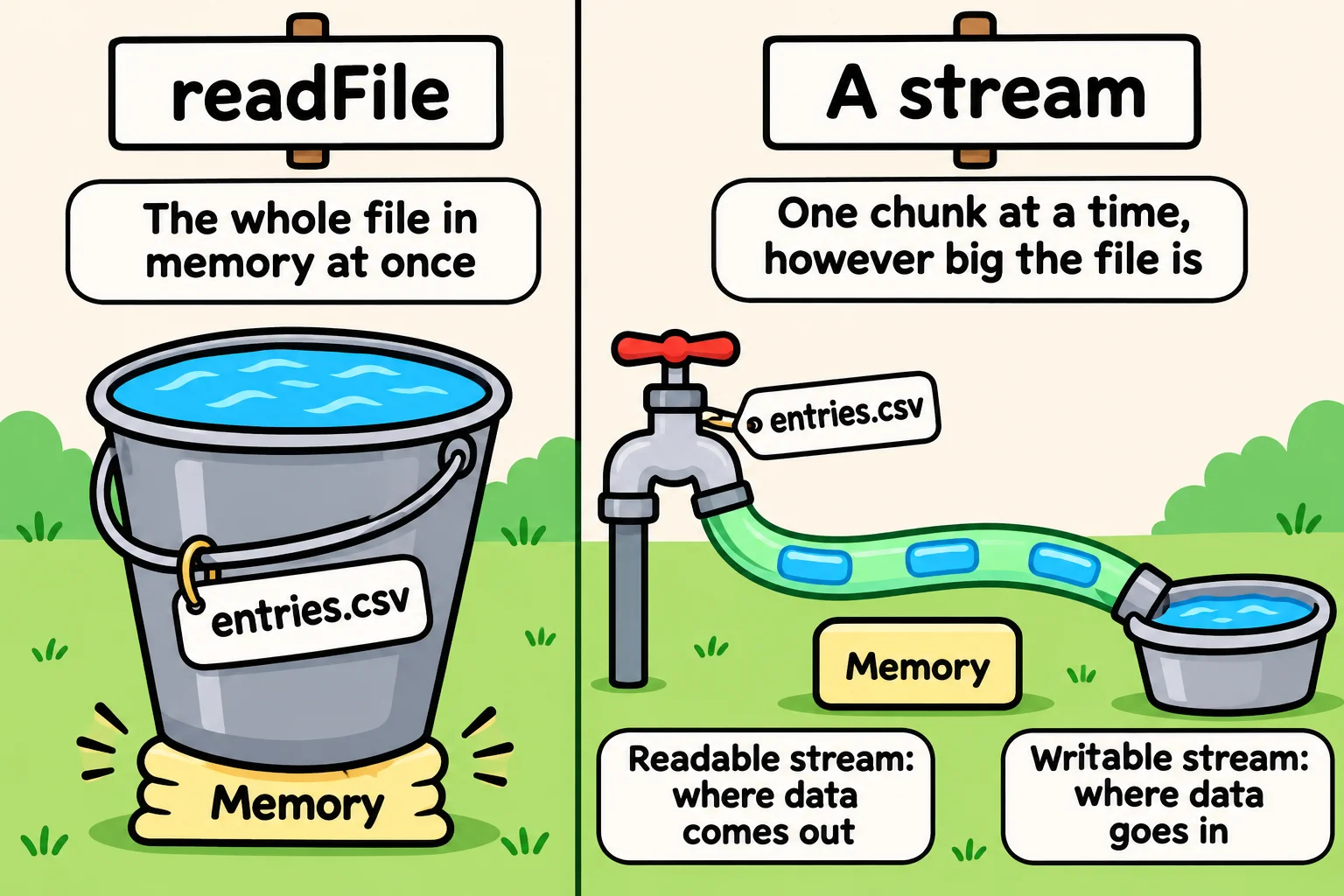
- readFile holds the whole file in memory at once, like a bucket. A stream moves it in chunks, like a hose, so memory stays small however big the file is.
- A readable stream is where data comes out, such as a file being read. A writable stream is where it goes in, such as a file being written or an HTTP response.
- await pipeline(readable, writable) joins the two, slows the reader when the writer falls behind, and rejects with the error if either side fails.
- readline's createInterface turns a readable stream into lines, so a for await loop reads a big CSV one line at a time.
- An Express response is a writable stream, so pipeline can send a file or a list of rows to it, and res.attachment names the download.
Sooner or later every app has a file too big to treat like a small one: a log that grows all year, a video, a nightly backup, an export of every order since the shop opened. Streams are how Node moves those without running out of memory, and they're already underneath every request and response your APIs have handled.
Snapshot Saturday, the town's yearly photo contest, keeps a line for every entry it has ever had in entries.csv. The judges want to download it, the organizers want a backup every night, and they'd like a count of entries in each category. Reading and Writing Files would start with readFile. Here's why that stops working.
A bucket or a hose
readFile works like a bucket: it fills the whole file into memory, and only then do you carry it. That's fine for a 1 MB file. A 2 GB file needs 2 GB of memory for one request, and fifty judges downloading at once would need a hundred. Node won't even make a string longer than 536,870,888 characters, about 512 MB of text.
A hose works differently: water moves through it a little at a time, and you never hold more than what's in the hose. That's a stream: data that moves in pieces, called chunks. A readable stream is where data comes out, such as a file being read or a request arriving. A writable stream is where it goes in, such as a file being written or a response going back.
To try it, make a stand-in for the contest's file, 30,000 entries. In a folder with { "type": "module" } in its package.json, save make-entries.js:
import { writeFile } from "node:fs/promises";

const names = ["Ava", "Mateo", "Grace", "Omar"];
const categories = ["landscape", "portrait", "landscape", "wildlife"];

const lines = ["id,name,category,title"];
for (let id = 1; id <= 30000; id++) {
  lines.push(`${id},${names[id % 4]},${categories[id % 4]},Photo ${id}`);
}
await writeFile("entries.csv", lines.join("\n") + "\n");
console.log("entries.csv is ready");
entries.csv is ready
Then read it as a stream, counting the chunks:
import { createReadStream } from "node:fs";

let chunks = 0;
let bytes = 0;

for await (const chunk of createReadStream("entries.csv")) {
  chunks += 1;
  bytes += chunk.length;
}

console.log(`${chunks} chunks, ${bytes} bytes`);
15 chunks, 960311 bytes
createReadStream reads 64 KB (65,536 bytes) at a time, and for await ... of (read "for await of") waits for each chunk as it arrives. Each chunk is a Buffer, a box of raw bytes. A 30 GB file goes through the same loop, still 64 KB at a time.
Joining a hose to a hose: pipeline
The nightly backup copies one file into another: a readable stream into a writable one. pipeline, from node:stream/promises, joins them:
import { createReadStream, createWriteStream } from "node:fs";
import { stat } from "node:fs/promises";
import { pipeline } from "node:stream/promises";

await pipeline(createReadStream("entries.csv"), createWriteStream("entries-backup.csv"));
const { size } = await stat("entries-backup.csv");
console.log(`Backup done: ${size} bytes`);

try {
  await pipeline(createReadStream("entries-2025.csv"), createWriteStream("old-backup.csv"));
} catch (err) {
  console.log(`Backup failed: ${err.code}`);
}
Backup done: 960311 bytes
Backup failed: ENOENT
pipeline does two jobs you'd otherwise forget. When the writer is slower than the reader (a slow disk, or a judge on a slow phone connection), it pauses the reader until the writer catches up. That's called backpressure. And when either side fails, it closes both and the await rejects with the error, here ENOENT because there's no entries-2025.csv. createWriteStream makes its file as soon as it's called, so the failed copy still leaves an empty old-backup.csv behind.
Older code joins streams with readable.pipe(writable), which doesn't pass errors on. Use pipeline.
Reading a big CSV line by line
Counting entries per category needs lines, not chunks, and a chunk can end in the middle of a line. createInterface from node:readline turns a readable stream into lines:
import { createReadStream } from "node:fs";
import { createInterface } from "node:readline";

const lines = createInterface({ input: createReadStream("entries.csv"), crlfDelay: Infinity });
const counts = {};

for await (const line of lines) {
  const [id, name, category] = line.split(",");
  if (id === "id") continue; // the header line
  counts[category] = (counts[category] ?? 0) + 1;
}

console.log(counts);
{ portrait: 7500, landscape: 15000, wildlife: 7500 }
Each time around the loop, line is one line without its line break. crlfDelay: Infinity counts a Windows line ending, \r\n, as one break, not two. ?? (read "nullish coalescing") starts a category's count at 0 the first time it's seen. Only a chunk and the line being read are ever in memory.
Sending a CSV to a response
An Express response is a writable stream too, so the judges' download is one pipeline:
app.get("/entries.csv", async (req, res) => {
  res.attachment("entries.csv");
  await pipeline(createReadStream("entries.csv"), res);
});
res.attachment tells the browser to save the answer as a file, and sets the type from the name. Sending GET http://localhost:3100/entries.csv from REST Client shows:
HTTP/1.1 200 OK
X-Powered-By: Express
Content-Type: text/csv; charset=utf-8
Content-Disposition: attachment; filename=entries.csv
Transfer-Encoding: chunked
Transfer-Encoding: chunked means the body comes in pieces, so the server never needed the whole file at once.
When the rows are in your program rather than in a file, Readable.from (from node:stream) turns a list of lines into a readable stream: await pipeline(Readable.from(lines), res). A MongoDB find() cursor has a stream() method for the same job, so an export of a whole collection never holds every document at once.
Check yourself
2 questions to try on the lesson page.
So what
Whenever data might be big, move it like water through a hose: a readable stream, a writable stream and pipeline between them, and your server's memory stays the same size whether the file is 1 MB or 30 GB.