Testing an API with Supertest
Supertest hands a request straight to an Express app, with no server running and no port, so a test can check the status code, the headers and the JSON body that come back, for a GET and for a POST with a body.
Journeyman · Node.js · Unit Testing · Updated
After this lesson you can
- Test an Express route with Supertest's request(app), checking the status code, the Content-Type header and the JSON body
- Test a POST with .send(), and check what it changed with a second request
- Explain what an end-to-end API test proves that a unit test doesn't, and why the app is tested without a port
Key takeaways
- request(app) from Supertest hands each request straight to the app that app.js exports, so no server runs and no port is chosen.
- await request(app).get("/shows/1") gives back the response, and a test checks its status, its headers and its body with assert.
- response.body is the JSON already turned into data, so assert.deepEqual compares it with the object you expect.
- .send() adds a JSON body to a POST, and a second request afterwards checks that the change really happened.
- A test through the whole app proves the route, the body, the status code and the data change work together, which a test of one function can't.
At work, an API's tests send it hundreds of requests on every push, and a change that breaks one endpoint doesn't get merged until it's fixed. This lesson writes the first of those tests for Starlight Stage's tickets API.
Clicking Send Request doesn't scale
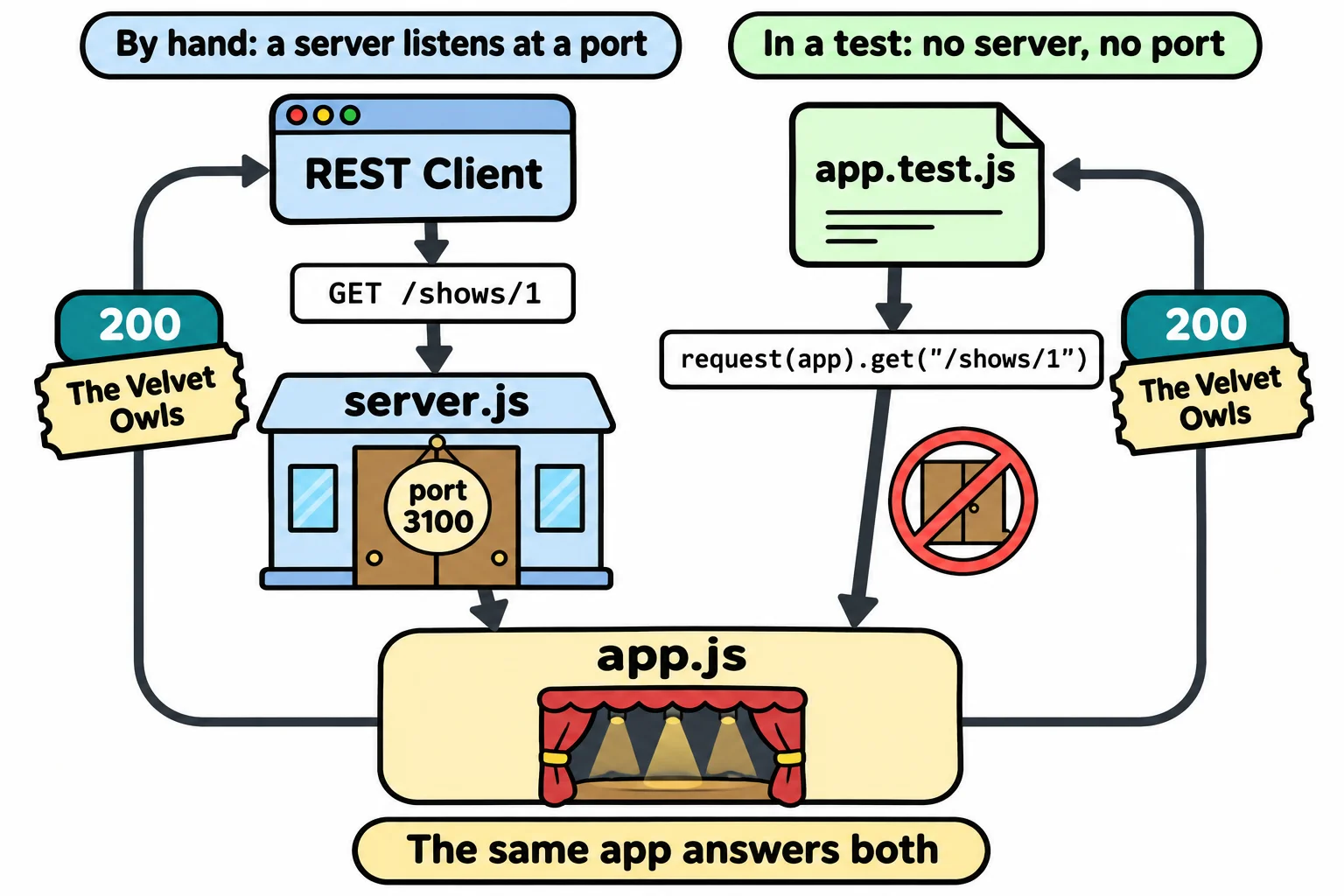
Starlight Stage's API is an Express app, split the way the course has split every server so far: app.js makes the app with export const app = express(), and server.js starts it with listen at port 3100. Its shows live in memory, in data.js:
| Show | id | Price | Seats left |
|---|---|---|---|
| The Velvet Owls | 1 | $25 | 40 |
| Midnight Brass Band | 2 | $32 | 4 |
| Juniper Lane | 3 | $18 | 0 |
It answers GET /shows, GET /shows/1 (one show, or a 404), and POST /shows/2/tickets with a body such as { "quantity": 2 }, which sells the tickets, answers 201 with the new ticket and takes the seats off the show. The ticket's total comes from orderTotal, the function Your First Tests with node --test tested.
You could check every answer with REST Client after each change. But the API will grow to dozens of requests, and after every change someone would have to send each one again and read each answer. Sooner or later, someone skips one. A test can send the request and read the answer for you, every time.
Supertest: a request with no server
Before a concert, the band plays a sound check: the real songs, on the real stage, with the doors still closed. Supertest gives your app a sound check. Its request(app) hands each request straight to the app that app.js exports, the same code that answers real requests, without starting a server or opening a port. Nothing keeps running when the tests end, and no port can be already in use. That's the reason app.js and server.js are separate files.
Install it as a dev dependency, a package needed only while you build and test, at the version this course uses:
npm install --save-dev --save-exact supertest@7.3.2
Checking the status, headers and body
In app.test.js:
import { test } from "node:test";
import assert from "node:assert/strict";
import request from "supertest";
import { app } from "./app.js";

test("GET /shows/1 answers 200 with The Velvet Owls", async () => {
  const response = await request(app).get("/shows/1");

  assert.equal(response.status, 200);
  assert.equal(response.headers["content-type"], "application/json; charset=utf-8");
  assert.deepEqual(response.body, {
    id: 1,
    title: "The Velvet Owls",
    date: "2026-12-04",
    price: 25,
    seatsLeft: 40,
  });
});
request(app).get("/shows/1") sends the request, and await waits for the answer, so the test function is async. The response has three parts to check:
response.status: the status code, here200.response.headers: every header, with names in lowercase. Express'sres.jsonsendsContent-Type: application/json; charset=utf-8, which says the body is JSON written in UTF-8, the usual way to store text.response.body: the JSON, already turned into data, soassert.deepEqualcan compare it with the object you expect.
Sending a body, and checking what changed
A POST sends a body. .send() turns an object into JSON, sends it, and sets the request's Content-Type for you. Add a second test:
test("POST /shows/2/tickets with quantity 2 answers 201 and leaves 2 seats", async () => {
  const response = await request(app).post("/shows/2/tickets").send({ quantity: 2 });

  assert.equal(response.status, 201);
  assert.deepEqual(response.body, { id: 1, showId: 2, quantity: 2, total: 66 });

  const show = await request(app).get("/shows/2");
  assert.equal(show.body.seatsLeft, 2);
});
The answer alone doesn't prove the sale happened, so the test asks for show 2 again: its 4 seats should now be 2. Run both:
node --test
✔ GET /shows/1 answers 200 with The Velvet Owls (25.4285ms)
✔ POST /shows/2/tickets with quantity 2 answers 201 and leaves 2 seats (14.6704ms)
ℹ tests 2
ℹ suites 0
ℹ pass 2
ℹ fail 0
ℹ cancelled 0
ℹ skipped 0
ℹ todo 0
ℹ duration_ms 242.9976
Now say someone tidies the POST route and writes res.json(ticket) instead of res.status(201).json(ticket). The ticket still sells, and REST Client still shows it, so a person checking by eye could miss it. The test isn't fooled:
✖ POST /shows/2/tickets with quantity 2 answers 201 and leaves 2 seats (13.7338ms)
  AssertionError [ERR_ASSERTION]: Expected values to be strictly equal:

  200 !== 201
What a test through the whole app proves
The orderTotal tests in the last lesson are unit tests: each checks one function on its own. They're fast, and when one fails, you know exactly which function to look at. But they can't tell you whether the route's path is right, whether express.json() reads the body, whether the answer is 201, or whether the seats really change.
A Supertest test is an end-to-end test of the API: a request goes in one end and a response comes out the other, through every piece in between. It proves the pieces work together, the way a fan's phone app will use them. Most projects keep both kinds: unit tests for the rules, and API tests for every endpoint.
Check yourself
2 questions to try on the lesson page.
So what
Every endpoint you build from here on can carry its own test, so one node --test checks the whole API in a second, without starting a server.