Inner, Left, Right and Outer Joins
A join has to decide what happens to rows that find no match, and merge's how= says which ones to keep (inner only the matches, left every row of the left table, right every row of the right one, outer every row of both), while indicator=True and a row count before and after show what the join did.
Journeyman · Python · Database · Updated
After this lesson you can
- Choose inner, left, right or outer with how= by saying which rows that don't match each one keeps
- Find the rows a join didn't match with indicator=True, and check the row counts before and after a join
Key takeaways
- merge keeps only the rows that match unless you say otherwise; how="inner" is the default, and the rows that found no match disappear without a word.
- how="left" keeps every row of the left table, how="right" every row of the right one, and how="outer" every row of both, with NaN where nothing matched.
- indicator=True adds a _merge column that says both, left_only or right_only for every row, so you can count and look at the rows that didn't match.
- Count the rows before and after every join. A count that changes when you didn't expect it is the first sign of a problem.
Real tables never match perfectly. A customer with no orders, an order for a product someone deleted, a club nobody joined yet: every join has to decide what to do with rows like these, and the choice changes your answer. You'll make this choice every time you join, so it's worth making on purpose.
The example is Oakridge Middle School's after-school clubs: clubs.csv (8 clubs: club_id, club_name, room) and memberships.csv (student_id, club_id: one row for each student in each club, as the club advisers typed them).
A row disappears
The activities coordinator wants every membership with its club's name. Joining Tables with merge does that:
import pandas as pd

clubs = pd.read_csv("clubs.csv")
memberships = pd.read_csv("memberships.csv")
inner = memberships.merge(clubs, on="club_id")
print("memberships:", len(memberships))
print("rows after:", len(inner))
memberships: 237
rows after: 236
One membership is gone, and pandas said nothing. Unless you tell it otherwise, merge keeps only the rows whose key is in both tables. That's called an inner join, and the count before and after is the only thing that gave it away.
how=: which rows to keep
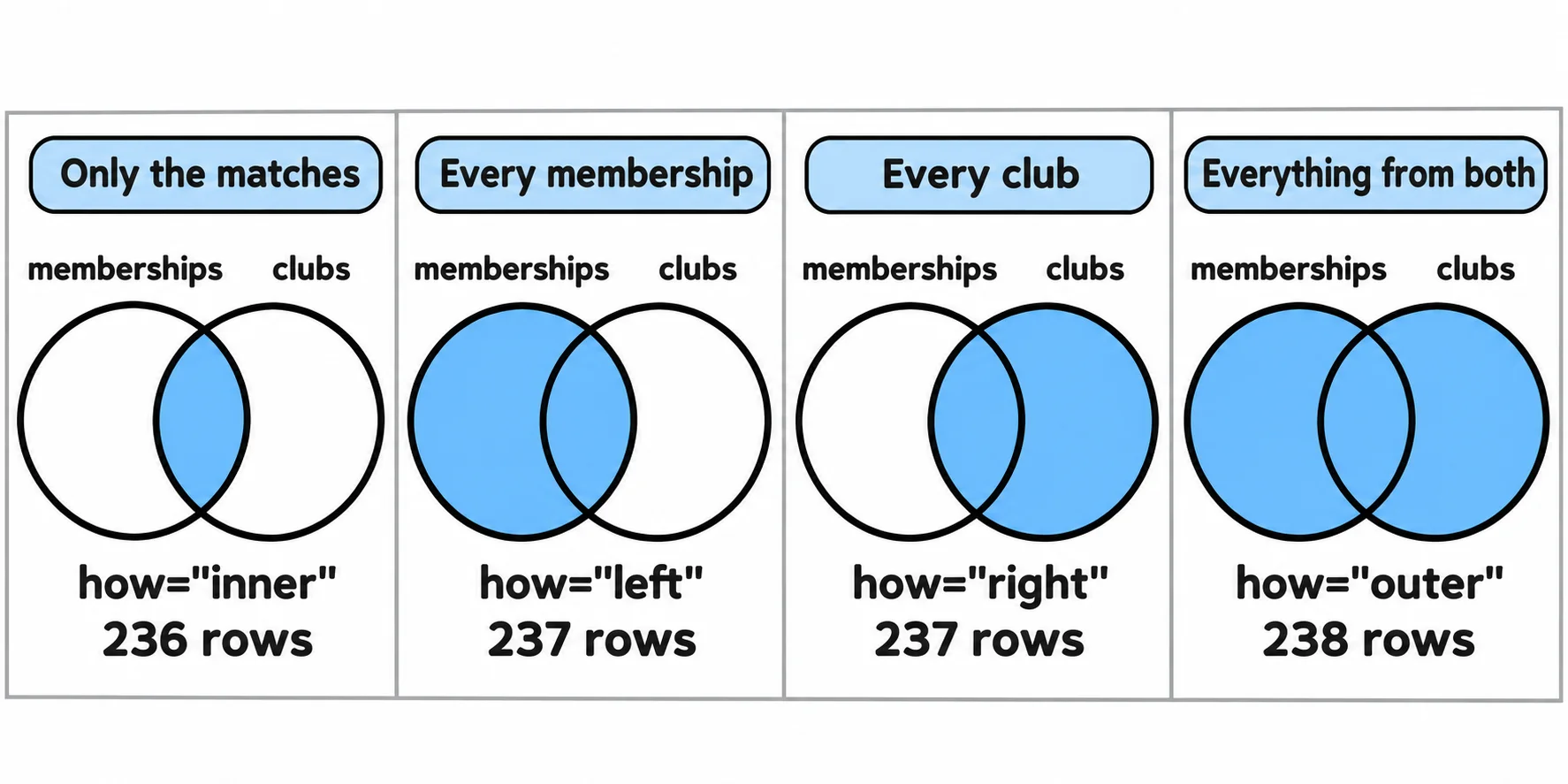
Picture two overlapping circles: the left one holds every row of the left table, memberships, and the right one every row of clubs. The overlap is the rows that match. how= says which parts to keep:
how="inner"(the default): only the overlap, the rows that match.how="left": the whole left circle. Every membership stays, and a membership whose club isn't inclubsgetsNaN(missing) forclub_nameandroom.how="right": the whole right circle. Every club stays, withNaNwhere no membership matched.how="outer": both circles. Every row of both tables.
for how in ["inner", "left", "right", "outer"]:
    joined = memberships.merge(clubs, on="club_id", how=how)
    print(how, len(joined))
inner 236
left 237
right 237
outer 238
Four joins, four answers. If you know SQL, these are INNER JOIN, LEFT JOIN, RIGHT JOIN and FULL OUTER JOIN, and they keep the same rows. A right join is a left join with the tables swapped, so most people write left joins and put the table they want to keep whole on the left.
indicator=True: which rows matched
The counts say how many rows didn't match, not which. indicator=True adds a column, _merge, that says where each row came from: both, left_only or right_only. An outer join keeps every row, so it can show them all:
checked = memberships.merge(clubs, on="club_id", how="outer", indicator=True)
checked["_merge"].value_counts()
_merge
both          236
left_only       1
right_only      1
Name: count, dtype: int64
checked[checked["_merge"] != "both"]
     student_id club_id club_name     room      _merge
236         NaN     C08  Yearbook  Library  right_only
237      1037.0     CO3       NaN      NaN   left_only
Two stories. Yearbook (C08) is new this year and has no members yet, so nothing from memberships matched it. And an adviser typed CO3, with the letter O, for Art Club's C03, with a zero: student 1037's membership points at a club that doesn't exist. (The student_id column shows decimals now, because a missing value turns a column of whole numbers into decimals.) The inner join hid both; the indicator found them.
Choosing the join
Start from the question, and decide which table's rows must all be in the answer:
- "Every membership, with its club's name" keeps every membership: a left join from
memberships. It gives 237 rows, and oneclub_nameis missing, which is your cue to fixCO3. - "Members of each club, counting only memberships we can place" uses only the matches: an inner join.
- "Anything that doesn't line up, on either side" needs both: an outer join with
indicator=True.
Whichever you choose, write down the row count before and after. A left join that keeps every row of the left table should end with at least as many rows as it started with; When a Join Goes Wrong shows what it means when it ends with more.
Check yourself
2 questions to try on the lesson page.
So what
Every join quietly decides what to do with the rows that don't match; how= makes that decision yours, and indicator=True with a count before and after shows you exactly what it cost.