CSV Files: Tables in Plain Text
A CSV file is a table in plain text that every spreadsheet can open and save, and Python's csv module writes it with DictWriter and reads it with reader or DictReader, giving back every value as text that you convert to numbers with int() and float().
Apprentice · Python · Updated
After this lesson you can
- Read a CSV file with csv.reader or csv.DictReader, and convert its numbers from text with int() and float()
- Write rows to a CSV file with csv.DictWriter and a header row, opening the file with newline=""
Key takeaways
- A CSV file is a table in plain text, one row per line with commas between the values, and its first line usually names the columns.
- csv.DictReader gives each row as a dictionary keyed by the column names, and csv.reader gives each row as a list.
- Every value read from a CSV file is text, so convert numbers with int() or float() before doing math with them.
- csv.DictWriter writes the header row with writeheader() and a row for each dictionary with writerow() or writerows().
- Open a CSV file with newline="" as well as encoding="utf-8", so the csv module controls where each row ends.
Most of the tables you'll be handed live in a spreadsheet: a club's runs, a shop's sales, a class's grades. Every spreadsheet app can save a table as a CSV file, and so can most websites with a Download button. That's how a table gets into your Python program, and how your program's results get back to someone who wants them in a spreadsheet.
The example is the Riverbend Running Club's spreadsheet of members' runs: the date, the runner, the miles and the minutes.
A table in plain text
Saved as CSV, the club's spreadsheet is a plain text file named runs.csv:
date,runner,miles,minutes
2026-11-02,Priya,3.1,29
2026-11-03,Marcus,4.0,38
2026-11-04,Zoë,5.2,47
CSV stands for comma-separated values, and that's all it is: one row of the table per line, with a comma between the values. The first line is the header, the names of the columns. Any spreadsheet app opens this file as a table, and any text editor shows it as above.
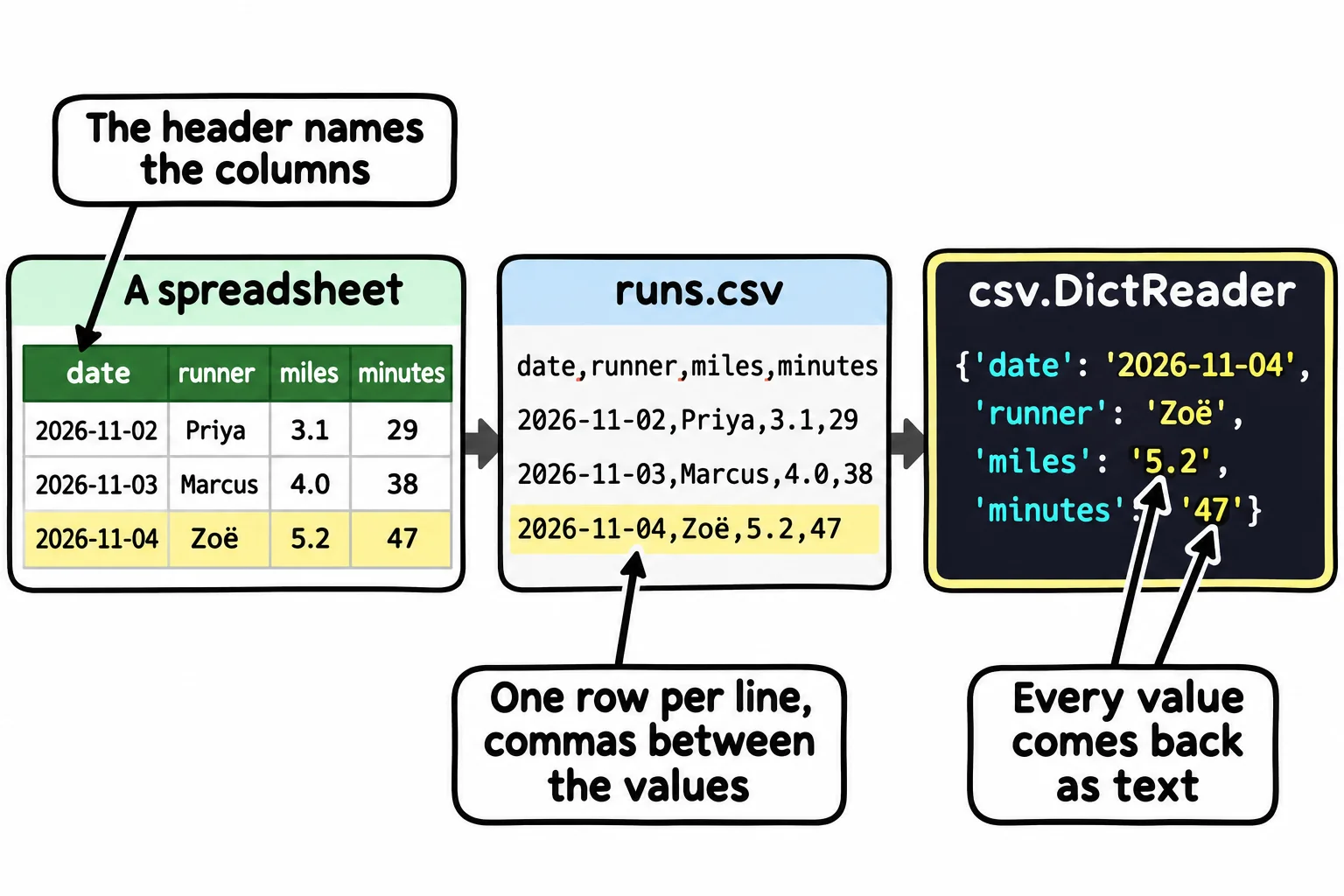
You could read it line by line and split each line at its commas. That works until a value has a comma inside it, such as a route named River Trail, north loop, which a spreadsheet saves in double quotes so the comma isn't read as a new column. Python's built-in csv module knows these rules, and import csv brings it into your program.
Writing a table with DictWriter
Each run is a dictionary, and the csv module's DictWriter writes a list of them as rows:
import csv

runs = [
    {"date": "2026-11-02", "runner": "Priya", "miles": 3.1, "minutes": 29},
    {"date": "2026-11-03", "runner": "Marcus", "miles": 4.0, "minutes": 38},
    {"date": "2026-11-04", "runner": "Zoë", "miles": 5.2, "minutes": 47},
]

with open("runs.csv", "w", newline="", encoding="utf-8") as file:
    writer = csv.DictWriter(file, fieldnames=["date", "runner", "miles", "minutes"])
    writer.writeheader()
    writer.writerows(runs)

print("Saved", len(runs), "runs.")
Saved 3 runs.
open(..., "w") opens the file for writing, and the with block closes it when its indented lines are done. encoding="utf-8" keeps the ë in Zoë the same on every computer. newline="" is for CSV files in particular: the csv module ends each row itself, and without it, Windows adds a second line break, so a spreadsheet shows a blank row after every run.
fieldnames lists the columns in order, matching the dictionaries' keys. writeheader() writes the header line, and writerows() writes one line for each dictionary in the list (writerow() writes one). The file it makes is the runs.csv shown above.
Reading it back: reader and DictReader
csv.reader reads the file the same way a loop over lines does, but splits each row correctly, giving a list per row:
import csv

with open("runs.csv", newline="", encoding="utf-8") as file:
    for row in csv.reader(file):
        print(row)
['date', 'runner', 'miles', 'minutes']
['2026-11-02', 'Priya', '3.1', '29']
['2026-11-03', 'Marcus', '4.0', '38']
['2026-11-04', 'Zoë', '5.2', '47']
To use it, you'd have to remember that the miles are at index 2, and skip the header. csv.DictReader does both for you: it reads the header first, then gives each row as a dictionary keyed by the column names:
import csv

with open("runs.csv", newline="", encoding="utf-8") as file:
    for run in csv.DictReader(file):
        print(run["runner"], "ran", run["miles"], "miles")
Priya ran 3.1 miles
Marcus ran 4.0 miles
Zoë ran 5.2 miles
run["miles"] reads like the column's name, and it keeps working if someone adds a column to the spreadsheet.
Numbers come back as text
A CSV file is text, so every value comes back as text, the numbers too. Adding two of them joins them instead:
import csv

with open("runs.csv", newline="", encoding="utf-8") as file:
    runs = list(csv.DictReader(file))

print(runs[0]["miles"] + runs[1]["miles"])

total = 0
for run in runs:
    total += float(run["miles"])
print("Club total:", round(total, 1), "miles")
3.14.0
Club total: 12.3 miles
"3.1" + "4.0" is "3.14.0": two strings joined end to end. Convert each number as you read it, with float() for the miles and int() for the minutes, and the math works. list(csv.DictReader(file)) keeps every row in a list, a list of dictionaries, so the rows are still there after the file is closed.
Do it: find the long runs
The club gives a badge for every long run. Its runs are in a CSV file with the header date,runner,miles,minutes, one run on each line after it.
path: the CSV file's name.least: the fewest miles that count as a long run.
Your job: write the function long_runs(path, least) so it reads the CSV file and returns a list of the runners' names whose run is at least least miles, in the order the file has them.
- Read it with
csv.DictReader, opening the file withnewline=""andencoding="utf-8". - A run of exactly
leastmiles counts. - A runner with two long runs is in the list twice.
- When no run is long enough, return an empty list,
[].
Worked through: with this file,
date,runner,miles,minutes
2026-11-02,Priya,3.1,29
2026-11-03,Marcus,6.2,58
2026-11-04,Zoë,5.0,47
long_runs("runs.csv", 5) checks 3.1 (too short), 6.2 (long) and 5.0 (exactly 5, so long), and returns ["Marcus", "Zoë"].
Practiced live on the lesson page: write the Python right there and check it.
Check yourself
2 questions to try on the lesson page.
So what
Spreadsheets are where most of the world's tables live, and with the csv module your program can read any of them and hand its results back in a form anyone can open.