Making Decisions with if, elif and else
An if statement runs its indented block only when its condition is True, elif tries the next condition when the ones above it were False, and else catches every case that's left, so a program takes the right path for each situation.
Novice · Python · Updated
After this lesson you can
- Run a block of code only when a condition is True with if, and choose between paths with elif and else
- Order elif conditions so each case reaches the right branch, and indent each block four spaces
Key takeaways
- An if line is the word if, a condition and a colon. The indented lines under it run only when the condition is True.
- elif (read "else if") checks another condition when every one above it was False, and else runs when none of them was True.
- Python checks the conditions from the top and runs only the first branch whose condition is True, so their order matters.
- Indentation, four spaces, marks the lines that belong to a block. A missing or uneven indent stops the program with an IndentationError before it runs.
A checkout page that says "Free shipping!" only over $50. A game that says "You win" or "Try again". A weather app that suggests a jacket below 50 degrees. Each one is a program choosing between paths, and in Python every one of those choices is an if. Once you can write one, your programs stop doing the same thing every time and start reacting to what they're given.
The example is still Splash Valley Water Park, where the ticket booth prints a price that depends on the guest's age.
Doing something only sometimes: if
Children under 3 get in free, and the booth should say so, but only for them. A sign at the gate does the same job in words: Under 3? Walk right in.
Python's version is an if statement:
age = 2
if age < 3:
    print("Under 3: free entry")
print("Enjoy your day at Splash Valley!")
Under 3: free entry
Enjoy your day at Splash Valley!
The if line has three parts: the word if, a condition (any comparison that answers True or False), and a colon. The indented line under it is the if's block: the lines that run only when the condition is True. The last line isn't indented, so it isn't part of the block, and it runs every time. Change the first line to age = 30: the condition is False, Python skips the block, and only Enjoy your day at Splash Valley! is printed.
Two paths: else
Everyone else pays. else gives the if a second path, for when its condition is False:
age = 30
if age < 3:
    print("Ticket: free")
else:
    print("Ticket: $30")
Ticket: $30
else has no condition of its own; it means "otherwise". It lines up with its if, ends with a colon, and has its own indented block. Exactly one of the two blocks runs, never both and never neither.
More than two paths: elif
The park actually has four prices: under 3 is free, 3 to 12 is $18, 13 to 64 is $30, and 65 and over is $20. Two paths aren't enough. elif, read "else if", adds another condition to try when the ones above it were False:
age = 8
if age < 3:
    print("Ticket: free")
elif age <= 12:
    print("Ticket: $18")
elif age <= 64:
    print("Ticket: $30")
else:
    print("Ticket: $20")
Ticket: $18
Python checks the conditions from the top. For 8: is 8 under 3? No. Is 8 at most 12? Yes, so it prints the $18 line and skips everything below it. Only the first branch whose condition is True runs, and else runs only when none of them was.
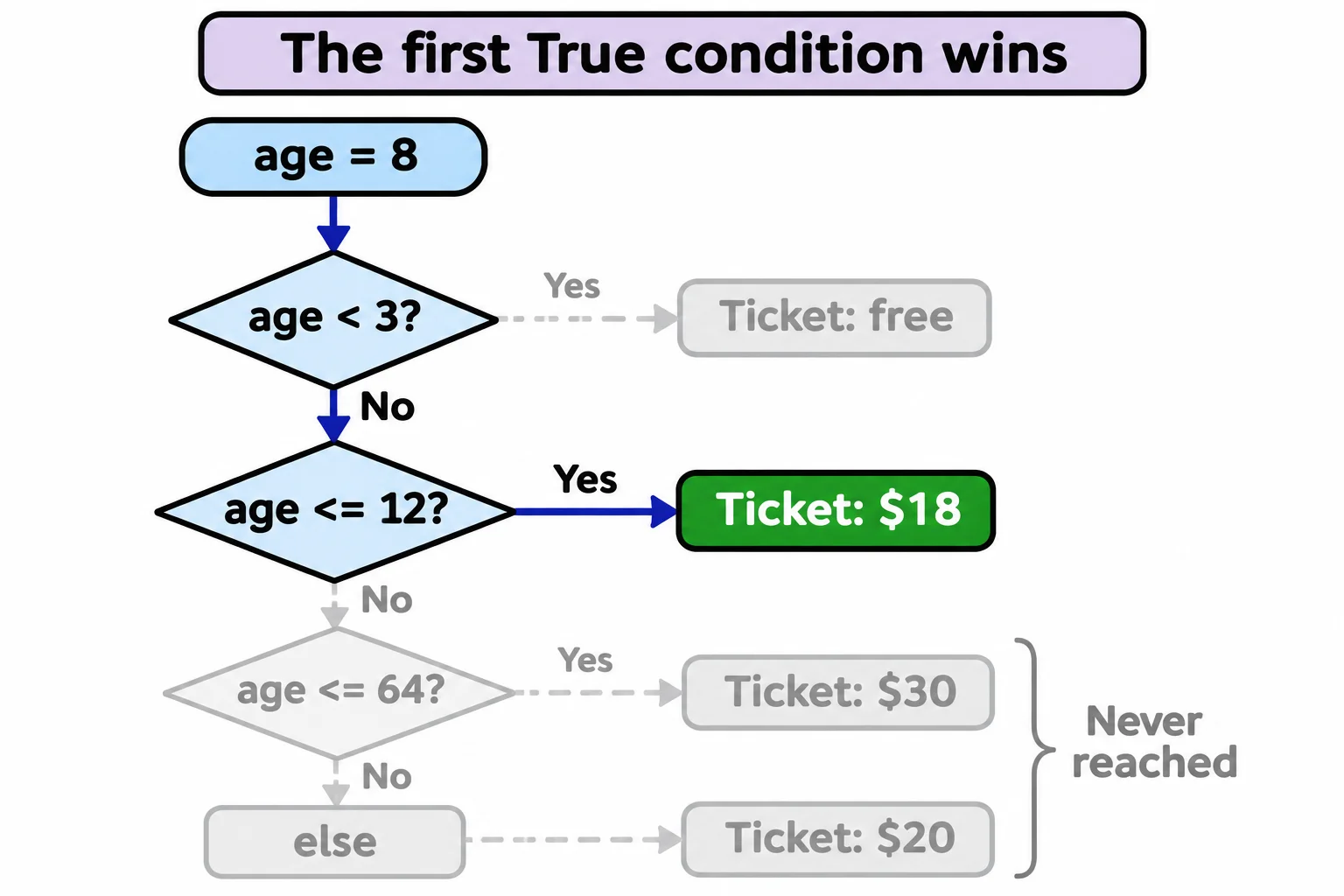
That's why the elif age <= 12 line doesn't need to say "and at least 3": a 2-year-old never gets that far. It's also why the order matters. Put age <= 64 first, and an 8-year-old matches it (8 is at most 64) and pays $30. When the conditions overlap, put the narrowest one first and let each elif pick up what's left.
Indentation is the block
Many languages mark a block with curly braces. Python uses indentation, the spaces at the start of a line: every line of a block is indented the same amount, and Python programmers use four spaces. VS Code adds them for you when you press Enter after a line that ends with a colon.
Leave the indent out, and the program doesn't run at all:
age = 2
if age < 3:
print("Ticket: free")
Here's what the terminal shows on Windows, from a file named tickets.py in the course folder (your path will be your own):
  File "C:\Users\Sam\python-course\tickets.py", line 3
    print("Ticket: free")
    ^^^^^
IndentationError: expected an indented block after 'if' statement on line 2
Read it from the last line up: an IndentationError, Python expected an indented block after the if on line 2, and line 3 is where it noticed. Python checks the layout of the whole file before it runs anything, so not even line 1 ran. Lines that are indented by different amounts, such as four spaces on one line and two on the next, stop it the same way, with unindent does not match any outer indentation level.
Do it: put the right sign on the Big Splash gate
The Big Splash slide's gate shows one of three signs, depending on how tall the guest is.
height: the guest's height in inches.
The practice box can't wait for someone to type, so the starter gives you a function line, def show_gate_sign(height):, and the tests call it with several heights. Functions come in Module 2 (What a Function Is: def and Calling); for now, write your lines indented under that line, and use height as a variable that already holds one guest's height.
Your job: inside show_gate_sign(height), print exactly one line:
Not yet: try the Minnow Poolwhen the guest is under 42 inches tall.Ride with an adultwhen the guest is 42 to 47 inches tall.Enjoy the Big Splashwhen the guest is 48 inches tall or more.
Worked through: with show_gate_sign(45), 45 isn't under 42, and it is under 48, so it prints Ride with an adult.
Practiced live on the lesson page: write the Python right there and check it.
Check yourself
2 questions to try on the lesson page.
So what
if, elif and else are how a program reacts to what it's given, and with four spaces of indentation and the narrowest condition first, every case lands on the path you meant.