Asking for Input, and Converting Types
input() asks a question in the terminal and always hands back the answer as text, so a program turns typed numbers into numbers with int() or float() (and numbers into text with str()), checks a value's type with type(), and stops with a ValueError when the text isn't a number.
Apprentice · Python · Updated
After this lesson you can
- Ask for input with input() and turn the answer into a number with int() or float()
- Tell a value's type with type(), convert between str, int and float, and read the ValueError a conversion raises
Key takeaways
- input() shows a question, waits for the person to type an answer and press Enter, and gives back what they typed.
- input() always gives back text, a str, even when the answer looks like a number, so "3" * 2 is "33", not 6.
- int() turns text into a whole number, float() into a decimal number, and str() turns a number into text. type() tells you which kind a value is.
- int("ten") stops the program with a ValueError, because the text isn't written as a number.
Until now, every program has worked on numbers written into its code: the same order, the same total, every run. Real programs ask: how many tickets, what's your name, how much are you paying? This lesson is how a program asks a question and uses the answer, and why the number someone types needs one more step before you can do math with it.
The example is the snack bar at Starlight Cinema, where popcorn is $6.50 and the program asks each customer for their order.
input(): asking a question
input() shows a question in the terminal, waits for the person to type an answer and press Enter, and gives back what they typed:
name = input("Name for the order: ")
print(f"Thanks, {name}!")
Run it, type Maya and press Enter, and the terminal shows:
Name for the order: Maya
Thanks, Maya!
The text in the parentheses is the question, called the prompt. End it with a space, so the answer doesn't run into it. The answer goes wherever you put input(): here, the assignment gives it to name.
Numbers that arrive as text
Now ask for a number, and double it:
popcorns = input("How many popcorns? ")
print(popcorns * 2)
How many popcorns? 3
33
Not 6, but 33. input() always gives back text, even when what was typed looks like a number. To Python, "3" is the character 3, like a 3 written on a sticky note, and a string times 2 is the string twice. Multiply it by the price, popcorns * 6.50, and Python stops with a TypeError, because a string can only be repeated a whole number of times.
type() shows what kind of value something is, its data type:
popcorns = input("How many popcorns? ")
print(type(popcorns))
print(type(3))
print(type(6.50))
How many popcorns? 3
<class 'str'>
<class 'int'>
<class 'float'>
<class 'str'> means "this value is a str", a string. The typed 3 is a string; the 3 written in the code is an int, and 6.50 is a float.
Converting: int(), float() and str()
To do math with the answer, turn the text into a number. That's type conversion, and each type's name does it:
int()turns text into a whole number:int("3")is3.float()turns text into a decimal number:float("20")is20.0.str()turns a number into text:str(3)is"3".
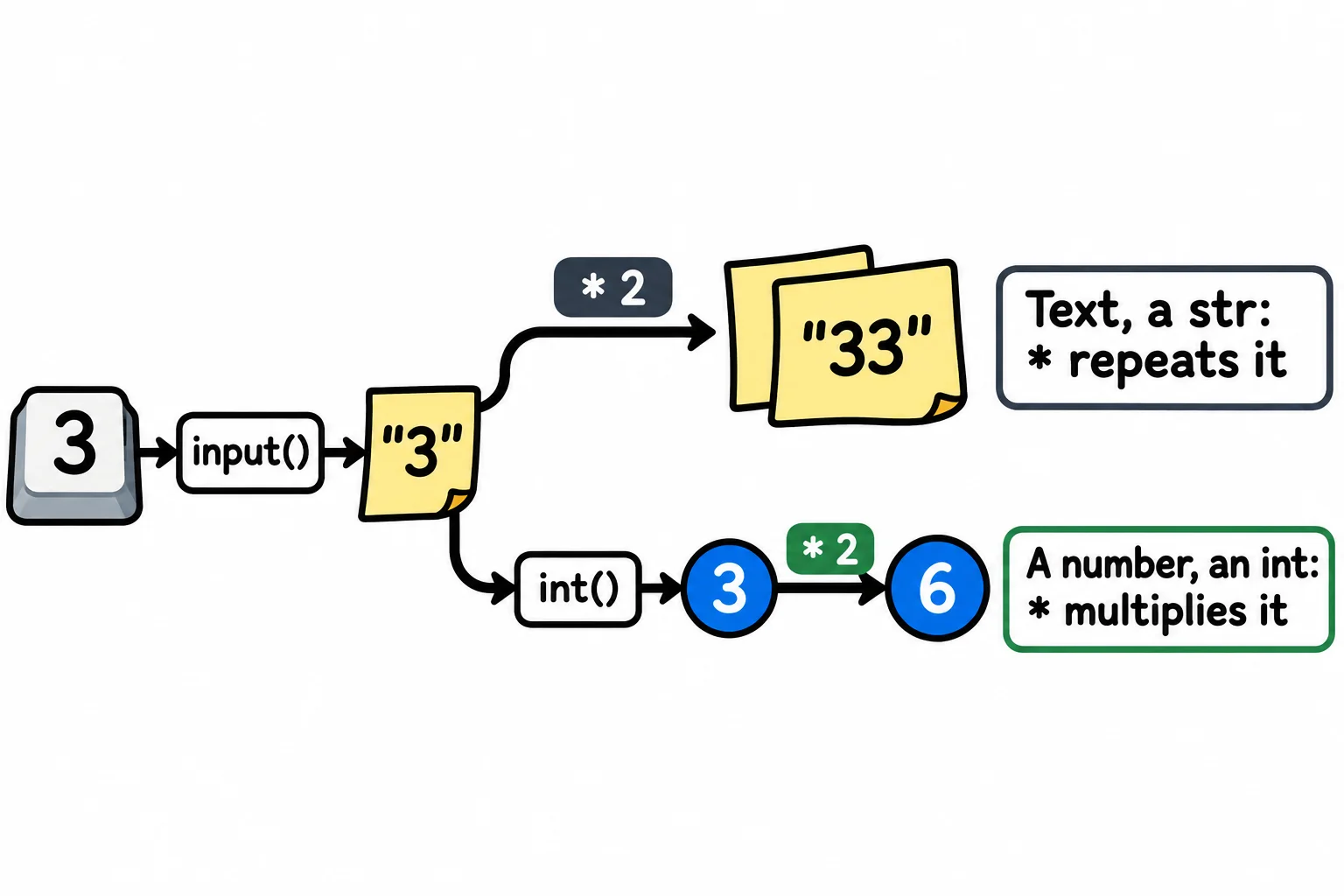
Wrap the input() in the conversion, and the answer arrives as a number:
popcorns = int(input("How many popcorns? "))
cash = float(input("Cash handed over: "))
cost = popcorns * 6.50
print(f"Change: ${cash - cost:.2f}")
How many popcorns? 3
Cash handed over: 20
Change: $0.50
Read the first line from the inside out: input() runs first and gives back "3", then int() turns it into 3, then popcorns gets it. Use int() for things you count, such as popcorns, and float() for amounts that can have cents.
str() goes the other way, for joining a number to text with +, as in "Popcorns: " + str(popcorns). An f-string turns values into text for you, so you'll need str() less often.
When the text isn't a number: ValueError
int() only understands text written as a whole number. Here's what the terminal shows on Windows when the customer types the word ten, from a file named order.py in the course folder (your path will be your own):
How many popcorns? ten
Traceback (most recent call last):
  File "C:\Users\Sam\python-course\order.py", line 1, in <module>
    popcorns = int(input("How many popcorns? "))
ValueError: invalid literal for int() with base 10: 'ten'
Read it from the last line up. A ValueError means the value had the right type, a string, but not a value int() can use. Invalid literal means the text isn't written the way a number is written, and base 10 means the everyday digits 0 to 9. The same happens with int("2.5"), because a whole number has no decimal point; float("2.5") works. Spaces around the digits are fine: int(" 3 ") is 3.
For now, your programs trust the person to type a number. Handling Errors with try and except, in Module 3, shows how a program catches a ValueError and asks again.
Do it: work out a customer's change
The snack bar's program asks how many popcorns a customer wants and how much cash they hand over, and prints their change. The practice box can't wait for typing, so the starter sets what the customer typed, as text, exactly as input() would give it back.
typed_popcorns: what the customer typed for the number of popcorns,"2".typed_cash: what they typed for the cash they handed over,"20".popcorn_price: the price of one popcorn,6.50.
Your job: below the starter's lines, make three variables, then print one line:
popcorns:typed_popcornsturned into a whole number (an int);cash:typed_cashturned into a decimal number (a float);change:cashminus what the popcorns cost atpopcorn_priceeach;- print
Change: $followed by the change with two decimal places.
Worked through: "2" becomes the whole number 2, and "20" becomes 20.0. Two popcorns cost 2 × 6.50, which is 13.0, and 20.0 − 13.0 leaves 7.0, so the program prints Change: $7.00.
Practiced live on the lesson page: write the Python right there and check it.
Check yourself
2 questions to try on the lesson page.
So what
Every number a person types reaches your program as text, and converting it is the step between asking a question and using the answer.