Lists: Keeping Things in Order
A list keeps many values in order under one name, so you can read any item by its index, counting from 0 at the front or from -1 at the back, add, insert and remove items, and check whether a value is there with in.
Novice · Python · Updated
After this lesson you can
- Make a list and read its items by index, counting from 0 at the front and from -1 at the back
- Add, insert and remove a list's items, and check whether a value is in a list with in
Key takeaways
- A list holds many values in order, in square brackets with commas between them, and len() tells you how many items it holds.
- Each item has an index, its position counted from 0. The first item is index 0, and the last is one less than the list's length.
- Negative indexes count from the end, so index -1 is the last item and -2 the one before it.
- append(), insert(), remove() and pop() change the list itself. pop() also hands back the item it took out.
- The in operator answers True or False to the question "is this value in the list?"
Programs rarely work with one value at a time. A class has thirty students, a playlist has fifty songs, a spreadsheet has a thousand rows. Whenever you have several values of the same kind that belong together in an order (the steps of a recipe, the scores on a quiz, the stops on a trip), you'll keep them in a list. Almost every Python program you write from here on has one.
The example is a road trip from Chicago to the Grand Canyon, with a stop for each night on the way.
Five stops, five variables
Here's a first try at the trip's plan, with one variable per stop:
stop_1 = "Chicago"
stop_2 = "Omaha"
stop_3 = "Denver"
stop_4 = "Moab"
stop_5 = "Grand Canyon"

print(stop_1, stop_2, stop_3, stop_4, stop_5)
Chicago Omaha Denver Moab Grand Canyon
It works until the plan changes. Add a night in Lincoln after Omaha, and every variable after it has the wrong number; every line that prints the trip needs another name added by hand. Ask "how many stops are there?" and the program can't answer, because the count lives only in your head. Five separate variables don't know they belong together.
A list: one name, many values in order
A shopping list on paper holds many lines under one heading, in the order you wrote them. A Python list is the same idea: one name for many values, kept in order. You write it in square brackets, [], with a comma between the items:
stops = ["Chicago", "Omaha", "Denver", "Moab", "Grand Canyon"]

print(stops)
print(len(stops))
['Chicago', 'Omaha', 'Denver', 'Moab', 'Grand Canyon']
5
print() shows the whole list, brackets and all, with each string in quotes. len(), which counts the characters in a string, counts a list's items too: 5 stops. A list can hold numbers as well, such as each day's miles, [470, 540, 355, 330], and [] on its own is an empty list, ready to fill.
Reading items by index
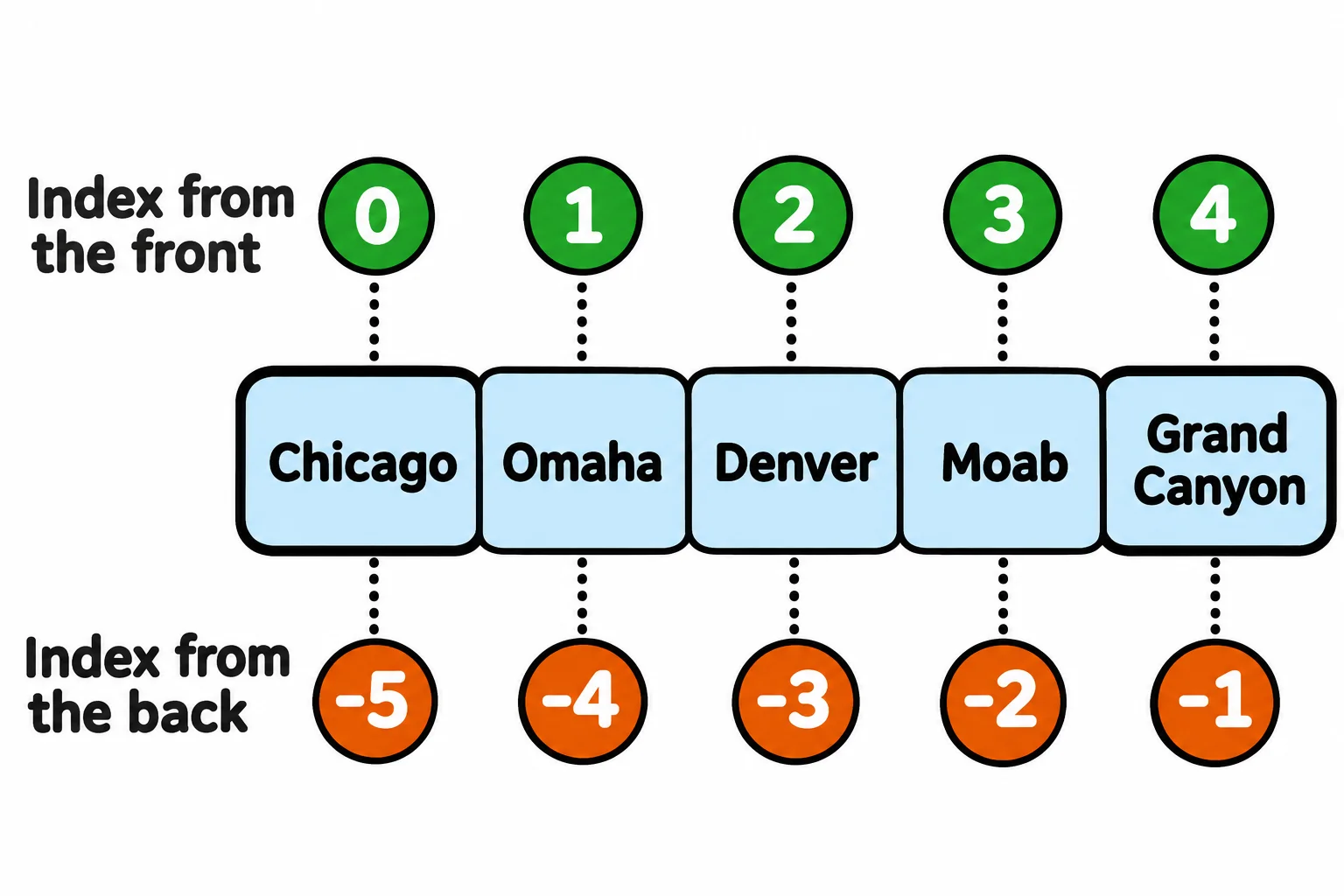
On paper you'd number the stops 1, 2, 3. Python numbers a list's items too, but it starts at 0. An item's number is its index, and you read an item by writing its index in square brackets after the list's name. stops[0] is read "stops, index zero":
stops = ["Chicago", "Omaha", "Denver", "Moab", "Grand Canyon"]

print(stops[0])
print(stops[2])
print(stops[4])
Chicago
Denver
Grand Canyon
Counting from 0 feels odd at first. It helps to read an index as "how many items come before this one": nothing comes before Chicago, so it's index 0. That makes the last of 5 items index 4, always one less than len(). Ask for an index the list doesn't have, such as stops[5], and Python stops with IndexError: list index out of range.
Often you want the last item, whatever the list's length. Negative indexes count from the end: -1 is the last item and -2 the one before it. stops[-1] is read "stops, index minus one":
stops = ["Chicago", "Omaha", "Denver", "Moab", "Grand Canyon"]

print(stops[-1])
print(stops[-2])
Grand Canyon
Moab
stops[-1] is the destination, and it still will be after you add more stops.
Changing a list
A paper list gets added to and crossed out. A Python list can change too, with its methods: functions that belong to a value, called with a dot after its name. Each of these changes the list itself, in place:
stops.append(city)addscityto the end.stops.insert(index, city)putscityat that index, and the items from there on move one place along.stops.remove(city)takes out the first item equal tocity.stops.pop(index)takes out the item at that index and hands it back. With no index, it takes the last item.
stops = ["Chicago", "Denver", "Grand Canyon"]

stops.insert(1, "Omaha")
stops.insert(3, "Moab")
stops.append("Las Vegas")
print(stops)

stops.remove("Las Vegas")
skipped = stops.pop(1)
print("Skipping", skipped)
print(stops)
['Chicago', 'Omaha', 'Denver', 'Moab', 'Grand Canyon', 'Las Vegas']
Skipping Omaha
['Chicago', 'Denver', 'Moab', 'Grand Canyon']
There's no new list here: the same stops holds different items afterward. To replace an item instead, assign to its index: stops[1] = "Lincoln" puts Lincoln where the item at index 1 was.
Is it in the list?
Before you add a stop, you'd check it isn't planned already. The in operator asks "is this value in the list?" and answers True or False; not in asks the opposite:
stops = ["Chicago", "Omaha", "Denver", "Moab", "Grand Canyon"]

print("Moab" in stops)
print("Las Vegas" in stops)
print("moab" in stops)

if "Las Vegas" not in stops:
    stops.append("Las Vegas")
print(stops)
True
False
False
['Chicago', 'Omaha', 'Denver', 'Moab', 'Grand Canyon', 'Las Vegas']
in compares exactly, capital letters included, so "moab" isn't "Moab". It's also how you stay clear of an error: stops.remove("Reno") stops with ValueError: list.remove(x): x not in list, so check with in first and remove a value only when it's there.
Do it: drop a stop from the trip
The trip planner has a Skip this stop button. It must never drop the start or the destination, and it mustn't stop with an error when the city isn't on the trip.
stops: the trip's stops in order, from the start to the destination.city: the stop to drop.
Your job: write the function drop_stop(stops, city) so it takes city out of stops and returns how many stops are left.
- When
cityis instopsand is a stop on the way, remove it from the list (the list itself changes). - When
cityis the first stop (the start) or the last stop (the destination), leave the list as it is. - When
cityisn't instops, leave the list as it is. - Either way, return how many stops the list holds.
Worked through: with stops = ["Chicago", "Omaha", "Denver", "Moab", "Grand Canyon"], drop_stop(stops, "Moab") removes Moab, so stops becomes ["Chicago", "Omaha", "Denver", "Grand Canyon"], and it returns 4. On the same five stops, drop_stop(stops, "Chicago") returns 5: Chicago is the start, so it stays.
Practiced live on the lesson page: write the Python right there and check it.
Check yourself
2 questions to try on the lesson page.
So what
A list gives many values one name and an order, so a program can count them, read any one by its position and change the plan without a new variable for every item.