Sets: No Duplicates Allowed
A set holds each value once and in no order, so it removes duplicates, checks quickly whether something is there, and compares two collections with union, intersection and difference.
Apprentice · Python · Updated
After this lesson you can
- Make a set to remove duplicates, add to it, and check what's in it with in
- Compare two sets with union, intersection and difference
Key takeaways
- A set keeps one of each value. set() turns a list into a set and drops the duplicates, and len() counts what's left.
- A set has no order and no positions, so sorted() turns it into a sorted list whenever the order matters, as it does when you print it.
- add() puts a value in a set, and adding one that's already there changes nothing. An empty set is set(), because {} makes an empty dictionary.
- Union (the | operator) is everything in either set, intersection (&) is what both sets have, and difference (-) is what the first set has that the second doesn't.
Some questions are about what's there, not how many times or in what order: which students handed in their work, which tags a blog uses, what two playlists have in common, what a recipe needs that isn't in your kitchen. Lists can answer them with enough loops; sets answer them in a line. You'll reach for a set whenever duplicates get in the way or two groups need comparing.
Pantry Pal, a recipe app, is planning a week of meals and wants one shopping list from all the recipes.
A list full of repeats
The week's three recipes need these ingredients, and some turn up more than once:
needed = ["eggs", "flour", "milk", "eggs", "cheese", "flour", "eggs"]

unique = []
for item in needed:
    if item not in unique:
        unique.append(item)
print(unique)
print(len(unique))
['eggs', 'flour', 'milk', 'cheese']
4
It works: before adding an item, check that it isn't there yet. That's four lines for "each one once", and every not in reads through the list built so far, which gets slow when the list holds thousands of items. Python has a collection made for exactly this job.
A set keeps one of each
Think of the guest list at a party's door: a name is either on it or it isn't, and writing it twice doesn't make two guests. A set works like that. It holds each value once, and it has no order: no first item and no positions.
needed = ["eggs", "flour", "milk", "eggs", "cheese", "flour", "eggs"]
shopping = set(needed)

print(len(shopping))
print(sorted(shopping))
shopping.add("butter")
shopping.add("eggs")
print(len(shopping))
print("cheese" in shopping)
4
['cheese', 'eggs', 'flour', 'milk']
5
True
set(needed)makes a set from the list, and the duplicates are gone: 7 items became 4.- A set has no order, so there's no
shopping[0]. Printing a set shows its items in an order Python picks, which can change from one run to the next, sosorted()turns it into a sorted list when you want a steady order. .add()puts in one value. Adding"eggs"again changed nothing: the set went from 4 to 5 with the butter and stayed at 5.inchecks whether a value is in the set, and it's fast even for a set of a million values, because a set finds a value without reading through the others.
You can also write a set with curly braces and commas: {"eggs", "flour"}. Curly braces with a colon in each pair make a dictionary instead, and empty curly braces, {}, make an empty dictionary, so an empty set is written set().
Comparing two sets
Picture two overlapping circles: one holds what the pancake recipe needs, and the other what's in the pantry. Some ingredients sit in the overlap, and some only in one circle. Python asks about each part with an operator:
recipe = {"eggs", "flour", "milk", "butter"}
pantry = {"eggs", "flour", "sugar"}

print(sorted(recipe - pantry))
print(sorted(recipe & pantry))
print(sorted(recipe | pantry))
print(sorted(pantry - recipe))
['butter', 'milk']
['eggs', 'flour']
['butter', 'eggs', 'flour', 'milk', 'sugar']
['sugar']
recipe - pantry, read "recipe minus pantry", is the difference: what the recipe needs that the pantry doesn't have. That's the shopping list.recipe & pantry, read "recipe and pantry", is the intersection: what both have.recipe | pantry, read "recipe or pantry", is the union: everything in either one, each value once. The|is the vertical bar key, usually above Enter.- The difference depends on the order:
pantry - recipeis what the pantry has that the recipe doesn't use.
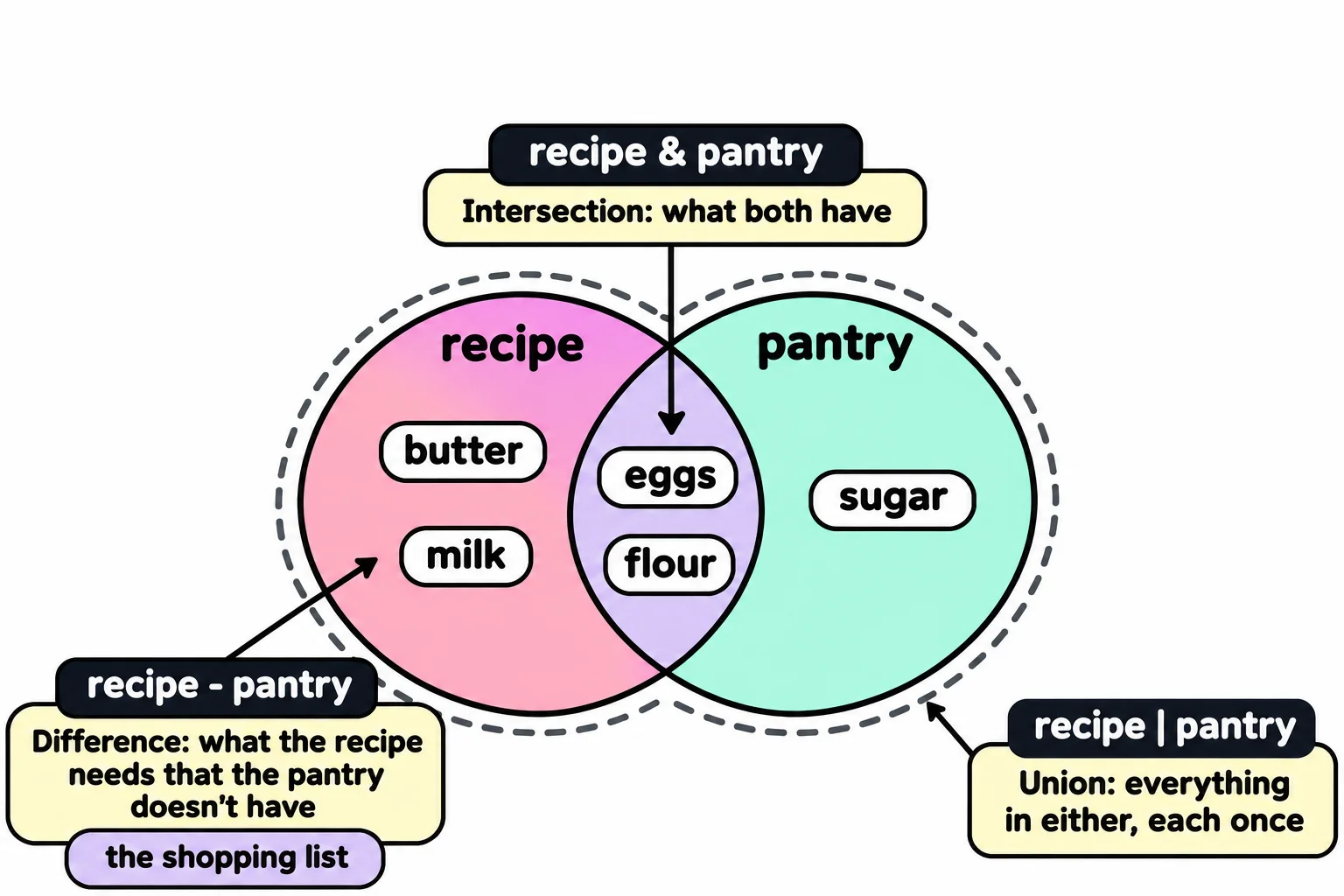
Each operator has a method with the same meaning, if you prefer words: recipe.difference(pantry), recipe.intersection(pantry) and recipe.union(pantry). In your textbook, these are the set operations of math class, drawn as a Venn diagram.
Do it: find the ingredients two recipes share
Pantry Pal suggests cooking two recipes on the same day when they share ingredients, so you shop once. The ingredient lists come straight from the recipe cards, so an ingredient can appear more than once in a list.
first: a list of the first recipe's ingredients.second: a list of the second recipe's ingredients.
Your job: write the function shared_ingredients(first, second) so it returns a list of the ingredients both recipes use.
- Each shared ingredient is in the list once, even when a recipe lists it twice.
- The list is sorted from A to Z.
- When the recipes share nothing, it returns an empty list,
[].
Worked through: pancakes need ["eggs", "flour", "milk", "butter"] and waffles need ["flour", "eggs", "butter", "sugar", "eggs"]. Both use eggs, flour and butter; sorted from A to Z, shared_ingredients returns ["butter", "eggs", "flour"].
Practiced live on the lesson page: write the Python right there and check it.
Check yourself
2 questions to try on the lesson page.
So what
A set answers "is it there?" and "what's the difference?" in one line, which turns a pile of loops into a shopping list, a list of who's missing or a check for duplicates.