Your First FastAPI Route
FastAPI turns Python functions into a web API, where a decorator ties each function to an address, a path parameter with a type hint reads part of the address, HTTPException answers 404, fastapi dev runs the app, and /docs lets you try every route.
Apprentice · Python · FastAPI · Updated
After this lesson you can
- Write a FastAPI route with @app.get that returns a list of dictionaries as JSON, and run the app with fastapi dev
- Read a path parameter such as book_id with a type hint, and raise HTTPException to answer 404 when the item isn't there
Key takeaways
- A back end is the program that answers a web API's requests. FastAPI is a Python framework for writing one, installed with pip install "fastapi[standard]".
- The decorator line @app.get("/books") ties the function below it to GET requests for /books, and FastAPI sends what the function returns as JSON.
- A path parameter such as {book_id} is filled in by the address. Its type hint int turns "2" into 2, and FastAPI answers 422 when the value isn't a whole number.
- raise HTTPException(status_code=404, detail="Book not found") answers 404 with that message, for an item that isn't there.
- fastapi dev main.py runs the app on your computer, and the page at /docs lists every route and lets you try each one.
Every app on your phone that shows a list, of messages, orders or songs, gets it from a program on a server that answers its requests. In What a Web API Is you stood at the order window and asked the National Weather Service for a forecast. This lesson puts you in the kitchen: you'll write the Python program that answers. It's the work behind every store, sign-up form and phone app, and it's how a tool you've written becomes something other programs can use.
The example is Chapter & Verse, a book club whose members want an app that lists the books the club has read and the one it's reading now.
The kitchen behind the order window
Chapter & Verse keeps its books in a Python list of dictionaries, one per book. A member's phone can't run your script or read a list inside your program. What the app needs is an address it can ask, such as /books, and an answer in JSON, the text format web APIs send.
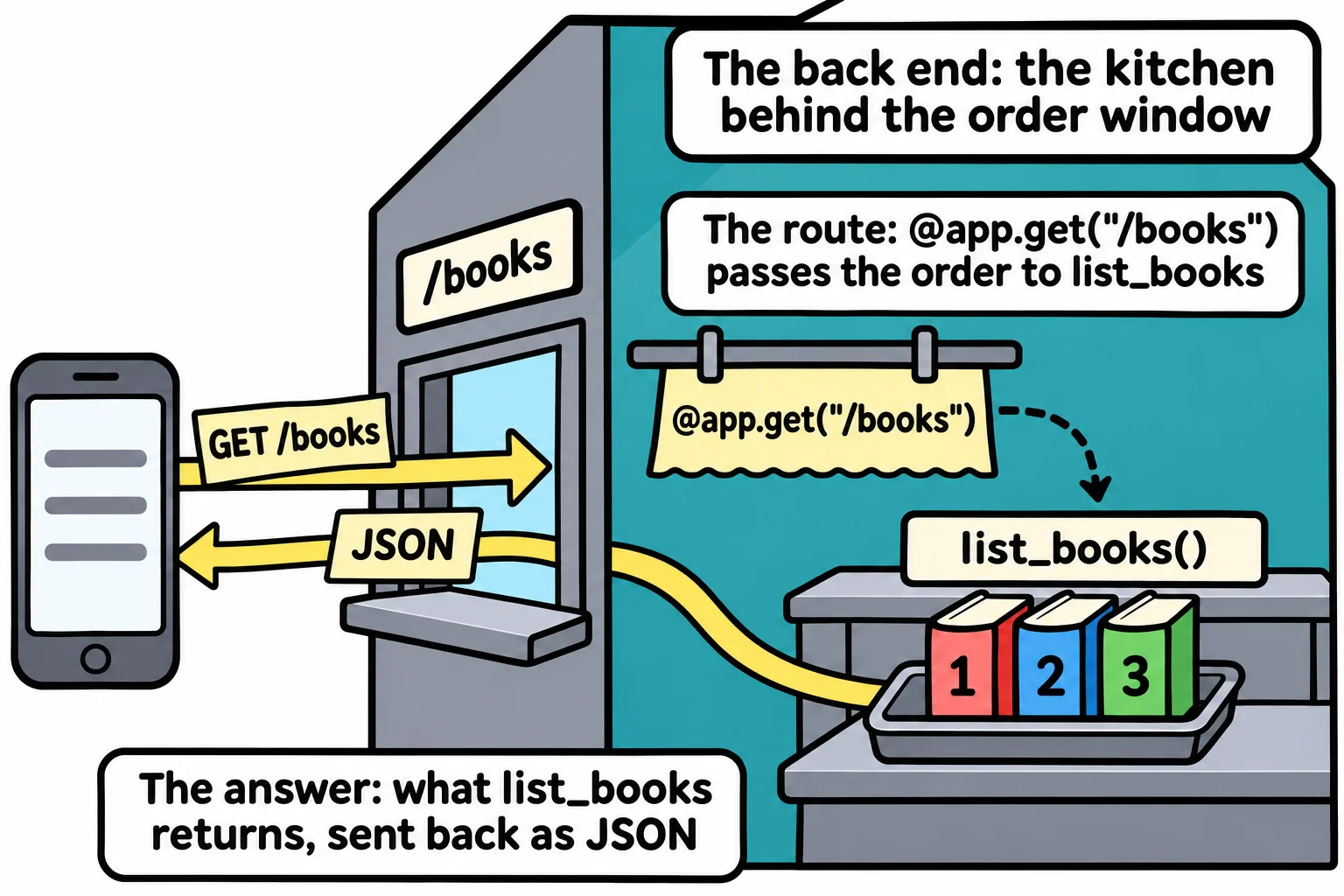
The program that waits for those requests and answers them is the back end: the kitchen behind the order window. You could write one from scratch, reading each request's raw text and writing raw answers, but every back end needs the same plumbing. A framework is ready-made code that does the plumbing and calls the functions you write. FastAPI is a popular Python framework for web APIs.
Make a folder, book-club, in your python-course folder, open it in VS Code, make and turn on a virtual environment as in Virtual Environments and pip, and install FastAPI:
pip install "fastapi[standard]"
[standard] adds the extras most FastAPI projects use, including the server that runs your app. The quotes keep zsh, on a Mac, from reading the square brackets as a pattern of file names.
An app and its first route
Save this as main.py:
from fastapi import FastAPI

app = FastAPI()

BOOKS = [
    {"id": 1, "title": "The Lantern Keeper's Cat", "pages": 312, "status": "read"},
    {"id": 2, "title": "Twelve Bridges North", "pages": 284, "status": "read"},
    {"id": 3, "title": "Rain over Copper Hill", "pages": 356, "status": "reading"},
]


@app.get("/books")
def list_books():
    return BOOKS
app = FastAPI() makes the app, the object that receives every request. The line @app.get("/books") is read "at app dot get books". A line that starts with @ right above a function is a decorator: it hands the function to something else to use. This one tells the app: when a GET request asks for /books, call list_books. An address tied to a function this way is a route.
list_books returns a list of dictionaries, and FastAPI turns it into JSON. You never call list_books() yourself: the app calls it each time a request comes in.
Run it, and ask it for the books
In the terminal, with the virtual environment on:
fastapi dev main.py
 ⚡️ Starting FastAPI in development mode

 🐍 Using import string: main:app

 🌐 Server started at http://127.0.0.1:8000
    Documentation at http://127.0.0.1:8000/docs

  Logs:

INFO:     Will watch for changes in these directories: ['C:\\Users\\Sam\\python-course\\book-club']
INFO:     Uvicorn running on http://127.0.0.1:8000 (Press CTRL+C to quit)
INFO:     Started reloader process [2566] using WatchFiles
INFO:     Started server process [2615]
INFO:     Waiting for application startup.
INFO:     Application startup complete.
fastapi dev starts Uvicorn, the server program that listens for requests and hands each one to your app (your terminal may color the lines, and the numbers in brackets differ on every run). 127.0.0.1 is your own computer, and 8000 is the port, the door number the server listens at. The dev part watches your files: save main.py, and the app restarts with your change. Leave it running, and open http://127.0.0.1:8000/books in your browser:
[{"id":1,"title":"The Lantern Keeper's Cat","pages":312,"status":"read"},{"id":2,"title":"Twelve Bridges North","pages":284,"status":"read"},{"id":3,"title":"Rain over Copper Hill","pages":356,"status":"reading"}]
That's your Python list, sent as JSON. When you're finished, press Ctrl+C in the terminal to stop the server.
One book by its number: a path parameter
The app also needs one book at a time: /books/1, /books/2, and so on. A route for every book would mean a new route each month. Instead, part of the address can be a blank that each request fills in, like the Size: ____ on an order form. Here's main.py with a second route:
from fastapi import FastAPI, HTTPException

app = FastAPI()

BOOKS = [
    {"id": 1, "title": "The Lantern Keeper's Cat", "pages": 312, "status": "read"},
    {"id": 2, "title": "Twelve Bridges North", "pages": 284, "status": "read"},
    {"id": 3, "title": "Rain over Copper Hill", "pages": 356, "status": "reading"},
]


@app.get("/books")
def list_books():
    return BOOKS


@app.get("/books/{book_id}")
def get_book(book_id: int):
    for book in BOOKS:
        if book["id"] == book_id:
            return book
    raise HTTPException(status_code=404, detail="Book not found")
"/books/{book_id}" is read "books slash book id in braces". The braces mark a path parameter: whatever a request puts in that place arrives in the function's parameter of the same name. Everything in an address is text, so /books/2 gives "2"; the type hint int tells FastAPI to turn it into the number 2, which can equal a book's "id".
When no book matches, the function raises an HTTPException, and FastAPI answers with its status code, 404 Not Found, and its detail as JSON. /books/2 answers 200 OK:
{"id":2,"title":"Twelve Bridges North","pages":284,"status":"read"}
/books/42 answers 404 Not Found:
{"detail":"Book not found"}
And /books/abc answers 422 Unprocessable Content, before your function even runs:
{"detail":[{"type":"int_parsing","loc":["path","book_id"],"msg":"Input should be a valid integer, unable to parse string as an integer","input":"abc"}]}
abc isn't a whole number, so the type hint's check fails, and FastAPI says where ("path", "book_id") and why.
The docs page FastAPI writes for you
With the server running, open http://127.0.0.1:8000/docs. FastAPI has written a page that lists every route in your app, built from your decorators and type hints, so it stays right as the app grows. Click GET /books/{book_id}, then Try it out, type 2 in the book_id box and click Execute: the page sends a real request and shows the answer and its status code.
This page is how you'll check a route by hand, and how other developers find out what your API offers without reading your code.
Check yourself
2 questions to try on the lesson page.
So what
A few lines of FastAPI turn a Python function into an address any app can ask, and the docs page shows the world what your API can do.