JDBC Objects
Meet the three objects that query MySQL from Java: a BasicDataSource to connect, a JdbcTemplate to run SQL, and a SqlRowSet to read the rows that come back.
Journeyman · Java · SQL · Updated
JDBC (Java Database Connectivity) is the Java library that contains the objects used to interact with databases.
Datasource
A datasource object holds the url, username and password: all the information needed to connect to the database.
BasicDataSource dataSource = new BasicDataSource();

dataSource.setUrl("jdbc:mysql://localhost:3306/northwind");
dataSource.setUsername("root");
dataSource.setPassword("your-root-password"); // the root password you chose when you installed MySQL
The url is the address to the database and consists of 5 parts
jdbc:mysql://localhost:3306/northwind
- jdbc: the protocol being used to connect to the database
- mysql: the database management system (DBMS)
- localhost: the address of the server where the DBMS lives
- 3306: the port on which the DBMS is listening for requests
- northwind: the name of the database
JdbcTemplate
The JdbcTemplate uses a DataSource object to execute SQL queries on a database. It opens and closes a connection to the database as needed.
JdbcTemplate jdbcTemplate = new JdbcTemplate(dataSource);

String query = """
        INSERT INTO products (product_name, unit_price)
        VALUES ('Milk Chocolate', 2.99);
        """;

jdbcTemplate.update(query);
There are 2 ways to execute a query using the JdbcTemplate:
jdbcTemplate.update(sql)runs a query that does not return rows. Use it for INSERT, UPDATE and DELETE statements.jdbcTemplate.queryForRowSet(sql)runs a query that returns rows. Use it for a SELECT statement.
SqlRowSet
The SqlRowSet is the object that can read the stream of data that is returned from a query. The JdbcTemplate returns a SqlRowSet when the queryForRowSet() method is called.
JdbcTemplate jdbcTemplate = new JdbcTemplate(dataSource);
String query = """
SELECT product_id
    , product_name
    , unit_price
FROM products;
""";
SqlRowSet row = jdbcTemplate.queryForRowSet(query);
while(row.next())
{
int productid = row.getInt("product_id");
String productName = row.getString("product_name");
double unitPrice = row.getDouble("unit_price");
System.out.println("Id: " + productid);
System.out.println("Name: " + productName);
System.out.println("Price: A SqlRowSet gives you access to the data set returned by the database, but you can only read one row at a time.
The row.next() method moves you to the next row in the data set. If the end of the data set is reached, it returns false, and the loop ends.
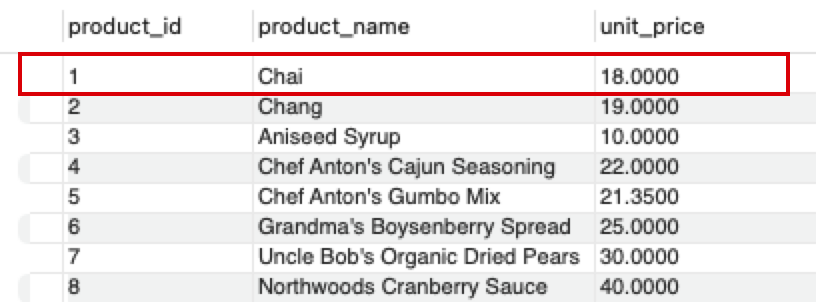
Do it: list the products for the budget shelf
The store's budget shelf shows every product that costs less than $10.00. The rows come from this query:
SELECT product_id
, product_name
, unit_price
FROM products;
Each row has three columns:
product_id: a whole number, read withgetInt.product_name: text, read withgetString.unit_price: a price such as18.0, read withgetDouble.
The practice box can't reach MySQL, so the bottom of Main.java has a stand-in for SqlRowSet, named StandInRowSet. Its rows are written in code, but its next(), getInt, getString and getDouble work as SqlRowSet's do, by column name. Leave it as it is. The tests make one like this:
StandInRowSet row = new StandInRowSet(
    new Object[] { 1, "Chai", 18.0 },
    new Object[] { 13, "Konbu", 6.0 },
    new Object[] { 3, "Aniseed Syrup", 10.0 },
    new Object[] { 33, "Geitost", 2.5 });
| Row | product_name |
unit_price |
Less than 10.0? |
|---|---|---|---|
| 1st | Chai | 18.0 | no |
| 2nd | Konbu | 6.0 | yes |
| 3rd | Aniseed Syrup | 10.0 | no: exactly 10.0 isn't less |
| 4th | Geitost | 2.5 | yes |
So budgetShelf(row) returns the list Konbu, Geitost.
Your job: write the method budgetShelf(StandInRowSet row) so it returns an ArrayList<String> of product names.
- Read the rows one at a time, in order, until there are no more.
- When a row's
unit_priceis less than10.0, add itsproduct_nameto the list. - A price of exactly
10.0isn't less, so that product isn't added. - When no product is cheap enough, or there are no rows, return an empty list.
The method and the class sit in the file, Main.java, with nothing around them: since Java 25, a small program can be written this way, without the public class and main around it that the lesson's code has.
Practiced live on the lesson page: write the Java right there and check it.