The CASE / WHEN Statement
How a CASE expression turns values into labels, such as HIGH or LOW, in a query's results.
Journeyman · SQL · MySQL · Updated
The SQL CASE expression is not a sub-query, but it is a useful tool for reports: it turns a range of values into a few labels.
For instance, in the last sub-query example, we selected all products whose prices were higher than average in their category. But what if we want to see all products with a column that states whether the price is higher or lower than the average?
We can first modify our query to calculate the difference between the unit_price and the average_price.
SELECT p.category_id
    , p.product_name
    , p.unit_price
    , ap.average_price
    , p.unit_price - ap.average_price AS difference
FROM products AS p
INNER JOIN (
    SELECT category_id
        , AVG(unit_price) AS average_price
    FROM products
    GROUP BY category_id
) AS ap
    ON p.category_id = ap.category_id
ORDER BY p.category_id
    , p.product_name;
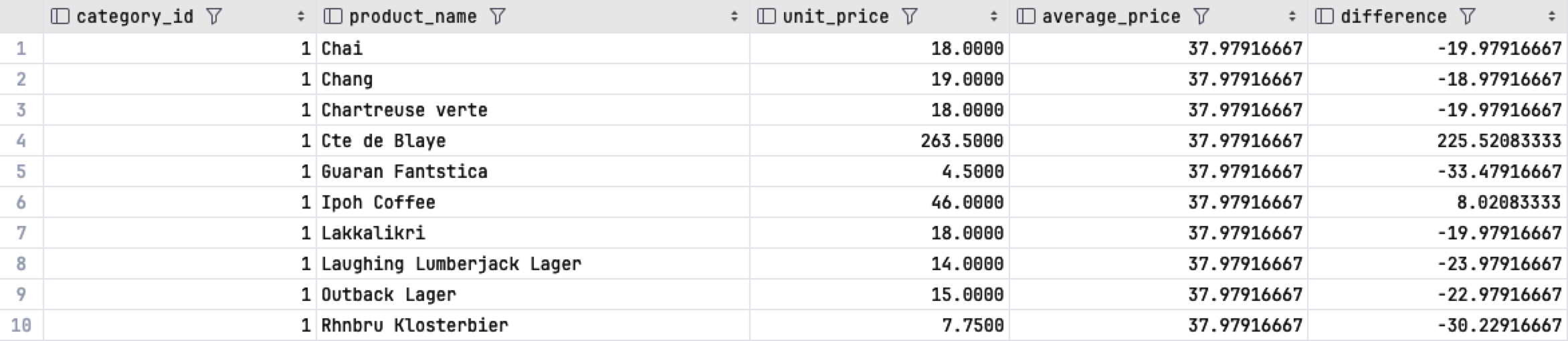
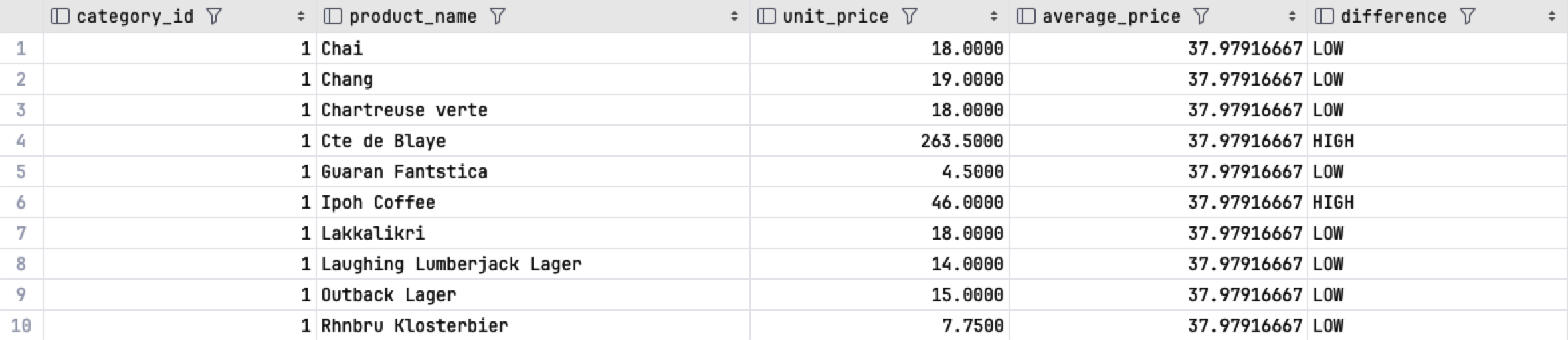
Adding the new column is helpful, but a list of numbers is hard to read at a glance. Labels such as HIGH or LOW would make the report easier to understand.
A CASE expression turns each value into a label.
SELECT p.category_id
    , p.product_name
    , p.unit_price
    , ap.average_price
    , CASE
        WHEN unit_price > ap.average_price THEN 'HIGH'
        ELSE 'LOW'
    END AS difference
FROM products AS p
INNER JOIN (
    SELECT category_id
        , AVG(unit_price) AS average_price
    FROM products
    GROUP BY category_id
) AS ap
    ON p.category_id = ap.category_id
ORDER BY p.category_id
    , p.product_name;
Do it: label each order on time, late or not shipped
The shipping manager wants every order labeled with how its shipping went, in words anyone can read.
The orders table has each order's order_id, its required_date (the day the customer needs it by) and its shipped_date (the day it left, or NULL when it hasn't left yet). It holds these rows (the Tables tab shows the SQL that makes it):
| order_id | required_date | shipped_date |
|---|---|---|
| 10248 | 2016-08-01 | 2016-07-16 |
| 10249 | 2016-08-16 | 2016-07-10 |
| 10264 | 2016-08-21 | 2016-08-23 |
| 10271 | 2016-08-29 | 2016-08-29 |
| 10280 | 2016-09-11 | 2016-09-12 |
| 11008 | 2018-05-06 | NULL |
| 11019 | 2018-05-11 | NULL |
Each order gets one label, the first rule that fits:
| When | Label |
|---|---|
shipped_date is NULL |
Not shipped |
shipped_date is later than required_date |
Late |
| Any other order | On time |
The lesson's CASE has one WHEN. A CASE can hold several, one after another: the database checks them from the top, and the first one that's true gives the label. ELSE gives the label when none of them is.
For example, order 10264 was needed by 2016-08-21 and shipped on 2016-08-23, two days later, so its label is Late. Order 10271 shipped on the very day it was needed, which isn't later, so it's On time.
Your query should give exactly these rows, in this order:
| order_id | status |
|---|---|
| 10248 | On time |
| 10249 | On time |
| 10264 | Late |
| 10271 | On time |
| 10280 | Late |
| 11008 | Not shipped |
| 11019 | Not shipped |
Your job: write one SELECT query on orders, with a CASE expression for the label.
- Show two columns:
order_id, then the label, namedstatus. - Give each order the label from the table above, checking the rules in that order.
- Spell the labels exactly as they are:
Not shipped,Late,On time. - Sort the rows by
order_id, smallest first.
Practiced live on the lesson page: write the SQL right there and check it.