Maps
Maps store values under unique keys. HashMap is fastest, LinkedHashMap keeps the order you added entries, and TreeMap sorts by key.
Apprentice · Java · Updated
Maps store collections of data in key/value pairs. The key is like a label that helps you locate the item you are looking for. When adding a new item, you must add a key along with the item.
Map entries are not accessible by their ordinal position. Instead, items can only be located by their key.
Keys must be unique, like a Primary Key in a database table. This makes maps ideal to use as lookup tables.
HashMap
In a HashMap, the key to each entry is hashed as it is added to the map. The hash is a number calculated from the key, a bit like a fingerprint.
Hash values serve as an index to help locate the item later. HashMaps are the fastest for key lookups because hash values provide an efficient index. This makes them the most common type of map.
Note: a HashMap does not keep its entries in any particular order, and we cannot control the order. Running this code printed Monday, Thursday, Friday, Sunday, Wednesday, Tuesday, Saturday.
Map<String, Integer> weekdays = new HashMap<>();

weekdays.put("Sunday", 1);
weekdays.put("Monday", 2);
weekdays.put("Tuesday", 3);
weekdays.put("Wednesday", 4);
weekdays.put("Thursday", 5);
weekdays.put("Friday", 6);
weekdays.put("Saturday", 7);

weekdays.forEach((key, value) -> {
    System.out.println(key + " : " + value);
});
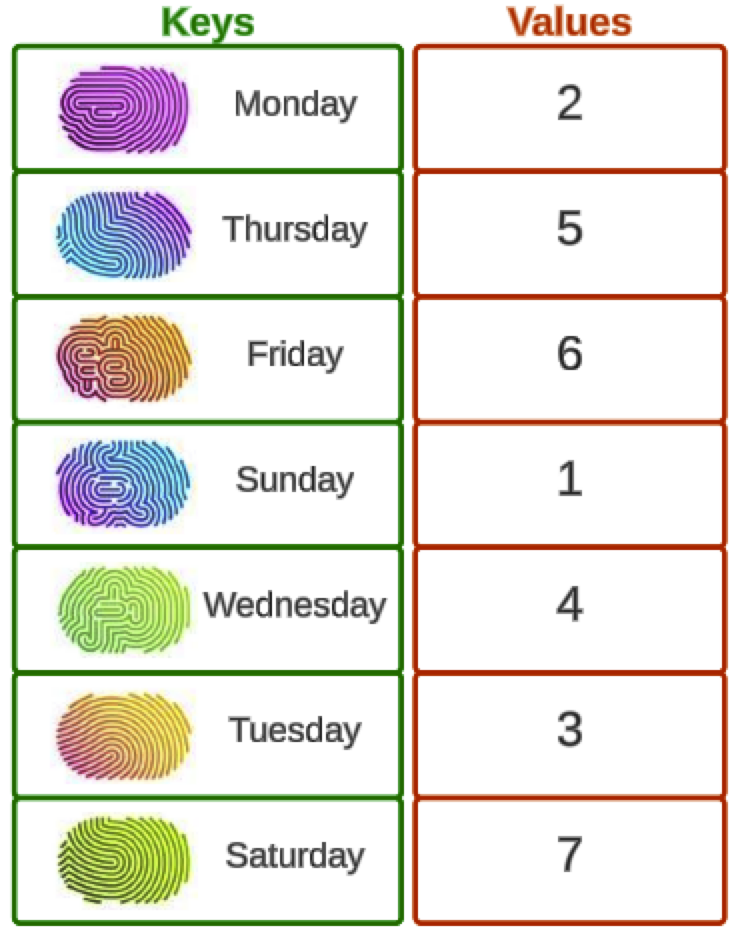
LinkedHashMap
In a LinkedHashMap, the key to each entry is still hashed as it is added to the map. However, as in a LinkedList, the map entries are linked to each other as they are added.
This means that as we iterate through the map in a forEach loop the entries will appear in the order they were added to the map.
Map<String, Integer> weekdays = new LinkedHashMap<>();

// add items here

weekdays.forEach((key, value) -> {
    System.out.println(key + " : " + value);
});
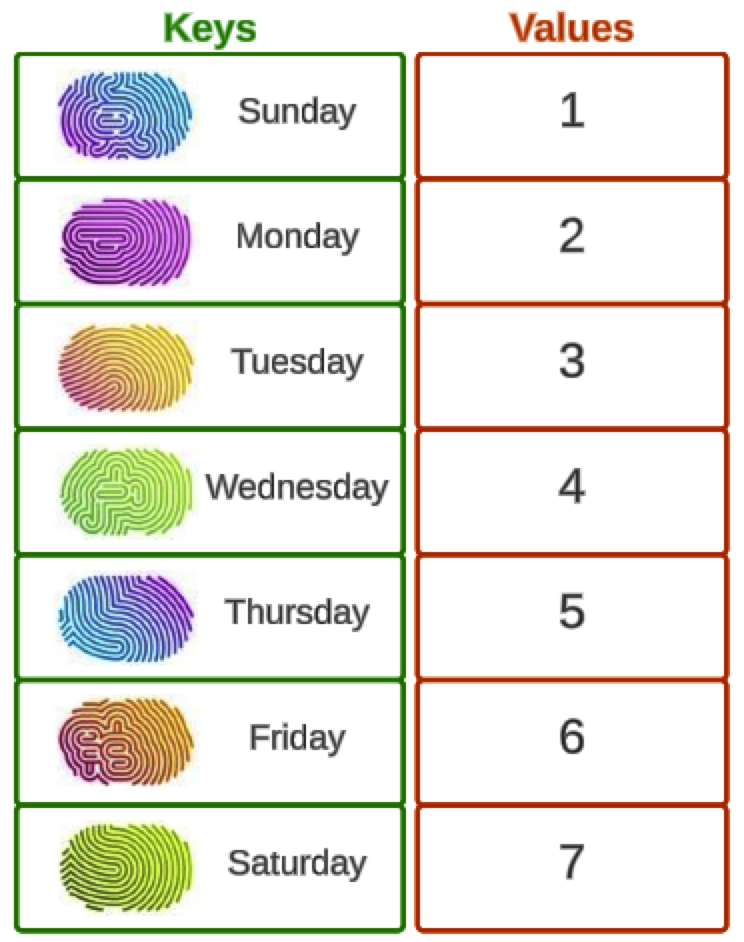
TreeMap
In a TreeMap, the key to each entry is not hashed. Entries are kept sorted by the key's natural order: alphabetical for String keys, smallest to largest for numbers.
This means that our weekdays map will be sorted alphabetically by the name of the weekday.
Map<String, Integer> weekdays = new TreeMap<>();

// add items here

weekdays.forEach((key, value) -> {
    System.out.println(key + " : " + value);
});
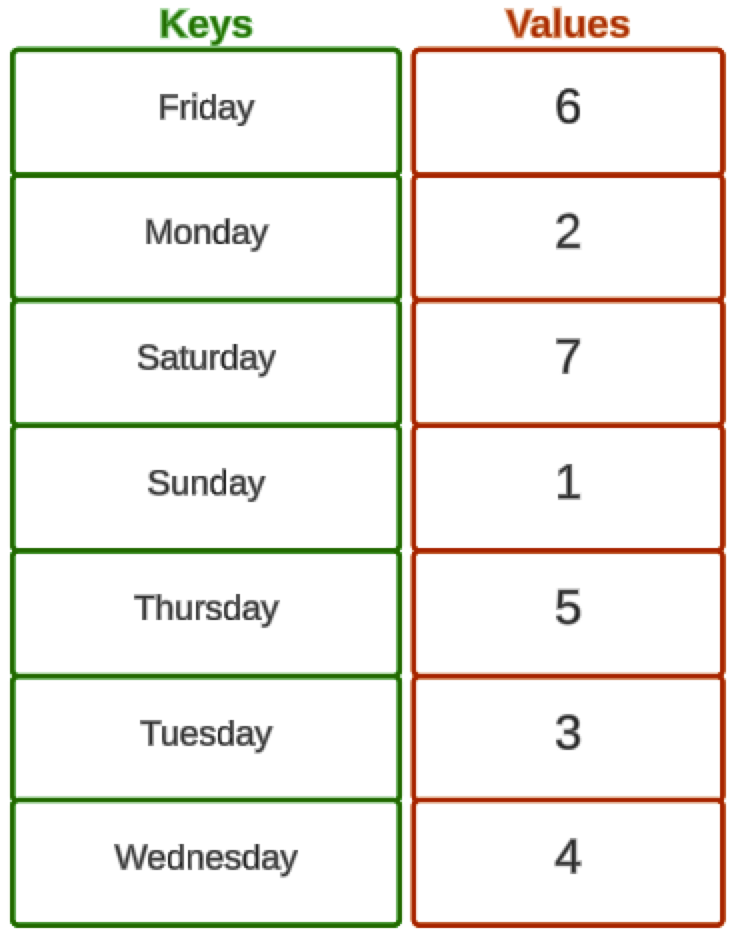
Do it: a menu board that stays in alphabetical order
The café's menu board lists its drinks in alphabetical order, so customers can find one fast. The board is a map: each drink's name is a key, and its price, in whole dollars, is the value. The owner adds new drinks during the year, and each one must land in its alphabetical place without anyone sorting the board again.
The owner gave you the drinks in this order:
| Drink | Price |
|---|---|
"Tea" |
3 |
"Coffee" |
4 |
"Mocha" |
5 |
"Cocoa" |
4 |
For example, menuBoard() gives a map whose drinks come out as Cocoa, Coffee, Mocha, Tea. When the owner later adds "Chai" at 4 with put, the drinks come out as Chai, Cocoa, Coffee, Mocha, Tea.
Your job: finish the method menuBoard() so it returns a Map<String, Integer> of the four drinks.
- Each drink's name is a key, and its price is the value.
- Choose the kind of map that keeps its keys in alphabetical order, even for drinks added later. The starter's
HashMapdoesn't.
Practiced live on the lesson page: write the Java right there and check it.