Common UML Diagrams
UML is a shared way of drawing software. A use case diagram shows who uses the system and for what, a class diagram shows the classes and how they're related, and a sequence diagram shows the messages that pass between parts, in order. Sketch them to think and to explain.
Apprentice · Software Development · OOP · Updated
After this lesson you can
- Read and sketch use case, class and sequence diagrams
Key takeaways
- A use case diagram shows the actors, as stick figures, and what they do with the system, as ovals named with a verb, inside the system boundary.
- In a class diagram, each class is a box with its name, properties and methods;
+meanspublicand-meansprivate. - A hollow triangle points at the parent or the interface: a solid line means inheritance, a dashed line means implements.
- A sequence diagram reads top to bottom, in time order: solid arrows are calls or requests, dashed arrows are replies.
- Keep diagrams small and quick. They're tools for thinking and explaining, not documents to keep perfect.
Before a builder lays a brick, there's a drawing everyone can read: the owner, the architect, the electrician. Software has one too. UML, the Unified Modeling Language, is a standard set of diagrams for drawing software, so that a developer, a tester and a product owner can all point at the same picture.
UML has more than a dozen kinds of diagram. Three cover almost everything you'll draw in your first years: use case, class and sequence diagrams. You don't need special software: a whiteboard or paper is fine. The point is to think, and to explain.
Use case diagrams: who does what
A use case diagram shows who uses the system, and what they use it for. It's drawn before any code, to agree on what to build.
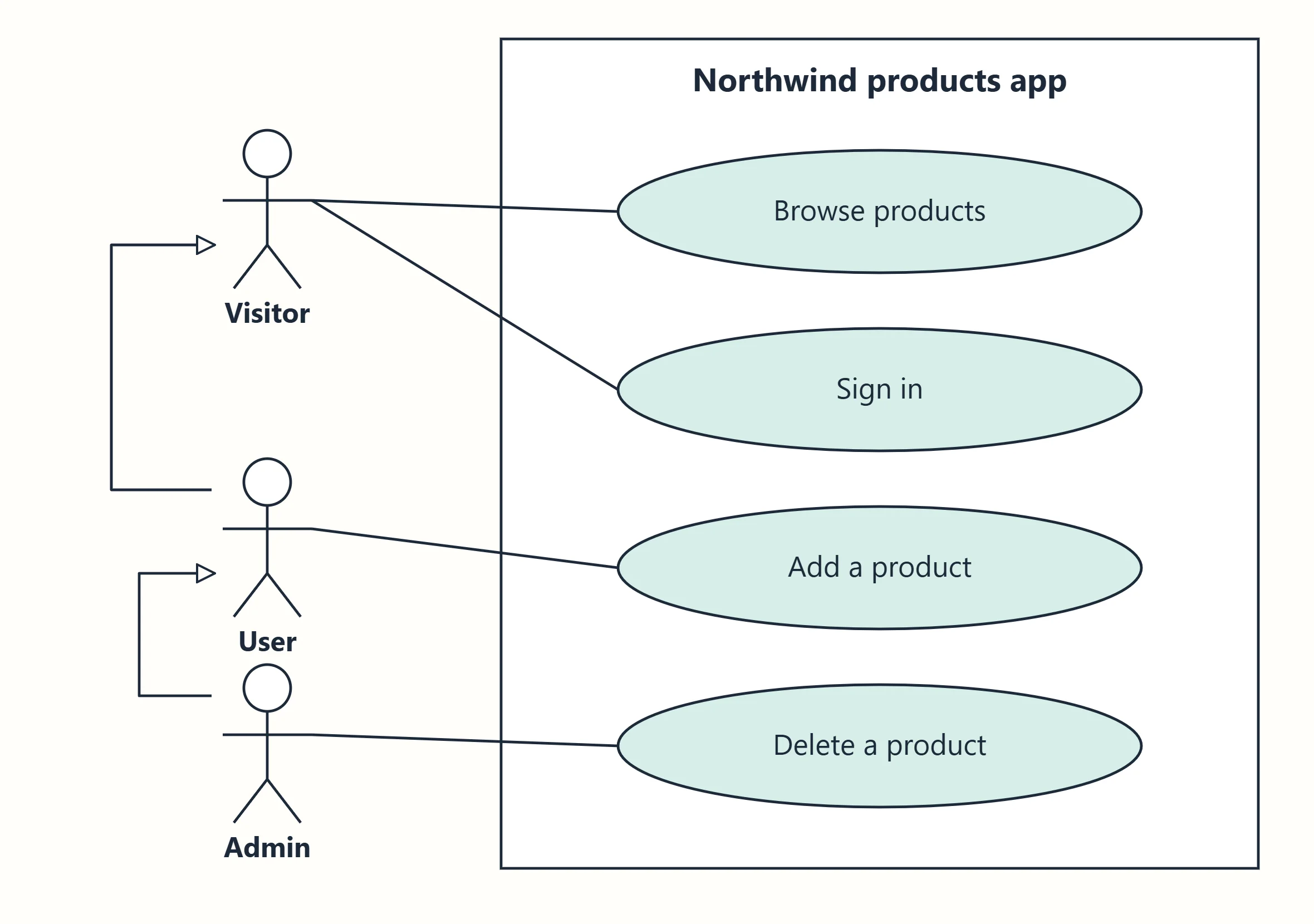
| Shape | Means |
|---|---|
| Stick figure | An actor: a person, or another system, outside the system that uses it |
| Oval | A use case: something an actor does with the system, named with a verb, such as Add a product |
| Box | The system boundary: what's inside is what you're building |
| Line | This actor takes part in this use case |
| Arrow with a hollow triangle | One actor is a kind of another: an Admin can do everything a User can, and more |
That's the products app from Exercise: Secure the App, at a glance: anyone browses, users add, admins delete.
Class diagrams: the classes and their relationships
A class diagram shows the classes: their properties, their methods, and how they're related. It's the diagram closest to code.
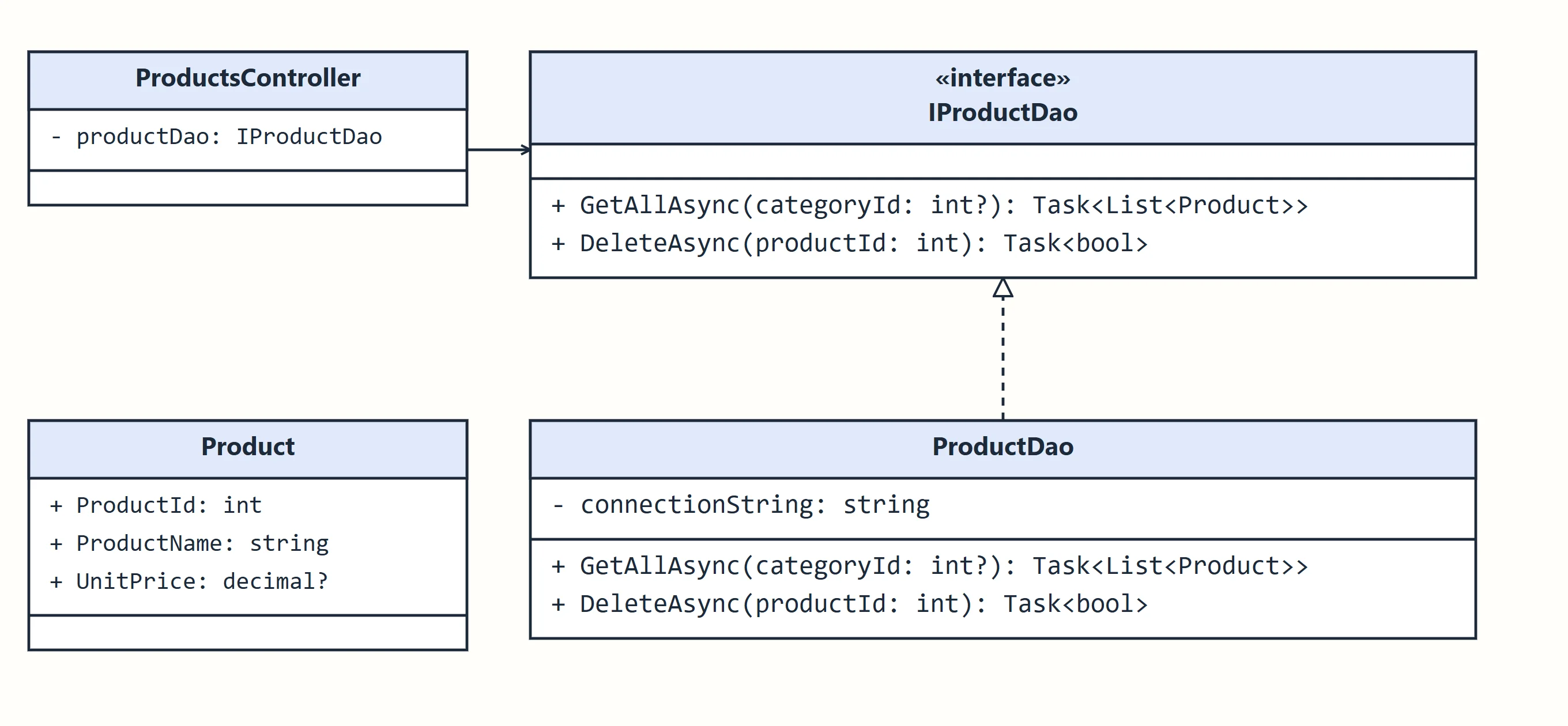
Each class is a box in three parts: its name, its properties, and its methods. The diagram above is this code:
public interface IProductDao
{
    Task<List<Product>> GetAllAsync(int? categoryId);
    Task<bool> DeleteAsync(int productId);
}

public class ProductDao : IProductDao
{
    private readonly string connectionString;
    // ...
}

public class ProductsController : ControllerBase
{
    private readonly IProductDao productDao;
    // ...
}
| Notation | Means |
|---|---|
+ |
public |
- |
private |
# |
protected |
name: type |
A property or field, such as + ProductName: string |
Method(parameter: type): returnType |
A method |
| «interface» above the name | An interface |
| Solid line, hollow triangle | Inheritance: class SavingsAccount : BankAccount. The triangle points at the parent. |
| Dashed line, hollow triangle | Implements: class ProductDao : IProductDao |
| Solid arrow | Association: one class uses or holds another, as ProductsController holds an IProductDao |
| Solid diamond | Composition: a part that can't exist without its whole, such as an order's lines |
You've seen these pictures before, in the inheritance and interfaces lessons. A class diagram doesn't need every property: draw what matters for the point you're making.
Sequence diagrams: who talks to whom, in order
A sequence diagram shows the messages that pass between parts of the system, top to bottom, in the order they happen. It's how you explain a flow, such as signing in:
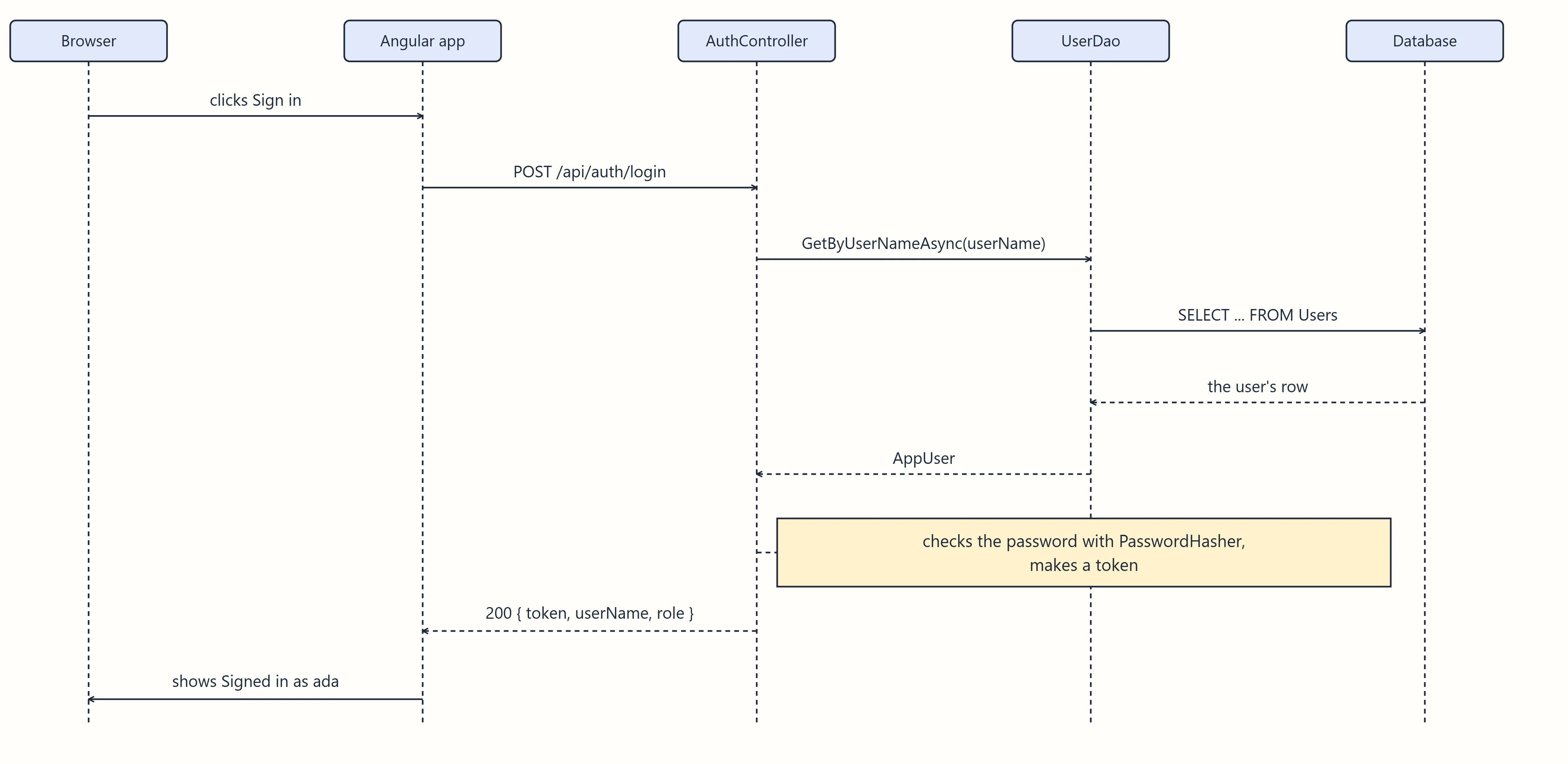
| Shape | Means |
|---|---|
| Box at the top, with a dashed line down | A lifeline: one part of the system, over time |
| Solid arrow | A message: a call or a request |
| Dashed arrow | A reply: what comes back |
| Top to bottom | Time: earlier messages are higher |
Reading it top to bottom tells the story: the browser asks the app, the app asks the API, the API asks the DAO, the DAO asks the database, and the answers come back in reverse. Sequence diagrams are great for spotting problems, such as one page that calls the API ten times.
When to draw them
| Diagram | Draw it to |
|---|---|
| Use case | Agree on what to build, with people who don't write code |
| Class | Plan, or explain, how the code is organized |
| Sequence | Explain, or debug, a flow through several parts |
Keep them small and quick. A diagram is a tool for thinking and talking, not a document to keep perfect. In interviews, being able to sketch a class or sequence diagram on a whiteboard is a real plus.
Check yourself
1 question to try on the lesson page.
So what
Use case diagrams say who does what, class diagrams say how the code is built, and sequence diagrams say what happens in what order. Learn the handful of shapes, and you can read, and sketch, the drawings every team uses.
Key terms
- Use Case Diagram
- UML Class Diagram
- Sequence Diagram