Planning Unit Tests
Plan unit tests from the requirements as a list of scenarios, each with its pre-conditions, inputs, expected output and expected property values.
Apprentice · Java · Unit Testing · Updated
Unit tests should be planned based on the application's requirements. As you familiarize yourself with the requirements, you will understand how to test your application and its objects.
Test Scenarios
It is common to track test scenarios to ensure that your code meets all requirements. There are various ways to track test scenarios. We will use a simple spreadsheet to track our tests.
Each scenario is unique and should focus on changing just one variable at a time. This allows us to isolate potential logic errors to find them more quickly.
Test scenarios include the following parts:
- Name: the scenario name and description
- Pre-conditions: what the beginning state of the object should be when the test is executed
- Inputs: Specific inputs used in this scenario
- Output: The expected output (not all methods have outputs)
- Expected Property Values: What are the expected values after this scenario executes
The following scenarios are for two methods in a Television class.
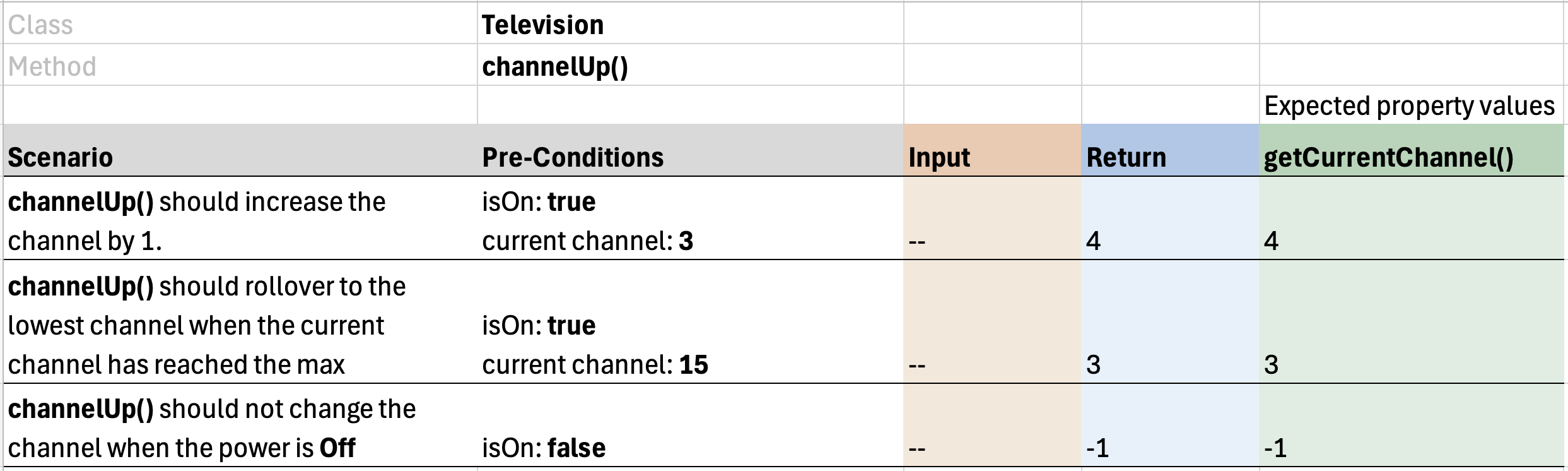
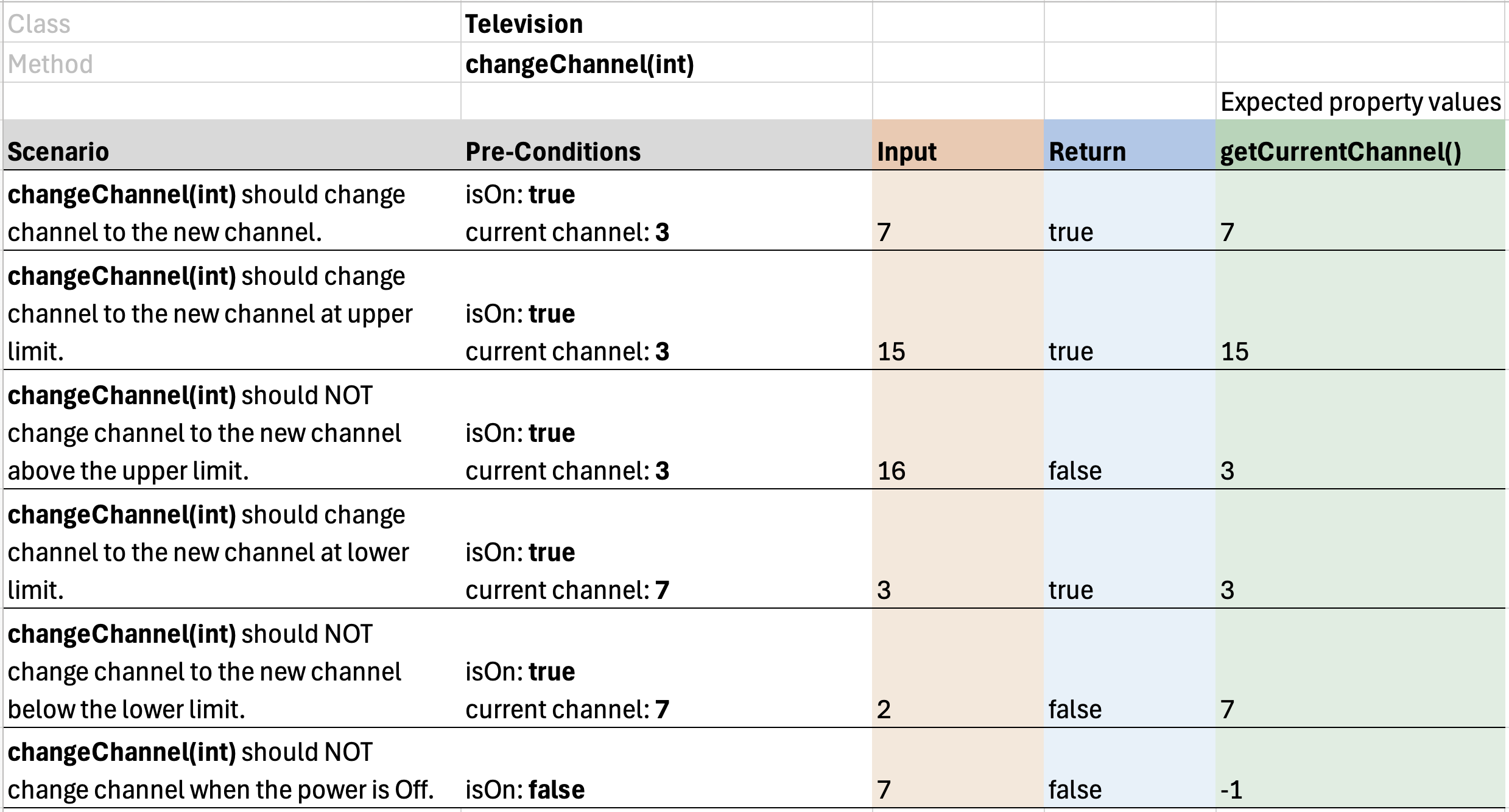
Notice that many of these scenarios are similar, but each scenario tests a specific requirement. It is tempting to combine scenarios… you should resist the temptation.
Do it: make changeChannel pass its scenarios
The team has planned the scenarios for the Television class's changeChannel method, and the box turns each scenario into a test. The method itself isn't written yet. Write it so every scenario passes.
The TV's channels go from 3 (its lowest) to 15 (its highest). A new TV is off, on channel 3. The rest of the class is given: turnOn(), isOn() and getCurrentChannel().
changeChannel gets one value:
newChannel: the channel to change to, anint, such as7.
The scenarios, each changing one thing:
| Scenario | Pre-conditions | Input | Output | Expected currentChannel |
|---|---|---|---|---|
| 1. A channel in range | on, channel 3 | 7 |
true |
7 |
| 2. The highest channel | on, channel 3 | 15 |
true |
15 |
| 3. Below the lowest | on, channel 3 | 2 |
false |
3 |
| 4. Above the highest | on, channel 3 | 16 |
false |
3 |
| 5. The TV is off | off, channel 3 | 7 |
false |
3 |
For example, scenario 1: the TV is turned on, then changeChannel(7) returns true, and getCurrentChannel() is 7 afterward.
Your job: write the method changeChannel(int newChannel) in the Television class. It returns a boolean.
- When the TV is on and
newChannelis from3to15, changecurrentChanneltonewChanneland returntrue. - When the TV is off, return
falseand leave the channel as it is. - When
newChannelis below3or above15, returnfalseand leave the channel as it is.
Practiced live on the lesson page: write the Java right there and check it.