What is a Variable
A variable is a named place where your program remembers a value; declare it with a type and a name, give it a value, print it, and name it by Java's rules and conventions.
Novice · Java · Updated
A variable is a way for a computer to remember small pieces of information.
They are useful because the computer can later use and re-use them to perform calculations.
To create a variable, you:
- give its data type
- give its name
- set the value it holds
// the data type of this variable is integer (a whole number)
// the name of this variable is "numberOfCars"
int numberOfCars;

// setting the value of a variable to 3
numberOfCars = 3;
To interact with the user, we can "write" information on the screen.
Java uses the System.out.print() and System.out.println() methods to write to the screen.
System.out.println(numberOfCars);
Notice that each statement in Java ends with a semicolon (;).
Time to Practice
Open your java-basics project in IntelliJ (the one you created in Java Maven Project). Right-click the com.askcodey package, choose New → Java Class, name it Variables01, and type this code inside a main method:
// Declare a variable that counts how many siblings you have
int numberOfSiblings;

// Set the number of siblings to 3
numberOfSiblings = 3;

// Print the value of the variable to the terminal (console)
System.out.println(numberOfSiblings);
Click the green Run arrow beside main to run it.
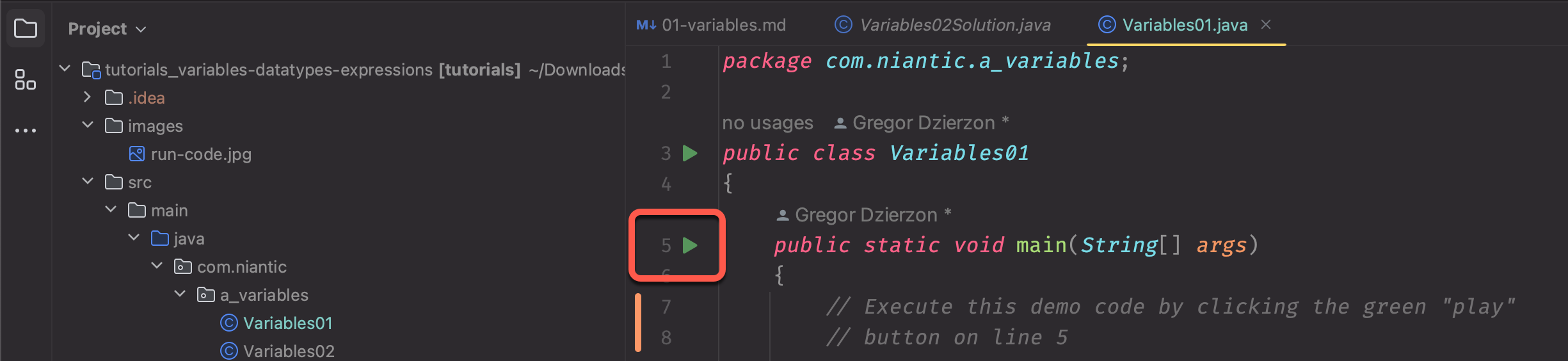
Notice that after running the code the number 3 is displayed in the terminal window.
Create Your Own
Create a class named Variables02. Declare an int variable for something you can count at home, such as numberOfChairs, give it a value, print it, and run it.
Combining Lines of Code
If you know the value of your variable when you declare it, you can set the value at the same time, like this.
// in this example we declare the variable "numberOfCars"
// as an integer and immediately set it to the value of 3

int numberOfCars = 3;
Printing
Additionally, the System.out.print() and System.out.println() methods allow you to print more than just a single value to the terminal.
// This prints the text "The number of cars at my house: "
// followed by the value of numberOfCars, all on the same line
System.out.println("The number of cars at my house: " + numberOfCars); // prints The number of cars at my house: 3
Practice
Create a class named Variables03. Declare a variable for your age and set it on the same line, then print a message such as My age is: 34.
Variable Naming rules
Java has strict rules concerning how variables must be named.
Variable names...
- can use letters, numbers,
_(underscore) and$ - can start with a letter,
_or$(in practice, start with a letter) - cannot have spaces or other special characters in them
- cannot start with a number
- cannot be a Java keyword, such as
intorclass
Legal
- name
- firstName
- age
- numberOfCars
- _lastName
- LAST_NAME
- column5
Illegal
- first name
- first-name
- Last*Name
- 1-name
Variable Naming Conventions
These naming conventions are guidelines and standards that are best practices to consider as you write your code.
Java variables use camelCase: they begin with a lowercase letter, and each additional word starts with a capital, as in numberOfCars. You'll see other styles too:
- PascalCase begins with an uppercase letter. Java uses it for class names, such as
HelloTutorials. - UPPER_CASE is all capitals with underscores between words. Java uses it for constants.
- snake_case is all lowercase with underscores between words. You'll see it in MySQL column names, such as
first_name.
Variable names should be meaningful
This means that you should be very thoughtful about what you name your variables. Each variable should describe the purpose of the value that is being stored in that variable.
This makes your code easier to read and to understand.
Good variable names
firstName
age
ageOfOldestChild
pricePerGallon
numberOfSugarCookies
numberOfChocolateChipCookies
totalNumberOfCookies
totalYardSize
Questionable variable names
i        // there are times when you will see 1 letter variables
         // but these are exceptions to the rule - we will discuss
         // those exceptions later
x
z
first    // first what? first name? first pet? first school?
price    // price of what?
cookies  // this does not say what we are storing about the cookies:
         // the number? the type?
column1
column2
column3  // we know that these are columns, but we have no idea what is
         // being stored in each column
Variables can have numbers in them, but it is not very common to add numbers to variable names. If you choose to add a number to your variable, it should have a clear purpose that makes your code easier to understand.
Do it: show the kitchen what's in the oven
The kitchen at Build-It Pizzeria has a screen that shows two counts: how many pizzas are in the oven, and how many orders are waiting their turn. Your program keeps each count in a variable, then prints it.
The two variables:
pizzasInOven: how many pizzas are in the oven, anint. Right now it's4.ordersWaiting: how many orders are waiting, anint. Right now it's7.
With those values, the program prints exactly these two lines:
Pizzas in the oven: 4
Orders waiting: 7
Your job: write the program that stores the two counts and prints them.
- Under the first comment, declare an
intnamedpizzasInOvenand give it the value4. - Under the second comment, declare an
intnamedordersWaitingand give it the value7. - Inside
main(), printPizzas in the oven:(with a space after the colon) followed by the value ofpizzasInOven. - On the next line, print
Orders waiting:(with a space after the colon) followed by the value ofordersWaiting. - Join the text and the variable with
+, so the values come from the variables.
The box holds a short Java file: the variables and a main() method with nothing around them. Since Java 25, a small program can be written this way, and main() runs when the program starts. Declare the variables above main(), where the comments are, so the tests can read them.
Until both variables exist, the Tests tab says the tests use something your code doesn't have yet. That's expected.
Practiced live on the lesson page: write the Java right there and check it.