Columns and Totals: awk
awk splits every line into numbered fields, prints the ones you ask for, keeps only the lines that match a condition, and adds up a column, in total or per month, item or address.
Journeyman · Unix · Linux · Updated
After this lesson you can
- Print chosen fields with awk, using $1, $NF and -F for a CSV, and keep only the lines that match a condition
- Add up a column with awk, and count or total it per key, then sort the result
Key takeaways
- awk splits each line into fields at the spaces. $1 is the first field, $NF the last, and -F, splits at commas instead, for a CSV file.
- A condition in front of the braces picks the lines, such as $5 > 20. NR > 1 skips a header line, which would otherwise slip through.
- total += $5 adds a column up line by line, and END { print total } prints it once, after the last line.
- count[$3]++ counts each value and sales[$1] += $5 totals each one. The order they print in isn't fixed, so pipe them into sort.
The bakery's online orders come out of the shop's website as a CSV file, and the owner wants one thing from it: total sales for each month. A spreadsheet can do it, once you've opened it, sorted it and built the sums. cut can pull the totals column out (Columns and Characters: cut and tr), but it can't add them up. awk reads a file a line at a time and works with its columns: it picks them, filters by them, and adds them up. Data analysts use it to total a column before a spreadsheet is even open, and IT administrators use it to read server logs.
Set up the practice folder
These lines add two files to the bakery's website folder from Find and Replace in a Stream: sed: orders.csv, the orders from September to November, and access.log, a day of the website's visits. A \ at the end of a line carries the command on to the next one. The lines are safe to run again.
mkdir -p ~/terminal-practice/bakery-site && cd ~/terminal-practice/bakery-site
printf '%s\n' 'date,order,item,qty,total' \
  '2026-09-03,1001,sourdough loaf,2,14.00' '2026-09-03,1002,cinnamon roll,6,21.00' \
  '2026-09-17,1003,blueberry muffin,4,12.00' '2026-10-01,1004,sourdough loaf,1,7.00' \
  '2026-10-08,1005,birthday cake,1,38.50' '2026-10-08,1006,cinnamon roll,2,7.00' \
  '2026-10-22,1007,sourdough loaf,3,21.00' '2026-11-02,1008,blueberry muffin,6,18.00' \
  '2026-11-05,1009,cinnamon roll,4,14.00' '2026-11-09,1010,sourdough loaf,2,14.00' > orders.csv
printf '%s\n' \
  '203.0.113.5 - - [09/Nov/2026:08:02:11 +0000] "GET / HTTP/1.1" 200 5120' \
  '203.0.113.5 - - [09/Nov/2026:08:02:15 +0000] "GET /menu HTTP/1.1" 200 8340' \
  '198.51.100.23 - - [09/Nov/2026:08:10:42 +0000] "POST /login HTTP/1.1" 401 310' \
  '198.51.100.23 - - [09/Nov/2026:08:10:49 +0000] "POST /login HTTP/1.1" 401 310' \
  '192.0.2.40 - - [09/Nov/2026:08:31:07 +0000] "GET /old-menu.html HTTP/1.1" 404 162' \
  '203.0.113.5 - - [09/Nov/2026:08:33:30 +0000] "GET /order HTTP/1.1" 200 6210' \
  '198.51.100.23 - - [09/Nov/2026:08:40:02 +0000] "POST /login HTTP/1.1" 401 310' \
  '198.51.100.23 - - [09/Nov/2026:08:41:15 +0000] "GET /menu HTTP/1.1" 200 8340' \
  '203.0.113.77 - - [09/Nov/2026:09:05:19 +0000] "GET /menu HTTP/1.1" 200 8340' \
  '203.0.113.77 - - [09/Nov/2026:09:05:40 +0000] "POST /login HTTP/1.1" 401 310' \
  '203.0.113.77 - - [09/Nov/2026:09:05:58 +0000] "POST /login HTTP/1.1" 200 1290' \
  '203.0.113.77 - - [09/Nov/2026:09:06:44 +0000] "POST /order HTTP/1.1" 500 220' \
  '192.0.2.40 - - [09/Nov/2026:09:15:58 +0000] "GET /old-menu.html HTTP/1.1" 404 162' \
  '198.51.100.8 - - [09/Nov/2026:10:01:26 +0000] "GET / HTTP/1.1" 200 5120' \
  '198.51.100.8 - - [09/Nov/2026:10:01:40 +0000] "GET /menu HTTP/1.1" 200 8340' \
  '198.51.100.8 - - [09/Nov/2026:10:01:41 +0000] "GET /favicon.ico HTTP/1.1" 404 162' \
  '192.0.2.40 - - [09/Nov/2026:10:45:12 +0000] "GET /old-menu.html HTTP/1.1" 404 162' \
  '203.0.113.5 - - [09/Nov/2026:11:12:54 +0000] "GET /menu HTTP/1.1" 200 8340' \
  '203.0.113.5 - - [09/Nov/2026:11:12:55 +0000] "GET /favicon.ico HTTP/1.1" 404 162' \
  '198.51.100.8 - - [09/Nov/2026:11:30:05 +0000] "GET /menu HTTP/1.1" 200 8340' \
  > access.log
Each line of the log is one visit, in the layout most web servers write: the visitor's address, the time, the request (GET /menu asks for the menu page), the status code (200 means it worked, 404 means no such page) and the size of the answer in bytes.
Fields: $1, $2 … $NF
Think of a line as a row of boxes in a spreadsheet. awk splits every line at its spaces into fields and numbers them: $1 (read "field one") is the first, $2 the second, and $NF the last, however many there are. A log line has 10 fields: the address is $1, the page $7, the status $9. What awk does goes inside braces, in single quotes:
awk '{ print $1, $9 }' access.log | head -n 4
203.0.113.5 200
203.0.113.5 200
198.51.100.23 401
198.51.100.23 401
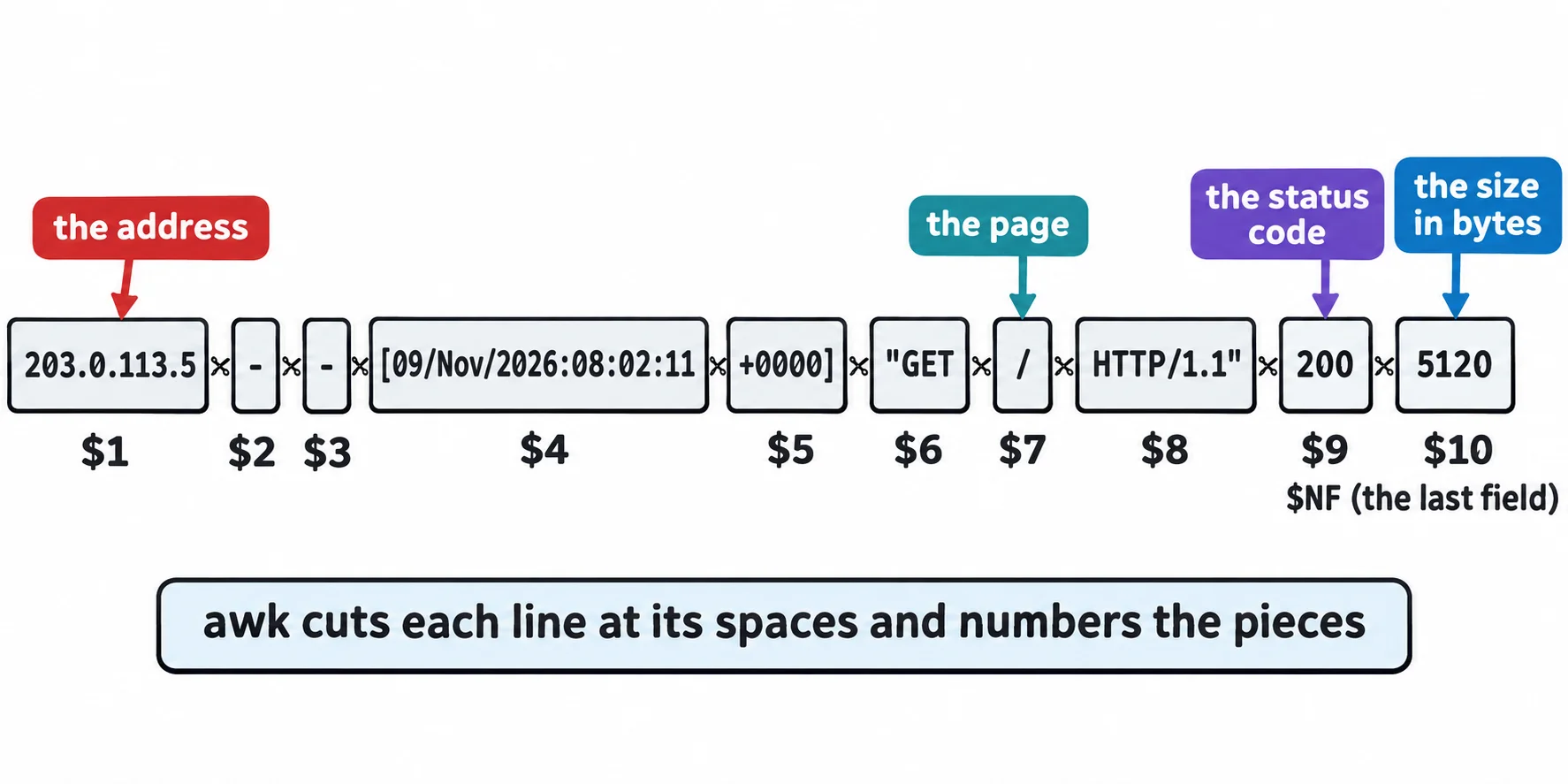
The comma in print $1, $9 puts a space between the two. { print $7, $NF } would print each page and its size.
A comma for a CSV: -F,
A CSV file separates its fields with commas, and sourdough loaf has a space inside it. -F, (read "F comma") sets the field separator to a comma, so the item is $3 and the total is $5, or $NF:
awk -F, '{ print $3, $NF }' orders.csv | head -n 3
item total
sourdough loaf 14.00
cinnamon roll 21.00
-F, splits at every comma, even one inside quotes, so a CSV with values such as "Lee, Sam" needs more care. GNU awk 5.3 has a --csv option for it, but not every awk does.
Conditions: only the lines you want
A condition in front of the braces chooses the lines, like grep, but by a field. On its own, with no braces, it prints the whole line. Here are the orders over 20 dollars:
awk -F, '$5 > 20' orders.csv
date,order,item,qty,total
2026-09-03,1002,cinnamon roll,6,21.00
2026-10-08,1005,birthday cake,1,38.50
2026-10-22,1007,sourdough loaf,3,21.00
The header slipped in: total isn't a number, so awk compared it as text, and as text it comes after 20. NR is the line's number, and NR > 1 && $5 > 20 (&& read "and") skips line 1. To match text, use == and quotes: '$3 == "cinnamon roll" { print $1, $4 }' prints the date and quantity of every cinnamon roll order.
Sums and counts per key
total += $5 (read "add $5 to total") keeps a running total as the lines go past. END { … } runs once, after the last line, which is when the total is ready:
awk -F, 'NR > 1 { total += $5 } END { print total }' orders.csv
166.5
For a total per something, use a name with a key in square brackets: an array, like a row of labeled jars. count[$3]++ adds one (++, read "plus plus") to the item's jar, and sales[month] += $5 adds the total to the month's jar. substr($1, 1, 7) is the first 7 characters of the date, 2026-09. In END, for (m in sales) visits every jar, and printf "%s %.2f\n" prints each total with two decimals, the way money is written:
awk -F, 'NR > 1 { sales[substr($1, 1, 7)] += $5 } END { for (m in sales) printf "%s %.2f\n", m, sales[m] }' orders.csv | sort
2026-09 47.00
2026-10 73.50
2026-11 46.00
That's the owner's answer. The | sort matters: the order a for … in loop visits the jars isn't fixed. Ubuntu in WSL runs GNU awk (gawk), other Linux systems may run mawk, and a Mac has its own awk. Everything in this lesson works the same in all three, but they can list the jars in a different order, so sort them.
Check yourself
2 questions to try on the lesson page.
So what
Fields, a condition and a running total answer most "how many?" and "how much?" questions about a log or a CSV file, in one line, without opening a spreadsheet.