Building a Pipeline a Step at a Time
Build a long pipeline the way people who write them do, starting with head on a few lines, adding one stage at a time and looking after each, and read someone else's one-liner the same way, from the left.
Journeyman · Unix · Linux · Updated
After this lesson you can
- Build a pipeline one stage at a time, starting with head and checking the output after each stage
- Read someone else's pipeline from the left, saying what each stage hands to the next
Key takeaways
- Start with head -n 3 and the file, so you see the data's shape and every test is short.
- Add one stage, run it, and look at what it hands on. Only then add the next.
- When every stage works, swap head for the whole file, and save the answer with > at the end.
- Read someone else's one-liner from the left. Run it up to each | in turn, and say what that stage hands to the next.
The bakery's owner asks which pages of the website people visit most. The answer is one line of commands joined by pipes, and you'll see lines like it in every tutorial, often five or six commands long. Typing all of it at once and hoping rarely works: when the answer comes out wrong, you can't tell which part went wrong. People who write these lines every day build them the way you'd build a tower of blocks, one block at a time, checking that each one sits straight before adding the next. A web developer checking last night's errors works this way, and so does a data analyst cleaning up an export.
The examples use access.log in ~/terminal-practice/bakery-site, made in Columns and Totals: awk.
Start with head: see the data's shape
Before any answer, look at a few lines. head -n 3 keeps the tests short, so each result fits on the screen:
head -n 3 access.log
203.0.113.5 - - [09/Nov/2026:08:02:11 +0000] "GET / HTTP/1.1" 200 5120
203.0.113.5 - - [09/Nov/2026:08:02:15 +0000] "GET /menu HTTP/1.1" 200 8340
198.51.100.23 - - [09/Nov/2026:08:10:42 +0000] "POST /login HTTP/1.1" 401 310
The page is the seventh field, after the method (GET or POST).
Add one stage, and look
Add the first stage: pick out the page.
head -n 3 access.log | awk '{ print $7 }'
/
/menu
/login
Three pages, one a line: right. Now count them. uniq -c counts only lines that sit next to each other, so sort goes first (Count, Sort, Remove Duplicates: wc, sort and uniq):
head -n 3 access.log | awk '{ print $7 }' | sort | uniq -c
      1 /
      1 /login
      1 /menu
Each stage did what it should on lines you can check by eye. That's the point of head: a mistake shows up in three lines, not hidden in three thousand.
Swap head for the whole file, and save
The stages work, so give the first one the whole file instead of head, then add the last two: sort -rn puts the biggest count first, and head -n 3 keeps the top three.
awk '{ print $7 }' access.log | sort | uniq -c | sort -rn | head -n 3
      6 /menu
      5 /login
      3 /old-menu.html
The menu wins. When the answer is right, add > top-pages.txt at the end to save it. A long pipeline can also be split over lines: end a line with | and the shell waits for the rest, which makes it easier to read:
awk '{ print $7 }' access.log |
  sort | uniq -c |
  sort -rn | head -n 3 > top-pages.txt
cat top-pages.txt
      6 /menu
      5 /login
      3 /old-menu.html
To track down a wrong answer at this point, take stages off the end until the output looks right, and the stage you took off last is the one to fix.
Reading someone else's one-liner
A one-liner is a whole job in one line of commands. When someone hands you one, read it the way it runs, from the left, and run it up to each | in turn. Here's one for "which missing pages do people ask for?":
grep ' 404 ' access.log | cut -d' ' -f7 | sort | uniq -c | sort -rn
      3 /old-menu.html
      2 /favicon.ico
Run the first stage alone, and it's the five visits whose status code was 404, no such page. The second stage, cut -d' ' -f7 (Columns and Characters: cut and tr), keeps the seventh space-separated field, the page:
grep ' 404 ' access.log | cut -d' ' -f7
/old-menu.html
/old-menu.html
/favicon.ico
/old-menu.html
/favicon.ico
Then sort | uniq -c counts each page, and sort -rn puts the biggest count first.
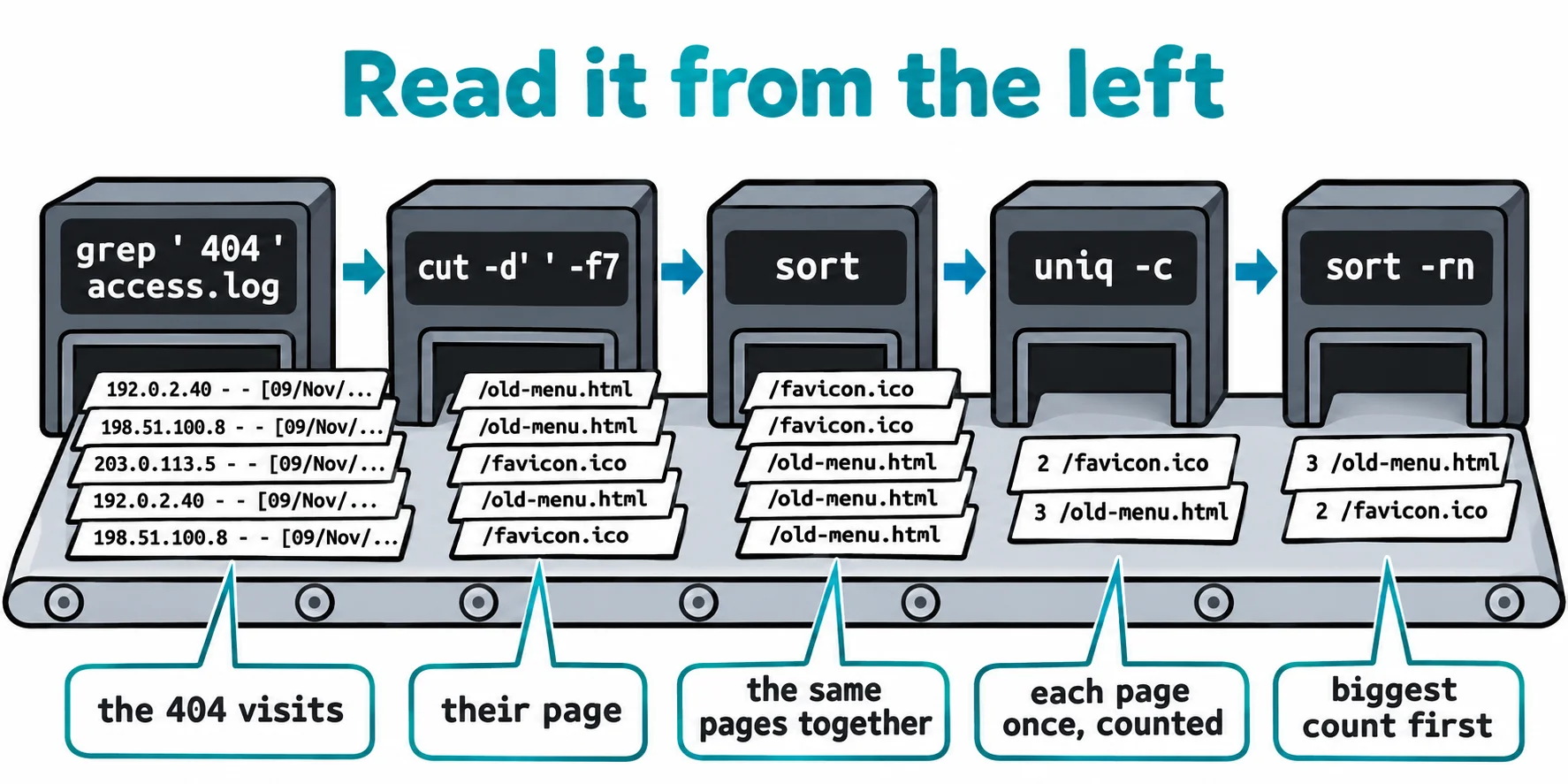
Said aloud: "find the 404 lines, keep the page, count each page, biggest first." Once you can say a one-liner in words like that, you can change it, and you know what it does before you run it on something that matters.
Check yourself
2 questions to try on the lesson page.
So what
Building a stage at a time, and reading from the left, turn a scary line of symbols into small steps you can check, and that's how any report in the terminal gets built.