Count, Sort, Remove Duplicates: wc, sort and uniq
wc counts lines, words and characters, sort puts lines in order, as text or with -n as numbers, and uniq merges repeated lines that sit next to each other, so sort | uniq -c | sort -rn ranks how often each line appears.
Apprentice · Unix · Linux · Updated
After this lesson you can
- Count lines, words and characters with wc, using -l, -w and -c
- Sort lines with sort, -n and -r, and rank repeated lines with sort, uniq -c and sort -rn
Key takeaways
- wc -l counts lines, -w words and -c characters. Given no file name, wc counts what comes through a pipe.
- sort puts lines in alphabetical order. -n sorts them as numbers, and -r reverses the order.
- uniq merges a repeated line only when it sits right after its twin, so sort first. uniq -c writes how many times each line appeared.
- sort | uniq -c | sort -rn counts how often each line appears, most often first. It's worth knowing by heart.
Bea wants to open a stall at a farmers' market, and she wants it in the city her online orders come from most. With 520 orders, a tally on paper would take an afternoon, and one slip spoils it. A spreadsheet can do it, after some clicking through menus. In the terminal it's one line, and it's a line you'll use again and again: a data analyst counting survey answers, a web developer finding a website's most visited pages, an IT tech finding which laptop breaks most often.
The examples use the bakery folder from Pipes: | (its setup lines make it). Go into it with cd ~/terminal-practice/bakery.
A column on its own
The question is about one column, the city. This line saves it in a file of its own, cities.txt, one city a line. Take its first half on trust for now: cut -d, -f5 takes the fifth column of every line, and tail -n +2 (read "tail from line 2") starts at the second line, which leaves out the header. Columns and Characters: cut and tr, next, explains both.
cut -d, -f5 orders.csv | tail -n +2 > cities.txt
head -n 4 cities.txt
Portland
Bend
Corvallis
Portland
wc: how many?
wc (word count) counts. With -l (for lines), the one you'll use most, it counts lines:
wc -l orders.csv cities.txt
  521 orders.csv
  520 cities.txt
 1041 total
orders.csv has 521 lines: 520 orders and the header. Given two files, wc adds a total. Without an option, it prints three counts, lines, words and characters, before the name:
wc orders.csv
521 1383 41043 orders.csv
-w (words) and -c (characters) ask for one of the other two. Strictly, -c counts bytes, which is the same as characters for plain English text. Give wc no file name, and it counts what comes through a pipe. This is how many orders came from Medford:
grep Medford orders.csv | wc -l
27
On a Mac, wc puts more spaces in front of its numbers; the numbers are the same.
sort: put lines in order
sort prints lines in alphabetical order, so the same cities end up together:
sort cities.txt | head -n 3
Bend
Bend
Bend
Numbers are a trap. sort compares lines character by character, the way a dictionary orders words, so 128.50 comes before 9.75, because 1 comes before 9. Here are three order totals, one a line, made with printf from Writing to Files: echo, > and >>:
printf '%s\n' 9.75 32.00 128.50 | sort
128.50
32.00
9.75
-n (for numeric) sorts by the value of the number instead. -r (for reverse) turns any order upside down, so -rn puts the biggest number first.
printf '%s\n' 9.75 32.00 128.50 | sort -n
9.75
32.00
128.50
uniq: merge the repeats
uniq (unique) prints each line once, but it merges a repeat only when it comes right after its twin. In cities.txt the cities are mixed up, so few repeats are neighbors:
uniq cities.txt | wc -l
375
375 lines, from a file of six cities. Sort first, and every Portland lands next to every other Portland:
sort cities.txt | uniq
Bend
Corvallis
Eugene
Medford
Portland
Salem
sort -u (for unique) does both in one command: sort -u cities.txt prints the same six lines.
The pattern: sort | uniq -c | sort -rn
uniq -c (for count) writes in front of each line how many times it appeared:
sort cities.txt | uniq -c
     89 Bend
     23 Corvallis
     73 Eugene
     27 Medford
    212 Portland
     96 Salem
That's the answer, in alphabetical order. Sort it by the counts, as numbers, biggest first, and the top line answers Bea's question:
sort cities.txt | uniq -c | sort -rn
    212 Portland
     96 Salem
     89 Bend
     73 Eugene
     27 Medford
     23 Corvallis
Portland, by a long way. Read the pattern aloud: sort, so repeats are neighbors; count each one; sort by the counts, biggest first. It works on any column. Here it ranks the bestsellers, straight from orders.csv, with head -n 3 keeping the top three:
cut -d, -f6 orders.csv | tail -n +2 | sort | uniq -c | sort -rn | head -n 3
    175 sourdough loaf
    100 croissant
     80 blueberry muffin
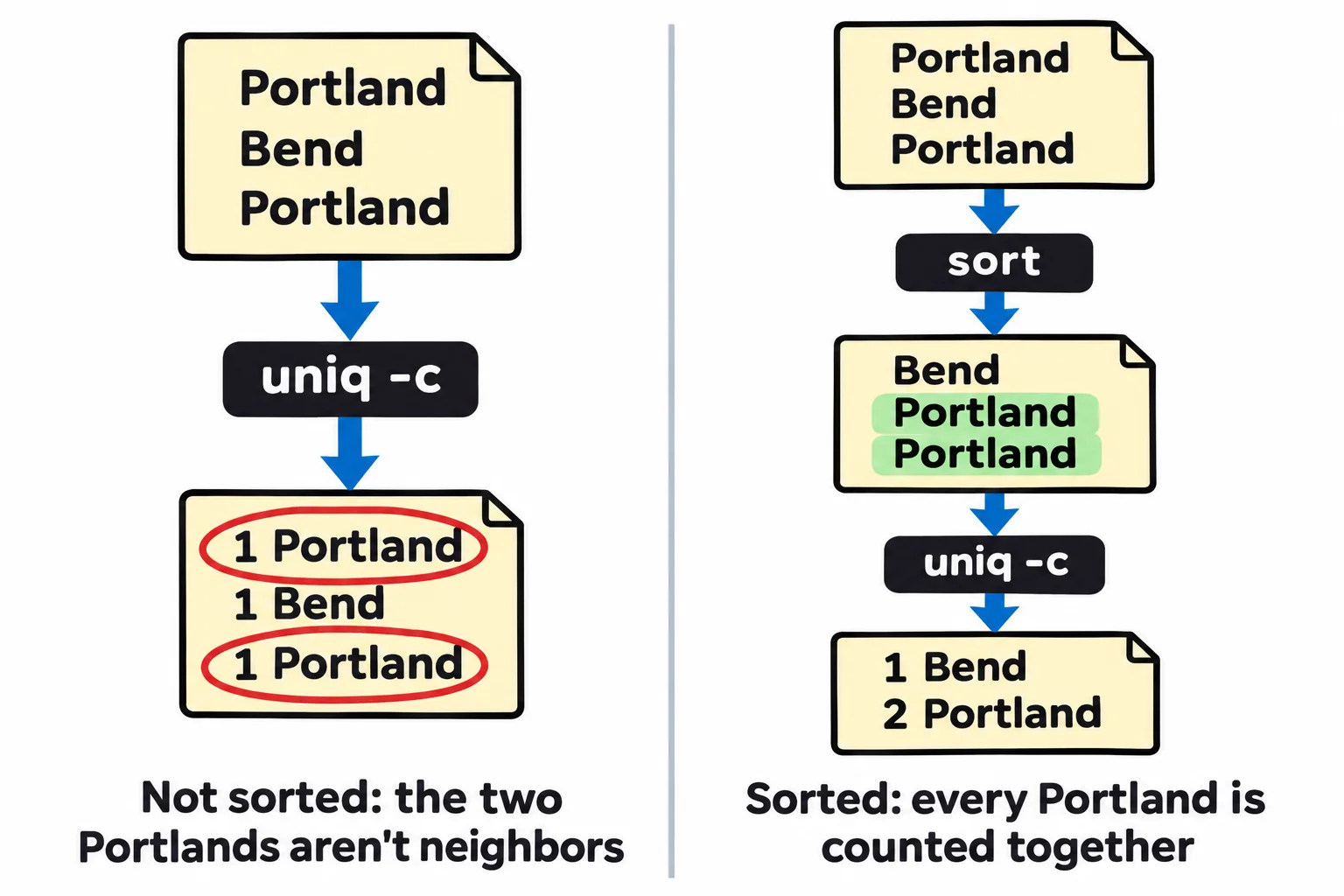
The slip to watch for is leaving out the first sort. uniq -c then counts only runs of neighbors, and Portland shows up dozens of times with small counts. (On a Mac, uniq -c puts fewer spaces before each count; the counts are the same.)
Check yourself
2 questions to try on the lesson page.
So what
sort | uniq -c | sort -rn turns any list into a ranking: cities, bestsellers, a website's visitors, the errors in a log. It's one of the most useful lines in this course.