Pipes: |
The pipe, |, hands everything one command prints to the next command as its input, so small commands that each do one job join into a pipeline that answers a question none of them can answer alone.
Apprentice · Unix · Linux · Updated
After this lesson you can
- Send one command's output into another command with a pipe
- Read a pipeline from left to right, saying what each command hands to the next
Key takeaways
- | (read "pipe") sends what the command on its left prints into the command on its right, instead of onto the screen.
- The command after a pipe reads what comes through the pipe, so it gets no file name of its own.
- Commands joined by pipes make a pipeline. Read it from left to right; each command does one job and hands its lines on.
- | hands lines to a command; > saves them in a file. A > where you meant | makes a new file instead.
Bea runs Bluebird Bakery, and her online shop has exported last year's orders: 520 of them, in one file. She has questions. What were the last three birthday cakes people ordered? How many croissant orders came from Bend? grep (from Finding Text: grep) finds lines, but it hands you every one it finds, and tail shows the end of a file, not the end of what grep found. No single command answers her. Joined together, they answer in one line. This is the idea that turns a list of commands into a toolkit, and data analysts, web developers and IT techs use it every day on logs, exports and lists.
Set up the bakery folder
Every lesson in this chapter uses Bluebird Bakery's made-up orders. Copy these lines into your terminal. The first line makes the folder ~/terminal-practice/bakery and goes into it. The long middle part is a small program for awk, a tool the next chapter teaches in Columns and Totals: awk; it writes a year of orders into orders.csv. The last line shows the file's first three lines. The lines are safe to run again, and they make the same orders every time.
mkdir -p ~/terminal-practice/bakery && cd ~/terminal-practice/bakery
awk 'BEGIN {
  split("Maya Diego Ben Priya Owen Lena Marcus Aiko Jonah Rosa", f1, " ")
  split("Theo Nadia Felix Grace Omar Ivy Caleb Hana Luis Zoe", f2, " ")
  split("Lopez Ruiz Carter Shah Brooks Novak Reed Tanaka Price Silva", l1, " ")
  split("Grant Haddad Moreau Kim Farah Chen Wells Sato Ortega Hart", l2, " ")
  split("Portland Salem Portland Eugene Bend Portland Salem Eugene Portland Corvallis", t1, " ")
  split("Bend Portland Salem Portland Eugene Medford Portland Salem Bend Portland", t2, " ")
  split("sourdough loaf,croissant,cinnamon roll,baguette,blueberry muffin,birthday cake", item, ",")
  split("8 3.5 4.25 4.5 3.25 32", price, " ")
  split("31 28 31 30 31 30 31 31 30 31 30 31", days, " ")
  print "order,date,customer,email,city,item,qty,total"
  x = 11
  for (n = 1; n <= 520; n++) {
    x = (x * 75 + 74) % 65537; c = x % 20 + 1
    x = (x * 75 + 74) % 65537; r = x % 20
    i = r < 6 ? 1 : r < 10 ? 2 : r < 13 ? 3 : r < 16 ? 4 : r < 19 ? 5 : 6
    x = (x * 75 + 74) % 65537; q = i == 6 ? 1 : x % 4 + 1
    name = c <= 10 ? f1[c] " " l1[c] : f2[c - 10] " " l2[c - 10]
    city = c <= 10 ? t1[c] : t2[c - 10]
    email = name; sub(" ", ".", email); email = email "@example.com"
    if (x % 7 != 0) email = tolower(email)
    d = int((n - 1) * 365 / 520) + 1; m = 1
    while (d > days[m]) { d -= days[m]; m++ }
    printf "%d,2025-%02d-%02d,%s,%s,%s,%s,%d,%.2f\n", 1000 + n, m, d, name, email, city, item[i], q, q * price[i]
  }
}' > orders.csv
head -n 3 orders.csv
order,date,customer,email,city,item,qty,total
1001,2025-01-01,Zoe Hart,zoe.hart@example.com,Portland,sourdough loaf,3,24.00
1002,2025-01-01,Luis Ortega,luis.ortega@example.com,Bend,cinnamon roll,2,8.50
orders.csv is a CSV file, short for comma-separated values: a table written as plain text, one order a line, with a comma between one column and the next. The first line, the header, names the columns: the order number, the date, the customer's name, email and city, what they ordered, how many, and the total in dollars. Any spreadsheet program opens a CSV file, and so does every command in this chapter.
| hands the lines on
To find the last three birthday cake orders with what you know so far, you could save what grep finds into a file with > (from Writing to Files: echo, > and >>), read the end of that file with tail (from The Start and End of a File: head and tail), then delete the file:
grep "birthday cake" orders.csv > cakes.txt
tail -n 3 cakes.txt
rm cakes.txt
1463,2025-11-21,Nadia Haddad,nadia.haddad@example.com,Portland,birthday cake,1,32.00
1499,2025-12-16,Luis Ortega,luis.ortega@example.com,Bend,birthday cake,1,32.00
1514,2025-12-27,Hana Sato,hana.sato@example.com,Salem,birthday cake,1,32.00
It works, but it takes three commands and a file you never wanted, made only to carry lines from one command to the next.
A restaurant kitchen has a pass: a shelf between two cooks. One cook finishes a plate and sets it on the pass, and the next cook picks it up and does their part. Nobody carries plates across the room. The pipe, | (read "pipe"), is the terminal's pass. Put it between two commands, and everything the first one prints goes to the second one instead of onto your screen:
grep "birthday cake" orders.csv | tail -n 3
1463,2025-11-21,Nadia Haddad,nadia.haddad@example.com,Portland,birthday cake,1,32.00
1499,2025-12-16,Luis Ortega,luis.ortega@example.com,Bend,birthday cake,1,32.00
1514,2025-12-27,Hana Sato,hana.sato@example.com,Salem,birthday cake,1,32.00
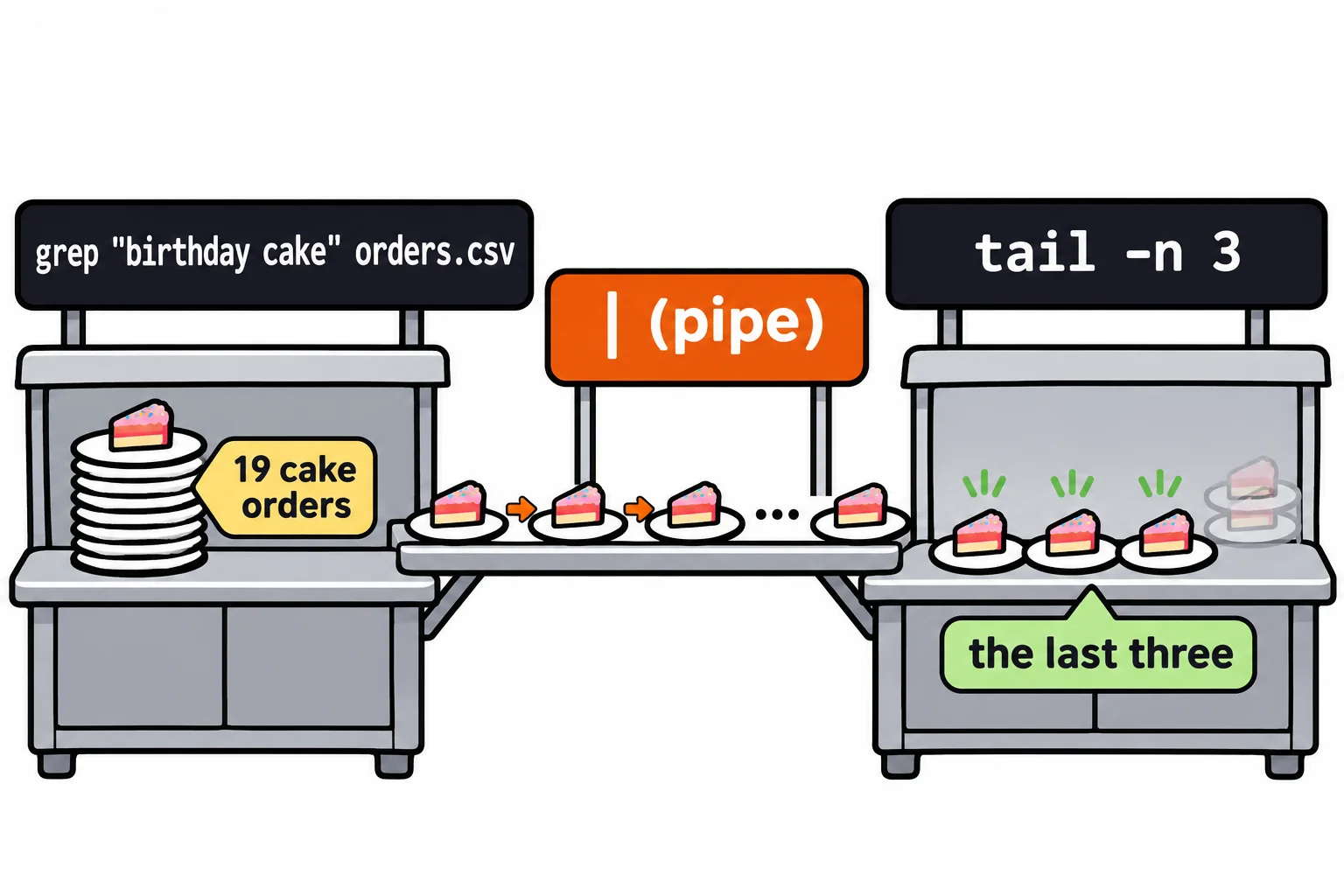
The same answer, in one line, with no file left over. grep found the 19 cake orders and handed them on; tail -n 3 kept the last three. Notice that tail has no file name now: it reads what comes through the pipe. On most keyboards, | is Shift and the backslash key, \. Pipes work the same way in zsh on a Mac.
Pipelines: one job each
A pipe can feed another pipe. Commands joined this way make a pipeline. How many croissant orders came from Bend?
grep Bend orders.csv | grep croissant | wc -l
11
Read a pipeline from left to right, one stage at a time. grep Bend keeps the orders from Bend and hands them on. grep croissant keeps the croissant orders among those. wc -l counts the lines it's handed (Count, Sort, Remove Duplicates: wc, sort and uniq takes wc apart). Eleven orders.
Each command does one small job and doesn't care where its lines came from. That's why a few dozen small tools can answer thousands of questions: nobody needs a command for "croissants from Bend", only a way to join the ones they have. When a pipeline gives a strange answer, run it one stage at a time and look at what each stage hands on.
Two slips to watch for
The command after a pipe must not get a file name of its own. Give tail one, and it reads the file and ignores the pipe:
grep "birthday cake" orders.csv | tail -n 3 orders.csv
1518,2025-12-29,Caleb Wells,caleb.wells@example.com,Portland,croissant,3,10.50
1519,2025-12-30,Lena Novak,lena.novak@example.com,Portland,croissant,4,14.00
1520,2025-12-31,Lena Novak,lena.novak@example.com,Portland,cinnamon roll,3,12.75
Those are the last three lines of the whole file: croissants and a cinnamon roll, not cakes. Nothing warns you; the answer is wrong.
The other slip is typing > where you meant |. The pipe hands lines to a command; > (read "into") saves them in a file. So > tail saves the cake orders in a new file named tail:
grep "birthday cake" orders.csv > tail
ls
orders.csv tail
Nothing printed, and a file appeared. Delete it with rm tail. The rule to remember: | feeds a command, > fills a file.
Try it in the terminal
Terminal Quest: The Archive, goal 4: played right on the lesson page.
Back in the Archive, count every log line with Otto's badge number, 7714, in one pipeline, and add the count to your case notes. grep -r, from Finding Text: grep, searches every log at once.
Check yourself
2 questions to try on the lesson page.
So what
A pipe joins small commands into a tool you make on the spot. The rest of this module, and much of every script you'll write, is pipelines.