Quotes: Double, Single and None
Without quotes, the shell splits a variable's value at its spaces and turns a * into file names, the number-one bash bug; "$name" in double quotes keeps the value exactly as it is, and single quotes keep everything as typed.
Journeyman · Unix · Linux · Updated
After this lesson you can
- Put double quotes around every $name, so spaces and * in a value stay as they are
- Choose double quotes, single quotes or none for a piece of text in a command
Key takeaways
- Without quotes, the shell cuts a $name's value into words at its spaces and swaps a * in it for file names. This is word splitting.
- Put double quotes around every $name, $1, "$@" and $( ): "$card" stays one piece, spaces and stars included.
- Single quotes keep everything exactly as typed, $ included. Use them for text that should never change.
- Leave the quotes off only when you want the shell to act, as with a wildcard in ls *.txt. A ~ inside quotes isn't your home folder.
Aunt Rosa sent a thank-you note, and it's saved as Aunt Rosa.txt. Your script keeps the file's name in a variable and prints it with cat $card. Instead of the note, out comes Rosa's shopping list, from a different file. Swap cat for rm, and the script deletes a file you never named. It's the number-one bug in bash scripts, and it catches out experienced developers and admins too. The fix is two characters, a pair of double quotes, and the habit takes a minute to learn.
The examples use the card shop from Arguments: $1, $# and "$@". Add two files to it, one with a space in its name:
cd ~/terminal-practice/cards
printf 'Dear Aunt Rosa,\nThank you for the scarf!\n' > 'Aunt Rosa.txt'
printf 'eggs\nflour\nbirthday candles\n' > Rosa.txt
pwd
/home/sam/terminal-practice/cards
What the shell does to a bare $name
Keep the note's name in a variable, and print it without quotes:
card='Aunt Rosa.txt'
cat $card
eggs
flour
birthday candles
cat: Aunt: No such file or directory
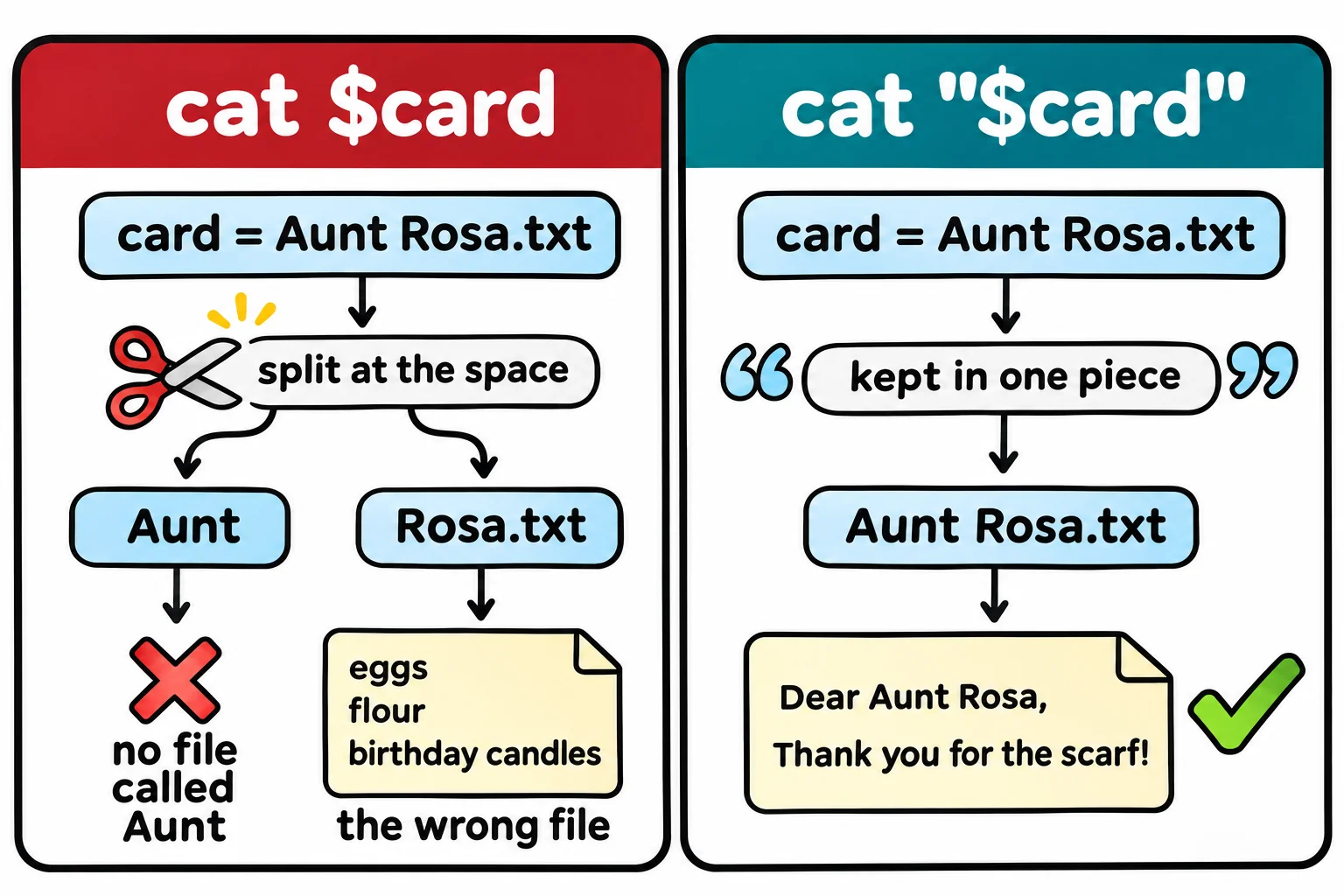
After the shell fills in $card, it cuts the value into words at every space, the same way it cuts a line into arguments. cat received two names, Aunt and Rosa.txt. There's no file called Aunt, and Rosa.txt is the shopping list. Cutting a value apart like this is called word splitting. (The order of the lines and the wording of the error differ from system to system; the two names are the same everywhere.)
That's not all the shell does to a bare value. A * in it is a wildcard, the same as one you typed:
note='Thanks a million * from all of us'
echo $note
Thanks a million Aunt Rosa.txt Rosa.txt args.sh ask-card.sh card-for-Maya.txt card.sh greeting.sh party.sh secret-card.sh from all of us
The star became every file in the folder. Your list shows whatever is in yours.
Double quotes: "$name", always
Double quotes tell the shell: fill in the value, then leave it alone. No splitting at spaces, no wildcards:
cat "$card"
echo "$note"
Dear Aunt Rosa,
Thank you for the scarf!
Thanks a million * from all of us
The rule that prevents this whole family of bugs: put double quotes around every $: "$card", "$1", "$@", and the "$(date +%F)" of Values from Commands: $( ) and $(( )). You'll rarely be wrong with them, and a script without them works only until the first name with a space. ShellCheck, from Writing Scripts in VS Code, underlines a $name without quotes for exactly this reason.
Double quotes still fill in every $. An apostrophe is fine inside them, so echo "It's Maya's card" prints It's Maya's card.
Single quotes: exactly as typed
Sometimes a $ is a dollar sign. In double quotes, bash reads $5 as the fifth argument from Arguments: $1, $# and "$@", which is empty at the prompt:
echo "Cards cost $5 each"
echo 'Cards cost $5 each'
echo "Cards cost \$5 each"
Cards cost  each
Cards cost $5 each
Cards cost $5 each
Single quotes keep everything between them exactly as typed: no $, no wildcards, no splitting. Use them for text that should never change, such as printf's pattern or a price. A backslash, \ (read "backslash"), does the same for one character, so \$5 inside double quotes is a dollar sign too. A single quote can't go inside single quotes; put that text in double quotes instead.
No quotes: when you want the shell to act
Leave the quotes off when you want the shell to do its work: to turn a wildcard into names, or ~ into your home folder. Quotes switch both off:
ls *.txt
ls "*.txt"
cd "~/terminal-practice"
'Aunt Rosa.txt'   Rosa.txt   card-for-Maya.txt
ls: cannot access '*.txt': No such file or directory
bash: cd: ~/terminal-practice: No such file or directory
In quotes, *.txt is a file literally called *.txt, and ~ is a folder literally called ~. Keep those outside the quotes and quote the rest, as in cd ~/"photos to print" or "$HOME/photos to print".
The choice, in three lines:
- Double quotes around anything with a
$: the value is filled in and kept in one piece. - Single quotes around text that must stay exactly as typed.
- No quotes where you want a wildcard, a
~or{a,b}to be expanded.
zsh at a Mac's prompt doesn't split a bare $name at spaces or expand a * in it, which hides this bug while you test there. Your scripts run in bash, where it bites, so quote them anyway.
Check yourself
2 questions to try on the lesson page.
So what
Double quotes around every $, single quotes for exactly-as-typed and no quotes only when you want a wildcard to work: that one habit keeps a name with a space from turning into the wrong file.