Arguments: $1, $# and "$@"
The words typed after a script's name are its arguments: $1 is the first, $2 the second, $# says how many there are, and "$@" hands all of them on, each in one piece.
Apprentice · Unix · Linux · Updated
After this lesson you can
- Read the arguments typed after a script's name with $1, $2 and $#
- Pass every argument on, each in one piece, with "$@"
Key takeaways
- The words typed after a script's name are its arguments. Inside the script, $1 is the first, $2 the second, and so on.
- An argument that wasn't typed is empty, not an error, so a script can quietly do the wrong thing.
- $# is how many arguments were typed, and $0 is the script's own name.
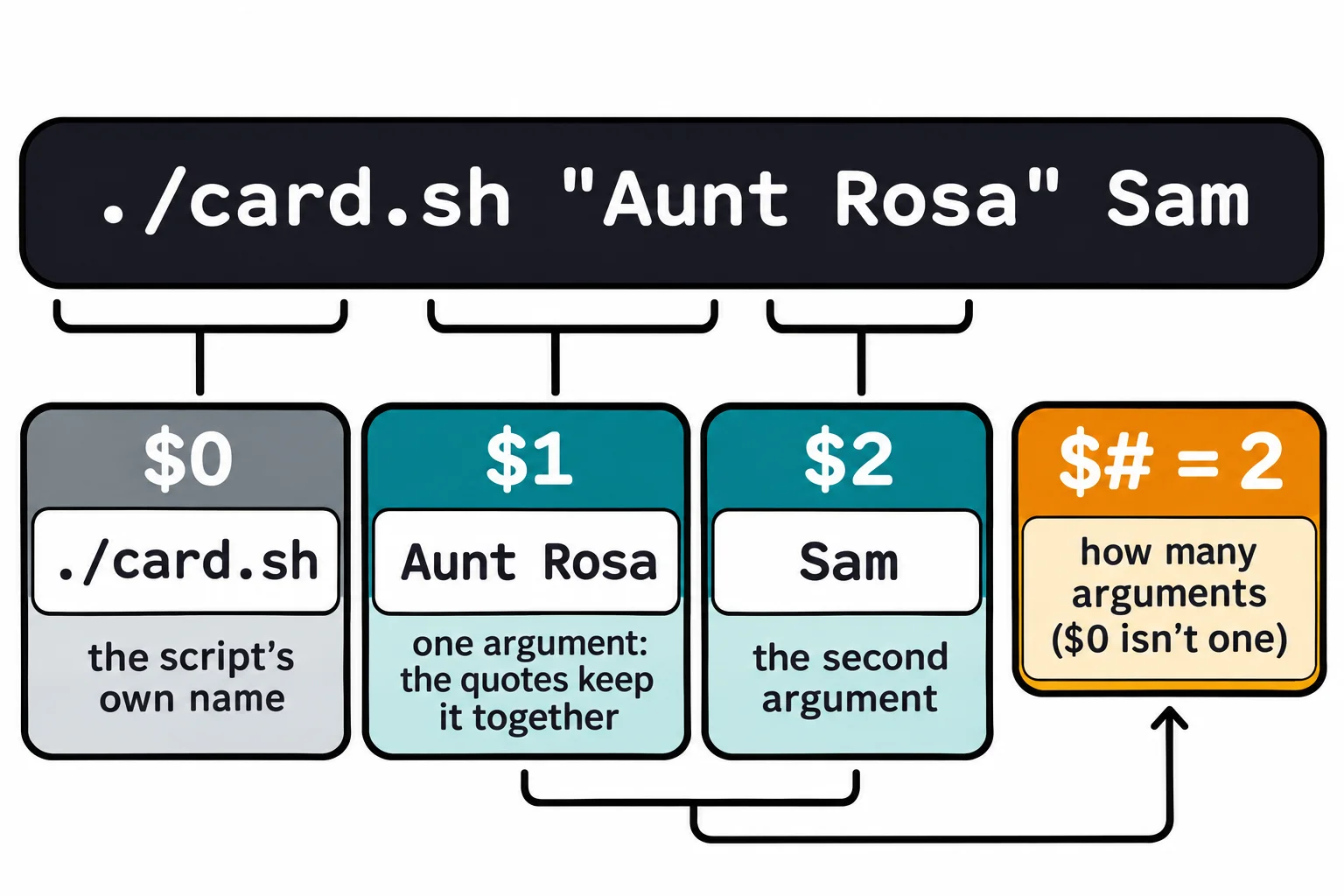
- Quotes around a name with spaces, as in "Aunt Rosa", make it one argument.
- "$@" is all the arguments, each kept in one piece. Without the quotes, a name with spaces falls apart.
You wrote a script that prints a birthday card for Maya. Next week it's Diego's birthday. You could copy the script and change the name inside it, and a month later you'd have a folder of almost identical scripts, one per friend. Every app you use solves this the other way: cp doesn't have a copy of itself for every file, you tell it which files when you run it. Your scripts can work the same way, and that's what makes one script useful for every name, every folder and every day. A web developer's deploy script takes the site's name; an IT tech's script takes the computer to check.
Set up the card shop
This chapter's practice folder is a small card shop. Make it and go into it:
mkdir -p ~/terminal-practice/cards && cd ~/terminal-practice/cards
pwd
/home/sam/terminal-practice/cards
Open nano card.sh and type this script, then save with Ctrl+O and Enter, and quit with Ctrl+X:
#!/usr/bin/env bash
# card.sh: a birthday card for the name you give it.
echo "Happy birthday, $1!"
echo "From $2"
Make it runnable with chmod +x card.sh, as in Your First Script.
$1: the first word after the name
When you run a script, the words you type after its name are its arguments, the same as the folder in ls ~/terminal-practice. The script finds them in numbered variables: $1 (read "dollar one") is the first, $2 the second, up to $9, and past that ${10}. Because they're found by their place in the line, they're called positional parameters.
./card.sh Maya Sam
./card.sh Diego Sam
Happy birthday, Maya!
From Sam
Happy birthday, Diego!
From Sam
One script, any name. Now leave one out:
./card.sh Maya
Happy birthday, Maya!
From
There was no second argument, so $2 was empty. Bash doesn't complain about an argument that's missing; the card goes out unsigned. The next section shows how a script can count what it was given.
$#: how many arguments, and quotes around a name
Make a second small script, args.sh, that shows what a script receives. It's a handy tool whenever arguments surprise you:
#!/usr/bin/env bash
# args.sh: shows what a script was given.
echo "Script: $0"
echo "How many: $#"
echo "First: $1"
echo "Second: $2"
$# (read "dollar hash") is how many arguments were typed, and $0 is the name the script was run by. Now send a card to Aunt Rosa:
chmod +x args.sh
./args.sh Aunt Rosa Sam
./args.sh "Aunt Rosa" Sam
Script: ./args.sh
How many: 3
First: Aunt
Second: Rosa
Script: ./args.sh
How many: 2
First: Aunt Rosa
Second: Sam
The shell splits a line into arguments at its spaces, so Aunt Rosa is two. In quotes it's one, the same rule as in The Shape of a Command. Run without arguments, the script says How many: 0. If This, Then That: if and [[ ]] uses $# for exactly that: a script that stops and explains how to run it when it gets the wrong number.
"$@": all of them, safely
A party has more than two guests. "$@" (read "dollar at, in quotes") is every argument at once, each kept in one piece. It's how a script hands everything it was given to another command. Make party.sh:
#!/usr/bin/env bash
# party.sh: a birthday line for every name you give it.
printf 'Happy birthday, %s!\n' "$@"
printf (from Writing to Files: echo, > and >>) uses its pattern again for every extra argument, so it prints one line per name:
chmod +x party.sh
./party.sh Maya Diego "Aunt Rosa"
Happy birthday, Maya!
Happy birthday, Diego!
Happy birthday, Aunt Rosa!
Now take the quotes off, so the line ends in $@, save, and run it again:
Happy birthday, Maya!
Happy birthday, Diego!
Happy birthday, Aunt!
Happy birthday, Rosa!
Without the quotes, the shell splits every argument at its spaces again, and Aunt Rosa becomes two guests. "$*", with a star, does something else again: it joins every argument into one, so the script prints a single line, Happy birthday, Maya Diego Aunt Rosa!. Put the quotes back: "$@", in double quotes, is the one to use. A script that works on folders hands them on the same way, as in ls -l "$@", so it works for any folders you name, spaces and all.
On a Mac, scripts run in bash 5 by their first line, so all of this works the same; zsh at the prompt also knows $1, $# and "$@".
Try it in the terminal
Terminal Quest: Mission Control, goal 5: played right on the lesson page.
Your turn: Mission Control needs a beacon. Write beacon.sh, a one-line script that prints BEACON and its first argument, make it runnable, and send ./beacon.sh KESTREL into the transmitter with a pipe.
Check yourself
2 questions to try on the lesson page.
So what
Arguments turn a script into a tool you can point at anything: $1 and $2 for each word, $# to count them, and "$@" to pass them all on in one piece.