Shell, Terminal, Prompt
The terminal is the window, the shell is the program inside it that runs your commands, and the prompt is the line where the shell waits for the next one.
Novice · Unix · Linux · Updated
After this lesson you can
- Tell the terminal, the shell and the prompt apart
- Read a prompt such as sam@laptop:~$ and copy a tutorial's command without its $
Key takeaways
- The terminal is the window you type in. Its font, colors and tabs are the window's settings.
- The shell is the program in the window that reads each command and runs it. bash is a shell, and so is zsh, the Mac's.
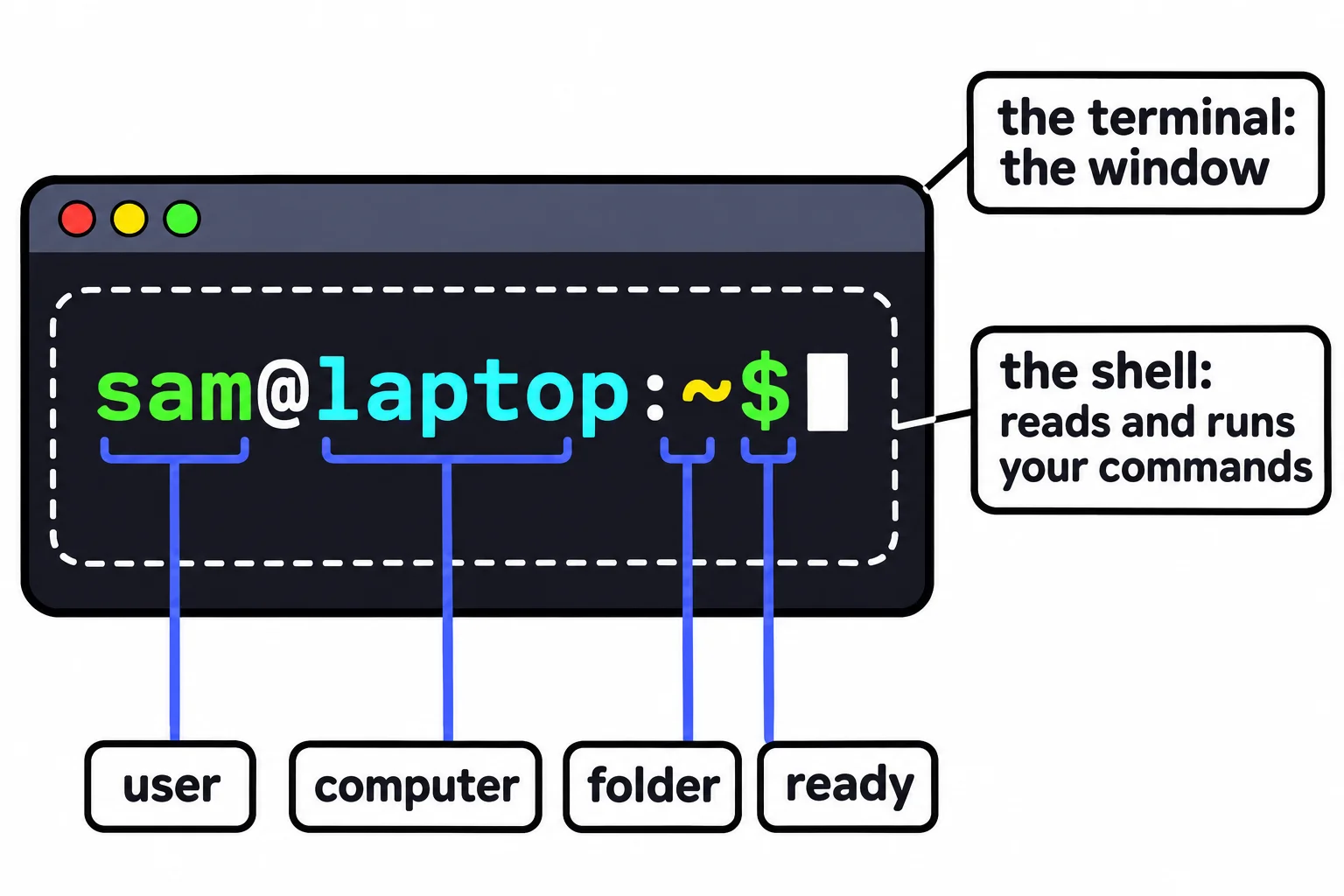
- The prompt is the shell saying "ready". sam@laptop:~$ shows the user, the computer, the folder you're in, and $.
- In a tutorial, a $ at the start of a line stands for the prompt. Type what comes after it, not the $.
Tutorials, classmates and coworkers use three words as if they were one: "open your terminal", "type this into the shell", "at the prompt, run…". They're three different things, and knowing which is which tells you where to look when something goes wrong. Is it a setting of the window, the program inside it, or the command you typed?
Think of a restaurant. The dining room is where you sit. The waiter takes your order to the kitchen and brings back what the cooks made. And when the waiter stands at your table with a notepad, asking "What'll it be?", that's your moment to order. In the terminal, those three are the terminal, the shell and the prompt.
The terminal: the window
The terminal is the dining room: the window you type into. On a Mac it's the Terminal app; on Ubuntu it's called Terminal too; on Windows it's Windows Terminal. It shows text and passes on what you type, but it doesn't understand a single command itself.
Its font size, colors and tabs are the window's own settings. Making the text bigger is a terminal setting, and it changes nothing about how commands work. In your textbook, a terminal may be called a terminal emulator: it imitates the screen-and-keyboard terminals that people once used to reach a big shared computer.
The shell: the program that listens
The shell is the waiter. It's a program running inside the terminal that reads each line you type, works out which program you mean, runs it and shows you what it printed. The shell on Linux and in Ubuntu on Windows is bash; on a Mac it's zsh (read "zee shell"), a close cousin. To ask which shell you have:
echo $SHELL
/bin/bash
echo prints what you give it, and $SHELL is read "the value of SHELL": the name of your shell, kept where any program can look it up. On a Mac it prints /bin/zsh. One terminal can hold different shells: Windows Terminal can have Ubuntu's bash in one tab and PowerShell in the next.
The prompt: the shell is ready
The prompt is the waiter with the notepad: the text the shell prints when it's ready for your next command. On Ubuntu it looks like sam@laptop:~$, where laptop stands for your computer's name. Read it left to right:
sam: who you are, your user name.@(read "at"), thenlaptop: the computer you're on.:, then~(read "tilde", or "home"): the folder you're in, here your home folder.$: "ready, type here".
The prompt changes as you move. After cd ~/terminal-practice, it reads sam@laptop:~/terminal-practice$. A Mac's zsh writes its prompt like sam@Sams-MacBook-Air ~ %, with a % where bash has $. And if a prompt ever ends in #, you're the administrator, called root, and every command can change the whole computer, so slow down.
When there's no prompt, the shell is busy: a command is still running. The Shape of a Command shows how to stop one.
The $ in tutorials
Tutorials often show a command with a $ in front, and what it prints on the next line:
$ pwd
/home/sam
The $ stands for your prompt, so you can tell what to type from what the computer printed back. Copy only what comes after it. Type the $ too, and bash thinks $ is the name of a command:
$ pwd
bash: $: command not found
Check yourself
2 questions to try on the lesson page.
So what
The terminal is the window, the shell runs your commands and the prompt says it's ready. With those three words straight, every tutorial you read makes more sense, and so does every error message.