Subcommands: app add, app list
A tool that does several jobs gives each job a word of its own, a subcommand, as git and docker do: a case on the first argument picks the job, shift drops that word, and one function per subcommand does the work.
Freelancer · Unix · Linux · Updated
After this lesson you can
- Choose a subcommand's function with a case on the first argument, and answer an unknown command on stderr with exit code 2
- Drop the first argument with shift, so a subcommand's function gets only its own arguments from "$@"
Key takeaways
- A subcommand is a word after the app's name that picks one job: git commit, apt install, recipes add. Each job then has its own options and arguments.
- case "$1" in sorts the first word into a job, and *) answers a word it doesn't know, on stderr with exit code 2.
- shift drops the first argument: $2 becomes $1, $3 becomes $2, and $# goes down by one.
- One function per subcommand keeps each job in one place, and after shift, "$@" hands it only its own arguments.
Your recipe box can list recipes, but adding one still means opening nano. You could add a flag, -a, but then does -c name the category to list, or the one to add? Tools that do several jobs solve this another way, and you've used them: apt install tree and apt remove tree, git add and git commit. Docker, which developers use to run apps in containers, has docker run and docker ps. The word after the tool's name picks the job.
One word, one job
Picture a food hall: the tool's name is the building, the next word is the counter you walk up to, and the rest is your order at that counter. That word is a subcommand. In git commit -m "Fix the typo", git is the app, commit is the subcommand, and -m "Fix the typo" is that subcommand's option. Each subcommand has options of its own: -m means something to git commit and nothing to git status. Many tools give each one its own help page too, as in git commit --help.
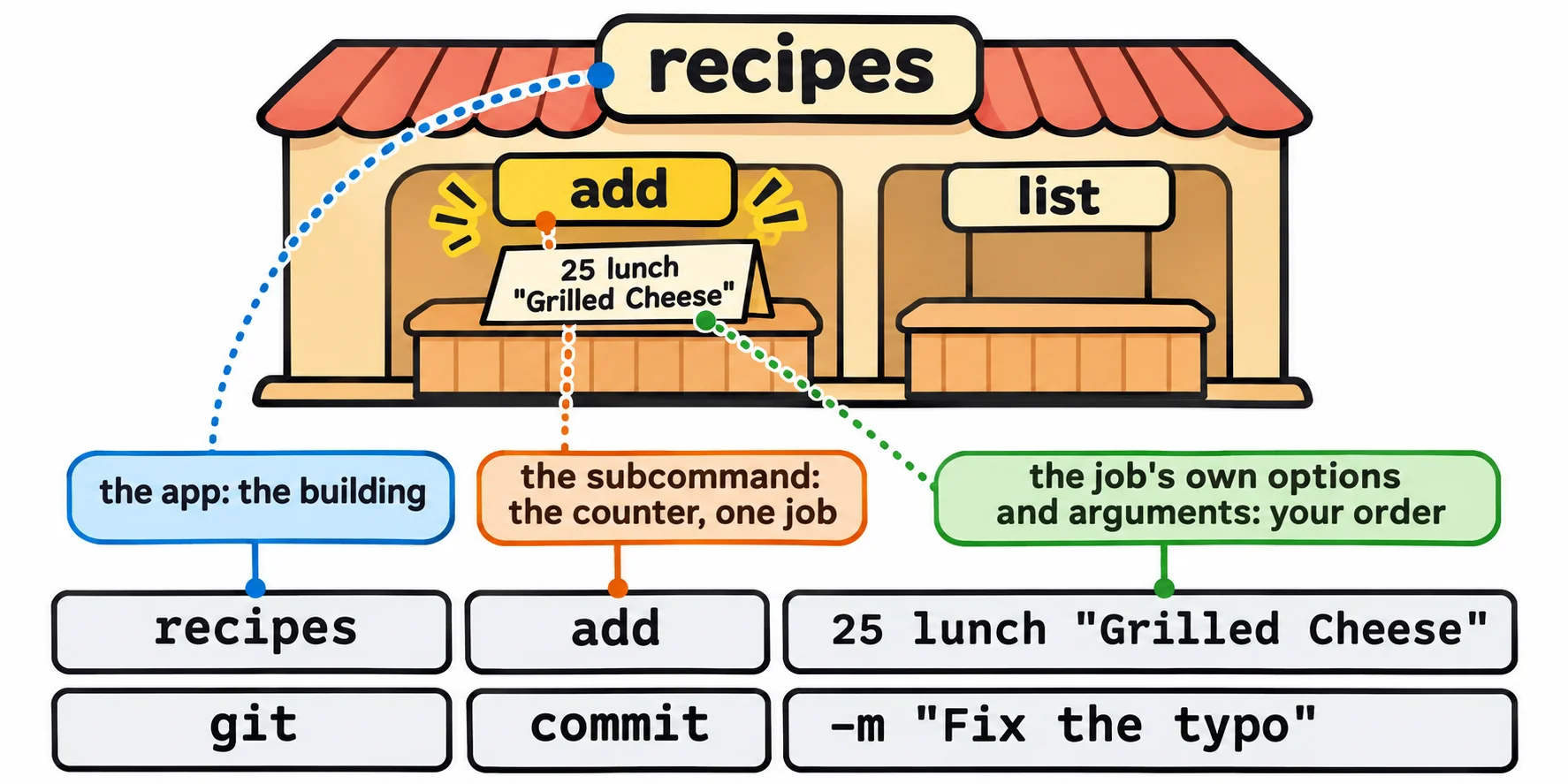
Your recipe box will work the same way:
recipes add 25 lunch "Grilled Cheese"adds a recipe.recipes list -c lunchlists them, with the options from Options and Flags: getopts and --help.
shift: drop the first word
Once the script knows the job is list, the listing code wants -c lunch, not list -c lunch. shift drops the first argument, and the rest move down one, like a line at a counter moving up after the first person is served. Try it with a small function at the prompt:
words() {
  echo "$# words, the first is $1"
  shift
  echo "$# words, the first is $1"
}
words list -c dinner
3 words, the first is list
2 words, the first is -c
One function per subcommand
Here's the recipe box rebuilt around its two jobs. Open recipes with nano and replace everything in it with this:
#!/usr/bin/env bash
# recipes: a recipe box you run from the terminal

usage() {
  cat <<EOF
Usage: recipes COMMAND

Commands:
  add MINUTES CATEGORY "NAME" add a recipe
  list [-q] [-c CATEGORY]     list your recipes

  -h, --help                  show this help
  --version                   show the version
EOF
}

cmd_add() {
  if [[ $# -ne 3 ]]; then
    echo 'Usage: recipes add MINUTES CATEGORY "NAME"' >&2
    exit 2
  fi
  echo "$1 $2 $3" >> recipes.txt
  echo "Added $3."
}

cmd_list() {
  local only="" quick=no opt
  while getopts ":c:q" opt; do
    case "$opt" in
      c) only="$OPTARG" ;;
      q) quick=yes ;;
      :) echo "recipes: -$OPTARG needs a value, such as -$OPTARG dinner" >&2; exit 2 ;;
      \?) echo "recipes: there's no -$OPTARG option. Try: recipes --help" >&2; exit 2 ;;
    esac
  done
  while read -r minutes category name; do
    if [[ -n "$only" && "$category" != "$only" ]]; then
      continue
    fi
    if [[ "$quick" == yes && "$minutes" -gt 30 ]]; then
      continue
    fi
    echo "$name ($minutes min, $category)"
  done < recipes.txt
}

case "$1" in
  add) shift; cmd_add "$@" ;;
  list) shift; cmd_list "$@" ;;
  -h|--help) usage ;;
  --version) echo "recipes 1.1.0" ;;
  "") usage >&2; exit 2 ;;
  *) echo "recipes: there's no $1 command. Try: recipes --help" >&2; exit 2 ;;
esac
Read it from the bottom, because that's where the script starts. The case sorts the first word into a job. add) shift; cmd_add "$@" ;; drops the word add and hands every other argument to cmd_add, each in one piece. An empty first word gets the help page, and a word the case doesn't know gets a message; both go to standard error with exit code 2.
Each job lives in its own function, from Functions: Naming a Job. cmd_add checks that it got exactly three arguments, so a name without quotes is caught before it's saved. cmd_list is last lesson's listing code, with its variables made local (Local Variables and Getting a Value Back).
./recipes add 10 lunch "Grilled Cheese"
./recipes list -c lunch
./recipes add 10 lunch Grilled Cheese
./recipes cook
Added Grilled Cheese.
Tomato Soup (20 min, lunch)
Grilled Cheese (10 min, lunch)
Usage: recipes add MINUTES CATEGORY "NAME"
recipes: there's no cook command. Try: recipes --help
Room to grow
A new job later, such as recipes count, is one more function and one more line in the case; nothing else changes. That's how git grew to dozens of subcommands without becoming a tangle. When a tool you're learning has subcommands, its help page lists them, and tool subcommand --help usually explains one.
Check yourself
2 questions to try on the lesson page.
So what
recipes add and recipes list are one tool with two jobs, shaped like git and docker: a case on the first word, shift, and a function for each job.