Cleaning Up: trap and mktemp
mktemp makes a temporary file or folder with a name no other file has, and trap '...' EXIT runs cleanup however a script ends, Ctrl+C included, so a script that works in a scratch file never leaves half-finished work behind.
Freelancer · Unix · Linux · Updated
After this lesson you can
- Make a temporary file or folder with a name no other file has, with mktemp
- Remove temporary files however a script ends, Ctrl+C included, with trap ... EXIT
Key takeaways
- mktemp makes an empty temporary file with a new random name and prints that name; mktemp -d makes a folder; mktemp photos/.moving.XXXXXX puts it where you say.
- trap 'rm -f "$tmp"' EXIT runs the cleanup whenever the script ends: at its last line, at exit, when strict mode stops it, or when you press Ctrl+C.
- Use single quotes around a trap's command, so $tmp is read when the script ends, not when the trap is set.
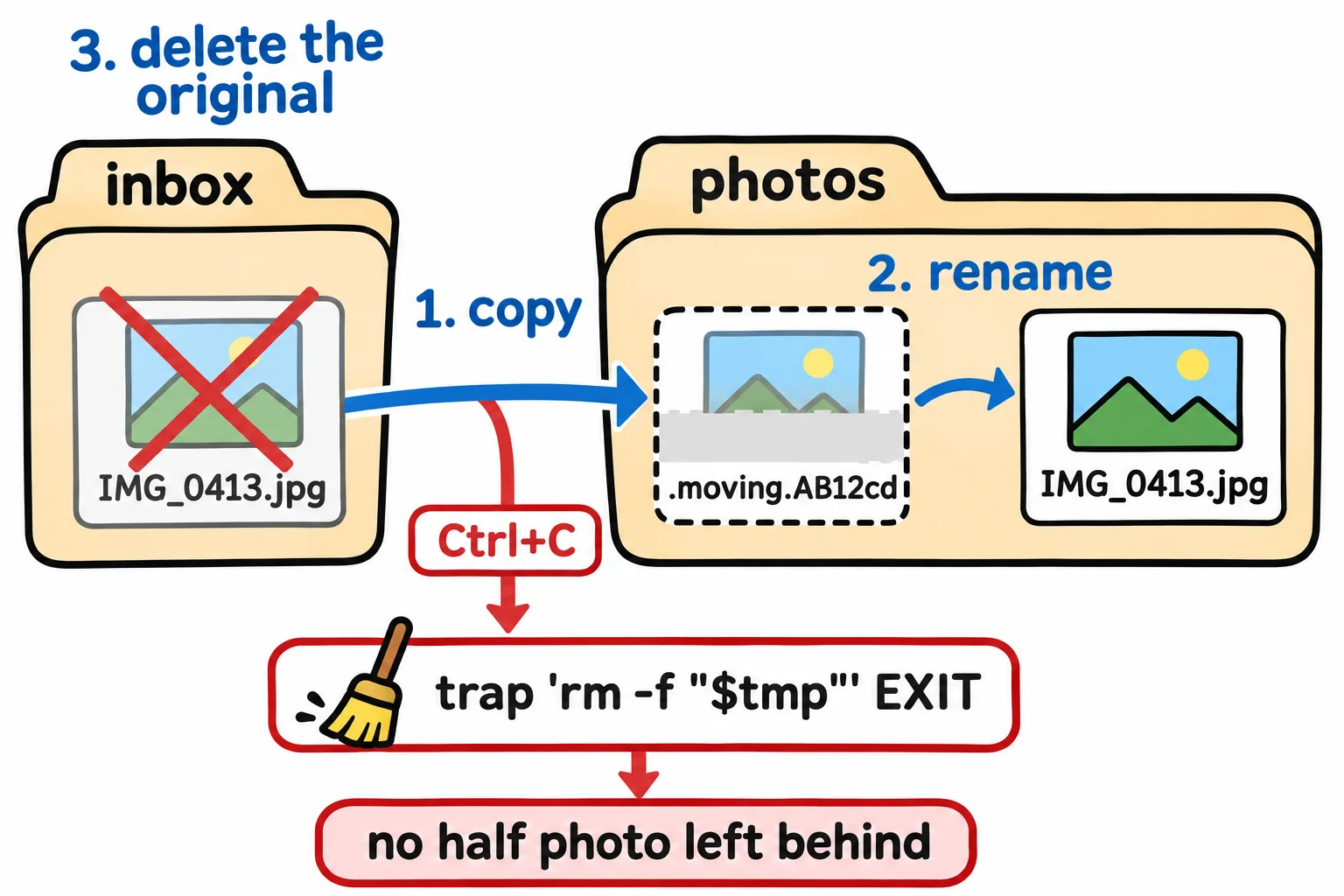
- A safe move copies into a hidden temporary file first and renames it only when the copy is whole, so a half-copied file never wears a real name.
You start copying a two-gigabyte video to a USB drive, realize it's the wrong one, and press Ctrl+C. The drive now holds a file with the video's real name and half its contents. Tomorrow it looks like a backup, and it won't play. A move between two drives is really a copy and then a delete, so a script that moves files can leave the same kind of half-file behind. Careful programs work in a scratch file and give it the real name only when it's whole; your browser does exactly this with .part and .crdownload files while it downloads. Bash has two tools for it: mktemp makes the scratch file, and trap makes sure it's cleaned up, whatever happens.
The examples use the mover folder and mover.sh from Strict Mode: set -euo pipefail.
mktemp: a scratch name nobody else has
A temporary file is one a script makes for its own use and removes when it's done. Its name matters: if every copy of your script used /tmp/mover.tmp, two copies running at once would write over each other's work. mktemp (read "make temp") makes an empty file with a new random name and prints the name:
mktemp
mktemp -d
mktemp photos/.moving.XXXXXX
/tmp/tmp.fnPP9aOBRq
/tmp/tmp.usjWVmdJDG
photos/.moving.AE9l07
Your names will be different: that's the point. Plain mktemp makes a file in /tmp, the system's folder for temporary files, and -d makes a folder there. Given a name ending in X's, it puts the file where you say and swaps each X for a random letter or digit. The dot at the start of .moving makes it a hidden file, so it stays out of an ordinary ls. Save the name in a variable, tmp=$(mktemp), and use "$tmp" from then on. (Remove the three you made: rm -r with each name.)
Ctrl+C leaves a mess
slow-copy.sh copies one photo into a scratch file in photos and pretends the copy takes 30 seconds, the way a big video does:
#!/usr/bin/env bash
# slow-copy.sh: copies one photo the slow way, like a big video going to a USB drive.
set -euo pipefail
tmp=$(mktemp photos/.moving.XXXXXX)
echo "Copying into $tmp"
cp inbox/IMG_0413.jpg "$tmp"
sleep 30
mv "$tmp" photos/IMG_0413.jpg
echo "Done."
Run it, press Ctrl+C after the first line appears, then look in photos with ls -A, which shows hidden files too:
Copying into photos/.moving.Qpg6y6
^C
.moving.Qpg6y6  IMG_0412.jpg
Ctrl+C sends the script a signal, a message from the system that says "stop now", and the script stopped right there. The half-made scratch file stayed. Remove it with rm photos/.moving.* before you go on.
trap: cleanup that always runs
trap (read "when this happens, run that") sets a command for bash to run at a moment of your choosing. EXIT is the moment the script ends, for any reason: its last line, an exit, a failure strict mode stopped, or Ctrl+C. Add one line after the mktemp line:
trap 'rm -f "$tmp"' EXIT
Run it again, press Ctrl+C again, and look:
Copying into photos/.moving.H0xOJV
^C
IMG_0412.jpg
Nothing left behind. Keep the trap's command in single quotes, so $tmp is read when the script ends, not when the trap is set, and use rm -f, which says nothing if the file is already gone.
The mover's safe move
Now give mover.sh the same care. Below the two folder checks, set tmp to nothing (otherwise a run that ends before its first mktemp trips strict mode's -u inside the trap) and set the trap. Replace everything from skipped=0 to the loop's done with these lines. The new loop moves each photo in three steps: copy it into a hidden scratch file in the destination (cp -p keeps the photo's date), give the scratch file the photo's name, and only then delete the original:
tmp=""
trap 'rm -f "$tmp"' EXIT
skipped=0
for file in "$src"/*; do
  [[ -e "$file" ]] || continue
  name=$(basename "$file")
  if [[ -e "$dest/$name" ]]; then
    echo "mover: skipped $name: $dest already has one." >&2
    skipped=$((skipped + 1))
    continue
  fi
  tmp=$(mktemp "$dest/.moving.XXXXXX")
  cp -p "$file" "$tmp"
  mv "$tmp" "$dest/$name"
  rm "$file"
  echo "Moved $name."
done
Keep the ending if [[ $skipped -gt 0 ]] lines as they were.
Run the practice lines from Errors a User Can Act On for a fresh folder, then try it:
./mover.sh inbox photos
ls -A photos
mover: skipped IMG_0412.jpg: photos already has one.
Moved IMG_0413.jpg.
Moved IMG_0414.jpg.
IMG_0412.jpg  IMG_0413.jpg  IMG_0414.jpg
No scratch files, the cake still in place, and if anything stops the script halfway, the trap tidies up after it. trap works the same on a Mac; there, plain mktemp uses a temporary folder of your own, so its names start with /var/folders/ instead of /tmp.
Check yourself
2 questions to try on the lesson page.
So what
With mktemp and trap, a script cleans up after itself even when it's interrupted, and a file appears under its real name only when it's whole.