Users and Groups
Every person and many programs on a Linux computer have a user account with a number and a list of groups: whoami, id and groups show yours, /etc/passwd lists every account, adduser and usermod -aG add a person and a group, and a server runs each program as a user of its own.
Journeyman · Unix · Linux · Updated
After this lesson you can
- Find out who you are, your user ID and your groups with whoami, id and groups
- Say what sudo adduser and sudo usermod -aG do, and why the -a matters
- Read a user's line in /etc/passwd, and explain why a server runs each program as a user of its own
Key takeaways
- whoami prints your user name. id adds your user ID, your main group and every group you're in. groups lists only the group names.
- A group shares access. On Ubuntu, members of adm may read the system logs, and members of sudo may use sudo.
- /etc/passwd has one line for each account: seven fields split by colons, from the name to the home folder and the shell.
- sudo adduser maya adds a person, and sudo usermod -aG adm maya adds her to a group. Without -a, -G replaces her other groups.
- A server runs each program as its own user, such as www-data for a web server, so a program that's broken into reaches only its own files.
A book club's website runs on a small home server: an old laptop in Sam's closet, with Ubuntu on it and no screen. Maya and Diego help look after it. The quick way is to share Sam's password, and that's where the trouble starts: nobody can tell who changed a setting, the password has to change for everyone when Diego leaves the club, and everyone can do everything, including delete the website by mistake. Linux has a better answer, built in: an account for each person, and groups for what they share. IT administrators set up every server this way, and the same commands tell you who you are on any Linux computer, your own laptop included.
Who am I? whoami, id and groups
You met whoami in sudo and Who Owns a File. id tells the whole story, and groups the short version:
whoami
id
groups
sam
uid=1000(sam) gid=1000(sam) groups=1000(sam),4(adm),24(cdrom),27(sudo),30(dip),46(plugdev),100(users)
sam adm cdrom sudo dip plugdev users
Read id's line from the left:
uid=1000(sam)is your user ID: the number the computer really uses for you. The name in brackets is for people. On Ubuntu, the first person's account is 1000 and the next one 1001.gid=1000(sam)is your main group. Ubuntu gives each user a group of their own, with the same name.groups=lists every group you're in. A group is a named list of users who share access, like a key that opens the same doors for everyone who has a copy.
Two of Sam's groups matter for looking after a computer: members of adm may read the system logs (Reading System Logs), and members of sudo may use sudo. Your list may be a little different. On a Mac, id and groups work the same way, with groups such as staff and admin.
Where accounts are listed: /etc/passwd
Every account has one line in /etc/passwd (read "etc pass-wd"), a text file anyone may read. grep finds lines in it; this pattern, from Patterns: Regular Expressions for grep, picks the lines that start with sam: or www-data::
grep -E '^(sam|www-data):' /etc/passwd
www-data:x:33:33:www-data:/var/www:/usr/sbin/nologin
sam:x:1000:1000::/home/sam:/bin/bash
Each line has seven fields, separated by : (read "colon"): the name; an x, because the scrambled password lives in /etc/shadow; the user ID; the main group's ID; a comment, often the person's full name, empty for Sam; the home folder; and the shell, the program that starts when the user signs in. Sam gets bash. www-data gets /usr/sbin/nologin, a shell that turns everyone away: nobody can sign in as www-data.
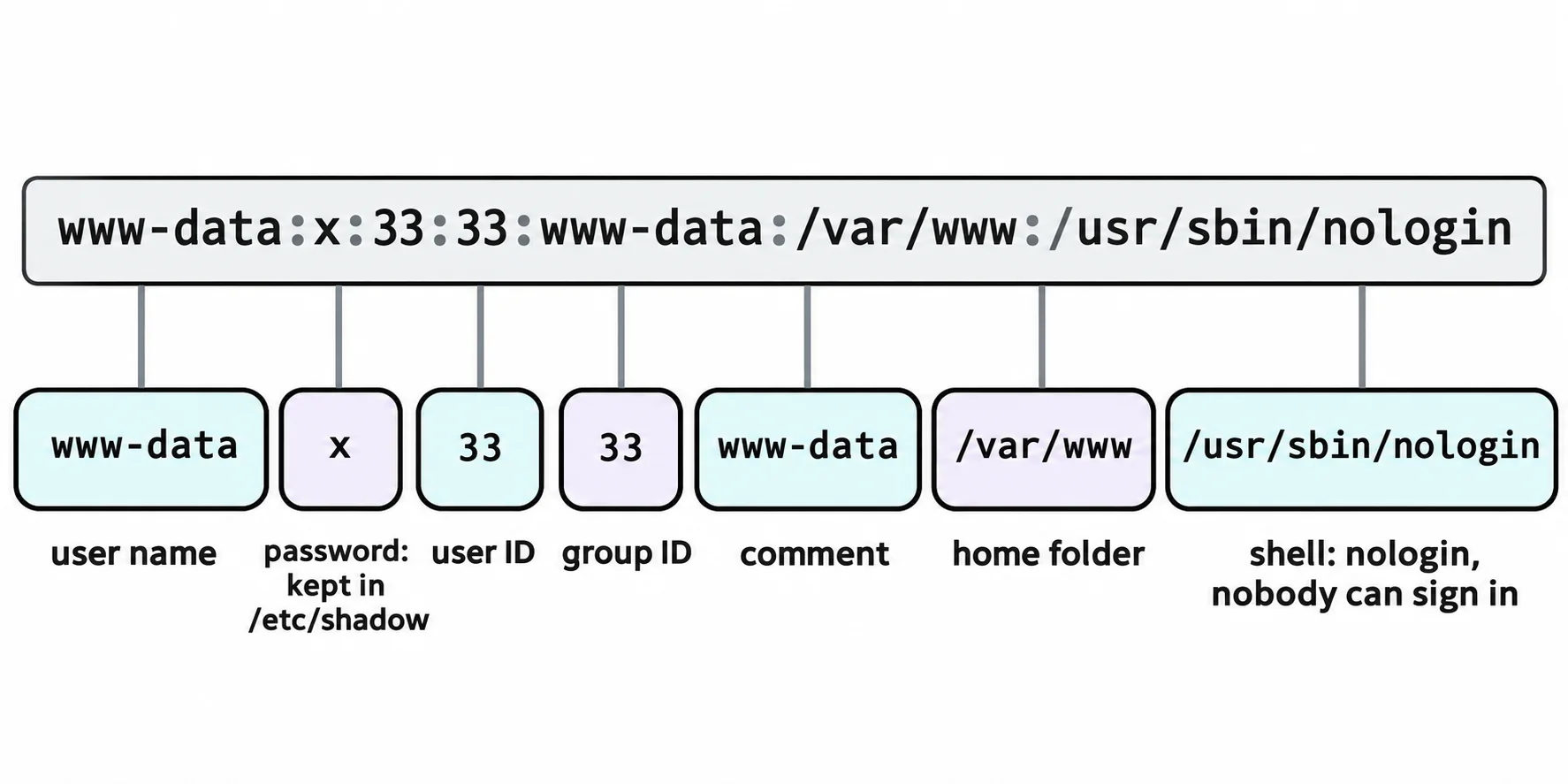
To see who is in a group, getent group reads the groups' list. The last field is the members:
getent group sudo adm
sudo:x:27:sam
adm:x:4:syslog,sam
Adding a person
These two lines change the computer, so they're for a server you look after, not for trying on your laptop now. On Ubuntu, and in WSL:
sudo adduser maya
sudo usermod -aG adm maya
adduser makes Maya's account: the next user ID, a group named maya and a home folder, /home/maya. It asks for her password twice, then a few details, such as her full name, that you may skip with Enter. (It's Ubuntu's friendlier front end to useradd, which other tutorials use.) usermod -aG adm maya puts her in adm, so she can read the logs. -G names the groups, and -a (append) means "add these to her groups". Remember the -a: without it, -G replaces all her other groups with the ones you name. A new group counts from her next sign-in.
Here's the result on an account that's already in adm: syslog, the user that writes the log files.
id syslog
uid=100(syslog) gid=101(syslog) groups=101(syslog),4(adm)
After the usermod line, id maya ends the same way, with 4(adm). When Diego leaves the club, sudo deluser diego removes his account. On a Mac, you add a person in System Settings, under Users & Groups.
Why programs get users of their own
People aren't the only users. Here's who runs three programs that are always running on Ubuntu (-C picks programs by name and -o picks the columns; What's Running: ps, top and htop has more):
ps -o user,pid,comm -C cron,rsyslogd,chronyd
USER         PID COMMAND
root         309 cron
syslog       340 rsyslogd
_chrony      377 chronyd
_chrony      399 chronyd
rsyslogd, which writes the log files, runs as syslog, and chronyd, which keeps the clock right, runs as _chrony. They're system users: accounts for programs, not people, and nobody signs in as them. The book club's web server runs as www-data, which Ubuntu already has, ready for one:
id www-data
uid=33(www-data) gid=33(www-data) groups=33(www-data)
Why bother? A web server talks to strangers all day. If someone finds a bug in it and breaks in, they get www-data's rights: the website's files, and not Sam's home folder or the system. It's a hotel key card that opens one room. Giving every account only the access its job needs is the principle of least privilege, and it's for people too: Maya gets adm to read the logs, not sudo. On a Mac, the users for programs have names that start with an underscore, such as _www.
Check yourself
2 questions to try on the lesson page.
So what
id answers "who am I, and what may I do?" on any Linux computer, and one account per person or program, with only the groups it needs, keeps a mistake or a break-in small.