Permissions: Read, Write and Run
Every file says who may read it, change it and run it, for its owner, its group and everyone else; ls -l shows it as letters such as rwxr-xr-x, chmod +x lets a program run, and chmod 644 or 600 sets all nine at once with numbers.
Apprentice · Unix · Linux · Updated
After this lesson you can
- Read the permissions in ls -l as read, write and run for the owner, the group and everyone else
- Change permissions with chmod +x and with numbers such as 755, 644 and 600, and explain Permission denied
Key takeaways
- In ls -l, the nine letters after the first character are three sets of r (read), w (write) and x (execute, meaning run), for the owner, the group and everyone else.
- A dash means that permission is missing. "Permission denied" means you tried to read, change or run something without the permission it needs.
- chmod +x file lets a program run, and ./file runs it from the folder you're in.
- In chmod's numbers, read is 4, write is 2 and run is 1. Add them up for each set, so 755 is rwxr-xr-x, 644 is rw-r--r-- and 600 is rw-------.
A tutorial says "run ./install.sh", and the terminal answers Permission denied. Or you share a computer with your family and want your journal to stay yours. On Linux and on a Mac, every file carries a small set of rules about who may read it, who may change it and who may run it. They're called permissions, and they're the reason behind the second most common error message in the terminal. A web developer fixes them when a script won't run on a server; an IT administrator sets them so that only the right people can open a file.
This lesson uses the workshop from Variables in the Shell. Go into it with cd ~/terminal-practice/workshop.
Permission denied
Ada's kettle-bot is a program, and PATH: How a Command Is Found showed that a program in the folder you're in is run with ./ in front of its name. Try it:
./kettle-bot
bash: ./kettle-bot: Permission denied
The file is there, and bash kettle-bot would run it (bash reads it, and reading is allowed). What's missing is permission to run the file itself. ls -l shows the permissions at the start of each line:
ls -l
total 16
-rw-r--r-- 1 sam sam   44 Nov  9 05:27 diary.txt
-rw-r--r-- 1 sam sam  152 Nov  9 05:27 kettle-bot
drwxr-xr-x 3 sam sam 4096 Nov  9 05:27 projects
drwxr-xr-x 2 sam sam 4096 Nov  9 05:27 tools
Your dates will differ. Looking Around: ls said to skip this first column for now. Now it's time to read it.
Reading rwxr-xr-x
Think of a sign on a door that says who may come in and what they may do. The first character is the type: - for a file, d for a folder. The next nine are three sets of three, for three kinds of people:
- the owner (here
sam, the first name on the line), also called the user,u; - the group (the second name, also
sam), people who share access,g; - others, everyone else with an account on the computer,
o.
Each set says the same three things, always in this order: r read, w write (change or delete it), x execute (run it). A - means "not allowed".
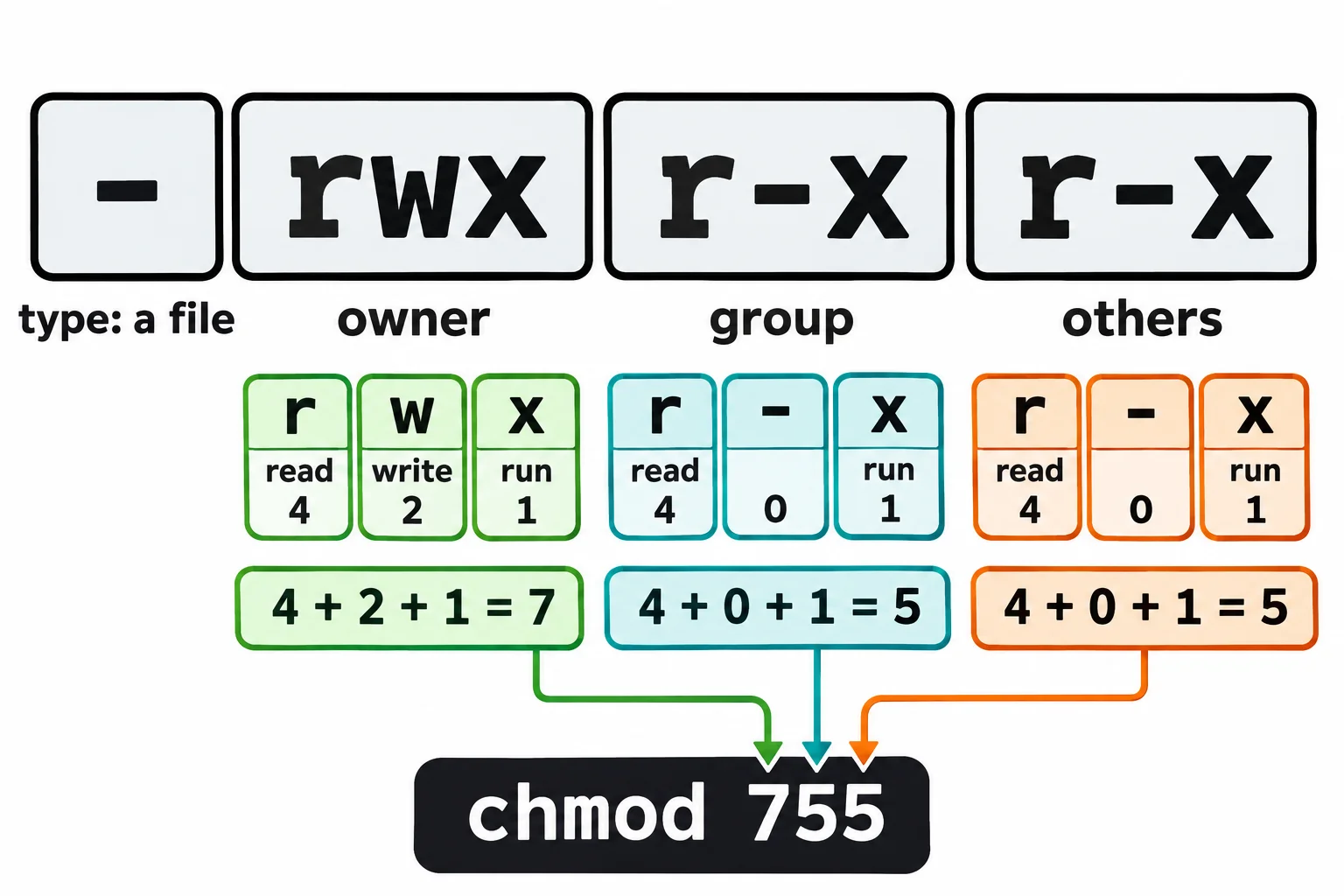
So -rw-r--r-- on kettle-bot reads: a file; the owner may read and write it; the group may read it; others may read it. Nobody may run it. That's the usual start for any file you make, programs included.
chmod +x: let it run
chmod (short for change mode) changes permissions. +x adds run permission:
chmod +x kettle-bot
ls -l kettle-bot
POWER=on ./kettle-bot
-rwxr-xr-x 1 sam sam 152 Nov  9 05:27 kettle-bot
Pouring tea...
Three xs appeared, one in each set, and the kettle-bot runs. chmod changes a file's rules for everyone who uses it, so read a program before you give it x, as you did with cat kettle-bot. chmod -x takes run permission away again. To change one set only, name it: chmod u+x adds x for the owner alone.
The numbers: 755, 644, 600
Tutorials often write permissions as three digits. Each letter has a value: r is 4, w is 2 and x is 1. Add up each set, and the three sums, owner then group then others, are the number:
| Number | Letters | Who it's for |
|---|---|---|
| 755 | rwxr-xr-x |
programs and folders: you change it, everyone may read and run it |
| 644 | rw-r--r-- |
ordinary files: you change it, everyone may read it |
| 600 | rw------- |
private files: only you may read or change it |
Ada's diary should be private:
chmod 600 diary.txt
ls -l diary.txt
-rw------- 1 sam sam 44 Nov 9 05:27 diary.txt
Avoid chmod 777, even when a forum post suggests it: it lets everyone change the file, and a smaller number fixes the same problem. On a folder, r lets you list its names, w lets you add and delete files in it, and x lets you go into it, which is why folders are usually 755.
What "Permission denied" means. You tried to do something without its letter: run a file without x, as ./kettle-bot did; read a file without r (cat on a file set to 000 says cat: diary.txt: Permission denied); or change a file without w. ls -l shows which letter is missing, and if the file is yours, chmod gives it back.
On a Mac, ls -l sometimes shows an @ or a + after the nine letters: the file has extra information attached, such as where it was downloaded from. The nine letters mean the same. In WSL, keep your work inside your Linux home folder: Windows folders under /mnt/c don't keep these permissions the same way.
Try it in the terminal
Terminal Quest: The Clockwork Workshop, goals 1 to 2: played right on the lesson page.
Ada's machines are programs, and the kettle-bot won't run yet. See which machines may run, then let the kettle-bot run.
Check yourself
2 questions to try on the lesson page.
So what
ls -l tells you who may read, change and run every file, and chmod changes it. "Permission denied" is now a missing letter you can find and fix.