Wildcards: *, ? and [ ]
A wildcard pattern such as *.jpg stands for every name that fits it, and the shell swaps in those names before the command runs, so echo shows you the list first and one mv moves every photo at once.
Apprentice · Unix · Linux · Updated
After this lesson you can
- Predict which names a pattern with *, ? or [ ] matches
- Move or copy many files at once with a wildcard, checking the match with echo first
Key takeaways
- matches any run of characters, even none, so *.jpg means every name that ends in .jpg.
- ? matches exactly one character, and [ ] matches one character from a list or a range, such as [1-3].
- The shell swaps the pattern for the matching names before the command runs. echo and the pattern show you that list first.
- When nothing matches, bash hands the pattern over unchanged, and the command says there's no such file. zsh stops before running it.
You're back from a trip, and your Downloads folder has 300 new photos in it, mixed in with a lease and a stack of receipts. Moving them one at a time is 300 commands. A file manager can do it in one drag if you sort by type, click the first photo, Shift-click the last and check that no PDF got caught on the way. The terminal has a shorter way: describe the names you want, and let the shell find them.
Set up the practice folder
The same mess as before, in a folder of its own. These lines are safe to run again:
mkdir -p ~/terminal-practice/wildcards && cd ~/terminal-practice/wildcards
mkdir -p photos music documents
touch IMG_2041.jpg IMG_2042.jpg IMG_2043.jpg IMG_2051.jpg beach-day.png
touch boarding-pass.pdf lease.pdf resume.docx road-trip-mix.mp3 rainy-day.mp3
touch receipt-2026-01.pdf receipt-2026-02.pdf receipt-2026-05.pdf receipt-2026-11.pdf
ls
IMG_2041.jpg   boarding-pass.pdf  rainy-day.mp3        resume.docx
IMG_2042.jpg   documents          receipt-2026-01.pdf  road-trip-mix.mp3
IMG_2043.jpg   lease.pdf          receipt-2026-02.pdf
IMG_2051.jpg   music              receipt-2026-05.pdf
beach-day.png  photos             receipt-2026-11.pdf
*: any name that fits
A wildcard is a character that stands in for others, like the blank tile in a word game. The most useful one is * (read "star"), which matches any run of characters, even none. *.jpg (read "star dot jpg") means every name that ends in .jpg, and receipt* every name that starts with receipt. To see what a pattern matches, put it after echo, which prints whatever it's given:
echo *.jpg
echo receipt*
IMG_2041.jpg IMG_2042.jpg IMG_2043.jpg IMG_2051.jpg
receipt-2026-01.pdf receipt-2026-02.pdf receipt-2026-05.pdf receipt-2026-11.pdf
A * skips names that start with a dot, so hidden files stay out of it. And a pattern matches capital letters exactly, on a Mac too: *.jpg doesn't match SUNSET.JPG.
The shell does the matching
Here's why a wildcard works with any command: the shell swaps the pattern for the names before the command runs. Type mv *.jpg photos/, and bash looks in the folder, finds the four photos, and runs mv IMG_2041.jpg IMG_2042.jpg IMG_2043.jpg IMG_2051.jpg photos/. mv never sees the star. In your textbook this is called globbing, and a pattern such as *.jpg is a glob.
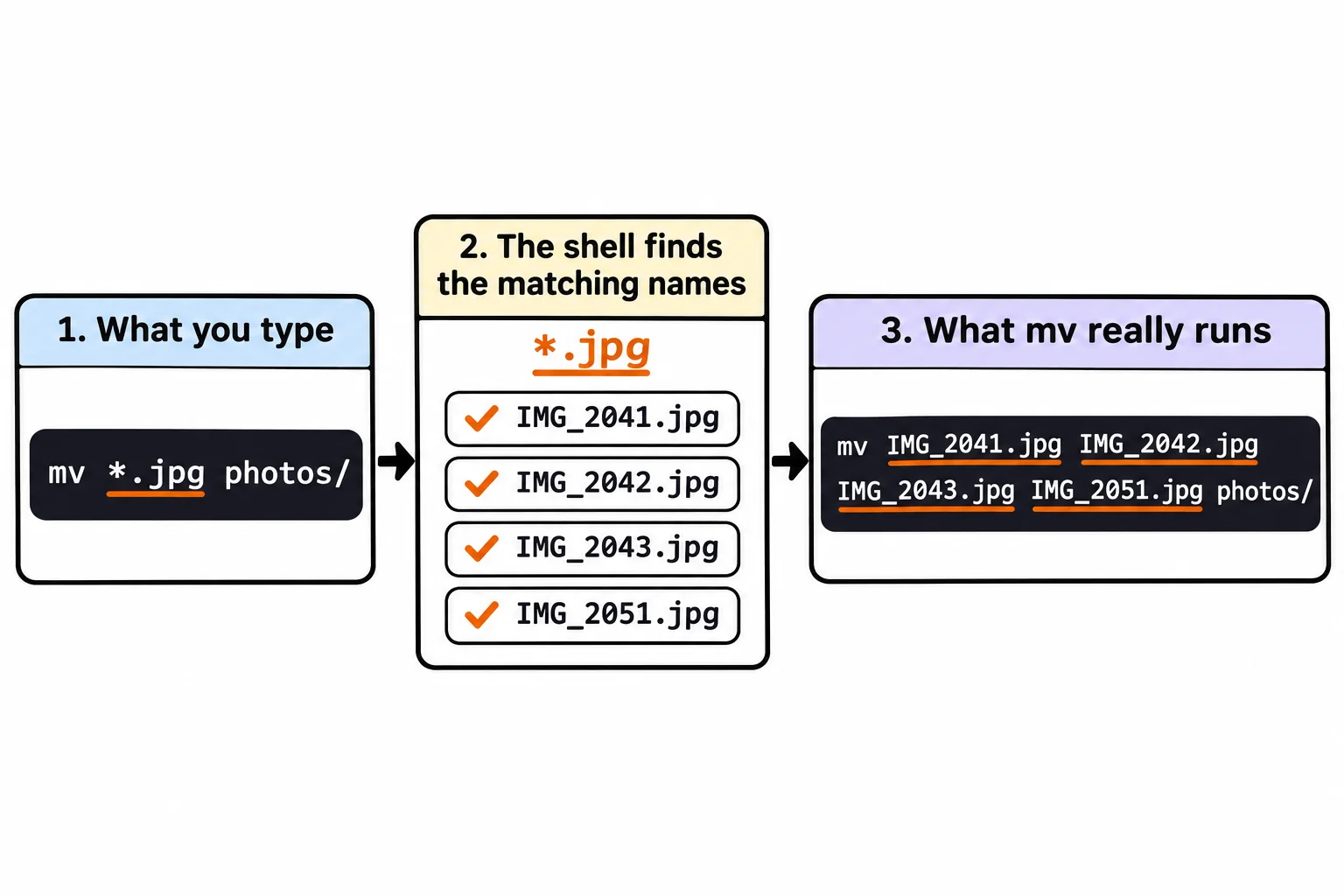
That's what makes echo first a good habit: echo gets exactly the list the real command would get. Check the list, press the up arrow, change echo to the real command, and run it:
echo *.jpg *.png
IMG_2041.jpg IMG_2042.jpg IMG_2043.jpg IMG_2051.jpg beach-day.png
mv *.jpg *.png photos/
mv *.mp3 music/
ls
boarding-pass.pdf  music                receipt-2026-02.pdf  resume.docx
documents          photos               receipt-2026-05.pdf
lease.pdf          receipt-2026-01.pdf  receipt-2026-11.pdf
Seven files sorted with two commands, and 300 photos would take the same one line. cp takes wildcards the same way.
? and [ ]: exactly one character
? (read "question mark") matches exactly one character, whatever it is. [ ] (read "brackets") matches one character from the list inside them, and a dash makes a range: [1-3] is 1, 2 or 3, and [25] is 2 or 5. The receipts are named by month, which makes them good for trying both:
echo receipt-2026-0?.pdf
echo receipt-2026-0[1-3].pdf
receipt-2026-01.pdf receipt-2026-02.pdf receipt-2026-05.pdf
receipt-2026-01.pdf receipt-2026-02.pdf
0? matched every month from 01 to 09 that's there, and 0[1-3] only January to March: the first quarter of the year, ready to move into a folder of its own.
When nothing matches
There are no videos in this folder. Here's what a pattern that matches nothing does:
echo *.mp4
mv *.mp4 music/
*.mp4
mv: cannot stat '*.mp4': No such file or directory
When nothing matches, bash hands the pattern over unchanged. mv looks for a file that's really named *.mp4, finds none and says so (cannot stat means it couldn't look the file up). Nothing moves, and nothing breaks. zsh, the shell on a Mac, is stricter: it stops before running the command at all, with an error saying no matches were found. Either way, the message means the same thing: check your pattern.
Try it in the terminal
Terminal Quest: Moving Day, goals 3 to 4: played right on the lesson page.
There's a bookshelf in the living room now. Put every book on it with one command, then empty the whole kitchen box into the kitchen.
Check yourself
2 questions to try on the lesson page.
So what
A wildcard turns "every photo", "every receipt from March" or "everything in this box" into one short pattern. With echo first, you see exactly which files a command will touch before it touches them.