Color: Names, Hex, rgb() and hsl()
CSS colors text with the color property and fills the area behind it with background-color, and it writes each color as a name, a hex code, rgb() or hsl(), with an alpha value when the color should be see-through.
Novice · CSS · Updated
After this lesson you can
- Set an element's text and background colors with color and background-color
- Write a color as a name, a hex code, rgb() or hsl(), with alpha for transparency
Key takeaways
colorsets the color of the text, andbackground-colorfills the area behind it.- Named colors such as
tomatoare quick to try. A brand's exact colors usually come as hex codes, such as#e4572e. - A hex code and
rgb()both mix red, green and blue light. Each amount goes from none (0, or00) to full (255, orff). hsl()gives a hue (a spot on the color wheel, 0 to 360), then saturation and lightness as percentages, which makes lighter and darker shades quick to plan.- An alpha value after a slash, as in
rgb(0 0 0 / 50%), makes a color see-through.
Sol Taco Truck's sign is painted a warm sunset orange, and the owner wants the website to match it exactly. Their designer sends over the brand colors as a short list of codes: #e4572e, #3b2a1a, #fff4e0. You'll meet codes like these all the time: in a company's brand guide, in a design file a designer hands you, in a class assignment that asks for "a color scheme of three colors", or when you match the orange in a logo with a color picker. This lesson shows what those codes mean, the other ways CSS writes a color, and the two properties that put color on a page.
Two properties: the lettering and the wall
A painted sign has two colors that matter: the color of the letters, and the color of the board behind them. CSS has a property for each:
colorsets the color of an element's text.background-colorfills the area behind the text: the element's whole box, from edge to edge.
h1 {
  color: white;
  background-color: darkorange;
}
The heading's letters turn white, on an orange band that runs the width of the page. (An <h1> is as wide as the page, so its background is too.) When you choose a pair, keep the text and its background far apart in lightness, dark on light or light on dark, so the words stay readable. Color That Works: Palettes and Contrast, in Module 5, shows how to measure that.
Named colors
The quickest way to write a color is by name. CSS knows nearly 150 named colors, from the plain (red, white, black) to the oddly specific (tomato, papayawhip, rebeccapurple). Capital letters don't matter: Tomato and tomato are the same color.
.spicy {
  color: white;
  background-color: firebrick;
}
Names are great for trying things out. Their limit: a brand's exact orange almost never has a name. For that, you need a way to describe any color at all.
Try it. In your sol-taco-truck folder from Type, Class and ID Selectors (or any page with a heading), give the h1 the color tomato, then seagreen, then rebeccapurple, saving after each. Then try a name that doesn't exist, such as sunsetorange: the heading goes back to its old color, because the browser skips a declaration it can't understand.
Hex codes: three pairs for red, green and blue
Look very closely at a screen and every dot of it is three tiny lights: one red, one green, one blue. Each light can be off, full on, or anywhere in between, and mixing the three makes every color you see. A hex code writes those three amounts in one short code:
h1 {
  color: #e4572e;
}
Read #e4572e as "hash e4 57 2e". After the hash come three pairs of characters, one pair for each light, in the order red, green, blue:
| Pair | Light | Amount |
|---|---|---|
e4 |
red | 228 out of 255: a lot |
57 |
green | 87 out of 255: some |
2e |
blue | 46 out of 255: a little |
Lots of red, some green and a little blue make the truck's orange. The pairs are written in hexadecimal, a way of counting that uses the digits 0 to 9 and then the letters a to f, so one character can count from 0 to 15. Each pair counts from 00 (light off) to ff (full on, 255). You won't need to do the math: color pickers write hex codes for you. What helps is reading the shape: #000000 is all lights off, black; #ffffff is all full, white; #ff0000 is full red only.
A hex code can also be written short, with one character per light, when each pair is a doubled character: #f00 means #ff0000, and #fff means #ffffff. Capital letters don't matter here either.
rgb(): the same three amounts as numbers
rgb() mixes the same three lights, written as ordinary numbers from 0 to 255. Read it as "r g b":
h1 {
  color: rgb(228 87 46);
}
That's the truck's orange again, exactly the same color as #e4572e. You'll also see it written with commas, rgb(228, 87, 46), the older way; both work in every current browser.
Mixing light doesn't work like mixing paint. Red paint and green paint make a muddy brown, but red light and green light make yellow: rgb(255 255 0) is bright yellow. All three at full is white, as on a stage when every spotlight points at one spot.
hsl(): a spot on the color wheel
Hex and rgb() are how screens think. hsl() is closer to how people talk about color: "an orange, fairly bold, medium light". Read it as "h s l". It takes three values:
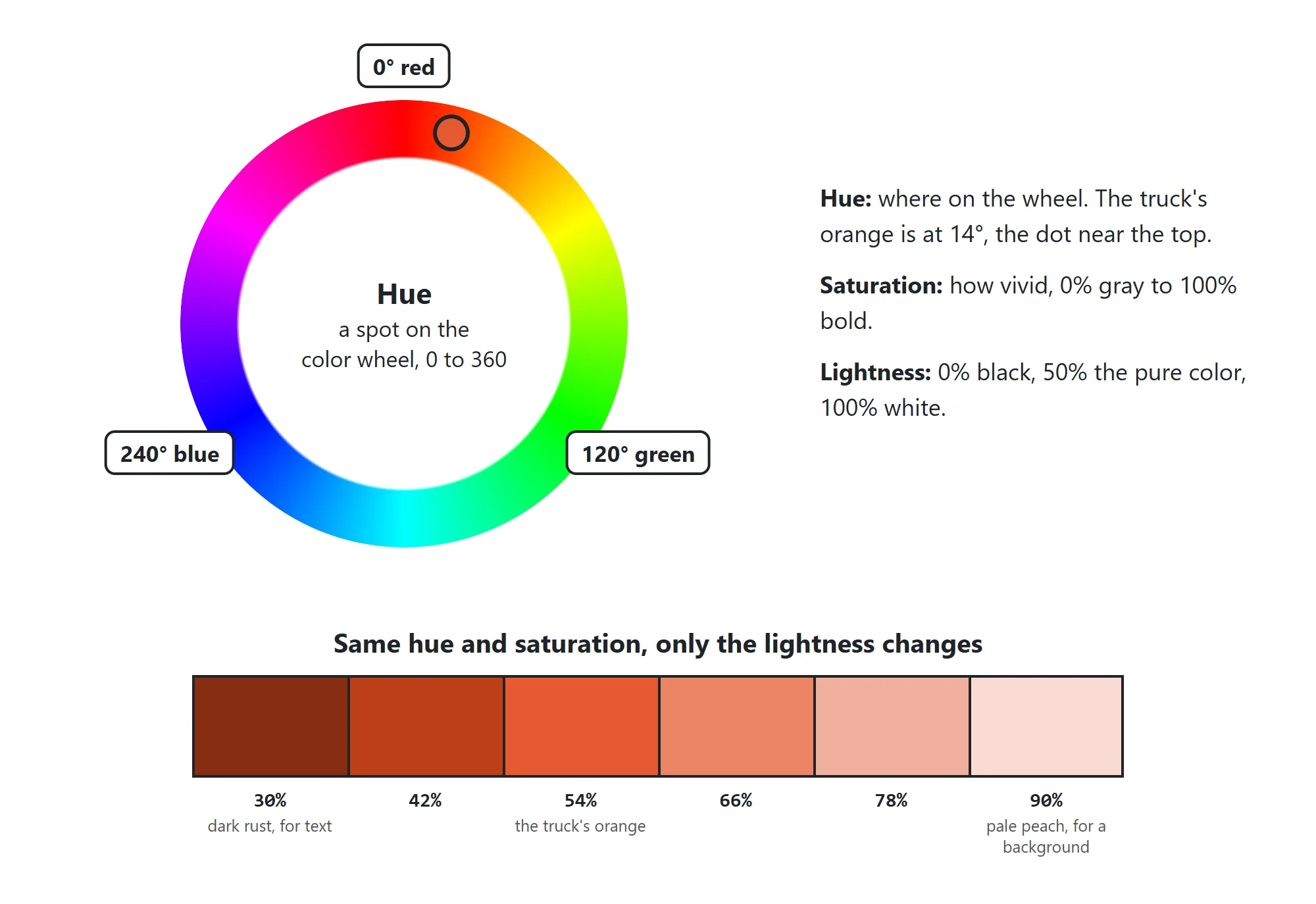
- Hue: a spot on the color wheel, in degrees from 0 to 360. 0 is red, 120 is green, 240 is blue, and 360 is back to red. Orange sits around 15 to 40.
- Saturation: how vivid, from
0%(gray) to100%(as bold as it gets). - Lightness: from
0%(black) through50%(the pure color) to100%(white).
h1 {
  color: hsl(14 77% 54%);
}
hsl(14 77% 54%) is almost exactly the truck's orange. Where hsl() helps most is building a palette. Keep the hue, change the lightness, and you get shades that belong together: hsl(14 77% 30%) is a dark rust for text, and hsl(14 77% 90%) a pale peach for a background. With hex codes, you'd need a color picker to find those.
See-through colors: alpha
Tinted glass lets you see through it and still colors what's behind. A color can do the same with an alpha value: how solid it is, from 0 (invisible) to 1 (solid), or from 0% to 100%. Write it after a slash, read "slash":
.new {
  background-color: rgb(46 134 171 / 50%);
}
The New labels get a blue background at half strength, so the page's background shows through. Alpha works in hsl() too, as in hsl(14 77% 54% / 0.25), and a hex code can take a fourth pair for it: #e4572e80 is the truck's orange at about half strength (80 is 128, about half of 255). The keyword transparent means fully see-through, which is where every background starts.
Alpha on a background-color makes only the background see-through: the text on top stays solid.
Try it. Open your page with Live Server and press F12 (Cmd+Option+I on a Mac) for the developer tools. Select the heading in the Elements panel, find its color in the Styles pane, and click the small color square beside the value. A color picker opens, with an eyedropper you can point at anything on the screen. Shift+click the square to switch the value between hex, rgb() and hsl(): the same color, written each way.
Check yourself
2 questions to try on the lesson page.
So what
Every brand, theme and dark mode you'll ever build is made from these few ways of writing a color. Read a hex code as three amounts of light, plan shades with hsl(), and you can match any color a designer hands you.