Type, Class and ID Selectors
A selector tells the browser which elements a rule styles (every element of one kind, every element with a class, or the one element with an id), and commas let one rule style several selections at once.
Novice · CSS · Updated
After this lesson you can
- Choose the elements a rule styles with type, class and id selectors
- Write a selector list, the universal selector and comments in a stylesheet
Key takeaways
- A type selector, such as
h2, styles every element of that kind on the page. - A class selector starts with a dot, as in
.spicy, and styles every element with that class, whatever kind of element it is. - An id selector starts with a hash, as in
#todays-special, and styles the one element with that id. - Commas make a selector list, so one rule styles several selections. The star,
*, selects every element. - Anything between
/*and*/is a comment, a note for people that the browser skips.
Picture the window of a taco truck at lunchtime. The cook can call out "all tacos are up!", or "everything spicy, grab extra napkins", or "order 42, that one's yours". That's three ways of pointing: by kind, by a label that many things share, and by one name that belongs to one thing. CSS points in the same three ways. You'll use them in every stylesheet you write: when a class assignment says "make the prices bold", when a manager asks for the new menu items to stand out, and when a style lands on the wrong thing and you need to work out why.
A selector says which elements
A CSS rule has two parts: a selector, then curly braces holding the styles. The selector is the pointing part. It names the elements the rule styles, and the browser finds every element on the page that matches. (If rules are new to you, Your First CSS Rule in this course's first chapter builds one step by step.)
Every example in this lesson styles the same page: the menu of Sol Taco Truck, a food truck that parks by the river. Here it is in full:
<!DOCTYPE html>
<html lang="en">
<head>
  <meta charset="utf-8">
  <title>Sol Taco Truck</title>
  <link rel="stylesheet" href="styles.css">
</head>
<body>
  <h1>Sol Taco Truck</h1>
  <p id="todays-special">Today's special: pineapple al pastor tacos</p>
  <h2>Tacos</h2>
  <p>Carne asada <span class="label spicy">Spicy</span></p>
  <p>Chicken tinga <span class="label spicy">Spicy</span> <span class="label new">New</span></p>
  <p>Black bean and corn</p>
  <h2>Drinks</h2>
  <p>Horchata <span class="label new">New</span></p>
</body>
</html>
The class and id attributes are the hooks the selectors below hold on to. Hooks for CSS: the class and id Attributes explains how to add them, if you'd like a refresher.
Try it. In your css-in-depth folder, make a folder named sol-taco-truck, with this page as index.html and an empty styles.css beside it. Open index.html with Live Server. Keep it open: each section below adds a rule to styles.css.
Type selectors: every element of one kind
The plainest selector is the name of an element, with no angle brackets. It's called a type selector, because it picks elements by their type. (In your textbook it may be called an element selector or a tag selector: same thing.)
h2 {
  color: darkorange;
}
Read it as "for every h2, set the color to dark orange". Both headings, Tacos and Drinks, turn orange, and a third <h2> added tomorrow would turn orange too, with no change to the CSS. Type selectors are how you set a site's defaults: how every paragraph reads, how every heading looks.
Class selectors: everything with the same label
Think of the "spicy" sticker the cook puts on a wrapper. Any item can get one, and anyone can spot every spicy item by the sticker. A class is that sticker for elements, and a class selector finds them: a dot, then the class name, read "dot spicy".
.spicy {
  color: white;
  background-color: firebrick;
}
Both Spicy labels turn white on dark red. The selector cares only about the class, not the kind of element: a <p>, an <li> or an <h3> with class="spicy" would be styled the same way.
One element can wear several classes, separated by spaces in the HTML: class="label spicy" has two. A .label rule styles all three labels, and a .spicy rule only the spicy two. That's how most real stylesheets work: a class for what every label shares, and another for what makes one kind different.
A class name in CSS must match the HTML exactly, capital letters included. .Spicy finds nothing on this page, because the HTML says spicy.
Try it. Add a .new rule that gives the New labels a seagreen background and white text. Save, and watch both New labels change, even though one is on a taco and one is on a drink.
ID selectors: the one and only
An id is like the number on an order ticket: it belongs to one order, and calling it reaches exactly one person. An id selector is a hash, then the id, read "hash todays-special":
#todays-special {
  font-weight: bold;
  background-color: gold;
}
Only today's special gets the gold background and bold text (font-weight gets its own section in Fonts and Text: Family, Size, Weight and Spacing). An id must be unique on its page, so an id selector always means one element.
Use ids sparingly in CSS. When an id rule and a class rule disagree about the same element, the id wins, and that strength makes styles hard to change later. Specificity: Scoring a Selector, in Module 2, shows exactly how the browser decides. For now, a good habit: style with classes, and save ids for the one-of-a-kind parts of a page and for links that jump to a spot on it.
One rule, many selectors: commas and the star
Often several selections should look the same. Instead of writing the rule twice, list the selectors with commas between them. That's a selector list, and you can read each comma as "and also":
h1, h2, #todays-special {
  color: darkorange;
}
The main heading, both section headings and today's special all turn orange. Two things to know about lists:
- The commas matter.
h1 h2with a space instead of a comma means something different (anh2inside anh1), which Combinators: Descendant, Child and Sibling teaches in Module 2. Here it would find nothing. - One broken selector breaks the whole list. If one selector in the list is invalid, the browser skips the entire rule, not only that selector.
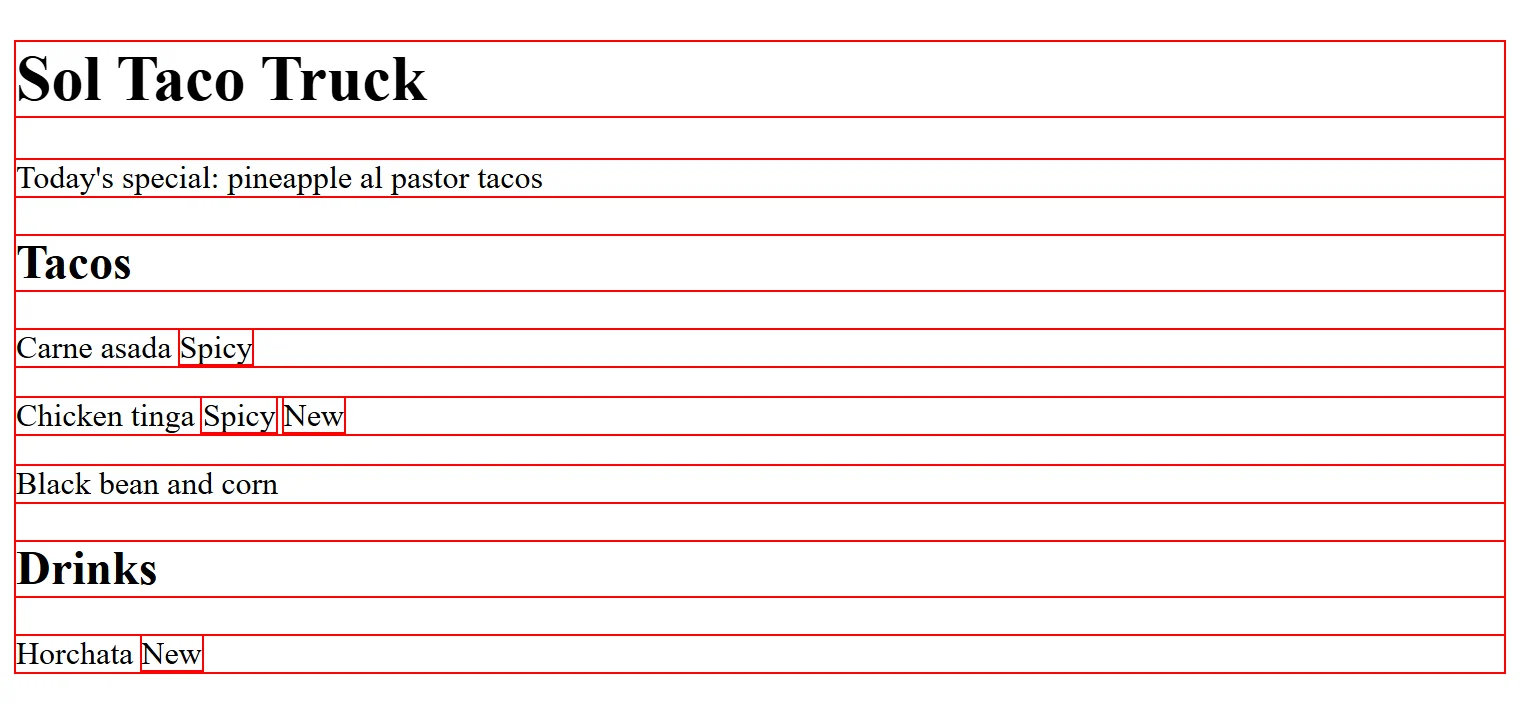
The universal selector is a star, *, read "star", and it selects every element on the page. A handy use while building a page:
* {
  outline: 1px solid red;
}
outline draws a line around an element, so this rule outlines every element and shows you where each one sits. Take it out when you're done. The star reaches everything, so it's for the few rules that truly belong on every element.
Comments: notes the browser skips
A comment is a note for people reading the stylesheet, and the browser skips it. It starts with /* (read "slash star") and ends with */ ("star slash"), and it can cover one line or many:
/* Menu labels: one class for every label, one for each kind */
.label {
  font-weight: bold;
}

.spicy {
  /* color: white; */
  background-color: firebrick;
}
Comments label the parts of a long stylesheet and explain choices a reader might wonder about. They also switch a declaration off without deleting it: above, the spicy labels keep their dark red background, but their text goes back to the page's text color, until you remove the comment marks.
CSS has only the /* */ kind. A line starting //, the comment of JavaScript and many other languages, is not a comment in CSS: the browser reads it as the start of a broken selector and skips the rule after it.
Try it. Comment out the color in your .spicy rule, as above, and save. Then put the line back. Finally, write // test on a line right above your h2 rule, save, and watch the headings lose their orange. Delete the // line and they come back.
Check yourself
2 questions to try on the lesson page.
So what
Every style on every site starts with a selector. Pick by type for defaults, by class for most of your styling, and by id for the one-of-a-kind parts, and you can style exactly the elements you mean.