Combinators: Descendant, Child and Sibling
Combinators let one selector reach elements by where they sit on the page's family tree, inside another element, directly under it, right after it or anywhere after it, with no class needed.
Apprentice · CSS · Updated
After this lesson you can
- Choose the combinator (a space, >, + or ~) that reaches the elements you mean
- Predict which elements a selector with a combinator matches
Key takeaways
- A space between two selectors is the descendant combinator.
li spanreaches every span inside a list item, however deep it sits. - The child combinator
>, read "child", reaches only elements directly inside another one, one level down. - The adjacent sibling combinator
+, read "next sibling", reaches the one element right after another. The general sibling combinator~, read "any later sibling", reaches every later one. - Combinators let you style a page by its structure, so you don't have to add a class to every element you want to reach.
Sooner or later you'll be handed HTML you can't change: a theme for a blog platform, a page your back-end teammate's code builds, a class assignment's starter files. Then someone asks for the artist names to be smaller and gray, and there isn't a class on them anywhere. You don't need one. Combinators let a selector say where an element sits: "the spans inside a song", "the line right after the title". This lesson teaches the four of them.
The page: Road Trip Mix
Every lesson in this chapter styles the same page: Road Trip Mix, a playlist of twelve songs for a long drive. Here's its main part, cut down to two songs. Each song is a list item with a title, an artist, a length and a Like checkbox:
<main>
<h2>Songs</h2>
<ol>
<li>
<strong>Golden Hour Highway</strong>
<span>Juniper & the Jets</span>
<span>3:42</span>
<input type="checkbox" aria-label="Like Golden Hour Highway">
</li>
<li>
<strong>Windows Down</strong>
<span>Maple Avenue</span>
<span>3:15</span>
<input type="checkbox" aria-label="Like Windows Down">
</li>
</ol>
</main>
There isn't a single class in it. & is how HTML writes an ampersand (&), and aria-label gives each checkbox a name that screen readers say out loud ("Like Golden Hour Highway"), since there's no visible label.
The page is a family tree
HTML nests, and nesting makes a family tree. Words from your own family fit it well:
- The
<ol>is the parent of each<li>, and each<li>is a child of the<ol>. - The two
<li>s share a parent, so they're siblings. Inside one song, the<strong>, the two<span>s and the<input>are siblings too. - Everything inside the
<main>, at any depth, is a descendant of it, the way grandchildren and great-grandchildren are your grandparents' descendants.
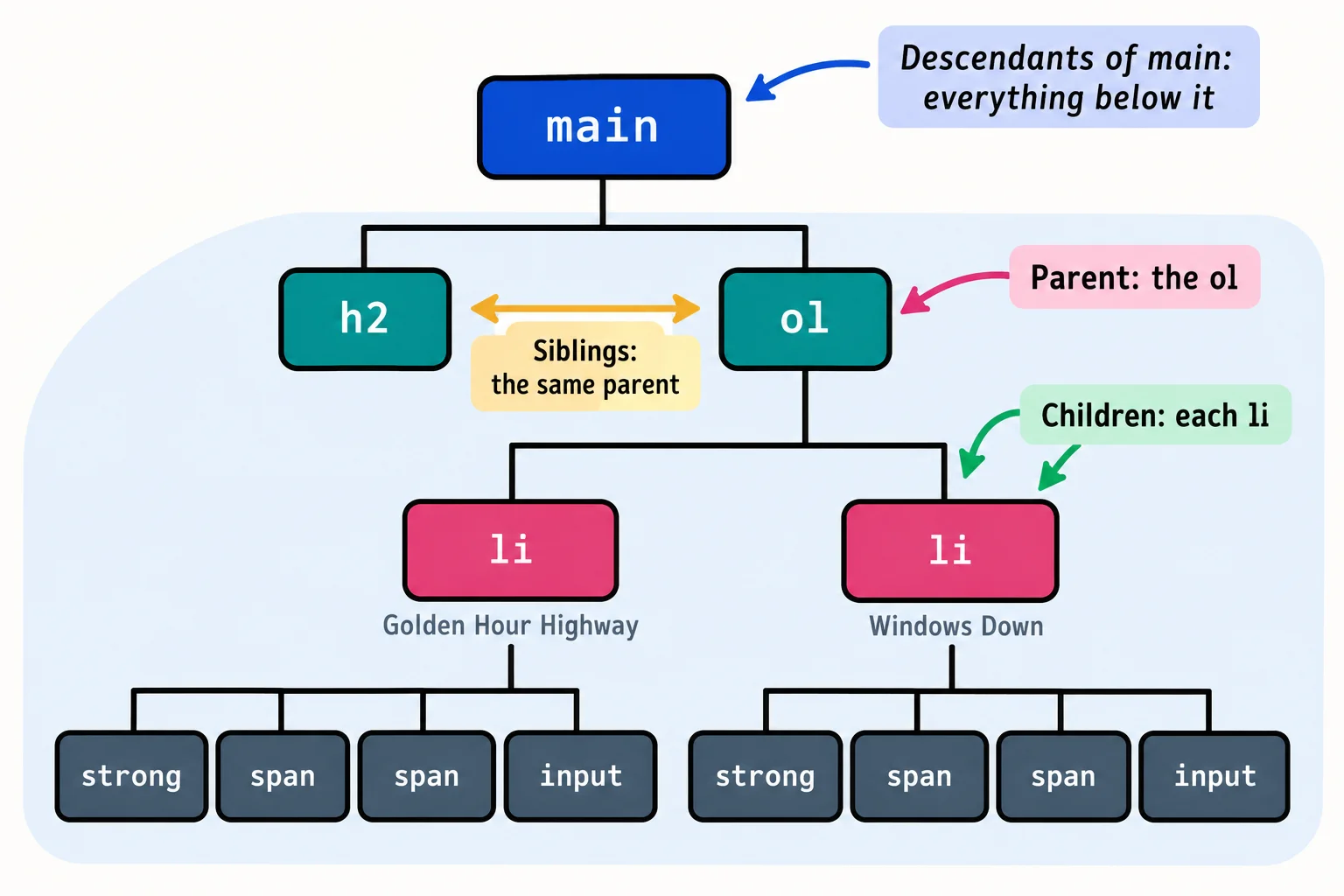
A combinator is the symbol between two selectors that says how the two are related on this tree. There are four.
A space: anywhere inside
The descendant combinator is a plain space. li span means "a <span> that sits anywhere inside an <li>":
li span {
  color: #64748b;
  font-size: 0.9rem;
}
That reaches the artist and the length of every song: four spans here, twenty-four on the full page. "Anywhere inside" means any depth: if a span were wrapped in another element inside the <li>, it would still match. That's why the space is the combinator you'll use most, and also why it can reach more than you meant.
> : directly inside
The child combinator is >, the greater-than sign, read "child". ol > li means "an <li> whose parent is an <ol>": one level down, children only, no grandchildren.
ol > li {
  padding: 0.75rem 1rem;
}

main > span {
  color: red;
}
The first rule pads every song. The second reaches nothing at all: the spans are inside <main>, but they're its great-grandchildren, not its children. Use > when an element of the same type might also appear deeper down and you want to reach only the top level, as with a menu that has a smaller menu inside it.
+ and ~ : the siblings after
Two combinators look sideways, at siblings, and they only look forward, at siblings that come later in the HTML.
- The adjacent sibling combinator is
+, the plus sign, read "next sibling".strong + spanmeans "a<span>that comes right after a<strong>, with the same parent": the artist, in every song. (The CSS standard now calls it the next-sibling combinator; it's the same thing.) - The general sibling combinator is
~, the tilde, read "any later sibling".strong ~ spanmeans "every<span>that comes after a<strong>, with the same parent": the artist and the length. (The standard's newer name is the subsequent-sibling combinator.)
strong + span {
  font-style: italic;
}

h2 ~ ol {
  margin-top: 0;
}
The first rule makes only the artist italic: the length span comes after the artist, not right after the title. The second reaches the <ol> because it's a later sibling of the <h2>, both children of <main>.
Try it. Make a road-trip.html in your css-in-depth folder with the HTML above and a <link> to a road-trip.css. Write li span { color: gray; }, then change it to strong + span, then to strong ~ span. Open the developer tools (F12, or Cmd+Option+I on a Mac) and hover over each rule's selector in the Styles pane: the browser highlights what it matches.
Which one fits?
| You want | Combinator | Example |
|---|---|---|
| Elements anywhere inside another | a space | li span: the artist and length in every song |
| Only the elements one level down | > (child) |
ol > li: the songs, not anything nested deeper |
| The one element right after another | + (next sibling) |
strong + span: the artist, right after the title |
| Every later element with the same parent | ~ (any later sibling) |
strong ~ span: the artist and the length |
You can chain them, too: main > ol > li reads from right to left as "a song directly in an <ol> that's directly in <main>". Keep chains short. Two or three steps say what you mean; six steps break the moment someone wraps one element in a <div>.
Check yourself
2 questions to try on the lesson page.
So what
Combinators let your CSS follow the page's structure, so you can style HTML you didn't write and can't change. The next lesson, Attribute Selectors, reaches elements by what their tags say instead.