Inheritance: What Children Get from Their Parents
Some properties, mostly text ones such as color and font, pass from an element to everything inside it, while box properties such as border and padding stay put, and a few keywords let you choose.
Apprentice · CSS · Updated
After this lesson you can
- Tell which properties pass down to child elements (text ones such as color and font) and which don't (box ones such as border and padding)
- Choose between inherit, initial, unset and revert, and use currentColor to reuse an element's text color
Key takeaways
- Text properties such as color, font-family, font-size and line-height pass down to the elements inside. Box properties such as border, padding, margin and background don't.
- An inherited value is the weakest of all. Any rule that targets the element itself beats it, even one of the browser's defaults.
- inherit takes the parent's value, initial the property's starting value, unset picks one of those two, and revert goes back to the browser's default.
- currentColor means "this element's text color", so a border or an icon can follow the text when it changes.
You give Spoke & Chain's sale banner white text, and every line inside it turns white. You give it a border, and the paragraphs inside don't each get a border of their own. Both are what you wanted, and neither happened by luck. Some properties pass from an element to everything inside it, and some don't. Knowing which is why you can set a font once on the <body> for a whole site, and why a button inside that banner still stubbornly shows black text in a different font.
Family traits
Children get some things from their parents, such as eye color or the family's last name, and not others, such as their parents' jacket or haircut. HTML elements are a family too. An element inside another is its child, the outer one is its parent, and everything inside an element, however deep, are its descendants.
In CSS, a property whose value passes from parent to child is inherited, and the idea is called inheritance:
<div class="sale-banner">
  <h2>Spring Sale</h2>
  <p>20% off every helmet until Sunday.</p>
</div>
.sale-banner {
  color: #ffffff;
  font-family: Georgia, serif;
}
No rule names the <h2> or the <p>, yet both come out white, in Georgia. They inherited the banner's color and font-family. That's why most sites set their font and text color once, on the <body>, and every element on every page follows.
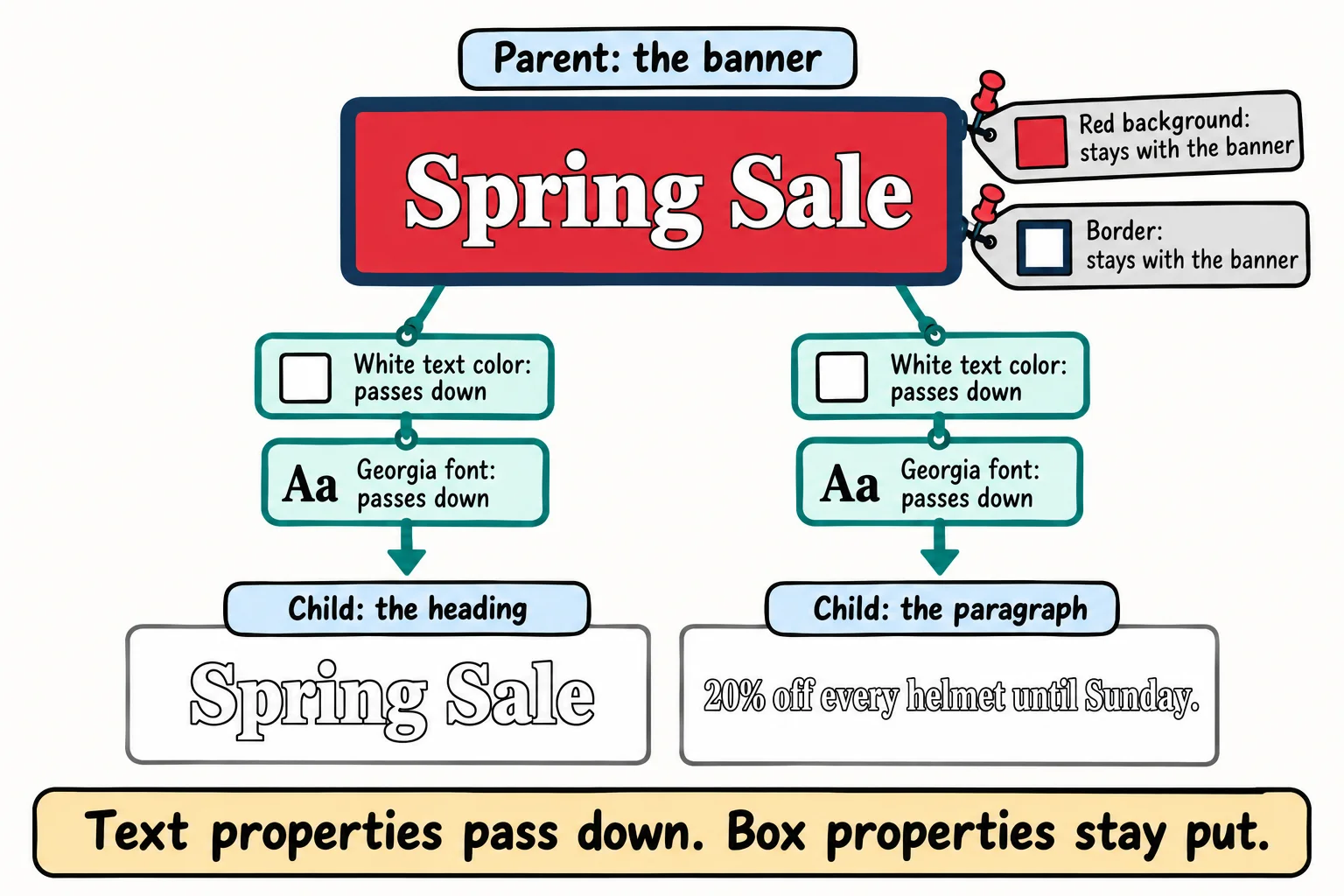
What passes down, and what doesn't
Each property decides for itself whether it's inherited. A rule of thumb covers most of them: properties about the text pass down; properties about the box stay put.
| Passes down (about the text) | Stays put (about the box) |
|---|---|
color |
border |
font-family, font-size, font-weight |
padding, margin |
line-height, letter-spacing |
background-color |
text-align |
width, height |
list-style |
display |
Picture the alternative: if border were inherited, a bordered banner would put a border around its heading, its paragraph and every word you made bold inside them.
.sale-banner {
  background-color: #e63946;
  border: 3px solid #1d3557;
  padding: 12px;
}
The paragraph inside the banner looks red too, but it isn't: its own background-color is transparent, the starting value, so you see the banner through it. Inspect the paragraph and the Computed tab shows rgba(0, 0, 0, 0), see-through black. Its border is 0px and its padding 0px.
Try it. Put a heading and a paragraph inside a <div>. Give the <div> a color, a font, a border and some padding. Which of the four do the heading and paragraph get? Check each in the Computed tab.
An inherited value always loses
An inherited value is the weakest thing in the cascade. Any rule that names the element itself beats it, even one of the browser's default styles. That's why some elements seem to ignore their parent:
<div class="sale-banner">
  <p>Bring your bike in for a check-up before the summer.</p>
  <a href="#book">See the times</a>
  <button>Book a tune-up</button>
</div>
With the banner's white Georgia text from before, in Chrome:
- the paragraph is white, in Georgia: no rule names it, so it inherits;
- the link is blue,
rgb(0, 0, 238): the browser's defaults set a link's color directly; - the button's text is black, in a small system font (Arial, on Windows) at 13.33 pixels: the browser's defaults give buttons their own color and font.
When you want a child to follow its parent, say so, with the keyword in the next section: button { font: inherit; color: inherit; } makes every button use the text around it. It's one of the first lines in many sites' stylesheets.
Four keywords for any property
Every property accepts a few special values, called the CSS-wide keywords. These four answer the question "where should this value come from?"
| Keyword | Means | color on a paragraph in the white banner |
|---|---|---|
inherit |
the parent's value, even for a box property | white |
initial |
the property's starting value, from the CSS rules | black |
unset |
inherit for a property that passes down, initial for one that doesn't |
white |
revert |
what the browser's default styles would give | white |
A fifth, revert-layer, comes in Cascade Layers with @layer, in the chapter Organizing Your Rules.
initial holds a surprise. A property's starting value isn't the browser's default for that element:
.old-notice {
  display: initial;
}

.new-notice {
  display: revert;
}
On a <div>, display: initial gives inline, the starting value of display for every element, so the <div> stops starting on its own line. display: revert gives block, what the browser's defaults give a <div>. When you want to undo your own styles, revert is usually the one you mean. Browser Defaults and a Small Reset, in the chapter Organizing Your Rules, puts it to work.
currentColor: borrow the text color
Sometimes a border or an icon should match the text, and keep matching when the text changes, such as on hover. The keyword currentColor means "this element's own color value":
.button {
  color: #e76f51;
  border: 2px solid currentColor;
}

.button:hover {
  color: #264653;
}
The Book a tune-up button's border is the same orange, #e76f51, as its text. When the mouse is over it, the text turns dark blue-green, and the border follows, with no second color to keep in step. A border with no color at all, such as border: 2px solid;, already uses currentColor.
Try it. Give a link border-bottom: 3px solid currentColor; and remove its underline with text-decoration: none;. Now change only its color. The line under it changes too.
Check yourself
2 questions to try on the lesson page.
So what
Set text styles once, high up, and let them flow down; set box styles on the box that needs them. When an element won't follow its parent, look for a rule that names it directly, and reach for inherit, revert or currentColor instead of copying values around.