Browser Defaults and a Small Reset
Every browser styles a page before your CSS arrives, with big headings, blue underlined links and margins you never wrote, and a short modern reset tames the defaults that get in your way without throwing away the useful ones.
Apprentice · CSS · Updated
After this lesson you can
- Explain where a browser's default styles come from and find them in the developer tools
- Write a small modern reset for box-sizing, margins and images, and explain why a giant reset does harm
Key takeaways
- The browser has its own stylesheet, the browser default styles. It's why a page with no CSS still has big headings, blue links and a gap around its edge.
- The developer tools label the browser's rules "user agent stylesheet", so you can see exactly which default you're fighting.
- A small modern reset sets box-sizing to border-box, removes the default margins, and makes images fit their box. Then you add back the spacing you want.
- A giant reset that strips everything does harm. It flattens headings and lists, and one that removes the focus outline leaves keyboard users lost.
You start a new page, and before you write a single line of CSS it already has a look: the main heading is huge and bold, the links are blue and underlined, and there's a thin white gap around the whole page. Then you put a heading at the top of a colored header, and a strip of white space appears above it that you never asked for. A photo on your phone runs off the edge of the screen. None of this comes from your stylesheet. It comes from the browser's own, and almost every professional stylesheet starts with a few lines that tame it. This lesson shows where those styles come from and which few lines to write.
A page that comes furnished
Moving into a furnished apartment, you find a couch, a table and a lamp already there. Some you keep, some you push against the wall, and you don't throw out the whole kitchen to make room for your own toaster.
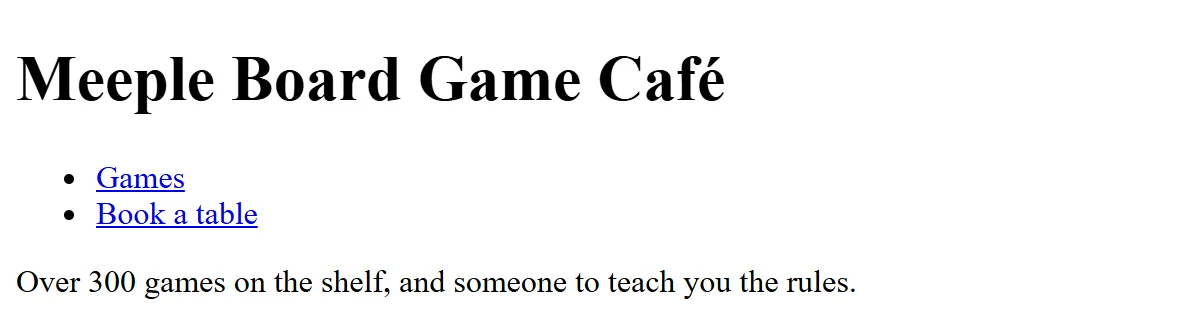
A browser does the same with a web page. It has its own stylesheet, built in, and it applies it to every page before yours. These browser default styles are why a page with no CSS at all is still readable. Here is Meeple's home page, a board game café, before any CSS:
<header>
  <h1>Meeple Board Game Café</h1>
  <nav>
    <ul>
      <li><a href="#games">Games</a></li>
      <li><a href="#book">Book a table</a></li>
    </ul>
  </nav>
</header>
<p>Over 300 games on the shelf, and someone to teach you the rules.</p>
The browser shows the heading big and bold, the menu as a bulleted list pushed in from the left, the links blue and underlined, and a gap of space above and below the heading, the list and the paragraph.
What the browser's stylesheet says
The browser's stylesheet is written in CSS, like yours. Here's a short piece of what Chrome's says, simplified a little:
body {
  margin: 8px;
}

h1 {
  font-size: 2em;
  font-weight: bold;
  margin: 0.67em 0;
}

p, ul {
  margin: 1em 0;
}

ul {
  list-style-type: disc;
  padding-left: 40px;
}
That margin: 8px on the body is the thin gap around every page. The 2em makes an <h1> twice the size of the text around it. The padding-left: 40px is what pushes a list in from the left. Links get their color and underline the same way.
Every browser has its own default stylesheet, and they are close but not identical. Chrome and Edge share one; Firefox and Safari each have their own. Small differences between them, such as the size of a button's text, are one reason people started writing resets.
Find the defaults in the developer tools
You don't have to guess which default you're fighting. Right-click the heading and choose Inspect. In the Styles pane (Firefox calls it Rules), the browser's rules are at the bottom, labeled user agent stylesheet. "User agent" is the formal name for a browser: the program that acts for you, the user.
Your rules always beat the browser's: that's the first round of the cascade, where a rule came from (see The Cascade: How the Browser Picks a Winner). So once you know which default is in the way, one rule of yours overrides it.
Try it. Make a file named defaults.html with a heading, a paragraph, a bulleted list and a link, and no CSS at all. Open it in your browser, inspect the heading, and find its font-size and margin in the user agent stylesheet. Then inspect the <body> and find the 8-pixel margin.
A small modern reset
A CSS reset is a short set of rules at the top of a stylesheet that removes the defaults that get in your way, so every page starts from the same ground. A modern reset is small. These three rules are the core of most of them:
*, *::before, *::after {
  box-sizing: border-box;
}

* {
  margin: 0;
}

img, svg, video {
  display: block;
  max-width: 100%;
}
*, read "star", is the universal selector: it matches every element.*::beforeand*::afteradd the decorations that pseudo-elements create (see Pseudo-Elements: ::before, ::after and ::marker). The first rule makes every width you write include the padding and border, as box-sizing: Making Width Mean What You Think explained.margin: 0removes every default margin: the body's 8-pixel gap, the space around headings, paragraphs and lists. That stray white strip above a heading in a colored header was the heading's default top margin.- The picture rule makes images, drawings and videos fit their box.
max-width: 100%means "never wider than the box you're in", so a big photo shrinks to fit a phone's screen instead of running off the edge.display: blockremoves the small gap a picture leaves below itself when it sits in a line like a word of text.
Many resets add one more rule: input, button, select, textarea { font: inherit; }. Form controls use the browser's own small font by default, and inherit (from Inheritance: What Children Get from Their Parents) gives them the page's font instead.
Try it. Add the three rules to defaults.html in a <style> element, save, and refresh. Which gaps disappeared? Inspect the heading again: its default margin is now crossed out.
Add back what you want
A reset clears the floor; it doesn't decide how your page should look. After it, you add the spacing you do want, on purpose, in one place:
h2 {
  margin-bottom: 1rem;
}

p + p {
  margin-top: 0.75rem;
}
Every <h2> on Meeple's site now has the same space under it, and paragraphs that follow paragraphs get a gap between them (+ is the next-sibling combinator from Combinators: Descendant, Child and Sibling). No spacing comes from the browser by surprise, so when a gap looks wrong, it's in your own stylesheet.
The reset goes at the very top of the stylesheet, before every other rule. The universal selector scores (0, 0, 0), the lowest specificity there is, so any of your rules with a type, a class or an id beats it. In Cascade Layers with @layer, the reset gets a drawer of its own, @layer reset, so it stays at the bottom even when files are combined.
Why a giant reset does more harm than good
In older tutorials, and in some textbooks, you'll meet big resets that remove almost everything, such as the Meyer reset, or normalize.css, which takes the other approach: keep the useful defaults and make them the same in every browser. Here's the kind of rule the "remove everything" style led to:
/* Part of an old "reset everything" stylesheet. Don't copy it. */
* {
  margin: 0;
  padding: 0;
  font-size: 100%;
  font-weight: normal;
  list-style: none;
  outline: none;
}
Look at what each line takes away:
font-size: 100%andfont-weight: normal: every heading is now the size and weight of the text, and<strong>isn't bold. You have to write all of that back by hand.list-style: none: every list loses its bullets and numbers, including the steps in a recipe, where the numbers matter.outline: none: the worst one. The outline is the ring a browser draws around the link or button you reach with the Tab key. Without it, someone who uses a keyboard instead of a mouse can't see where they are on the page.
A small reset removes only what gets in the way. Defaults that help (bold for <strong>, numbers on a numbered list, the focus ring) stay, and everything you keep is something you don't have to write.
Check yourself
2 questions to try on the lesson page.
So what
Every page you build starts with the browser's styles, not a blank sheet. Know where they come from, find them in the developer tools when they surprise you, and start each stylesheet with a small reset that removes only what's in your way.