Pseudo-Elements: ::before, ::after and ::marker
Pseudo-elements style a part of an element, or add decoration before or after it, such as a play icon, a quote mark, a list's numbers, a text box's placeholder or highlighted text, without changing the HTML.
Apprentice · CSS · Updated
After this lesson you can
- Add decoration with ::before and ::after and the content property, keeping real information in the HTML
- Style parts of an element with ::marker, ::placeholder and ::selection
Key takeaways
- A pseudo-element is written with a double colon, as in
li::marker, and styles a part of an element rather than the whole thing. ::beforeand::afteradd a box inside the element, before or after its content. They show nothing until you give them acontentvalue, even an empty one:content: "".- Screen readers don't reliably read text added with
content, and nobody can select or copy it. Keep real information in the HTML and use::beforeand::afterfor decoration. ::markerstyles a list's numbers or bullets,::placeholdera text box's hint text, and::selectionthe text someone highlights.
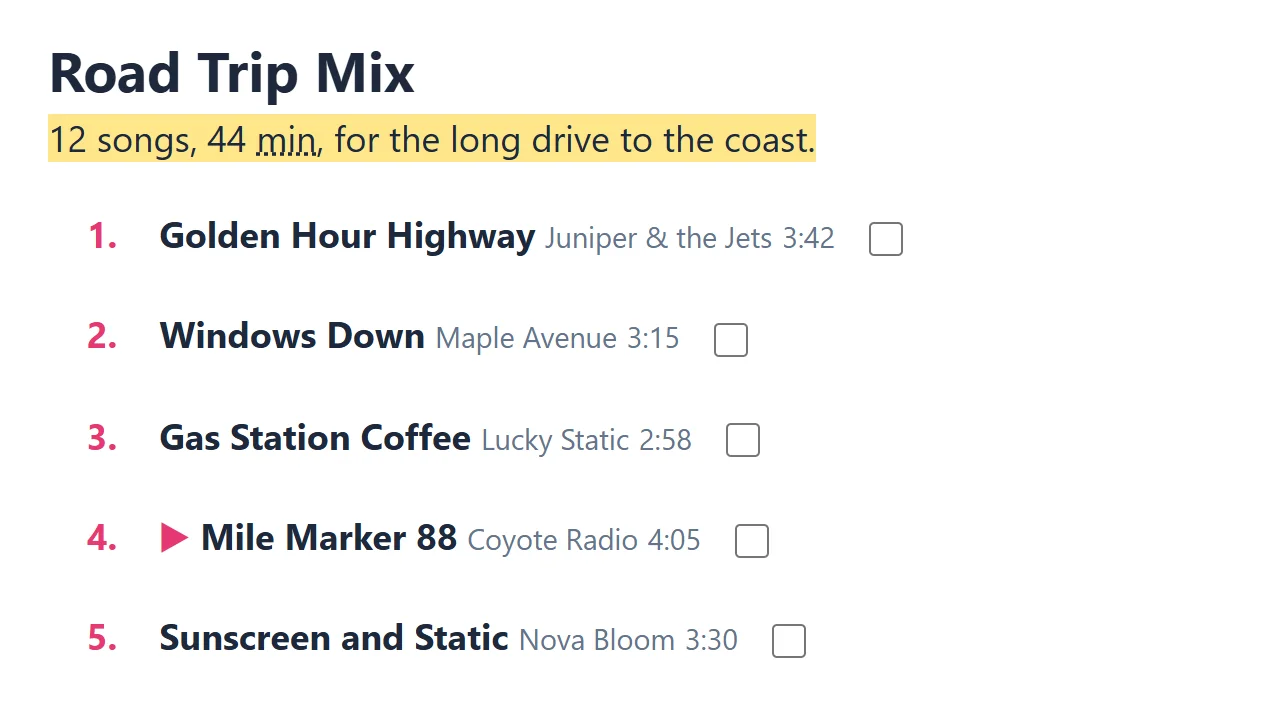
Look at the song that's playing in a music app: there's a little ▶ in front of it. A pull quote on a news site has a giant curly quote mark. A numbered recipe has big colored step numbers. Often, none of those are in the HTML. They're added by CSS, with pseudo-elements: parts of a page you can style that aren't elements of their own. You'll use them for small icons, decorations and list numbers, and to style parts of a page you can't reach any other way.
A double colon means "this part"
A pseudo-class (li:hover) picks an element in a certain state. A pseudo-element picks a part of an element, or adds a new part, and it's written with a double colon, ::, read "double colon": li::marker is read "li double colon marker", the number in front of a list item.
Here's the song that's playing now on the Road Trip Mix page, the playlist this chapter styles:
<li aria-current="true">
  <strong>Mile Marker 88</strong>
  <span>Coyote Radio</span>
  <span>4:05</span>
  <input type="checkbox" aria-label="Like Mile Marker 88">
</li>
aria-current="true" is the page's way of saying "this is the current song", and screen readers announce it. Older stylesheets write a single colon, as in :before, and browsers still accept it for the oldest pseudo-elements. New code uses two, so a pseudo-element never looks like a pseudo-class.
::before and ::after: a box at either end
::before adds a box inside the element, before its first piece of content, and ::after adds one after its last. They stay empty and invisible until you give them a content value: text in quotes, or "", an empty string, when the box is only a shape.
li[aria-current="true"] strong::before {
  content: "▶ ";
  color: #e63973;
}
Read it from the left: in the song whose aria-current is true, inside its <strong>, add a pink ▶ and a space before the title. The ▶ is a character like any letter, so it takes a color and a font size. Without the content line, nothing appears, and that's the first thing to check when a ::before doesn't show. One more catch: an <img> is replaced by its picture and holds no content of its own, so it gets no ::before or ::after. Form fields such as <input> get one in some browsers and not in others, so don't count on it there either.
Decoration only
Here's the rule: if it matters, put it in the HTML. Screen readers don't reliably read text added with content: some read it, some skip it, and none can tell it apart from the real text. Nobody can select it or copy it either, and search engines may ignore it.
- Fine in
::beforeor::after: the ▶ in front of the playing song (aria-currentalready says it's current), a decorative quote mark, a small arrow after a link that leaves the site, a colored bar or a dot. - Belongs in the HTML: "Explicit", a price, a warning, a song's length: anything a person would miss if it weren't there.
That's why the explicit songs on the page carry a real <abbr title="Explicit lyrics">E</abbr> in the HTML, and the ▶ comes from CSS.
Quotes and arrows
A friend left a note at the top of the mix. A big, decorative quote mark goes before it, and links that leave the site get a small arrow after them:
blockquote::before {
  content: "“";
  font-size: 3rem;
  color: #94a3b8;
}

a[href^="https://"]::after {
  content: " ↗";
}
The first rule puts a large gray curly quote before the <blockquote>, the element HTML uses for a quotation. The second adds ↗ after every link whose address starts with https://, the attribute selector from Attribute Selectors. Pseudo-elements go at the very end of a selector: a[href^="https://"]::after works, and a::after[href] doesn't.
Try it. In your road-trip.css, add the ▶ rule and the ↗ rule, and add a <blockquote> with a line of your own to road-trip.html. Then try to select the ▶ with your mouse: you can't, because it isn't really text on the page.
::marker, ::placeholder and ::selection
Three more pseudo-elements style parts the browser draws itself:
::markeris a list item's number or bullet. The playlist is an<ol>, so its markers are the track numbers.::placeholderis the gray hint text in an empty text box, such as Search this mix.::selectionis text the reader has highlighted by dragging over it.
li::marker {
  color: #e63973;
  font-weight: bold;
}

input::placeholder {
  color: #64748b;
}

::selection {
  background-color: #fde68a;
}
The track numbers turn pink and bold, the placeholder becomes a readable gray, and highlighted text turns yellow anywhere on the page. As of October 2026, Safari styles only a marker's color and font-size (the bold here won't show there), and Safari on iPhone and iPad ignores ::selection. Both are extras that the page doesn't depend on, so the page still works. Keep a placeholder dark enough to read, and never use it instead of a label: it disappears as soon as someone types.
Check yourself
2 questions to try on the lesson page.
So what
Pseudo-elements add the polish (an icon, a quote mark, styled numbers) without cluttering the HTML. Use them for decoration, keep the words that matter in the page itself, and everyone gets the same information.