Stacking: z-index and What Sits on Top
When boxes overlap, the browser stacks them like papers on a desk, and z-index, positioning and stacking contexts decide which one ends up on top, including why z-index 9999 sometimes still loses.
Journeyman · CSS · Updated
After this lesson you can
- Decide which overlapping element sits on top from position, z-index and order in the HTML
- Explain why a z-index loses inside a stacking context, and fix it at the right level
Key takeaways
- When boxes overlap, positioned elements sit above ones in normal flow, and among equals, the one later in the HTML sits on top.
- z-index picks a layer. A higher number sits in front, and a negative one goes behind. It works on positioned elements and on flex and grid items, not on static ones.
- A stacking context is a group whose layers stack together, like papers in a folder. A z-index only competes with others inside the same group.
- A positioned element with a z-index, any fixed or sticky element, opacity below 1, a transform and isolation isolate each start a new stacking context.
- When a z-index loses whatever the number, raise the z-index of the group it's in, not the element itself.
A dropdown menu that opens behind the photos instead of in front of them. A pop-up that slides under the sticky header. A badge that disappears under an overlay. Each time, someone types z-index: 9999;, and sometimes it still doesn't work. "Why won't my z-index work?" is one of the most searched CSS questions there is, and by the end of this lesson you'll know the answer, and the fix.
As soon as you position things, they start to overlap: a badge on a photo, an overlay on a photo, a header that cards scroll under, a button fixed above everything. The browser has to choose which one shows on top.
Papers on a desk
Drop a few sheets of paper on a desk, one after another. The one you dropped last is on top. Now put a heavy book on the pile: whatever order the papers came in, the book sits above them all.
A browser stacks overlapping boxes the same way, in an order called the stacking order:
- Boxes in normal flow come first, at the bottom, in the order they appear in the HTML.
- Positioned boxes (any
positionexceptstatic) come next, above them, also in the order they appear in the HTML. They're the heavy books.
<div class="photo">
  <span class="badge">New!</span>
  <img src="images/clover.svg" alt="Clover, a gray lop-eared rabbit, nibbling a carrot">
  <p class="pending-overlay">Adoption pending</p>
</div>
Say the .photo frame is position: relative, and the badge and the overlay are both position: absolute: the badge in the frame's top right corner, and the overlay covering the whole frame. The picture is in normal flow, so both positioned boxes sit above it. Between the two of them, the overlay comes later in the HTML, so it's on top, and it covers the badge.

z-index: choosing the layer
The page is flat, but think of it as having depth. Left to right is the x direction, top to bottom is y, and the direction from the screen toward your eyes is z. The z-index property (read "z index") gives an element a layer number along that direction. A higher number sits in front of a lower one:
.pending-overlay {
  position: absolute;
  inset: 0;
  z-index: 1;
}

.badge {
  position: absolute;
  top: 8px;
  right: 8px;
  z-index: 2;
}
Now the badge, at layer 2, sits in front of the overlay, at layer 1, whatever their order in the HTML. Elements with no z-index (its starting value is auto) count as layer 0. A negative value such as z-index: -1; puts an element behind the boxes in normal flow.
z-index works on positioned elements, and on flex and grid items (the boxes inside a flexbox or grid layout, which the next two chapters teach), even when they're static. On any other static element, it does nothing. So when a z-index seems to do nothing, check the element's position first:
.photo-caption {
  z-index: 10;
}
This caption is static, so its 10 is ignored. Adding position: relative; makes it count.
Try it. In your adoption-list folder, make stacking.html with Clover's photo frame above, a <style> element with the two rules, and .photo { position: relative; }. Give the badge and the overlay background colors. Swap the two z-index values, save, and watch the badge disappear under the overlay.
Stacking contexts: folders on the desk
Back to the desk. Now some of the papers are in folders. Inside a folder, you can shuffle the papers into any order. But a paper inside a folder can never come out above a folder that's lying on top of its own folder, however high it sits in its pile.
That folder is a stacking context: a group of boxes that stack together, as one layer, among the boxes around it. A z-index only competes with other z-index values inside the same stacking context. These start a new one:
- a positioned element (
relativeorabsolute) with az-indexother thanauto; - every
fixedandstickyelement; - a flex or grid item with a
z-indexother thanauto; - an element with
opacitybelow 1, or with atransformor afilter; - an element with
isolation: isolate;, which does nothing else, so it's the way to start one on purpose.
The page itself is the outermost stacking context: the desk.
Why z-index: 9999 still loses
Here is the shelter's bug. The sticky header has a "Find a pet" menu that drops down over the cards. Each card has z-index: 2, so a card can lift above its neighbors when the mouse is over it:
.site-header {
  position: sticky;
  top: 0;
  z-index: 1;
}

.find-menu {
  position: absolute;
  z-index: 9999;
}

.pet-card {
  position: relative;
  z-index: 2;
}
The menu opens behind the cards. Its 9999 doesn't help, because the menu is inside the header's folder, and that whole folder is at layer 1. The cards' folders are at layer 2, so every card sits on top of the header and everything in it. The 9999 only beats other boxes inside the header.
The fix is at the folder level. Give the header a z-index higher than the cards, such as z-index: 10;, and the menu can drop down in front of them. The menu's own z-index can go back to a small number.
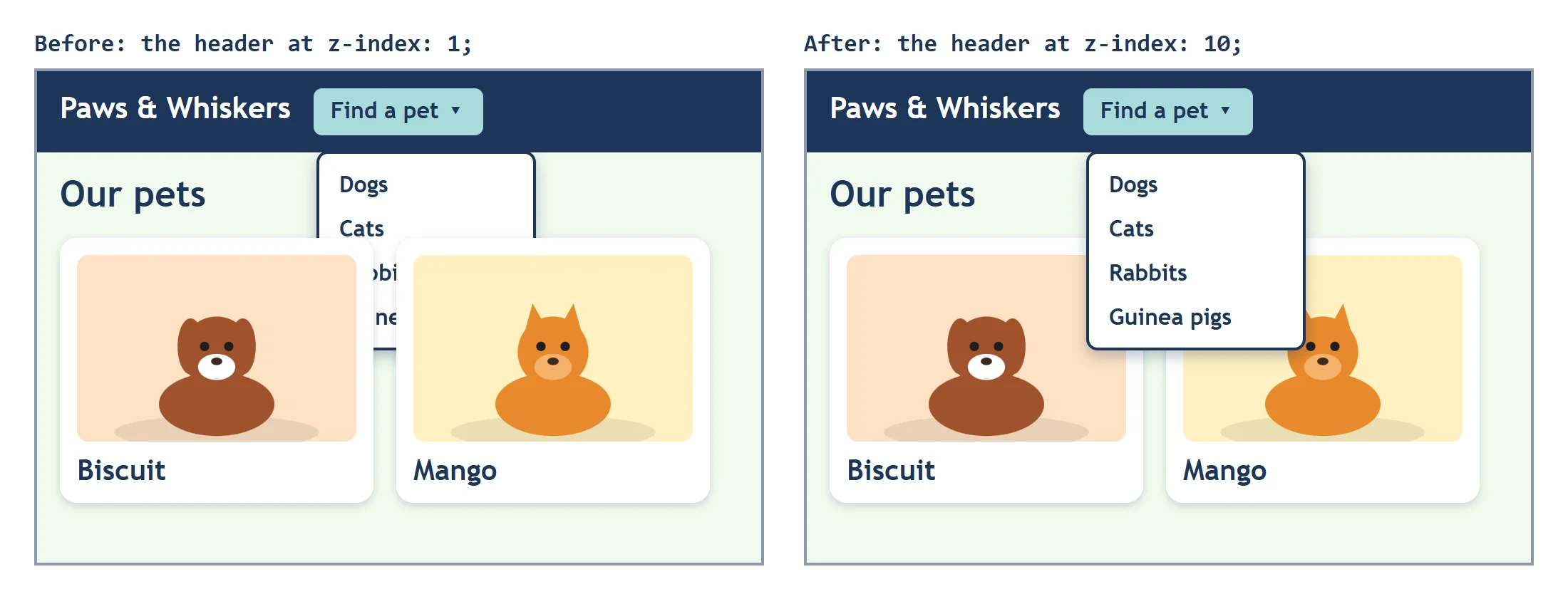
A small plan keeps this from happening on a real site: use only a few z-index numbers, each with a job, such as 1 for layers inside a card, 10 for the header, and 100 for anything fixed above everything. Pick the numbers once, write them down, and every new piece fits in.
Check yourself
2 questions to try on the lesson page.
So what
Whenever two things overlap, there's an order behind them, and now you can read it. When a z-index loses, look for the folder it's in: the fix is almost always one level up.