Elements and Tags
Every web page is built from elements, boxes with a start tag, content and an end tag, that fit inside each other like boxes inside boxes.
Novice · HTML · Updated
After this lesson you can
- Write an HTML element with a start tag, content and a matching end tag, and recognize a void element
- Nest elements correctly and name an element's parent, children and siblings
Key takeaways
- An element is a start tag, its content and an end tag, like a labeled box with a lid.
<p>opens a paragraph and</p>closes it. - An element can hold other elements. The outer one is the parent, the ones inside are its children, and children of the same parent are siblings.
- Close the inner element before the outer one, as you'd close the small box before the big one it sits in.
- Void elements such as
<br>,<hr>,<img>and<meta>hold nothing, so they have no end tag.
Every page you have ever opened, a coffee shop's menu, your bank's sign-in page, the page you're reading now, is made of the same small pieces. Once you can read them, you can open any page and see how it's built, and you can find the piece that's broken when a page looks wrong. Fixing a page like that is often the first task someone gets in a web job.
This lesson builds up the home page of The Daily Grind, a made-up neighborhood coffee shop, one piece at a time.
A labeled box with a lid
Picture a moving box with a label on its lid. You open the box, put something inside, and close it. The label says what kind of thing is inside: kitchen, books, winter coats.
HTML works the same way. Each piece of a page is an element: a box that holds some content and says what kind of content it is. A heading is one kind of box, and a paragraph is another:
<h1>The Daily Grind</h1>
<p>Your neighborhood coffee shop on Maple Street.</p>
The first line is a heading element (h1 is short for heading, level 1: the page's main title). The second is a paragraph element (p). The browser reads the labels and shows the heading big and bold, and the paragraph as ordinary text below it.
Start tags and end tags
The labels on the box are called tags, and an element has two of them:
<p>Latte: $4.50</p>
<p>is the start tag (you'll also hear opening tag). It opens the box. The<is the less-than sign, which in HTML everyone calls an angle bracket, and the>is the closing angle bracket. Read<p>aloud as "angle bracket p".Latte: $4.50is the content: what's in the box.</p>is the end tag (or closing tag). It closes the box. It's the start tag with a slash after the angle bracket: read</as "angle bracket slash".
The start tag and the end tag carry the same name, so the browser knows which box is being closed. Tag names are written in lowercase by habit; the browser accepts <P> too, but nobody writes it that way any more.
Try it. In VS Code, make a new file named elements.html in your practice folder. Type the two lines from the first example, save, then right-click the file and choose Open with Live Server. Change the heading's words, save again, and watch the page change.
Boxes inside boxes
A big box can hold smaller boxes. A paragraph can hold a few words that need extra weight, and those words get a box of their own:
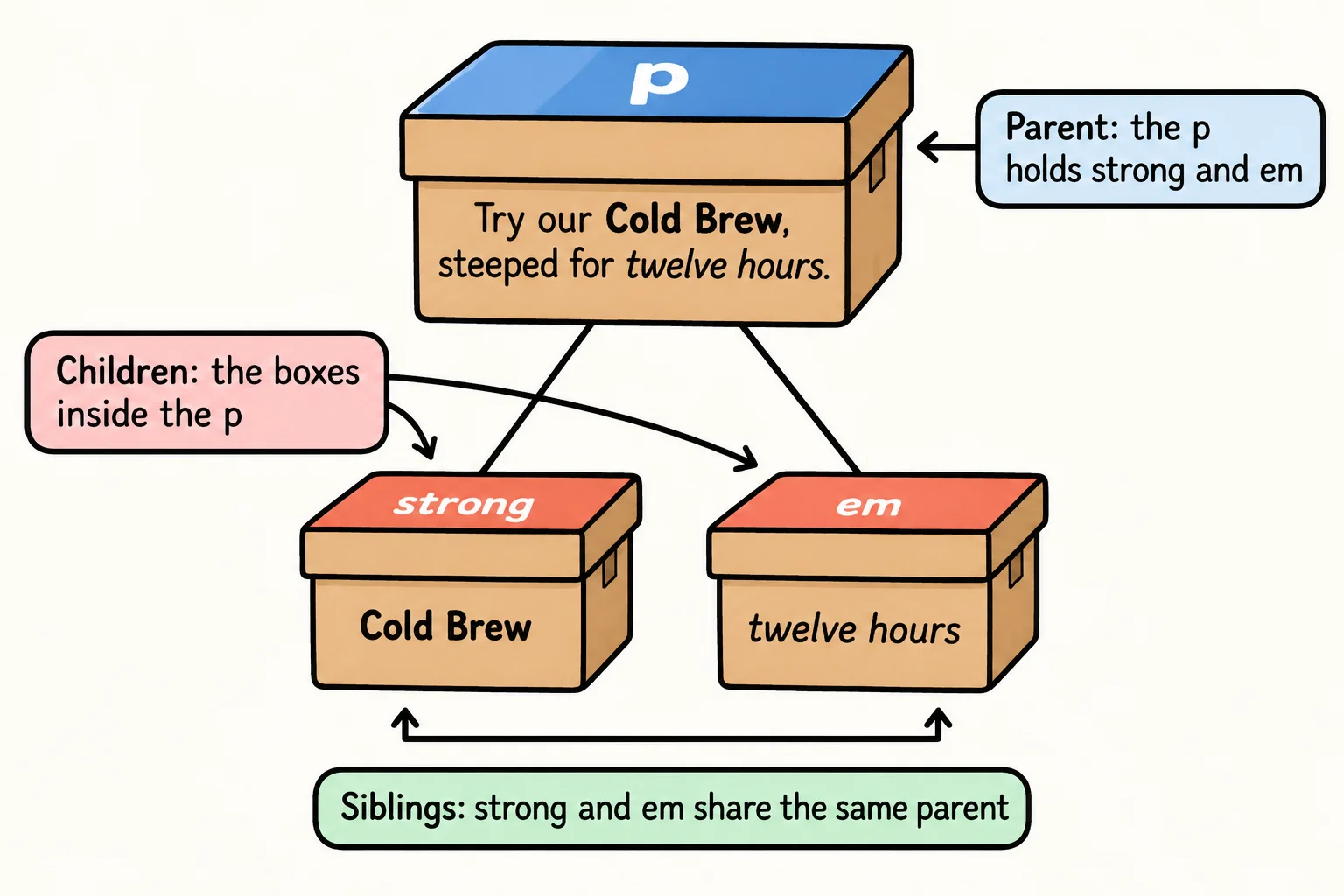
<p>Try our <strong>Cold Brew</strong>, steeped for <em>twelve hours</em>.</p>
<strong> marks words as important (the browser shows them in bold), and <em> marks words you'd stress when speaking (shown in italics). Putting one element inside another is called nesting, and it comes with family words:
- The
<p>is the parent of<strong>and<em>: it holds them directly. <strong>and<em>are the paragraph's children.<strong>and<em>are siblings: they share the same parent.
Close the inner box first
When you pack a small box inside a big one, you close the small box first, then the big one. Elements follow the same rule: the last element opened is the first one closed.
<p><strong><em>Muffins come out of the oven at 7:00 sharp!</em></strong></p>
Read the end tags from left to right: </em> closes the innermost box, then </strong>, then </p>. Mixing up the order, as in <strong><em>Fresh</strong></em>, is called misnested HTML. Browsers try to repair it quietly, and they don't always guess what you meant. The lesson Developer Tools: Inspecting a Page shows how to see what the browser did.
Try it. Indent each child one step further than its parent, as in the examples in this course. When every end tag sits under its own start tag, a missing or crossed one stands out.
Void elements: nothing inside
A few elements never hold anything. A line break is a place, not a box, and so is a horizontal line across the page. These are void elements, and they have a start tag only:
<p>214 Maple Street<br>Springfield</p>
<hr>
<p>Open 7:00 a.m. to 3:00 p.m.</p>
<br> breaks the line inside the address, and <hr> draws a line between two parts of the page. The void elements you'll meet most are <br>, <hr>, <img> (a picture) and <meta> (information about the page). Writing </br> is a mistake: there's no box to close.
In your textbook void elements may be called empty elements or self-closing tags, and you may see them written <br />, with a slash before the angle bracket. Both forms work in HTML. This course writes <br>.
Check yourself
2 questions to try on the lesson page.
So what
Every page on the web is boxes inside boxes. When you can read where each box opens and closes, you can read any page's HTML, and you can find the box that was closed in the wrong place.