Alt Text That Helps
Write alt text by what each picture is for, so a page still makes sense to someone who can't see its pictures, and add captions everyone can read.
Apprentice · HTML · Web Development · Updated
After this lesson you can
- Write alt text that fits a picture's purpose: informative, decorative, a link, text or a chart
- Caption a picture with figure and figcaption, and tell a caption apart from alt text
Key takeaways
- Alt text stands in for a picture. Write what the picture tells the reader here, the way you'd describe it on the phone.
- A decorative picture gets an empty alt, alt="", so screen readers skip it. Leaving alt out makes them read the file name.
- A picture that is a link says where the link goes, and a picture of words says the words.
- A chart gets a short alt plus its numbers on the page, in a table or a sentence.
- A figcaption is a caption everyone sees; alt text replaces the picture. They say different things.
Somewhere right now, someone is listening to a web page instead of looking at it: a blind student using a screen reader (a program that reads the page aloud), a commuter whose pictures haven't loaded on a slow train connection, a search engine trying to work out what a photo is about. For all of them, a picture is only as good as the words you gave it. Accessibility checkers, class rubrics and job interviews all ask about those words, and a yearly check of the web's top million home pages (WebAIM's Million report) finds pictures with no alt text on more than half of them.
A quick recap of Adding Pictures: an <img> element shows a picture, its src attribute says which file, and its alt attribute gives the words to use when the picture can't be seen. This lesson is about what to write in that alt. The running example is Postcards from the Coast, a made-up travel blog with photos of a lighthouse, a tide pool, a fish taco stand and a sunset.
Alt text is what you'd say on the phone
Imagine you're on the phone with a friend, telling them about your trip, and you're looking at your photos as you talk. You wouldn't say "IMG_4021.jpg" or "a photo". You'd say what matters: "the lighthouse is white with a red top, and you can climb it."
That's alternative text, alt text for short: the words that stand in for a picture. You write it in the alt attribute:
<img src="images/lighthouse.jpg" alt="The white Gull Point lighthouse with its red lantern room, on the rocks at low tide">
A screen reader says "image" (or "graphic") and then reads your alt text. If the file fails to load, the browser shows the alt text in the picture's place. And search engines read it to understand what the picture shows.
What you write depends on the picture's purpose, its job on this page. The next sections take the jobs one at a time.
| The picture's job | What the alt text says | Example |
|---|---|---|
| It tells the reader something | What it tells | The lighthouse photo |
| It's decoration | Nothing: alt="" |
A wavy line between sections |
| It's a link or a button | Where it goes, or what it does | The blog's logo, linking home |
| It's a picture of words | The words | A sign that reads Fish tacos, 3 for $9 |
| It's a chart or a map | A short summary, with the details nearby on the page | A chart of water temperatures |
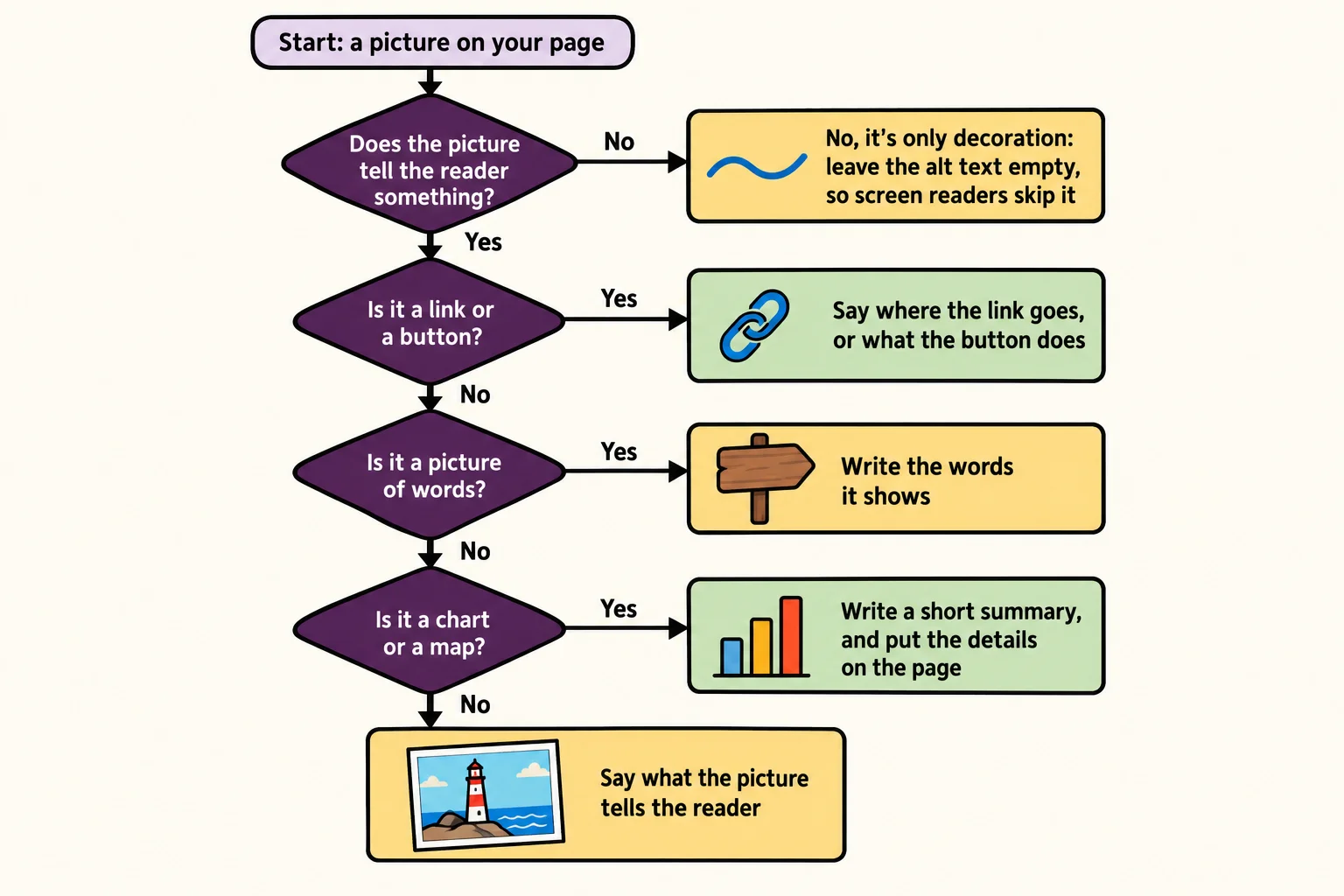
Pictures that tell something: say what it tells
Most photos on a page are informative: they add something the text doesn't. Their alt text says what a reader would miss without them. Here are three tries for the same lighthouse photo, side by side:
<!-- Not helpful: a screen reader reads out the file name -->
<img src="images/IMG_4021.jpg" alt="IMG_4021.jpg">

<!-- Not helpful: the screen reader already said "image", and "lighthouse" leaves out what you'd see -->
<img src="images/IMG_4021.jpg" alt="image of lighthouse">

<!-- Helpful: what a reader would miss -->
<img src="images/IMG_4021.jpg" alt="The white Gull Point lighthouse with its red lantern room, on the rocks at low tide">
A few rules of thumb:
- Don't start with "image of" or "picture of". The screen reader has already said it's an image.
- Keep it to a sentence or so. Describe what matters here, not every pebble.
- Context decides. On a page about lighthouse paint colors, "white with a red lantern room" is the point. On a page about tide times, "the rocks below the lighthouse at low tide" might be.
Try it. Open three photos on your phone and write the alt text for each one, as if it were going on a page about your week. Read each one aloud. Would a friend on the phone know what you saw?
Decorative pictures: an empty alt
Some pictures are only decoration: a wavy line between sections, a background swirl, an icon next to words that already say the same thing. A screen reader user gains nothing from hearing about them, so you tell the screen reader to skip them with an empty alt: alt="", read "alt equals empty quotes".
<!-- Skipped by screen readers: alt is there, and it's empty -->
<img src="images/wave.svg" alt="">

<!-- Read out as the file name, such as "wave dot svg": alt is missing -->
<img src="images/wave.svg">
An empty alt and a missing alt are not the same thing. With alt="", you've said "this is decoration." With no alt at all, the screen reader doesn't know, so many read the file name aloud instead. Every <img> gets an alt, even when it's empty.
Links, buttons and pictures of words
When a picture is the only thing inside a link, its alt text becomes the link's name. A screen reader user hears that name when they move through the page's links, so it says where the link goes, not what the picture looks like:
<a href="index.html">
  <img src="images/logo.svg" alt="Postcards from the Coast home">
</a>
alt="logo" would leave them guessing where the link goes, and alt="A blue wave and an orange sun" describes a picture they can't click with any confidence. A picture used as a button works the same way: a magnifying glass on a search button gets alt="Search".
A picture of words gets the words themselves. The taco stand's photo is all about its hand-painted sign, so the alt text says what the sign says:
<img src="images/taco-stand.jpg" alt="The taco stand's hand-painted sign: Fish tacos, 3 for $9">
Charts and other detailed pictures
A chart can hold twelve numbers, and a sentence of alt text can't. So a complex image gets two things: a short alt that says what the chart is and what it shows, and the full details somewhere on the page that everyone can read, such as a table or a sentence right after it.
<img src="images/water-temperature.png" alt="Bar chart of the bay's water temperature by month, warmest in August">
<table>
  <caption>Water temperature at Gull Point, in °F</caption>
  <thead>
    <tr><th>June</th><th>July</th><th>August</th><th>September</th></tr>
  </thead>
  <tbody>
    <tr><td>58</td><td>61</td><td>64</td><td>62</td></tr>
  </tbody>
</table>
The table helps more than the screen reader user. People who can see the chart can read the exact numbers too, and so can search engines.
Captions with figure and figcaption
Think of a museum: a painting hangs on the wall with a small card beside it. The card doesn't describe the painting (you can see it). It tells you what you can't see: who painted it, where, and when.
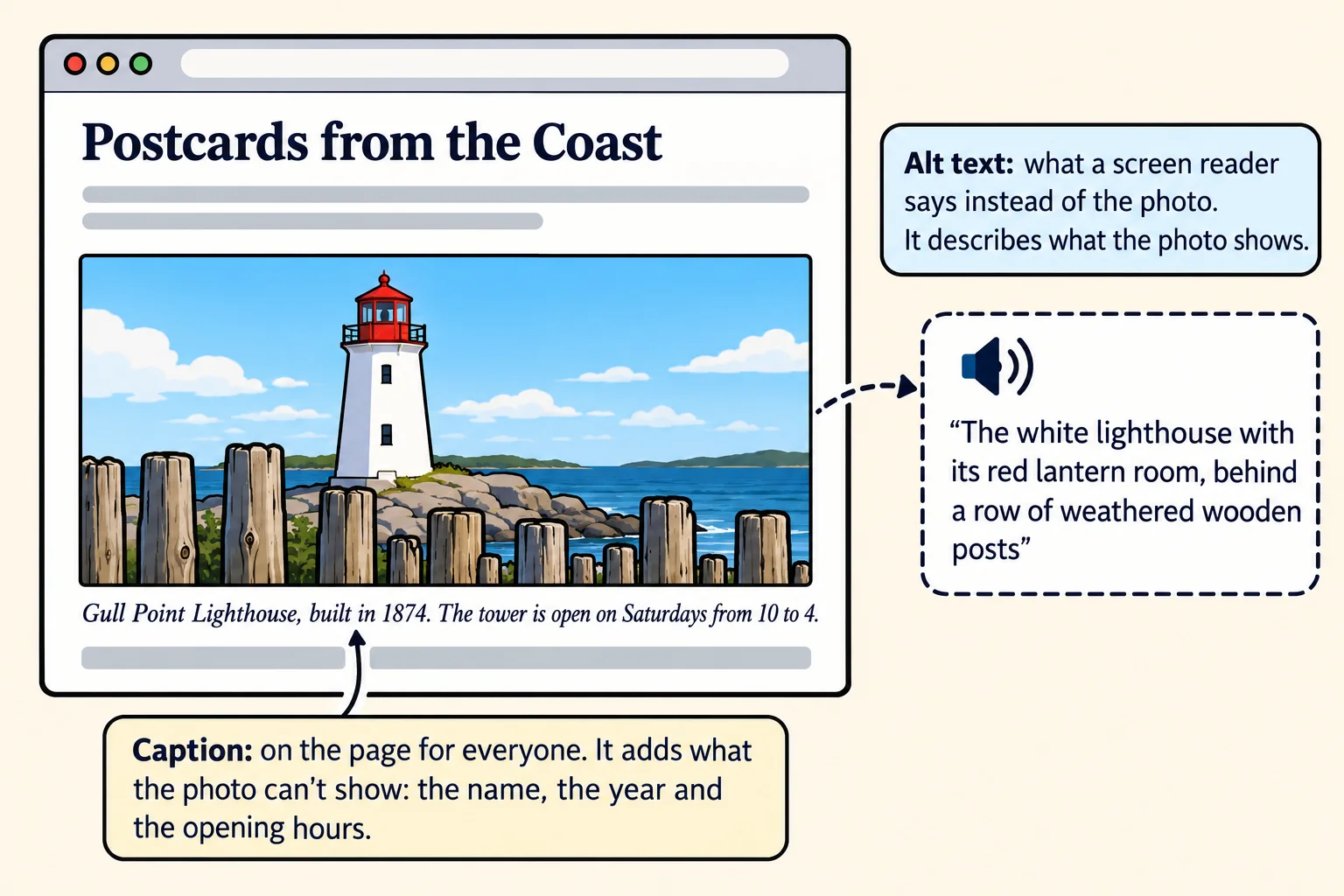
In HTML, that painting-and-card pair is a <figure>: a picture (or a chart, a code sample or a quote) with its caption. The caption is a <figcaption>, inside the figure, first or last:
<figure>
  <img src="images/lighthouse.jpg"
       alt="The white lighthouse with its red lantern room, behind a row of weathered wooden posts">
  <figcaption>Gull Point Lighthouse, built in 1874. The tower is open on Saturdays from 10 to 4.</figcaption>
</figure>
A caption and alt text do different jobs:
- The caption is for everyone. It's on the page, and it adds what the picture can't show: a name, a date, a place, an opening time.
- The alt text replaces the picture for someone who can't see it. It says what's in the picture.
- They don't repeat each other. A screen reader reads both, so the same sentence twice wastes the listener's time. A caption doesn't replace alt text either: the
<img>still needs its own.
Try it. Turn on your computer's screen reader: Narrator on Windows (Ctrl+Windows key+Enter) or VoiceOver on a Mac (Cmd+F5). Open a news site, press Tab to move through the links, and listen for a picture link with an unhelpful name. Turn the screen reader off the same way.
Check yourself
2 questions to try on the lesson page.
So what
Good alt text is a few words that decide whether a page works for everyone, and writing it by purpose (what is this picture for?) gets it right almost every time.