Link Previews with Open Graph
Open Graph tags in a page's head decide the card a chat app or social site shows when someone pastes your link, with its title, description and picture.
Journeyman · HTML · Web Development · Updated
After this lesson you can
- Write the Open Graph tags that give a shared link its title, description and picture
- Find and fix the mistakes that break a link preview
Key takeaways
- When a link is pasted into a chat or a post, the app reads the page's Open Graph tags to build its preview card.
- Open Graph tags are
<meta>tags withproperty="og:..."and acontentvalue: og:title, og:description, og:image, og:url and og:type. - The share picture needs its full address, starting https://, and works best at 1200 by 630 pixels. og:image:alt says what it shows.
- X reads
<meta name="twitter:card">to choose a big picture, and falls back to the Open Graph tags for the rest. - A preview tool can only read a page that's online, and apps remember a preview, so check it with a tool that fetches it again.
You paste a link into a group chat, and a moment later a card appears under it: a big photo, a bold headline, a line of text. Paste a different link and you get a bare blue address that nobody taps. The difference is a handful of lines in the page's head. You'll want them the day you share your portfolio in a job application on LinkedIn, post a friend's event page, or send the Rolling Tacos menu to the family group chat.
The card a chat app builds
A preview card is like a business card for your page: a picture, a name and one line about it, small enough to take in at a glance.
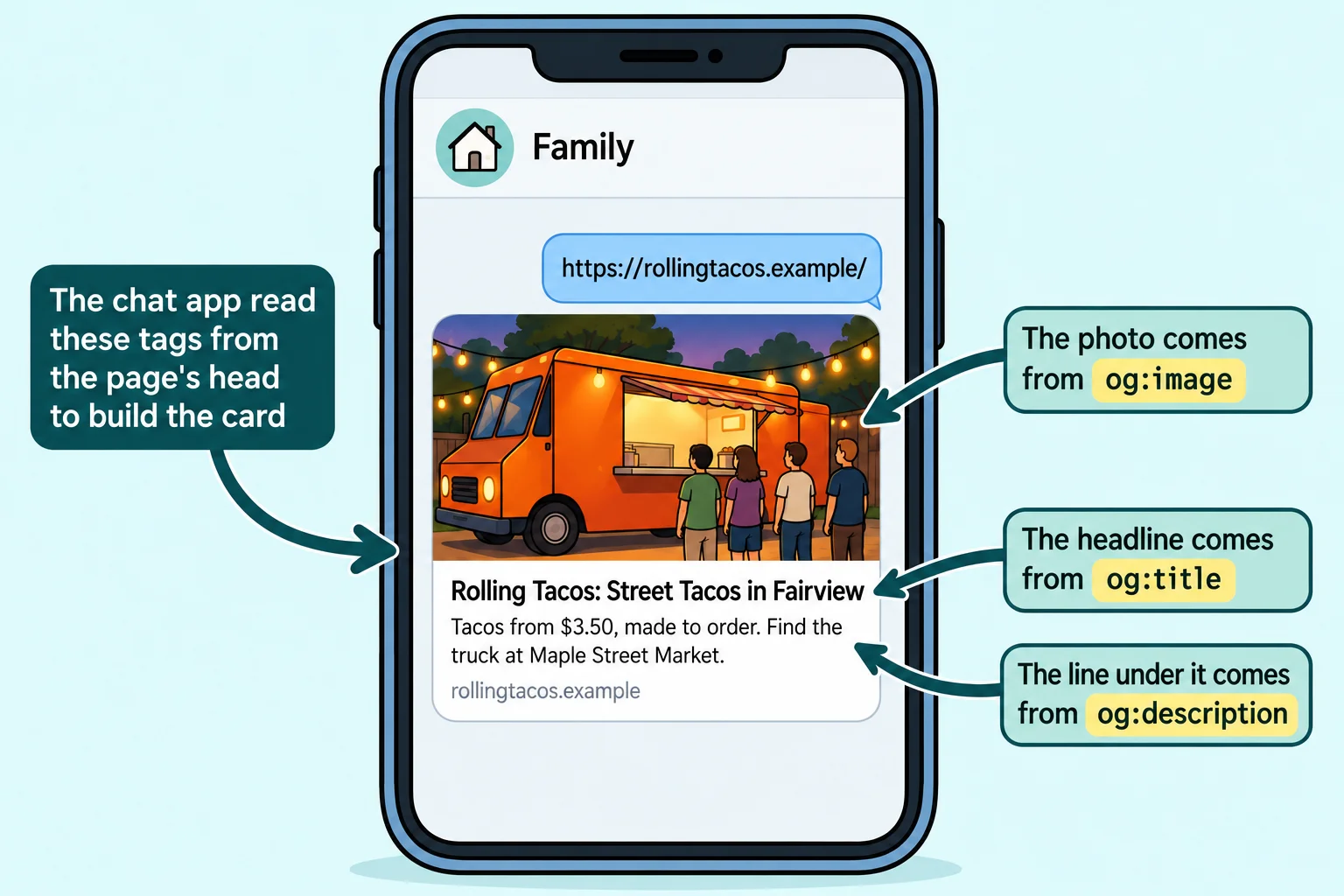
When you paste a link, the app's computers visit the page, read its <head>, and build the card from what they find. Most apps read the same set of tags, called Open Graph. Facebook made it in 2010, and today iMessage, WhatsApp, Slack, Discord, LinkedIn, Facebook and many more read it. With no Open Graph tags, an app guesses from the <title> and the page's text, or shows the bare address.
The tags every card needs
Each Open Graph tag is a <meta> tag with two attributes: property names the piece of the card, and content holds its value. The property starts with og:, read "O-G" (for Open Graph): og:title is "O-G title".
<meta property="og:title" content="Rolling Tacos: Street Tacos in Fairview">
<meta property="og:description" content="Tacos from $3.50, made to order. Find the truck at Maple Street Market.">
<meta property="og:type" content="website">
<meta property="og:url" content="https://rollingtacos.example/">
- og:title is the card's headline. It can be friendlier than the
<title>, because it's read in a chat, not a list of results. - og:description is the line under it. Keep it short: many cards show only one or two lines.
- og:type says what kind of thing the page is.
websitefits most pages; a blog post can usearticle. - og:url is the page's official address, the same one as its canonical link.
Watch the attribute: Open Graph uses property, where the description and the other tags you've met use name.
The picture: size and a full address
The picture is what makes people tap. Its tag is og:image, and its content must be the picture's full address, starting https://:
<meta property="og:image" content="https://rollingtacos.example/share-image.jpg">
<meta property="og:image:alt" content="The orange Rolling Tacos truck parked under string lights, with a line at its window">
Why the full address? Your page says share-image.jpg and the browser knows to look next to the page. But the app reads your page from its own computers, far away, the way a delivery driver needs the street address, not "the blue house next to mine". A short address such as share-image.jpg leads nowhere, and the card has no picture.
- 1200 by 630 pixels works best: wide, like the card. A small or square picture may be shown tiny, or cropped.
- A JPEG or PNG, and a small file (a few hundred kilobytes), so the card loads fast on a phone.
- og:image:alt describes the picture for people who use a screen reader, the same way an
altattribute does on the page. Write what the picture means, not "image".
X and twitter:card
X (the site that was Twitter) reads one tag of its own, and this one uses name, not property:
<meta name="twitter:card" content="summary_large_image">
summary_large_image asks for the big card with the picture across the top; summary gives a small square picture beside the text. For the title, description and picture, X falls back to your Open Graph tags, so you don't write them twice.
Checking a preview
Your preview tags work only once the page is online. The address Live Server gives you (http://127.0.0.1:5500/) points at your own computer, and no app can reach it from outside. Put the page online first; the lesson Put Your Site Online for Free shows how with GitHub Pages.
Then check the card:
- Meta's Sharing Debugger (developers.facebook.com/tools/debug, free, sign in with a Facebook account) shows the card Facebook builds and lists every Open Graph tag it found or missed.
- LinkedIn's Post Inspector (linkedin.com/post-inspector, sign in with LinkedIn) does the same for LinkedIn.
- Send the link to yourself in the chat app your friends use.
Apps remember a card for days after they first build it, so a fix may not show up at once. Both tools have a button that fetches the page again (in the Sharing Debugger, Scrape Again), and that refreshes the card on their own site. Other apps catch up on their own, given a few days.
| What you see | The usual cause |
|---|---|
| No picture | og:image is a short address, such as share-image.jpg, or the picture isn't online |
| The card says "Home" | No og:title, so the app used the <title> |
| The old title, after you changed it | The app remembered the old card: fetch it again with a preview tool |
| No card at all | The page isn't online, or the address is a Live Server one |
The whole head
Here is the Rolling Tacos home page's head, with its search tags from the last lesson and its preview tags together:
<!DOCTYPE html>
<html lang="en">
<head>
  <meta charset="utf-8">
  <meta name="viewport" content="width=device-width, initial-scale=1">
  <title>Street Tacos at Maple Street Market | Rolling Tacos</title>
  <meta name="description" content="Carne asada, chicken tinga and veggie tacos from $3.50, made to order, Tuesday to Saturday at Maple Street Market.">
  <link rel="canonical" href="https://rollingtacos.example/">
  <meta property="og:title" content="Rolling Tacos: Street Tacos in Fairview">
  <meta property="og:description" content="Tacos from $3.50, made to order. Find the truck at Maple Street Market.">
  <meta property="og:type" content="website">
  <meta property="og:url" content="https://rollingtacos.example/">
  <meta property="og:image" content="https://rollingtacos.example/share-image.jpg">
  <meta property="og:image:alt" content="The orange Rolling Tacos truck parked under string lights, with a line at its window">
  <meta name="twitter:card" content="summary_large_image">
</head>
<body>
  <h1>Rolling Tacos</h1>
</body>
</html>
Try it. Paste a link to a page you like (a news article, a recipe) into Meta's Sharing Debugger, or into a message to yourself. Then open the page, view its source, and search for og:. Find the tag behind each part of the card.
Check yourself
2 questions to try on the lesson page.
So what
The same page can arrive in a chat as a bare address or as a card people want to tap. A dozen lines in the head decide which, every time anyone shares your work.
Key terms
- <meta>
- Meta name
- Meta content
- URL
- Open Graph