Structured Data with JSON-LD
A JSON-LD block in a page's head describes a business to search engines as labeled facts (its name, address, location and hours), using the shared schema.org vocabulary.
Freelancer · HTML · Web Development · Updated
After this lesson you can
- Write a JSON-LD block that describes a local business with schema.org
- Find the mistakes that make structured data invalid or misleading
Key takeaways
- Structured data gives machines a page's facts with a label on each one, so a search engine doesn't have to guess which number is the phone.
- JSON-LD is written inside
<script type="application/ld+json">. It's data, not a program: the browser neither shows it nor runs it. - JSON is labeled data: braces hold an object, each label and text value is in double quotes, a colon joins them, and commas go between the pairs.
- schema.org names the types and labels, such as FoodEstablishment, address, geo and openingHoursSpecification.
- Check it with the Schema Markup Validator and Google's Rich Results Test, and describe only what the page shows. It makes extra features possible, not certain.
Search for a restaurant by name and the result often comes with more than a title: its hours, its address, a "Call" button, a pin on a map. Search engines read most of that from a business's listings and its pages, and you can help them by telling them the facts in a form a machine can't misread. This is the advanced end of the head: it's what a developer adds when a local business, a recipe site or an events page wants its facts to show up right. You'll describe Rolling Tacos, the food truck, so a search engine knows exactly when and where to find it.
Facts for people, facts for machines
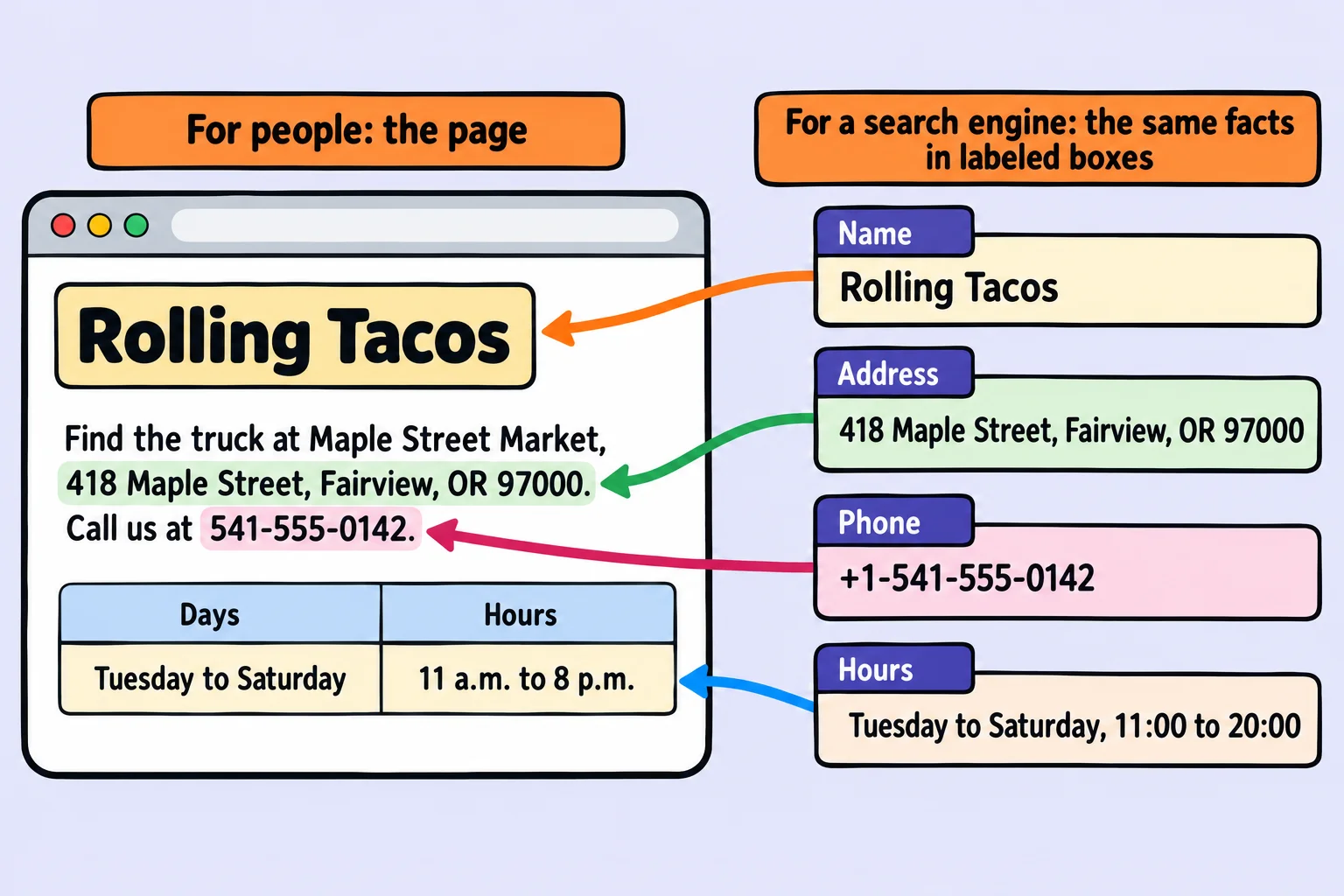
Picture a clinic's paper form: boxes labeled Name, Address, Phone. Anyone can find the phone number on it, because the box says so. Now picture the same facts in a chatty letter. A person can still find them; a machine has to guess whether "541-555-0142" is a phone number or an order number.
Your page is the letter. Structured data is the form: the same facts, each in a labeled box. The labels come from schema.org, a shared vocabulary that Google, Microsoft (Bing) and Yahoo started in 2011, and Yandex joined the same year, so the big search engines read the same words.
JSON, from zero
The form is written in JSON (said "JAY-son", short for JavaScript Object Notation, though you don't need JavaScript to write it). JSON is text with labels, and it has a handful of symbols:
{
"name": "Rolling Tacos",
"priceRange": "{and}, read "open curly brace" and "close curly brace", wrap an object: one thing and its labeled facts. Think of it as the whole form."name": "Rolling Tacos"is one pair: a label (called a key), a colon (read "colon", and think "is"), and a value. The name is Rolling Tacos.- Double quotes go around every key and every piece of text. Single quotes aren't allowed in JSON.
- Numbers such as
4have no quotes. [and], read "open square bracket" and "close square bracket", hold a list of values, separated by commas.- A comma goes between pairs, and none after the last one. A missing or extra comma is the mistake everyone makes first.
A value can be another object, in its own braces. That's how an address, with its street and town, fits into one box.
The script block
On a page, the JSON goes in a <script> element with a special type:
<script type="application/ld+json">
{
  "@context": "https://schema.org",
  "@type": "FoodEstablishment",
  "name": "Rolling Tacos"
}
</script>
type="application/ld+json"(read "application slash L-D plus JSON") marks the block as JSON-LD, JSON for Linked Data. A<script>usually holds a program, but this one holds data: the browser doesn't show it and doesn't run it."@context"(read "at context") names the vocabulary: schema.org."@type"(read "at type") says what kind of thing this is. schema.org has no food truck type, so Rolling Tacos uses the closest one,FoodEstablishment, a kind ofLocalBusiness. A café would useCafeOrCoffeeShop, a bakeryBakery; pick the most specific type that's true.
The block goes in the <head> (it works in the <body> too), and a page can have more than one.
Describing Rolling Tacos
Here's the truck's summer spot, with the facts its page shows. Each key is a schema.org property; address and geo hold objects of their own, each with its own @type:
<script type="application/ld+json">
{
  "@context": "https://schema.org",
  "@type": "FoodEstablishment",
  "name": "Rolling Tacos",
  "url": "https://rollingtacos.example/",
  "telephone": "+1-541-555-0142",
  "servesCuisine": "Mexican street tacos",
  "address": {
    "@type": "PostalAddress",
    "streetAddress": "418 Maple Street",
    "addressLocality": "Fairview",
    "addressRegion": "OR",
    "postalCode": "97000",
    "addressCountry": "US"
  },
  "geo": { "@type": "GeoCoordinates", "latitude": 44.05530, "longitude": -123.08840 }
}
</script>
addressLocality is the town and addressRegion the state. geo is the spot on a map, as latitude and longitude, numbers with five decimal places or more (you can copy them from a map app: right-click the spot in Google Maps). The telephone is written the international way, starting +1 for the United States.
Opening hours
The schedule is a list of objects, one for each group of days that share their hours. This goes inside the same block, after the other pairs (with a comma after the pair before it):
{
  "openingHoursSpecification": [
    {
      "@type": "OpeningHoursSpecification",
      "dayOfWeek": ["Tuesday", "Wednesday", "Thursday", "Friday", "Saturday"],
      "opens": "11:00",
      "closes": "20:00"
    }
  ]
}
Times use the 24-hour clock: "20:00" is 8 p.m. Days the truck is closed are left out. A shorter, older way exists as well, "openingHours": "Tu-Sa 11:00-20:00", but the longer form says the same thing with labels, and it's what Google's documentation shows.
Try it. Write a JSON-LD block for a business near you, or one you make up (a bike shop is a BikeStore, a barbershop a HairSalon). Give it a name, an address and its hours.
Check it, and keep it honest
Two free tools read your block, and both accept a pasted piece of code, so the page doesn't need to be online:
- The Schema Markup Validator (validator.schema.org): choose Code snippet, paste the block, and it lists what it understood and any mistakes, such as a property schema.org doesn't have.
- Google's Rich Results Test (search.google.com/test/rich-results): it says which of Google's extra result features the data could be used for.
Two honest rules:
- Describe what the page shows. If the page says the truck closes at 8 and the data says 9, one of them is wrong, and the searcher who drives over at 8:30 finds an empty lot. Don't mark up anything a visitor can't see, such as reviews that aren't on the page. Google calls that spam and can stop using a site's structured data.
- It's a request, not a guarantee. Valid structured data makes extra features possible. Whether a search engine shows them is its choice, and a local business's hours also come from listings such as its Google Business Profile.
You may meet an older way of writing structured data, Microdata: attributes such as itemprop="name" added to the visible HTML itself. It works, but JSON-LD keeps the facts in one block, apart from the page's layout, and it's the format Google recommends.
Check yourself
2 questions to try on the lesson page.
So what
A page that describes itself to machines gets its facts right in places you never see: search results, maps and assistants. And JSON, which you met here as labeled data, is the same format almost every app uses to send data across the web.