Popovers and Dialogs
A popover is a note that pops up over the page from a button and closes with Esc or a click outside, and a modal dialog is a box that blocks the page until the visitor closes it, both with no JavaScript.
Journeyman · HTML · Updated
After this lesson you can
- Open a popover from a button with popover and popovertarget
- Open and close a modal dialog from buttons with command, commandfor and a dialog form
- Choose details, a popover, a modal dialog or a link for a piece of a page
Key takeaways
- An element with the
popoverattribute stays hidden until a<button>whosepopovertargetnames itsidis pressed. Then it shows on top of everything. - A popover closes when the visitor presses Esc or clicks outside it (light dismiss), and the rest of the page keeps working while it's open.
- A modal
<dialog>blocks the rest of the page until it's closed. A button withcommand="show-modal"andcommandforset to itsidopens it. - A
<form method="dialog">inside the dialog closes it when its button is pressed, and so does Esc. - Use a popover for a hint or a note, and a modal dialog only when the visitor must deal with it before going on.
You've met both of these on almost every site. A small note pops up when you tap "House rules" or a question-mark icon, and it goes away when you tap anywhere else. And sometimes a box appears in the middle of the screen, the page behind it goes dim, and nothing else works until you answer it: "Leave the game? Your score won't be saved."
The first is a popover and the second is a modal dialog. Both used to need JavaScript, and a lot of it. Today the browser builds them from a few HTML attributes, including the parts homemade versions often get wrong: closing with the Esc key, putting the keyboard in the right place, and keeping the box on top of everything. You'll use them for help notes, menus, rules, confirmations and announcements.
A note that pops up: `popover` and `popovertarget`
Picture a sticky note you can slap on top of the page and flick away again. That's a popover. It takes two attributes:
popoveron the element that pops up. It stays hidden until something opens it.popovertarget(read "popover target") on a<button>. Its value is theidof the popover the button opens.
<button type="button" popovertarget="house-rules">House rules</button>

<div id="house-rules" popover>
  <h2>House rules</h2>
  <ul>
    <li>Teams of up to six.</li>
    <li>Phones face down during a round.</li>
    <li>The host's answer is final.</li>
  </ul>
</div>
The id is what joins the two: the button says "open house-rules", and the <div> is house-rules. Press the button and the rules appear in the middle of the screen, on top of everything else on the page. Press it again and they close. popovertarget works on buttons, not links (a link can't open a popover), and type="button" tells the browser this button doesn't send a form.
Try it. Add the house rules to your trivia-night page and press the button. Then press Tab until the button is outlined and press Enter: the keyboard works too.
Light dismiss: Esc or a click outside
A popover can be waved away. It closes when the visitor:
- presses Esc,
- clicks or taps anywhere outside it,
- or opens another popover.
Closing with a wave like that is called light dismiss. It's what makes a popover right for things a visitor can take or leave: a hint, a menu, a note. While it's open, the rest of the page keeps working: the visitor can still scroll, click links and open the answers below it.
When a note must stay until it's closed on purpose, write popover="manual". A manual popover ignores Esc and clicks outside; only its button (or another button aimed at it) closes it.
Popovers have worked in every major browser since January 2025, when the last one, Safari on the iPhone, caught up.
A box that waits for an answer: the modal `<dialog>`
Some messages shouldn't be waved away by a stray tap. Think of a game show host who says "Is that your final answer?" and waits. Nothing happens until you answer.
That's a modal dialog: a box that blocks the rest of the page until it's closed. (Modal means the page switches into a mode where only the box works.) HTML's <dialog> element is that box, and a button opens it with two attributes:
command="show-modal"says what the button does: show the dialog as a modal.commandfor(read "command for") holds theidof the dialog it controls, the waypopovertargetholds the popover's.
<button type="button" command="show-modal" commandfor="grand-prize">Reveal the grand prize</button>

<dialog id="grand-prize">
  <h2>Tonight's grand prize</h2>
  <p>A large pizza with any three toppings, and your team's name on the wall of champions.</p>
  <form method="dialog">
    <button>Close</button>
  </form>
</dialog>
When it opens, the page behind it goes dim (that dim layer is the backdrop), nothing behind it can be clicked, and the keyboard moves into the dialog, so pressing Tab moves only among the things inside it. Unlike a popover, a click outside does not close a modal dialog. The visitor closes it on purpose.
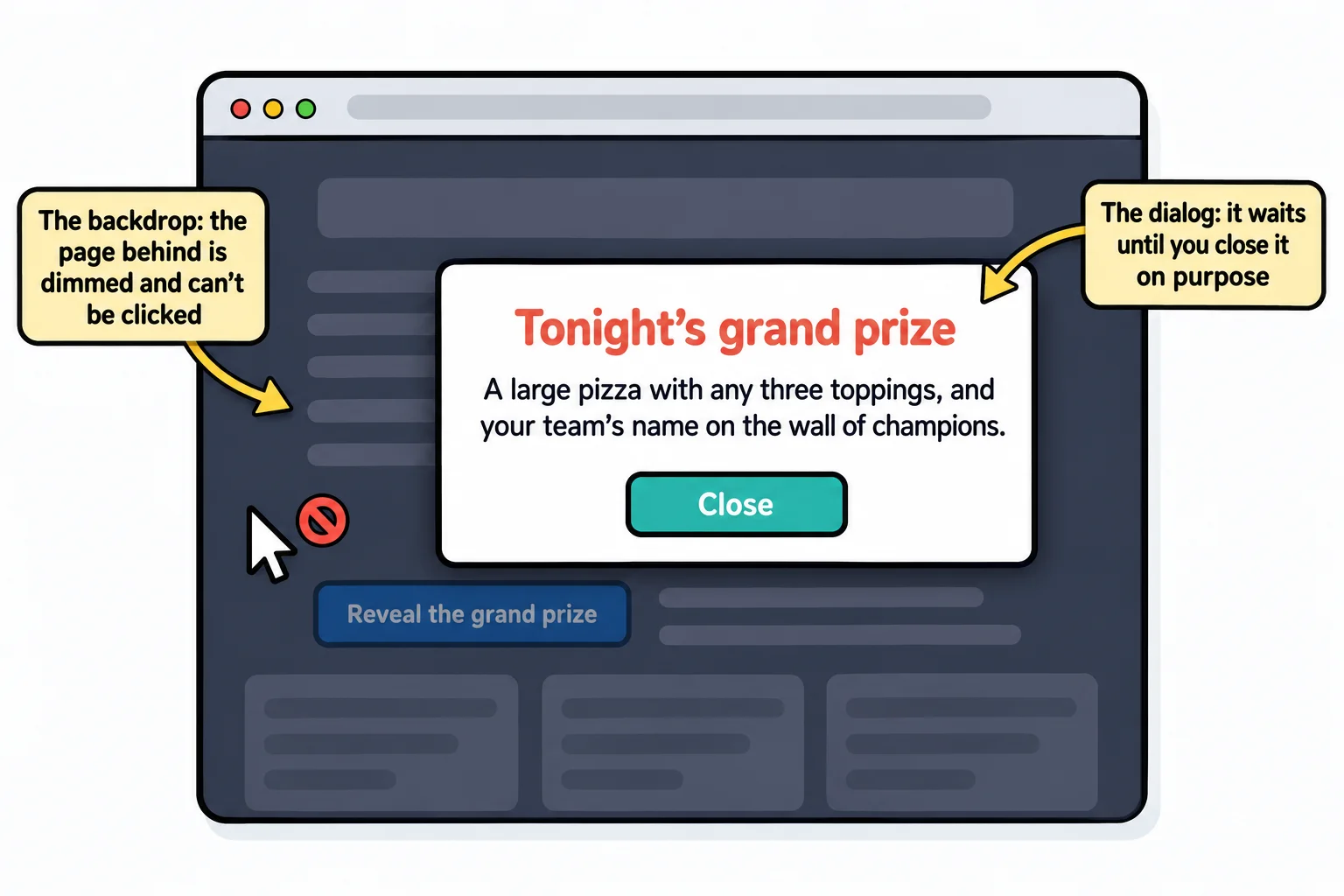
Newer than the rest. command and commandfor reached every major browser in December 2025 (Chrome and Edge 135, Firefox 144, Safari 26.2). In a browser older than that, the button shows but does nothing. The <dialog> element itself has worked everywhere since 2022, and the long-standing way to open it is one line of JavaScript; if you want to go further, the JavaScript in Depth course covers it.
Closing a dialog
A modal dialog needs a way out. There are three, and the first two are buttons inside it:
- A form with
method="dialog". Normally a form sends what's in it somewhere (Module 3 is all about that). A form whose method isdialogsends nothing; pressing its button closes the dialog. That's theClosebutton in the example above. - A button with
command="close", such as<button type="button" command="close" commandfor="grand-prize">Close</button>. It works from inside the dialog or anywhere else. - Esc, which the browser gives every modal dialog for free.
<dialog id="leave-game">
  <p>Leave the game? Your team's score won't be saved.</p>
  <form method="dialog">
    <button value="stay">Stay</button>
    <button value="leave">Leave</button>
  </form>
</dialog>
Both buttons close the dialog here. On a real site, a little JavaScript reads the value of the one that was pressed; on this page, the point is that the visitor has to choose before going on.
Details, a popover, a dialog or a link?
Four tools now show or reveal something. Ask what the visitor needs to do:
| Use | When | Trivia night example |
|---|---|---|
<details> |
The content belongs in the page and is folded away until wanted. It pushes the content below it down when it opens. | Each question's answer |
| A popover | A hint, note or menu that sits on top of the page and can be waved away. The page keeps working. | The house rules |
A modal <dialog> |
The visitor must deal with it before doing anything else. | "Leave the game? Your score won't be saved." |
A link (<a href>) |
The content is somewhere else: another page, or another place on this one. | The full prize list on its own page |
When you aren't sure, choose the gentler one. A modal dialog that interrupts a visitor for something they could have ignored is the one people complain about.
Check yourself
3 questions to try on the lesson page.
So what
A few attributes now give you the pop-ups that used to take a JavaScript library: a popover for notes that come and go, a modal dialog for questions that need an answer, with the keyboard and Esc already working. Knowing which one fits is what makes a page feel helpful instead of pushy.