Closures: Functions That Remember
A closure is a function together with the variables it could see where it was made, so it keeps using them after the function that made them has finished.
Journeyman · JavaScript · Updated
After this lesson you can
- Trace a closure step by step and predict what it returns
- Explain why functions made in a var loop share one variable, and fix the loop with let
Key takeaways
- A function can make another function and return it, the same way it returns a number or a string.
- A closure is a function plus the variables it could see where it was written. It keeps them after the outer function has finished.
- Every call to the outer function makes a new set of variables, so each function it returns remembers its own.
- A closure remembers the variable itself, not a copy of its value, so it sees every later change.
- Functions made in a var loop all share one variable and see its last value. With let, each time around the loop gets its own.
A like button that remembers how many times it was clicked, a game that remembers its high score between rounds, a search box that waits until you stop typing: a lot of what makes an app feel alive is a function that remembers something. The tool that does it is called a closure. It's one of the ideas JavaScript is best known for, a favorite question in job interviews, and the reason a lot of code in libraries such as React works the way it does. This lesson takes it one step at a time.
A function that makes a function
In Functions as Values: Callbacks you passed a function into another function. It works the other way too: a function can make a new function and return it, the same way it returns a number. A function that takes or returns another function is called a higher-order function.
function makeGreeter(arcadeName) {
  return (player) => `Welcome to ${arcadeName}, ${player}!`;
}

const greet = makeGreeter('Starlight Arcade');

console.log(greet('Ava'));
console.log(greet('Leo'));
Welcome to Starlight Arcade, Ava!
Welcome to Starlight Arcade, Leo!
makeGreeter runs once, returns the arrow function, and finishes. greet now holds that arrow function. Look closely at the output, though: when greet runs, makeGreeter is long finished, and its parameter arcadeName should be gone. Yet greet still knows it's the Starlight Arcade.
A backpack: what a closure is
When a function is made, it packs a backpack with the variables it can see right there: the ones in the scopes around it. Wherever the function goes, it carries the backpack, and it can reach in any time it runs.
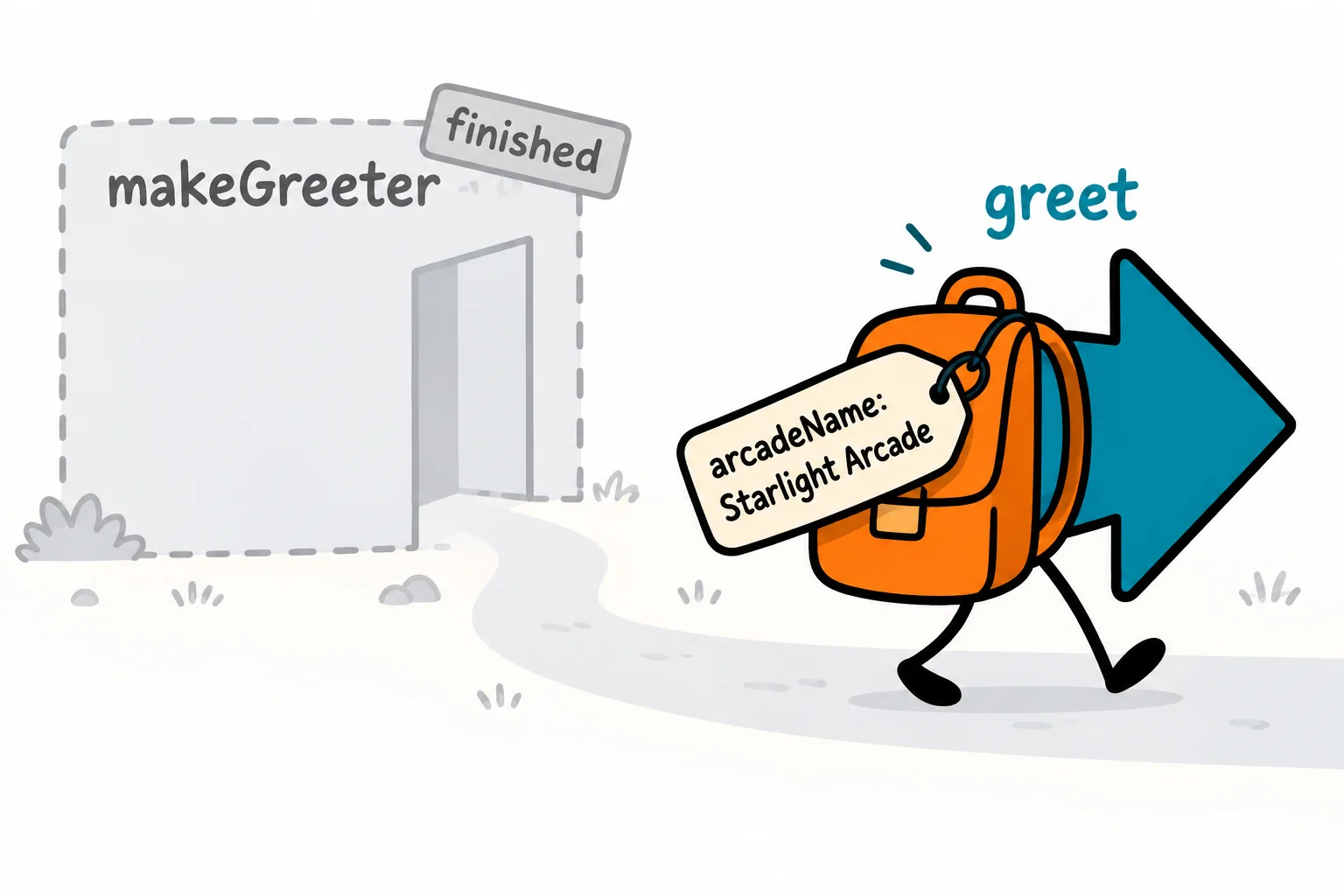
That's a closure: a function together with the variables it could see where it was made. In JavaScript, every function is a closure; it only becomes noticeable when the function outlives the scope it was made in, as greet does. The rule behind it is called lexical scope: "lexical" means "to do with the words as written", so a function's scope is decided by where it's written in the code, not by where it's called from.
Normally, when a function finishes, its variables are thrown away. JavaScript has a cleanup crew, the garbage collector, that frees the memory of values nothing can reach anymore. A closure keeps its variables reachable, so the cleanup crew leaves them alone for as long as the closure is around.
Step by step: a machine that remembers its high score
The Space Blaster machine keeps its high score between games. Here's a closure that does the same:
function makeGameMachine(gameName) {
  let highScore = 0;

  return (points) => {
    if (points > highScore) {
      highScore = points;
    }
    return `${gameName} high score: ${highScore}`;
  };
}

const spaceBlaster = makeGameMachine('Space Blaster');

console.log(spaceBlaster(4200));
console.log(spaceBlaster(3100));
console.log(spaceBlaster(6800));
Space Blaster high score: 4200
Space Blaster high score: 4200
Space Blaster high score: 6800
Follow it one step at a time:
makeGameMachine('Space Blaster')runs. It makesgameName('Space Blaster') andhighScore(0).- It makes the arrow function, which packs
gameNameandhighScorein its backpack, and returns it.makeGameMachineis finished. spaceBlaster(4200): 4200 is more than 0, sohighScorebecomes 4200.spaceBlaster(3100): 3100 isn't more than 4200, sohighScorestays 4200.spaceBlaster(6800): a new high score, 6800.
The highScore variable lives on between calls, because the closure keeps it. And nothing outside can reach it: there's no way to write spaceBlaster.highScore, so no other code can change the high score by accident.
Try it. Save the code as machine.js, add a fourth game with 5000 points, and predict the line it prints before you run node machine.js.
Every call packs a new backpack
Each time makeGameMachine runs, it makes a brand-new highScore, so every machine it returns remembers its own:
function makeGameMachine(gameName) {
  let highScore = 0;

  return (points) => {
    if (points > highScore) {
      highScore = points;
    }
    return `${gameName} high score: ${highScore}`;
  };
}

const spaceBlaster = makeGameMachine('Space Blaster');
const pinball = makeGameMachine('Pinball Planet');

console.log(spaceBlaster(4200));
console.log(pinball(900));
console.log(spaceBlaster(1000));
Space Blaster high score: 4200
Pinball Planet high score: 900
Space Blaster high score: 4200
Pinball's 900 doesn't touch Space Blaster's 4200. Two calls, two backpacks.
It remembers the variable, not a copy
The backpack holds the variable itself, not a snapshot of its value. If the variable changes later, the closure sees the change:
let tokensPerPlay = 2;

const priceSign = () => `Each game costs ${tokensPerPlay} tokens`;

console.log(priceSign());
tokensPerPlay = 3;
console.log(priceSign());
Each game costs 2 tokens
Each game costs 3 tokens
priceSign reads tokensPerPlay each time it runs, so it shows whatever the variable holds right then. Keep this in mind for the next section: it explains a classic puzzle.
The loop surprise: var and closures
Here's a puzzle that has confused programmers for years. A loop makes three functions, one for each prize booth, and puts them in an array. Each should announce its own booth:
const boothSigns = [];

for (var booth = 1; booth <= 3; booth++) {
  boothSigns.push(() => `Prize booth ${booth} is open`);
}

console.log(boothSigns[0]());
console.log(boothSigns[1]());
console.log(boothSigns[2]());
Prize booth 4 is open
Prize booth 4 is open
Prize booth 4 is open
Every function says booth 4, a booth that doesn't exist. Two things you already know explain it. A var belongs to the whole function or file, not to the loop, so there's only one booth variable, and all three functions packed that same one. And a closure remembers the variable, not its value. By the time the functions run, the loop has finished, and the loop only stopped when booth reached 4.
The fix is one word. With let, the loop makes a new booth each time around, so each function packs its own:
const boothSigns = [];

for (let booth = 1; booth <= 3; booth++) {
  boothSigns.push(() => `Prize booth ${booth} is open`);
}

console.log(boothSigns[0]());
console.log(boothSigns[1]());
console.log(boothSigns[2]());
Prize booth 1 is open
Prize booth 2 is open
Prize booth 3 is open
You'll meet the same puzzle whenever functions run after a loop has finished, such as timers and click handlers, and the fix is the same: let.
Check yourself
2 questions to try on the lesson page.
So what
A closure lets a function keep its own little memory, safe from the rest of the program. The next lesson, Closures at Work: Private State and Factories, puts that to work: counters nobody else can change, functions that build objects, and a function that can only run once.