Arrays of Objects
An array of objects is a list of records, like a stack of filled-in forms, and it's how programs keep search results, carts and listings that you read, loop over and update.
Apprentice · JavaScript · Updated
After this lesson you can
- Read a property of an object inside an array, such as pets[0].name
- Loop over an array of objects to print, count or collect records
Key takeaways
- An array of objects is a list of records that share the same keys, such as every pet waiting at a shelter.
- Read one value in two steps, left to right. In
pets[0].name,pets[0]picks the first object, then.namereads its name. - A
for...ofloop hands you one whole object at a time, so you can print it, count it or collect it. - The array holds the objects themselves, so changing an object you got from the array changes the one in the list.
One object is one pet. A real adoption site has dozens of pets, a music app has thousands of songs, and a store has a whole catalog of products. Search results, the items in a shopping cart, the posts in a feed, the rows of a leaderboard: each is a list where every item is a record with the same labels. In JavaScript, that's an array of objects, and it's the shape of data you'll meet most often at work. When a website asks its server for "all the dogs under 5 years old", the answer comes back as an array of objects.
A stack of forms
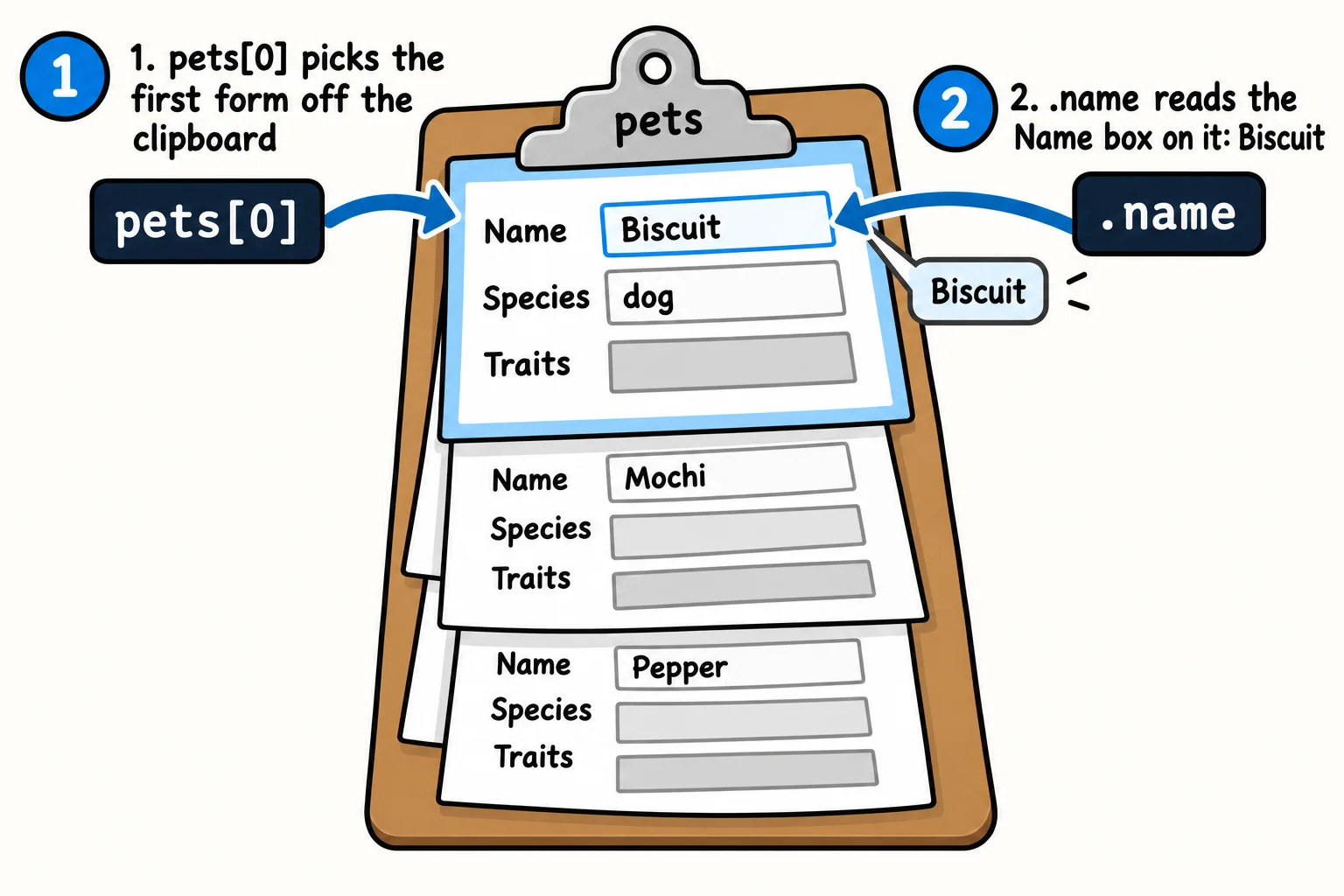
Picture the volunteer's clipboard at Happy Tails Rescue: a stack of intake forms, one per pet, every form with the same boxes. The clipboard keeps them in order; each form keeps its own pet's facts.
In code, the clipboard is an array, written with square brackets [ ], and each form is an object, written with curly braces { }. The objects are separated by commas, like any array's items:
const pets = [
  { name: 'Biscuit', species: 'dog', ageYears: 3, vaccinated: true, traits: ['loves fetch', 'good with kids'] },
  { name: 'Mochi', species: 'cat', ageYears: 2, vaccinated: true, traits: ['lap cat', 'chatty'] },
  { name: 'Pepper', species: 'rabbit', ageYears: 1, vaccinated: false, traits: ['shy', 'loves carrots'] },
];

console.log(pets.length);
console.log(pets[0].name);
console.log(pets[1].traits[0]);
console.log(pets[pets.length - 1].species);
3
Biscuit
lap cat
rabbit
pets.length counts the forms on the clipboard: 3. The array doesn't know or care what's inside each object; it counts items.
Reading one value: two steps, left to right
pets[0].name is read "pets, index zero, dot name". JavaScript works through it from left to right, one step at a time:
pets[0]picks a form off the clipboard: the first object (indexes start at 0)..namereads one box on that form:'Biscuit'.
Longer chains work the same way. pets[1].traits[0] picks the second pet (Mochi), reads her traits array, then takes its first item: 'lap cat'. And pets[pets.length - 1] is the last pet, whatever the length is, because the last index is always one less than the length.
When a chain goes wrong, the error message tells you which step failed. Asking for pets[5].name on a list of 3 pets stops with TypeError: Cannot read properties of undefined (reading 'name'). Read it as: "step one gave undefined (there's no pet at index 5), so step two had nothing to read name from." The fix is almost always in the step before the dot.
Try it. In your objects-practice folder, make shelter.js with an array of three pets of your own. Print the second pet's species, and the first trait of the last pet.
Looping over the records
A listing page shows every pet, so you need to visit every object. A for...of loop hands you one whole object each time around, and you name it something that reads well, such as pet. Inside the loop, pet is one form, so dot notation works on it as usual:
const pets = [
  { name: 'Biscuit', species: 'dog', ageYears: 3 },
  { name: 'Mochi', species: 'cat', ageYears: 2 },
  { name: 'Pepper', species: 'rabbit', ageYears: 1 },
  { name: 'Juniper', species: 'dog', ageYears: 7 },
];

for (const pet of pets) {
  console.log(`${pet.name} the ${pet.species}, age ${pet.ageYears}`);
}
Biscuit the dog, age 3
Mochi the cat, age 2
Pepper the rabbit, age 1
Juniper the dog, age 7
The plural-and-singular naming (pets for the list, pet for one item) is a habit worth keeping. It makes pet.name read like a sentence, and it keeps you from writing pets.name, which is undefined: the array itself has no name, only the objects inside it do.
Counting and collecting
Most questions about a list are a loop with an if inside. "How many pets are ready to go home?" is a count. "Which pets are dogs?" is a collection: start with an empty array and push each match into it.
const pets = [
  { name: 'Biscuit', species: 'dog', vaccinated: true },
  { name: 'Mochi', species: 'cat', vaccinated: true },
  { name: 'Pepper', species: 'rabbit', vaccinated: false },
  { name: 'Juniper', species: 'dog', vaccinated: true },
];

let readyCount = 0;
const dogs = [];

for (const pet of pets) {
  if (pet.vaccinated) {
    readyCount += 1;
  }
  if (pet.species === 'dog') {
    dogs.push(pet.name);
  }
}

console.log(`Ready to go home: ${readyCount}`);
console.log(`Dogs: ${dogs.join(', ')}`);
Ready to go home: 3
Dogs: Biscuit, Juniper
dogs.join(', ') glues the array's items into one string with a comma and a space between them; String Methods in chapter 4 covers it.
This "loop, check, count or collect" shape answers a huge number of real questions: orders over $50, songs by one artist, players who reached level 10. The next chapter, Transforming Data, teaches filter and friends, which do the same jobs in a single line, and they'll make more sense because you've written the loop yourself.
Try it. In shelter.js, count how many of your pets are younger than 3, and collect the names of every pet whose species is 'cat'. Print both.
Changing one record in the list
The clipboard holds the forms themselves, not photocopies. So when you take a form off the clipboard and write on it, the form on the clipboard has changed, because it's the same form.
Here, find (from the lesson Finding Things in an Array) hands back Pepper's object, and the code updates it:
const pets = [
  { name: 'Biscuit', species: 'dog', vaccinated: true },
  { name: 'Pepper', species: 'rabbit', vaccinated: false },
];

const pepper = pets.find((pet) => pet.name === 'Pepper');
pepper.vaccinated = true;

console.log(pets[1].vaccinated);
true
pepper and pets[1] are two ways to reach one object. That's usually what you want when you update a record. Sometimes it isn't: when you need a changed version and want the original left alone, you need a real copy. The lesson Spread and Rest shows how.
A table in the terminal
One more tool, because it makes lists of records a pleasure to look at. console.table prints an array of objects as a table, one row per object and one column per key:
const pets = [
  { name: 'Biscuit', species: 'dog', ageYears: 3 },
  { name: 'Mochi', species: 'cat', ageYears: 2 },
  { name: 'Pepper', species: 'rabbit', ageYears: 1 },
];

console.table(pets);
┌─────────┬───────────┬──────────┬──────────┐
│ (index) │ name      │ species  │ ageYears │
├─────────┼───────────┼──────────┼──────────┤
│ 0       │ 'Biscuit' │ 'dog'    │ 3        │
│ 1       │ 'Mochi'   │ 'cat'    │ 2        │
│ 2       │ 'Pepper'  │ 'rabbit' │ 1        │
└─────────┴───────────┴──────────┴──────────┘
It works in the browser's DevTools Console too. When data from somewhere else looks confusing, console.table is often the quickest way to see what you've actually got.
Check yourself
2 questions to try on the lesson page.
So what
Almost every screen in every app is an array of objects drawn on the page: a feed, a cart, a playlist, a search result. Now you can read any value in one, loop over every record, and pick out the ones you need.