What Is an Object
An object keeps everything about one thing together under labels, like a form with labeled boxes, so you can read, change and list a pet's name, age and more by name.
Novice · JavaScript · Updated
After this lesson you can
- Create an object and read its properties with dot and bracket notation
- Add, change and delete an object's properties
- List an object's keys, values and entries with Object.keys, Object.values and Object.entries
Key takeaways
- An object holds related values under labels. Each label and its value is a property, written
label: valueinside curly braces{ }. - Read a property with a dot,
pet.name, or with square brackets and the label as text,pet['name']. Brackets also take a label kept in a variable. - Assigning to a property changes it, or adds it if it isn't there yet, and
deletetakes it out. A missing property reads asundefined. - A
constobject can still have its properties changed.constonly stops the name from pointing at a different object. Object.keys,Object.valuesandObject.entriesturn an object into arrays of its labels, its values, or its label-and-value pairs.
Open any app on your phone and you'll see objects everywhere, even if nobody calls them that. Your profile has a name, a photo and a birthday. A song has a title, an artist and a length. A product in a shopping cart has a name, a price and a quantity. Whenever a program needs to keep several facts about one thing together, JavaScript uses an object. Data that comes from a website's server almost always arrives as objects too, so you'll read and build them in nearly every program you write from here on.
This chapter follows Happy Tails Rescue, a made-up pet adoption site. Each pet waiting for a home has a name, a species, an age in years, whether its shots are up to date, and a few traits that help a family pick the right match.
A form with labeled boxes
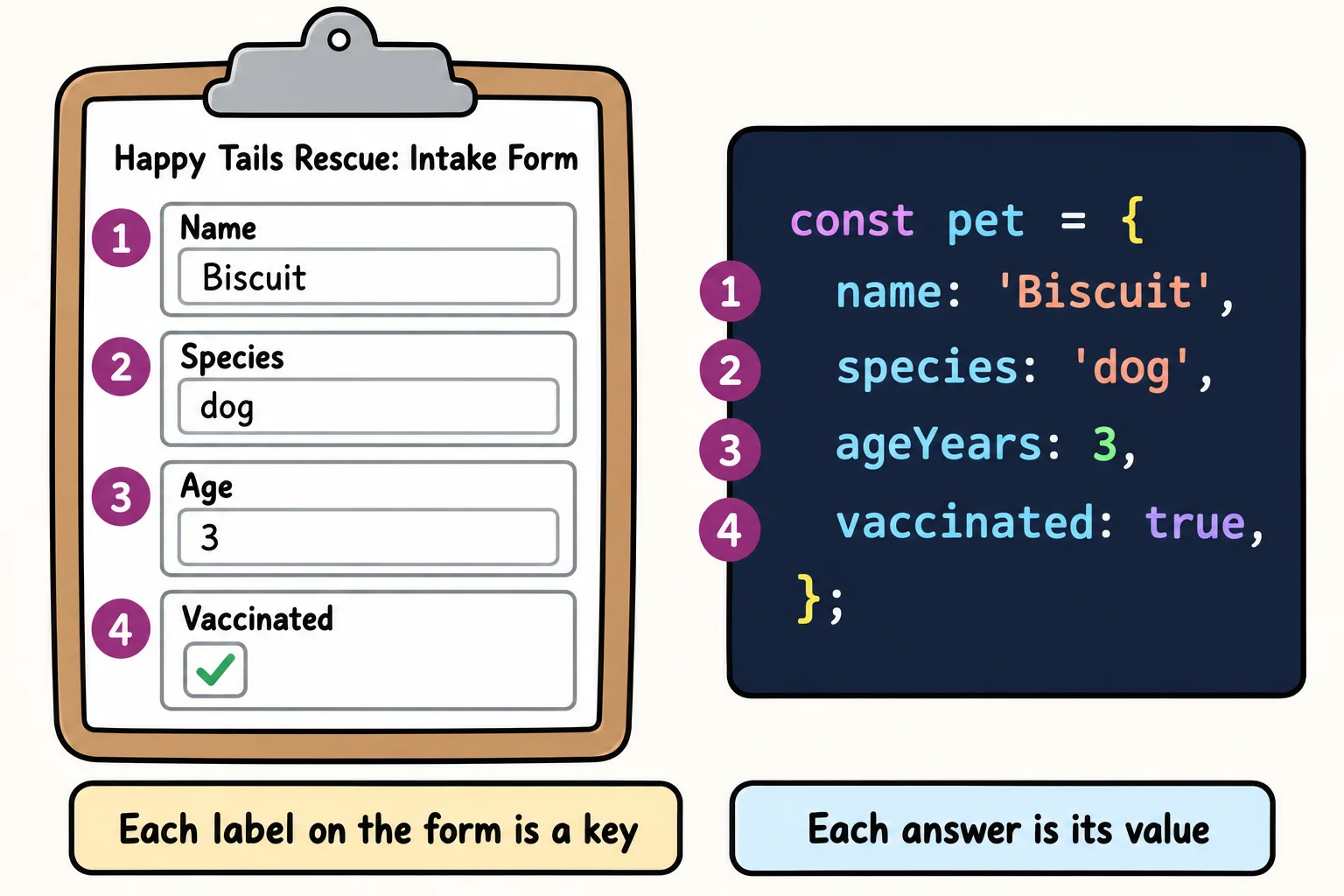
When a pet arrives at Happy Tails, a volunteer fills in an intake form. The form has labeled boxes: Name, Species, Age, Vaccinated. Each box holds one answer, and you find an answer by its label, not by counting boxes.
An object is that form, in code. Each labeled box is a property: a key (the label) and its value (what's written in the box). Together they're called a key-value pair. The keys are often called property names too; both words mean the same thing.
You write an object with curly braces { } (read "curly braces", or "braces"). Inside, each property is the key, a colon :, and the value, with a comma between properties:
const pet = {
  name: 'Biscuit',
  species: 'dog',
  ageYears: 3,
  vaccinated: true,
  traits: ['loves fetch', 'good with kids'],
};

console.log(pet);
{
  name: 'Biscuit',
  species: 'dog',
  ageYears: 3,
  vaccinated: true,
  traits: [ 'loves fetch', 'good with kids' ]
}
Writing an object out like this, braces and all, is called an object literal: the object is written "literally", right there in the code. A value can be anything: text, a number, true or false, or even a whole array, like traits. The comma after the last property is allowed, and it makes adding a property later a one-line change.
Try it. Make a folder named objects-practice, and in it a file named pet.js. Write an object for a pet you know (or one you'd like to adopt) with a name, a species and an age, print it with console.log, and run it with node pet.js.
Reading a property with a dot
To read one box of the form, write the object's name, a dot, and the key. pet.name is read "pet dot name". This is called dot notation:
const pet = {
  name: 'Biscuit',
  species: 'dog',
  ageYears: 3,
  vaccinated: true,
};

console.log(pet.name);
console.log(`${pet.name} is a ${pet.ageYears}-year-old ${pet.species}.`);
console.log(pet.color);
Biscuit
Biscuit is a 3-year-old dog.
undefined
The last line asks for a box the form doesn't have. JavaScript doesn't stop with an error: it hands back undefined, its value for "nothing here". That's handy, and it's also a classic bug. If you misspell a key (pet.nmae), you get undefined instead of the name, with no error to warn you. When a value comes out undefined and you expected something, check the spelling of the key first.
Reading a property with square brackets
The second way to read a property is bracket notation: square brackets [ ] with the key written as text inside them. pet['name'] is read "pet, bracket, name" and gives the same value as pet.name.
So why have two ways? Brackets can do two things a dot can't:
- The key can come from a variable.
pet[field]reads whichever propertyfieldnames right now. A search filter that lets a visitor choose "sort by age" or "sort by name" works this way. - The key can have spaces or dashes in it. A key like
'shelter id'has to be written in quotes, and a dot can't read it. Only brackets can.
const pet = {
  name: 'Mochi',
  species: 'cat',
  ageYears: 2,
  'shelter id': 'HT-0412',
};

const field = 'species';

console.log(pet['name']);
console.log(pet[field]);
console.log(pet['shelter id']);
Mochi
cat
HT-0412
Notice the difference between pet[field] and pet['field']. Without quotes, field is a variable, and JavaScript uses the value it holds ('species'). With quotes, 'field' is the key itself, and this pet has no property named field, so it would give undefined. Use a dot when you know the key as you write the code; use brackets when the key is in a variable or isn't a plain word.
Adding, changing and deleting properties
A form can be updated. Pepper the rabbit gets her shots, has a birthday, and the shelter starts tracking whether she's been adopted. In code, you assign to a property with =, the same way you'd give a variable a new value:
- If the property is already there, assigning changes its value.
- If it isn't there yet, assigning adds it.
- The
deletekeyword takes a property out of the object entirely.
const pet = { name: 'Pepper', species: 'rabbit', ageYears: 1, vaccinated: false };

pet.vaccinated = true;      // change a property that's there
pet.ageYears += 1;          // change it using its old value
pet.adopted = false;        // add a property that wasn't there
delete pet.species;         // take a property out

console.log(pet);
{ name: 'Pepper', ageYears: 2, vaccinated: true, adopted: false }
Wait: pet was declared with const, and it still changed. That surprises a lot of people. const means the name pet will always point at this same object; you can't write pet = { name: 'Clover' } later (JavaScript stops with TypeError: Assignment to constant variable). The boxes inside the object can still be filled in and erased. Think of const as a name tag glued to one form: the tag can't move to another form, but you can still write on the form.
Try it. In pet.js, give your pet a new property, adopted, set to false. Then change it to true on the next line, delete one property you don't need, and print the object again.
Listing every key and value
Sometimes you don't want one box; you want the whole form. A pet's detail page might show every fact about the pet, whatever facts it has. JavaScript has three helpers for that, and each one turns the object into an array:
Object.keys(pet)gives an array of the keys: the labels.Object.values(pet)gives an array of the values: the answers.Object.entries(pet)gives an array of entries: small two-item arrays, each holding a key and its value.
const pet = { name: 'Juniper', species: 'dog', ageYears: 7, vaccinated: true };

console.log(Object.keys(pet));
console.log(Object.values(pet));
console.log(Object.entries(pet));
[ 'name', 'species', 'ageYears', 'vaccinated' ]
[ 'Juniper', 'dog', 7, true ]
[
  [ 'name', 'Juniper' ],
  [ 'species', 'dog' ],
  [ 'ageYears', 7 ],
  [ 'vaccinated', true ]
]
Because they're arrays, everything you know about arrays works on them: length, indexes, and loops. A for...of loop over the entries prints the whole profile, one line per property. In each entry, entry[0] is the key and entry[1] is its value:
const pet = { name: 'Juniper', species: 'dog', ageYears: 7, vaccinated: true };

for (const entry of Object.entries(pet)) {
  console.log(entry[0] + ': ' + entry[1]);
}

console.log(`Juniper's profile has ${Object.keys(pet).length} details.`);
name: Juniper
species: dog
ageYears: 7
vaccinated: true
Juniper's profile has 4 details.
entry[0] and entry[1] work, but they don't say much. The lesson Destructuring, later in this chapter, shows a tidier way to write this same loop.
One more thing you may wonder about: a property's value can also be a function, and then it's called a method. You've used methods already, such as toUpperCase on a string. Writing your own is in Module 3's Methods and this; this chapter keeps to data.
Check yourself
2 questions to try on the lesson page.
So what
An object is how a program keeps the facts about one thing together, by name. Profiles, products, songs, settings and the data a website sends back are all objects, and from now on you can build them, read them, update them and list everything inside them.