Promises: then, catch and finally
A promise is a value that arrives later, like the buzzer a pizza shop hands you, and then, catch and finally say what to do when it works, when it fails, and either way.
Journeyman · JavaScript · Updated
After this lesson you can
- Explain a promise's three states and say which of then, catch and finally runs
- Chain then calls so each step gets the value the step before it returned
- Predict the order lines print in when code uses promises and timers
Key takeaways
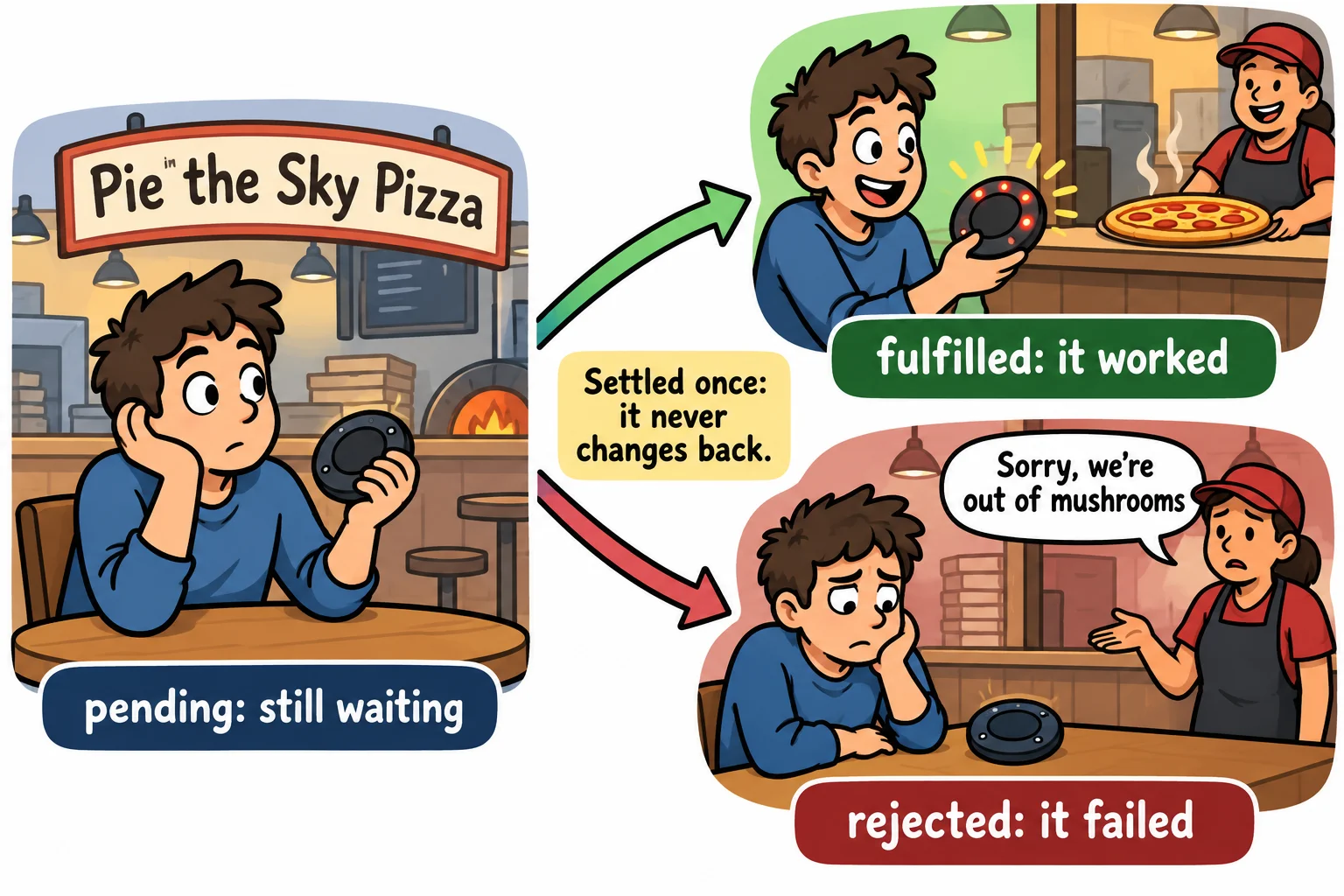
- A promise stands for a result that isn't ready yet. It starts pending, then settles once, as fulfilled (it worked) or rejected (it failed).
- then runs when the promise is fulfilled, catch when it's rejected, and finally either way.
- Whatever a then returns is handed to the next then. Return a promise, and the next step waits for it.
- One catch at the end of a chain catches a failure from any step before it.
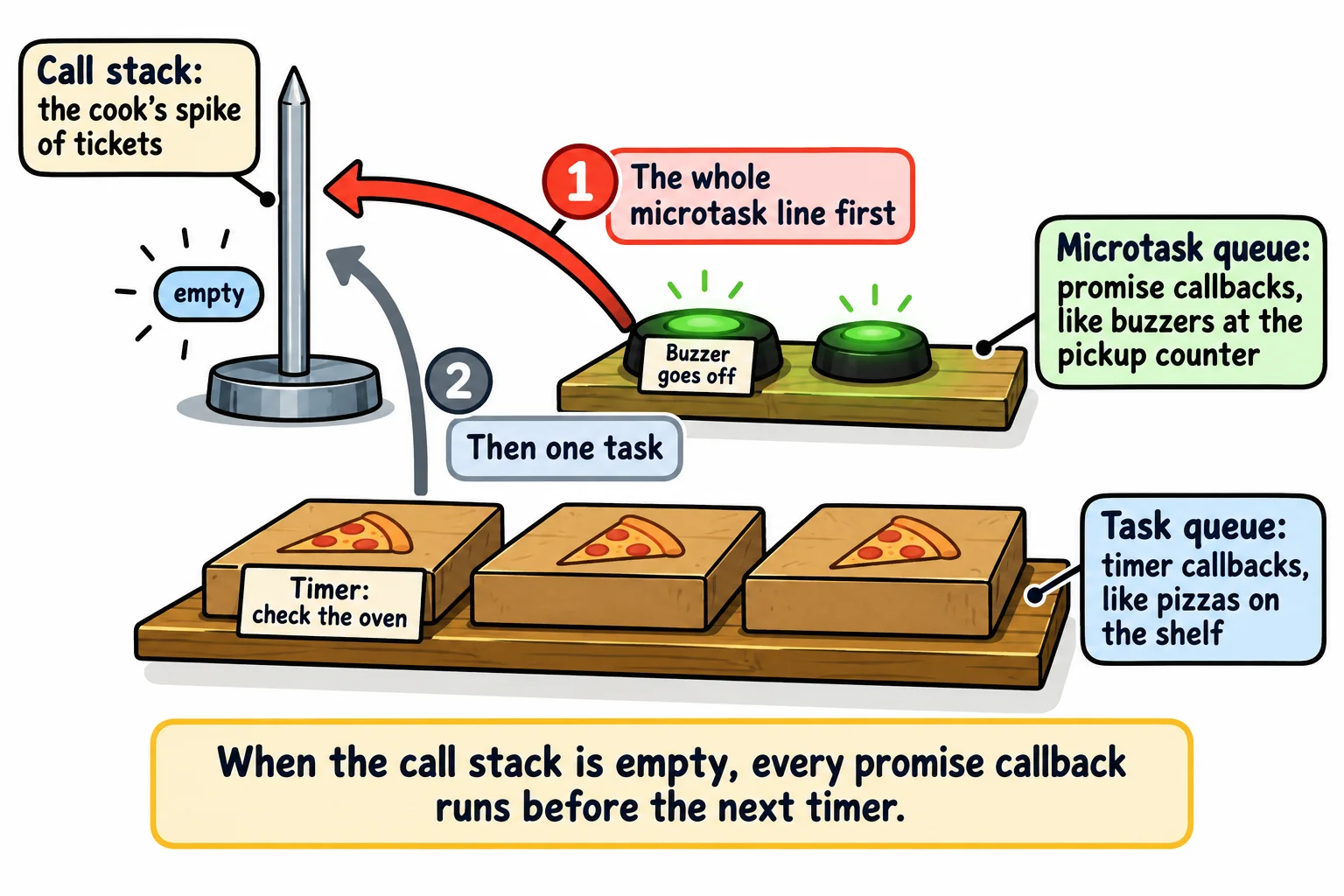
- Promise callbacks wait in the microtask queue, which runs before the next timer, so a then runs before a setTimeout of 0.
Almost everything your code asks for that takes time comes back as a promise: the weather for a city, a page of search results, a photo being uploaded, a file being read, a row being saved to a database. In the next chapter, fetch, the function that loads data from the internet, hands you a promise every single time. Once you can read a promise, a huge part of modern JavaScript opens up: you can ask for something slow, keep the page working while you wait, and deal with the answer, good or bad, when it arrives.
A buzzer, not a pizza
At Pie in the Sky Pizza, you order at the counter, and the cashier doesn't hand you a pizza: it isn't made yet. They hand you a buzzer. The buzzer isn't the pizza, it's a promise of the pizza. You can sit down, talk, check your phone. Later, one of two things happens: the buzzer goes off and your pizza is ready, or the cashier comes over to say they've run out of mushrooms.
A JavaScript promise is that buzzer: an object that stands for a result that isn't ready yet. Here's a function from the shop's code that returns one. How it makes the promise comes in the next section; for now, look at what it hands back:
function placeOrder(pizza) {
  return new Promise((resolve) => {
    setTimeout(() => resolve(`Your ${pizza} is ready`), 1000);
  });
}

const buzzer = placeOrder('Margherita');
console.log(buzzer);

setTimeout(() => console.log(buzzer), 1500);
Promise { <pending> }
Promise { 'Your Margherita is ready' }
Right after the order, the promise is pending: still waiting. A second and a half later it holds its value. These are a promise's states:
- pending: still waiting, like a quiet buzzer.
- fulfilled: it worked, and it holds a value (the pizza). You'll also hear "resolved".
- rejected: it failed, and it holds the reason, usually an
Error(out of mushrooms).
A promise that's no longer pending is settled. It settles only once: a buzzer that has gone off never goes back to waiting, and a fulfilled promise never turns into a rejected one.
Making a promise from a timer
You'll rarely make a promise yourself. fetch, file reading and database libraries hand you promises ready-made. Making one around a timer is the best way to see what's inside, so here's the shape:
new Promise((resolve, reject) => {
  // Start the slow work here.
  // When it works, call resolve(value). When it fails, call reject(error).
});
new Promise takes a function, and calls it straight away with two functions of its own, named resolve and reject by habit. (resolve, reject) => is read "resolve and reject, arrow": it's an arrow function with two parameters. Your code starts the slow work (here, a setTimeout) and, when it's done, calls one of them:
resolve(value)fulfills the promise with that value: the buzzer goes off.reject(error)rejects it with that reason: the cashier comes over with bad news.
In placeOrder above, the timer calls resolve after one second, with the message as the value.
then: when it's ready
To use the value, you don't wait at the counter. You tell the promise what to do when it's fulfilled, with .then (read "then"). You hand .then a function, and the promise calls it with the value once it arrives:
function placeOrder(pizza) {
  return new Promise((resolve) => {
    setTimeout(() => resolve(`Your ${pizza} is ready`), 1000);
  });
}

placeOrder('Margherita').then((message) => {
  console.log(message);
});

console.log('Order placed. Find a table!');
Order placed. Find a table!
Your Margherita is ready
Look at the order of the lines. .then doesn't stop the program: it leaves a note that says "when the buzzer goes off, run this". JavaScript carries on to the next line at once, and the note's function runs a second later. A function you hand over to be called later is a callback.
Try it. Save the code as buzzer.js and run node buzzer.js. Then change the 1000 to 3000 and run it again: the first line still prints straight away.
catch: when it goes wrong, and finally: either way
.catch (read "catch") runs when the promise is rejected, and gets the reason. .finally (read "finally") runs when the promise settles either way, so it's the place for anything that has to happen whatever the outcome, such as handing the buzzer back:
function addTopping(topping) {
  return new Promise((resolve, reject) => {
    setTimeout(() => {
      if (topping === 'mushrooms') {
        reject(new Error("Sorry, we're out of mushrooms"));
      } else {
        resolve(`${topping} added`);
      }
    }, 300);
  });
}

addTopping('mushrooms')
  .then((message) => console.log(message))
  .catch((error) => console.log(`Problem: ${error.message}`))
  .finally(() => console.log('Buzzer back on the counter'));
Problem: Sorry, we're out of mushrooms
Buzzer back on the counter
The promise was rejected, so the .then was skipped, the .catch ran, and the .finally ran last. finally gets no value: it doesn't need to know how things went. A rejected promise with no .catch anywhere is an unhandled rejection: Node stops the program with the error, and a browser shows it in red in the Console.
Try it. Change 'mushrooms' to 'olives' and run it again. Which lines print now?
Chaining: one step after another
A pizza takes steps: stretch the dough, add the sauce and cheese, bake it. Each .then returns a brand-new promise, so you can hang another .then on it, and build a chain. Two rules make a chain work:
- Whatever a
.thenfunction returns is handed to the next.then. - If it returns a promise, the next
.thenwaits until that promise is fulfilled.
function step(message, ms) {
  return new Promise((resolve) => setTimeout(() => resolve(message), ms));
}

step('Dough stretched', 200)
  .then((result) => {
    console.log(result);
    return step('Sauce and cheese on', 100);
  })
  .then((result) => {
    console.log(result);
    return step('Baked for 90 seconds', 300);
  })
  .then((result) => {
    console.log(result);
    return 'Boxed and ready';
  })
  .then((result) => console.log(result))
  .catch((error) => console.log(`Order stopped: ${error.message}`));
Dough stretched
Sauce and cheese on
Baked for 90 seconds
Boxed and ready
The steps run one after another, even though the sauce takes less time than the dough, because each step starts only when the one before it hands over its result. The single .catch at the end catches a failure from any step: if the oven broke, the steps after it would be skipped and the .catch would run. And a .then that forgets its return hands the next step undefined, so the chain doesn't wait.
In The Event Loop, in Pictures, waiting for one thing after another meant callbacks inside callbacks, each one indented further. A chain keeps every step at the same level, top to bottom.
When does then run? The microtask queue
Here's a puzzle. Which prints first: a timer with a delay of 0, or a promise that's already fulfilled? (Promise.resolve(value) makes a promise that is fulfilled already; Promise.reject(error) makes one that is rejected already.)
console.log('Order taken');

setTimeout(() => console.log('Timer: check the oven'), 0);

Promise.resolve('Buzzer goes off').then((message) => console.log(message));

console.log('Next customer, please');
Order taken
Next customer, please
Buzzer goes off
Timer: check the oven
The two ordinary lines print first: callbacks never interrupt the code that's running. Then the promise's callback beats the timer, because promise callbacks wait in their own, faster line, the microtask queue, and every time the call stack empties, JavaScript runs everything in the microtask queue before it takes the next task, such as a timer's callback, from the task queue. Think of the microtask queue as the pickup counter: whoever's buzzer went off is served before the next person in line orders.
Check yourself
2 questions to try on the lesson page.
So what
A promise lets your code ask for something slow and carry on, then react when the answer comes: then for success, catch for failure, finally for both. The next lesson, async and await, writes the same thing so it reads top to bottom, like a recipe.